
HubSpot's pricing page lists plans starting at $15 per month. The number you actually pay is usually much higher.
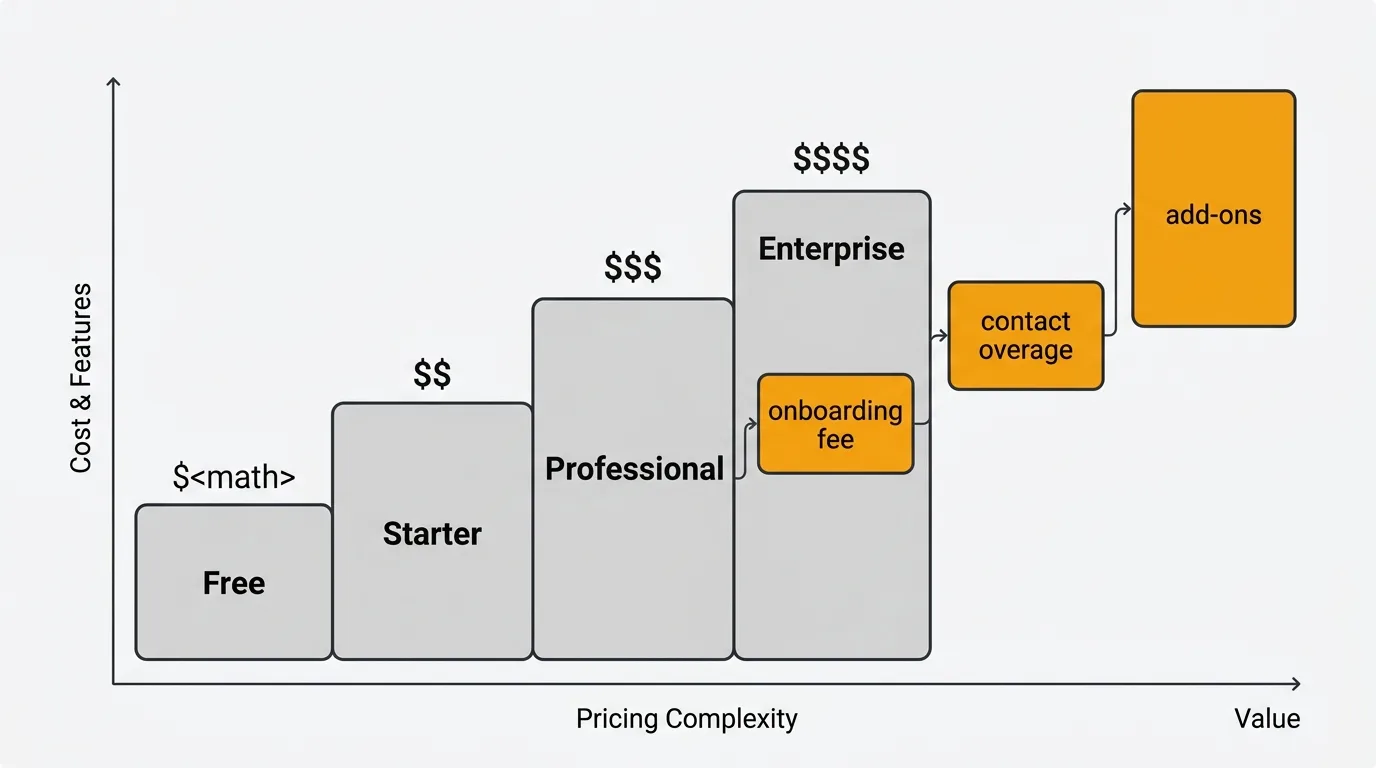
TLDR: HubSpot lists plans from $15 per month, but the real cost is usually much higher. The gap comes from three sources: mandatory onboarding fees on Professional and Enterprise plans, contact-based overages in Marketing Hub that auto-upgrade your tier mid-cycle, and essential features gated behind the $890 per month Professional jump. A realistic Marketing plus Sales plus Service setup runs into the thousands per month at team scale.
Pricing last verified March 2026. Vendors may change plans and pricing without notice.
Understanding where the costs actually live is the first step to deciding whether HubSpot is the right investment.
HubSpot's pricing structure
HubSpot is not one product. It is five separate hubs — Marketing, Sales, Service, Content, and Data — each with its own pricing tiers. You can buy hubs individually or bundle them into the Customer Platform.
This modular structure means flexibility, but also complexity. A marketing team might only need Marketing Hub. A full go-to-market team might need Marketing, Sales, and Service. Each combination has a different total cost.
Marketing Hub
| Plan | Price | Seats included | Marketing contacts | Onboarding fee |
|---|---|---|---|---|
| Free | $0 | Unlimited (limited features) | Up to 1M non-marketing contacts | None |
| Starter | $15/seat/mo | 1 | 1,000 | None |
| Professional | $890/mo | 3 | 2,000 | $3,000 (mandatory) |
| Enterprise | $3,600/mo | 5 | 10,000 | $7,000 (mandatory) |
Marketing Hub is the most expensive hub because of contact-based pricing. You pay for the number of "marketing contacts" — contacts you actively email or target with ads. Non-marketing contacts are free up to one million.
The catch: exceeding your contact tier auto-upgrades you mid-billing-cycle. Go from 2,000 to 2,001 marketing contacts on Professional and you are billed for the next block of 5,000 contacts at roughly $250/month. There is no grace period.
Sales Hub
| Plan | Price | Onboarding fee |
|---|---|---|
| Free | $0 | None |
| Starter | $20/seat/mo | None |
| Professional | $100/seat/mo | $1,500 (mandatory) |
| Enterprise | $150/seat/mo | $3,500 (mandatory) |
Sales Hub pricing is per seat across all tiers. A 10-person sales team on Professional pays $1,000/month ($12,000/year) plus the one-time $1,500 onboarding fee.
Service Hub
| Plan | Price | Onboarding fee |
|---|---|---|
| Free | $0 | None |
| Starter | $20/seat/mo | None |
| Professional | $100/seat/mo | $1,500 (mandatory) |
| Enterprise | $150/seat/mo | $3,500 (mandatory) |
Service Hub mirrors Sales Hub pricing exactly.
Content Hub (formerly CMS Hub)
| Plan | Price | Seats included | Onboarding fee |
|---|---|---|---|
| Free | $0 | Limited | None |
| Starter | $15/seat/mo | 1 | None |
| Professional | $450/mo | 3 | Required |
| Enterprise | $1,500/mo | 5 | Required |
Data Hub (formerly Operations Hub)
| Plan | Price |
|---|---|
| Free | $0 |
| Starter | $20/mo |
| Professional | $800/mo |
| Enterprise | $2,000/mo |
Customer Platform bundle
If you need multiple hubs, the Customer Platform bundles all five:
| Plan | Price | Onboarding fee |
|---|---|---|
| Starter | $20/mo (1 seat) | None |
| Professional | ~$1,781/mo | $4,500 |
| Enterprise | ~$5,000/mo | $12,000 |
The Starter to Professional jump
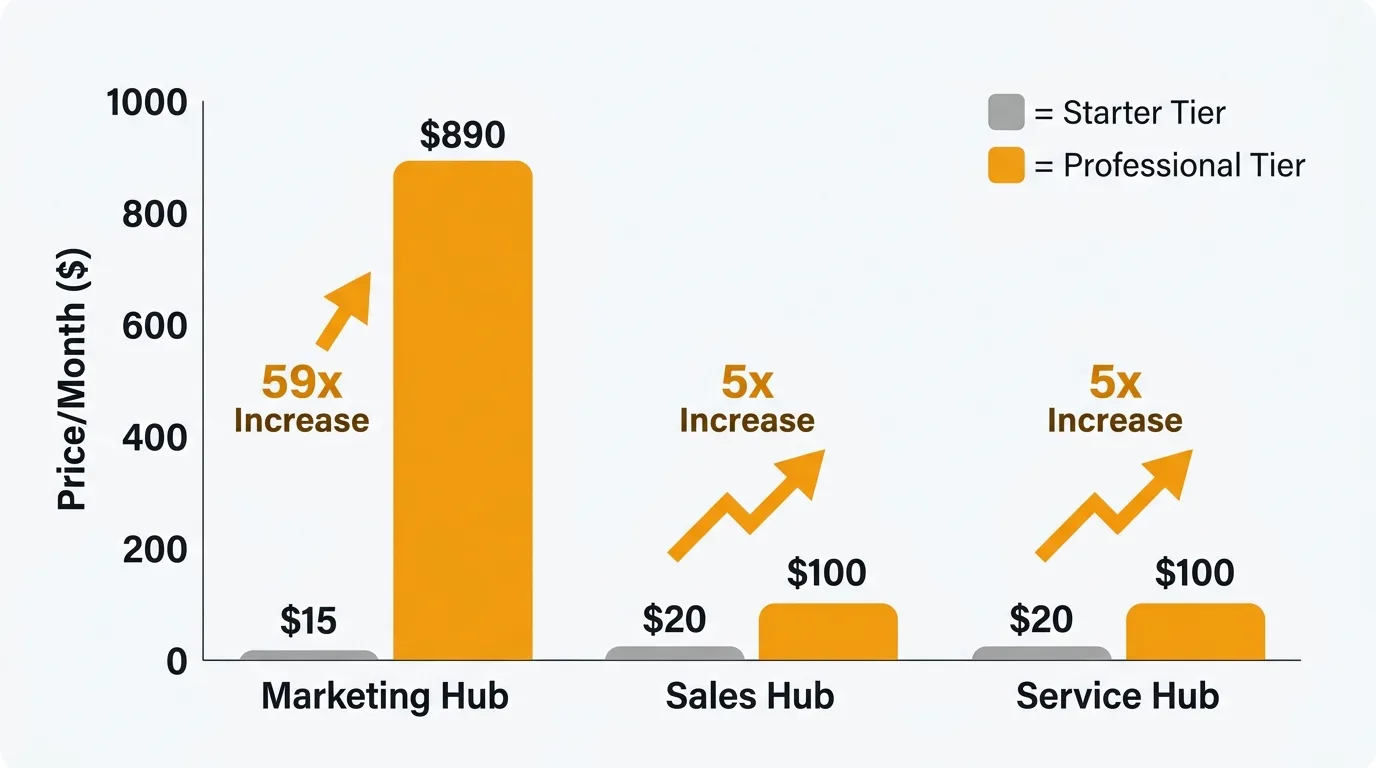
The most important pricing decision in HubSpot is whether to go from Starter to Professional. The gap is enormous:
- Marketing Hub: $15/seat/mo → $890/mo (a 59x increase for a solo marketer)
- Sales Hub: $20/seat/mo → $100/seat/mo (a 5x increase)
- Service Hub: $20/seat/mo → $100/seat/mo (a 5x increase)
This matters because HubSpot gates critical features behind Professional. Workflows, sequences, A/B testing, custom reporting, and advanced automation all require Professional or higher. Starter gives you the basics — contact management, email, forms — but the features that make HubSpot valuable as a platform are locked behind that jump.
Hidden costs to watch for
Mandatory onboarding fees
Every Professional and Enterprise plan requires a paid onboarding. You cannot skip it.
| Hub | Professional onboarding | Enterprise onboarding |
|---|---|---|
| Marketing | $3,000 | $7,000 |
| Sales | $1,500 | $3,500 |
| Service | $1,500 | $3,500 |
| Full Platform | $4,500 | $12,000 |
These are one-time fees, but they add up. A company buying Marketing Pro + Sales Pro + Service Pro pays $6,000 in onboarding before seeing a single feature. Some HubSpot partners can substitute their own onboarding to waive the fee, but you will still pay for the partner's services.
Contact overage charges
Marketing Hub's contact-based pricing is the most common source of surprise bills. Additional contacts are sold in blocks:
- Professional: 5,000 additional contacts for ~$250/month
- Enterprise: 10,000 additional contacts for ~$100/month
A Marketing Hub Professional user with 10,000 marketing contacts pays roughly $890 (base) + $400 (contact overage) = $1,290/month. The overage can exceed the base price.
Add-ons and extras
- Transactional email add-on: $600/month (requires Marketing Professional)
- Dedicated IP address: $300/month
- API limit increase (to 1M calls/day): $500/month
- Additional reporting dashboards, calling minutes, and contact lists at various prices
Annual lock-in
Professional and Enterprise plans require annual contracts paid upfront. There are no early termination refunds — you owe the full remaining balance. Auto-renewal is on by default, and customers commonly report being auto-renewed without clear advance notice. Read your renewal terms before signing.
HubSpot pricing at scale
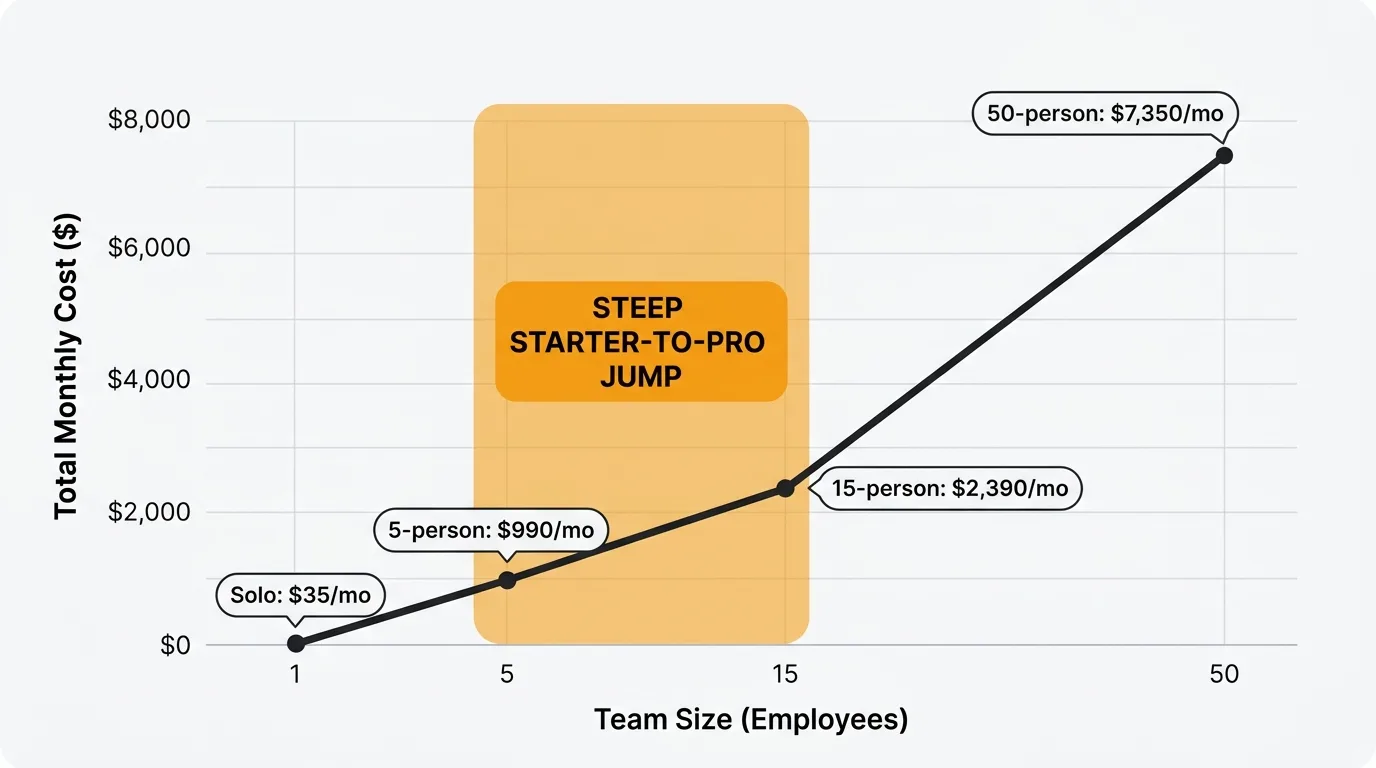
Here is what HubSpot actually costs for different team sizes, using the most common configuration (Marketing + Sales + Service):
| Team size | Configuration | Monthly cost | Annual cost | Onboarding |
|---|---|---|---|---|
| Solo founder | Marketing Starter + Sales Starter | $35/mo | $420/yr | $0 |
| 5-person startup | Marketing Pro + 5 Sales Starter seats | $990/mo | $11,880/yr | $3,000 |
| 15-person team | Marketing Pro + 10 Sales Pro + 5 Service Pro seats | $2,390/mo | $28,680/yr | $6,000 |
| 50-person org | Marketing Enterprise + Sales Enterprise + Service Enterprise | $7,350+/mo | $88,200+/yr | $14,000 |
These figures exclude contact overages, add-ons, and any custom pricing negotiations for large teams.
Free and cheaper alternatives
For CRM and sales (replacing Sales Hub)
Pipedrive starts at $14/user/month with no feature gates on core CRM functionality. Freshsales starts at $9/user/month with a solid free tier. Both avoid the Starter-to-Professional cliff that makes HubSpot Sales expensive for growing teams.
For marketing automation (replacing Marketing Hub)
Brevo (formerly Sendinblue) offers email automation starting at $9/month with no contact-based pricing — you pay for emails sent, not contacts stored. ActiveCampaign starts at $29/month with automation included on all plans. Neither charges mandatory onboarding fees.
For customer service (replacing Service Hub)
Freshdesk offers a 6-month free tier for 1-2 agents and paid plans from $19/agent/month. Help Scout starts at $25/user/month. Both include automation and knowledge base features that HubSpot gates behind Service Professional.
For customer feedback (replacing HubSpot's feedback tools)
Quackback is an open source (AGPL-3.0) feedback platform that gives you feedback boards, voting, a public roadmap, and a changelog. Where HubSpot meters seats and contacts, Quackback is free to self-host. The built-in AI analysis groups and summarizes feedback. You can self-host it free or use Quackback Cloud as a managed option, and the MCP server connects your feedback directly to AI assistants. See how it stacks up in our Quackback vs Canny and other feedback tool comparisons.
For CMS (replacing Content Hub)
WordPress with managed hosting costs $5-30/month and offers more flexibility than Content Hub. Webflow starts at $14/month for published sites. Both are significantly cheaper than Content Hub Professional at $450/month.
For all-in-one
EngageBay offers CRM, marketing, sales, and service starting at $14.99/user/month for the full suite. Zoho One bundles 40+ apps at $37/user/month. Neither requires mandatory onboarding fees or annual contracts.
Is HubSpot worth it?
HubSpot is a strong platform if your team needs tight integration between marketing, sales, and service and you can justify the Professional tier pricing. The free CRM is genuinely good — among the best free CRMs available. The ecosystem of integrations, the app marketplace, and the reporting capabilities at Professional and Enterprise tiers are competitive.
HubSpot is not worth it if you are paying for Professional just to get one or two gated features (like workflows or sequences), if your contact list is growing faster than your revenue, or if mandatory onboarding fees eat a meaningful portion of your budget. In those cases, purpose-built tools for each function will cost less and often do more in their specific domain.
Try Quackback — open source with a managed cloud option. Start free. Get started | View on GitHub
Frequently asked questions
Does HubSpot have a free plan?
Yes. HubSpot's free CRM includes contact management, email tracking, meeting scheduling, and basic forms. It is limited to 5 email templates, 1 automated email per form, and basic reporting. The free plan is a genuine product, not a trial — it works indefinitely.
How does HubSpot's contact pricing work?
Marketing Hub charges based on "marketing contacts" — contacts you actively email or target with ads. Non-marketing contacts (like CRM-only contacts) are free. You buy contacts in blocks, and exceeding your block auto-upgrades you to the next tier immediately with no grace period.
Can I cancel a HubSpot annual contract early?
No. HubSpot annual contracts require payment for the full term. There are no early termination refunds. You can request not to auto-renew at the end of your term, but you must do so before the renewal date.
What is the cheapest HubSpot plan for a small team?
The Starter Customer Platform at $20/month gives you access to all five hubs at the Starter tier. This is the most cost-effective entry point for teams that want more than the free plan. The jump to Professional starts at $890/month (Marketing) or $100/seat/month (Sales/Service).
Is HubSpot more expensive than Salesforce?
For small teams, yes — HubSpot Professional is often more expensive than Salesforce Essentials ($25/user/month). For enterprise teams, Salesforce typically costs more due to its add-on model and implementation costs. The comparison depends heavily on team size, which hubs you need, and how many marketing contacts you have.

Authored by James Morton
Founder of Quackback. Building open-source feedback tools.
Try Quackback
The open-source feedback platform. Boards, voting, and roadmaps.
Get startedStar on GitHub305