
Monday.com lists pricing at $9 per seat per month. What it does not tell you upfront is that you cannot buy one seat.
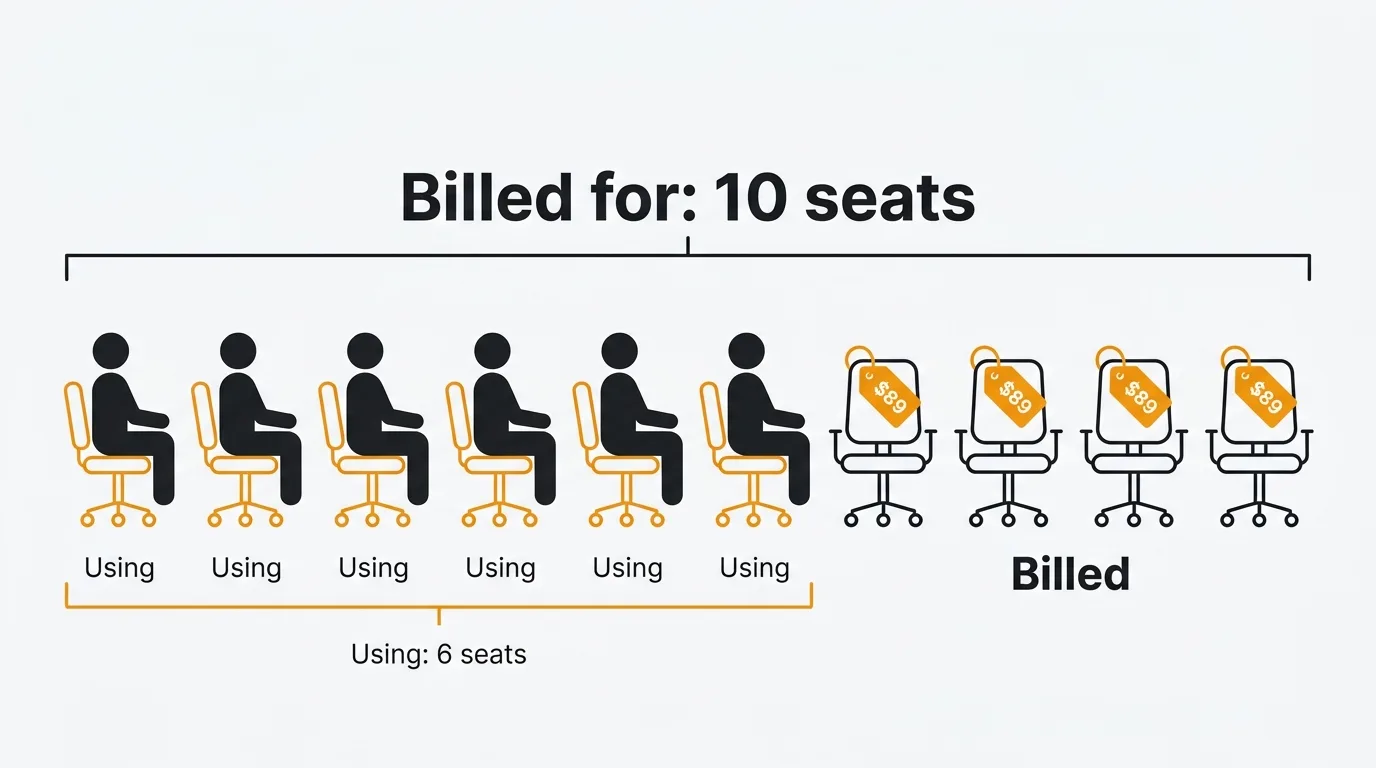
Monday.com uses a seat-bucket billing model. Every paid plan requires a minimum of three seats, and after that seats are sold in multiples of five. A team of six pays for ten seats. A team of sixteen pays for twenty. This "ghost seat" tax is the single most criticized aspect of Monday's pricing — and it is not obvious until you reach the checkout page.
Pricing last verified March 2026. Vendors may change plans and pricing without notice.
Monday.com pricing plans
All prices are per seat per month, billed annually. Monthly billing costs 18-33% more.
| Plan | Annual price | Monthly price | Min seats | Storage |
|---|---|---|---|---|
| Free | $0 | $0 | 1-2 users | 500 MB |
| Basic | $9/seat/mo | $12/seat/mo | 3 | 5 GB |
| Standard | $12/seat/mo | $14/seat/mo | 3 | 20 GB |
| Pro | $19/seat/mo | $24/seat/mo | 3 | 100 GB |
| Enterprise | Custom | Custom | Custom | 1 TB+ |
Teams of more than 40 users must request a custom quote.
What each plan includes
Free
Two users maximum, three boards, up to 1,000 items (expandable via referral). No automations, no integrations, 500 MB storage. Functional for personal task tracking. Not viable for team use.
Basic ($9/seat/month)
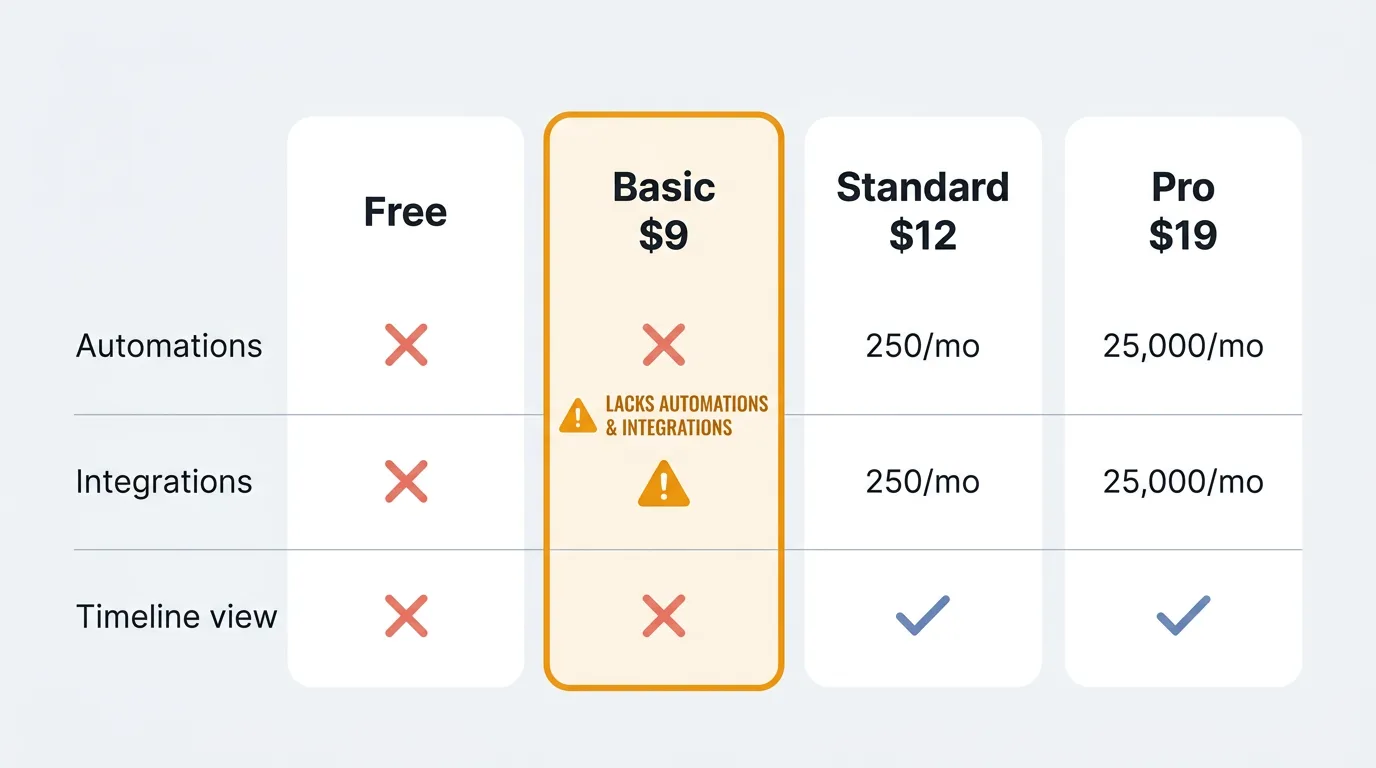
Unlimited boards and items, 5 GB storage. This sounds reasonable until you realize what is missing: zero automations and zero integrations. You cannot connect Monday to Slack, Gmail, or any other tool. You cannot create any automated workflows.
Basic is the most misleading tier. It looks like a usable plan on the pricing page, but the absence of automations and integrations makes it barely more capable than a shared spreadsheet. Multiple reviewers on G2 and Capterra call this out — the real entry price for a functional project management tool is Standard.
Standard ($12/seat/month)
This is where Monday becomes usable. You get 250 automation actions per month, 250 integration actions per month, Timeline and Gantt views, Calendar view, and guest access (two guests per paid seat). Storage increases to 20 GB.
The catch: 250 automation actions sounds generous, but each trigger counts as one action. A ten-person team with even light automation — status change notifications, due date reminders, and assignment alerts — can burn through 250 actions in the first week of the month. Hitting the cap forces an upgrade to Pro.
Pro ($19/seat/month)
The automation cap jumps from 250 to 25,000 actions per month — a 100x increase. Pro adds private boards, time tracking, chart views, formula columns, dependency columns, custom forms, and advanced reporting. Storage increases to 100 GB.
For most teams that outgrow Standard, Pro is the destination. The jump from $12 to $19 per seat per month (58% increase) is the cost of removing the automation ceiling.
Enterprise (custom pricing)
250,000 automation and integration actions per month. Multi-level permissions, HIPAA compliance, SCIM provisioning, five years of activity logs, 1 TB+ storage, and a dedicated customer success manager. Pricing requires a sales conversation.
The seat bucket problem
Monday.com does not sell individual seats after the initial three. Seats come in blocks of five: 3, 5, 10, 15, 20, 25, and so on. You always pay for the next increment.
| Team size | Seats billed | Unused seats | Basic annual cost | Pro annual cost |
|---|---|---|---|---|
| 1-3 | 3 | 0-2 | $324 | $684 |
| 4-5 | 5 | 0-1 | $540 | $1,140 |
| 6-10 | 10 | 0-4 | $1,080 | $2,280 |
| 11-15 | 15 | 0-4 | $1,620 | $3,420 |
| 16-20 | 20 | 0-4 | $2,160 | $4,560 |
| 21-25 | 25 | 0-4 | $2,700 | $5,700 |
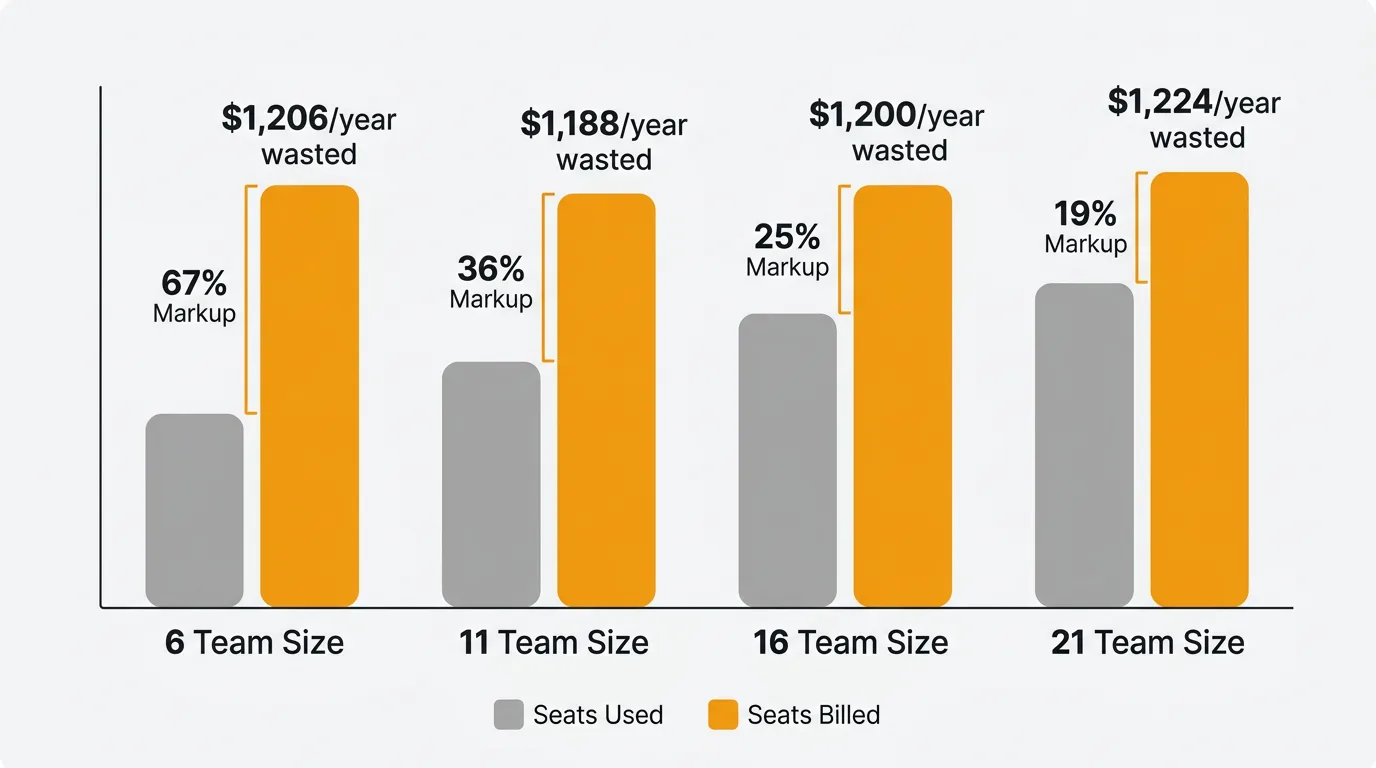
A six-person team on Pro pays for ten seats — $2,280/year for six users and four empty chairs. That is a 67% markup over the per-user price. The overpayment gets worse at awkward team sizes: a team of eleven pays for fifteen seats (36% markup), and a team of sixteen pays for twenty seats (25% markup).
Hidden costs and gotchas
No annual refunds. Monday.com does not refund unused months on annual plans. If you downsize mid-year, you lose the remaining balance.
Storage overages. Additional storage costs $2-5 per user per month beyond plan limits.
Premium support. Support packages cost $500-2,000 per month, though negotiated discounts of 40-60% are common.
Monthly billing penalty. Choosing monthly billing increases costs by 18-33% depending on the plan. Basic jumps from $9 to $12, Pro from $19 to $24.
Price increases. January 2024 saw a significant price hike across plans. February 2026 brought an 18% increase to Monday Service with no corresponding new features.
Automation cap escalation. Standard's 250 actions per month is the most common forced-upgrade trigger. Teams that adopt even basic automation outgrow Standard within weeks.
Free and cheaper alternatives
| Tool | Free tier | Paid from | Key advantage over Monday |
|---|---|---|---|
| ClickUp | Unlimited users | $7/user/mo | 15 view types, generous free plan, per-user pricing |
| Trello | Unlimited boards | $5/user/mo | Simple Kanban, low learning curve, no seat buckets |
| Asana | Up to 10 users | $10.99/user/mo | Clean workflow UI, no seat buckets |
| Notion | Unlimited (individuals) | $8/user/mo | Docs + tasks combined, flexible |
| Linear | Free for small teams | $8/user/mo | Dev-focused, fast, per-user pricing |
| SmartSuite | Free tier | $12/user/mo | 500K automation actions (vs Monday's 250 on Standard) |
The common thread: most competitors use per-user pricing without seat buckets and include automations on lower tiers.
For teams that need project tracking alongside customer feedback management, Quackback is open source and free to self-host. It covers feedback boards, voting, roadmaps, and changelogs — the product feedback workflow that Monday.com does not address. You can use Monday for project execution and Quackback for customer-facing feedback without paying for overlap.
Is Monday.com worth it?
Monday.com is a genuinely good project management tool. The visual interface, workflow automations (on Pro), and breadth of templates make it easy for non-technical teams to adopt. The G2 rating of 4.7/5 across 15,000+ reviews reflects real user satisfaction with the product itself.
The pricing model is the problem, not the product. Seat-bucket billing, the Basic plan's lack of automations, and Standard's low automation cap create a pricing experience that feels designed to push teams toward Pro. If your team size aligns with a bucket boundary (5, 10, 15, 20) and you need Pro-level features, Monday.com is competitively priced. If your team falls between buckets or you need more than 250 automation actions but less than Pro's full feature set, you are overpaying.
Frequently asked questions
Does Monday.com have a free plan?
Yes, for up to two users with three boards and 1,000 items. It includes no automations, no integrations, and 500 MB storage. It is functional for personal task management but not for team collaboration.
Why does Monday.com charge by seat bucket?
Monday.com has not publicly explained the bucket model. The practical effect is that most teams pay for more seats than they use, increasing average revenue per account. Competitors like Asana, ClickUp, and Linear all use per-user pricing without buckets.
What is the real minimum cost for Monday.com?
The three-seat minimum means the cheapest paid plan is $27/month (Basic, annual) or $36/month (Standard, annual). Since Basic lacks automations and integrations, the functional minimum is Standard at $36/month for three users.
How do Monday.com automation limits work?
Each automation trigger counts as one action. Standard allows 250 actions per month across your entire workspace (not per user). Pro allows 25,000. When you hit the limit, automations stop running until the next billing cycle. There is no overage charge — they simply stop working, which can be worse than an overage if you depend on them.
Is Monday.com cheaper than Asana?
For teams that align with seat-bucket boundaries, Monday Standard ($12/seat/month) is slightly cheaper than Asana Premium ($10.99/user/month) at small team sizes. But Monday's seat-bucket model means a six-person team pays for ten seats ($120/month) while Asana charges for six users ($66/month). At awkward team sizes, Asana is consistently cheaper.

Authored by James Morton
Founder of Quackback. Building open-source feedback tools.
Try Quackback
The open-source feedback platform. Boards, voting, and roadmaps.
Get startedStar on GitHub305