
AI agents are moving beyond text generation into tool use — read-write access to the systems your team uses every day. The mechanism enabling this is MCP, the Model Context Protocol, an open standard that lets AI models call external tools and query external data sources.
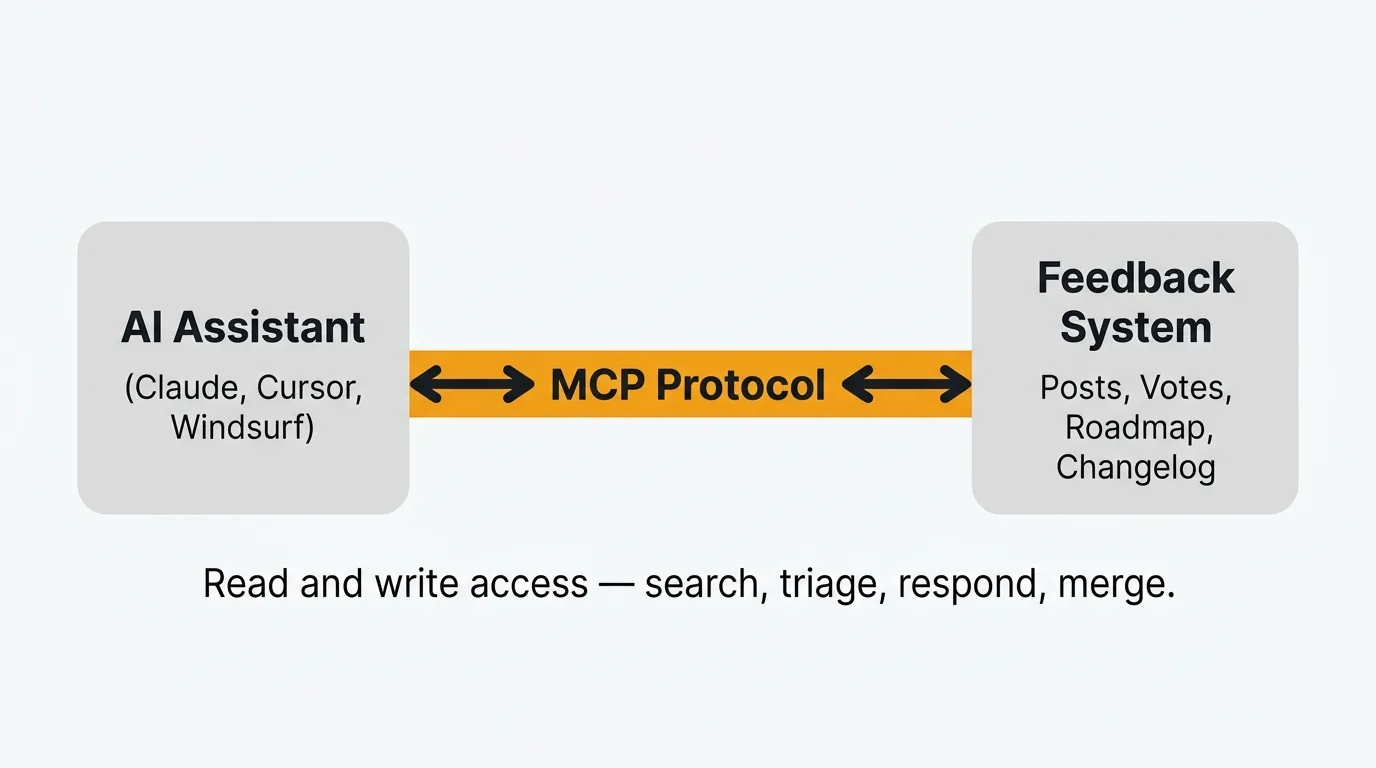
An MCP server for feedback management exposes your feedback tool's data and actions to AI agents through the Model Context Protocol, so any MCP-compatible client can search posts, triage requests, draft responses, detect duplicates, and create changelog entries directly from your feedback database. Quackback ships a built-in MCP server that works with clients like Claude Desktop, Cursor, and Windsurf. Setup takes minutes, and every action is logged, attributed, and reversible.
Feedback management is one of the first categories where this matters. Product teams collect hundreds of feature requests, bug reports, and suggestions. Most of that feedback sits in a board somewhere, waiting for a human to read it, categorize it, respond, and decide what to build. The bottleneck is not collecting feedback. It is processing it.
An AI agent with access to your feedback system can search across posts, detect duplicates, triage incoming requests, draft responses, and update your roadmap. Each operation completes in seconds rather than the minutes a human would spend. Every action is logged, attributed, and reversible.
This post covers what MCP is, how it works in the context of feedback management, and what you can do with Quackback's MCP server today.
What is MCP?
MCP stands for Model Context Protocol. Anthropic created it as an open standard for connecting AI models to external tools and data sources. Think of it as a universal adapter between an AI assistant and the software it needs to interact with.
Before MCP, connecting an AI model to an external system meant writing custom code. You would build an API integration, handle authentication, parse responses, and wire it all into your agent framework. Every tool required its own integration. Every AI client required its own connector.
MCP standardizes this. An MCP server exposes a set of tools (functions the AI can call) and resources (data the AI can read). An MCP client (the AI assistant) discovers those tools automatically and calls them when relevant. The protocol handles discovery, invocation, and response formatting.
In practice, this means you can install a single MCP server and every compatible AI assistant gets access to the same capabilities. Claude Desktop, Cursor, Windsurf, and any other MCP-compatible client can connect to the same server and use the same tools. No per-client integration work.
The protocol is open. Anthropic published the specification and reference implementations. Anyone can build an MCP server for their product. The ecosystem is growing. There are MCP servers for databases, file systems, cloud providers, and now feedback management.
How MCP works for feedback management
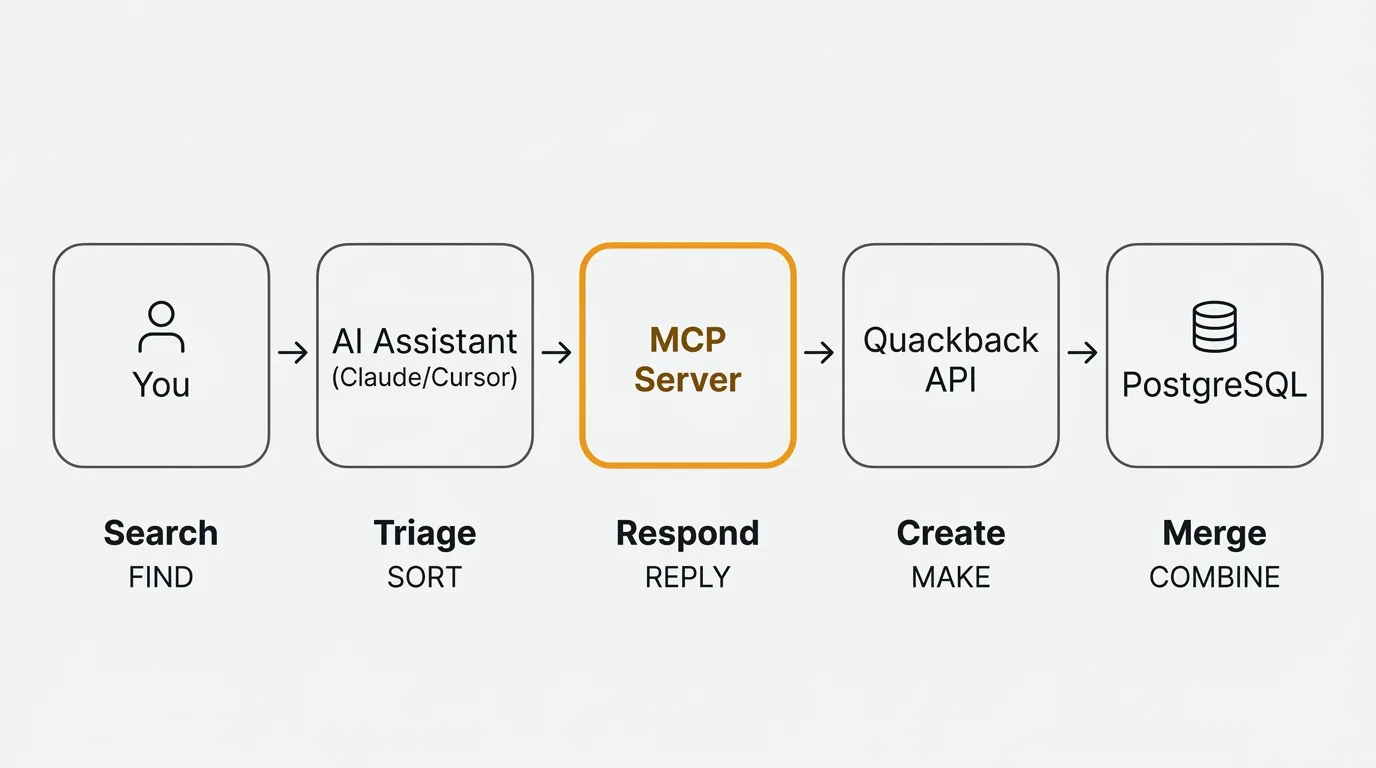
The flow is straightforward. Here is what happens when you ask your AI assistant a question about your feedback:
-
You ask a question. In Claude Desktop, Cursor, or any MCP-compatible client, you type something like "What are the top feature requests about performance?" or "Triage the feedback that came in today."
-
The assistant discovers available tools. When the MCP server is connected, the assistant knows it can search posts, read feedback details, create responses, update statuses, merge duplicates, and more. It picks the right tool based on your request.
-
The assistant calls the MCP server. The server receives the tool call with parameters (search query, filters, post IDs) and executes it against your feedback database. Authentication is handled at the server level, so the assistant never sees raw credentials.
-
The server returns results. Structured data comes back: a list of matching posts with their vote counts, statuses, tags, and comments. Or a confirmation that an action was completed.
-
The assistant processes the results. It can summarize what it found, suggest next steps, or take further actions. If you asked it to triage, it might categorize each post, assign tags, and set statuses in a single pass. If you asked it to find duplicates, it might identify clusters and propose merges.
-
You review and confirm. Depending on your setup, some actions happen automatically and some require approval. Either way, every action is logged with the agent's identity so your team knows what happened and who (or what) did it.
This is not a chatbot. It is an agent with tool access. The distinction matters. A chatbot generates text. An agent takes actions. When your AI assistant has MCP access to your feedback system, it can read and write data, not just talk about it.
What Quackback's MCP server can do
Quackback ships with a built-in MCP server. You do not need to install a separate package or configure a third-party integration. The server exposes the full feedback management workflow to any MCP-compatible AI client.
Here is what it covers:
Search feedback
Find posts by keyword, status, tag, board, or semantic similarity. The search is fast and flexible. You can ask your agent to find "all open requests about SSO" or "feedback mentioning slow load times" and get structured results with vote counts, statuses, and timestamps.
This replaces the manual workflow of opening your feedback board, applying filters, and scanning through results. The agent does it in one call.
Triage requests
Incoming feedback often needs categorization before it is useful. The MCP server lets your agent assign tags, set statuses, move posts between boards, and add internal notes. You can set up your agent to triage every new post that arrives in your inbox, categorizing it by topic, urgency, and team.
A single prompt like "Triage everything in the inbox" can process dozens of posts in seconds. Each post gets categorized, tagged, and routed to the right board. Your team starts their day with a clean, organized queue instead of an unsorted pile.
Write responses
Drafting responses to feedback takes time, especially when you need to acknowledge the request, explain your current thinking, and set expectations. The MCP server lets your agent draft and post responses directly.
You stay in control. You can have the agent draft responses for your review before posting, or let it post routine acknowledgments automatically. Either way, users get faster responses and your team spends less time on repetitive writing.
Detect duplicates
Duplicate feedback is one of the biggest time sinks in feedback management. The same request gets submitted five different ways by five different users. Each version has slightly different wording, so keyword search does not catch them all.
The MCP server combines keyword and semantic search to find similar posts. Your agent can identify clusters of related feedback and propose merges with reasoning. When posts are merged, votes are consolidated and all subscribers get notified. No feedback is lost.
Create changelog entries
When you ship a feature, you need to close the loop with the users who requested it. That means writing a changelog entry, updating the status of related feedback posts, and notifying voters.
Your agent can draft changelog entries based on the feedback posts linked to a shipped feature. It pulls in context from the original requests, summarizes what was built, and prepares the entry for your review. After publishing, voters are automatically notified that their request was addressed.
Manage roadmap
The MCP server can update items on your roadmap, change statuses, and link feedback posts to roadmap items. When you move a feature from "Planned" to "In Progress," the agent can update every linked feedback post simultaneously.
Attribution and auditability
Every action taken through the MCP server is attributed to the agent that performed it. Your team can see a clear audit trail: what was changed, when, and by whom. If an agent triages a post incorrectly, you can see exactly what it did and reverse it.
Current limitations
MCP is an emerging standard. The ecosystem is growing but not yet universal. Your AI client must support MCP — as of early 2026, that includes Claude Desktop, Claude Code, Cursor, VS Code, and Windsurf. Agent quality depends on the underlying model. Complex triage decisions may require human review. Bulk operations (triaging hundreds of posts at once) work but can be slow depending on the model's context window and rate limits.
For a full overview of these capabilities, see the MCP feature page.
Setting up the MCP server
Setup takes a few minutes. The MCP server is a built-in HTTP endpoint at /api/mcp on your Quackback instance. You configure your AI client to point at it, and you are ready to go. No separate package to install.
Quackback supports two authentication methods: OAuth (browser-based login flow) and API keys (for CI/programmatic use). Here is an example configuration for Claude Code using OAuth:
{
  "mcpServers": {
    "quackback": {
      "type": "http",
      "url": "https://your-instance.example.com/api/mcp"
    }
  }
}
For Cursor or Windsurf, use an API key instead. Generate one from Settings > Developers in your admin panel (keys use a qb_ prefix):
{
  "mcpServers": {
    "quackback": {
      "url": "https://your-instance.example.com/api/mcp",
      "headers": {
        "Authorization": "Bearer ${env:QUACKBACK_API_KEY}"
      }
    }
  }
}
The configuration varies slightly by client. Quackback's admin panel at Settings > Developers > MCP Server shows ready-to-copy configs for Claude Code, Cursor, VS Code, Windsurf, and Claude Desktop.
For full setup instructions, including self-hosted configurations and advanced options, see the documentation.
Use cases
The MCP server is a general-purpose interface. You can use it however fits your workflow. Here are four scenarios product teams are using today.
Engineering standup
Monday morning. Your team wants to know what users reported over the weekend. Instead of opening the feedback board, scrolling through posts, and summarizing themes manually, you ask your AI assistant:
"What feedback came in this week about performance?"
The agent searches your feedback for performance-related posts from the past seven days, returns a summary with vote counts and sentiment, and highlights anything urgent. Your standup stays focused on what matters.
Product review
You are preparing for a quarterly planning session. You need to know where user demand is highest. Ask your agent:
"Summarize the top 10 feature requests by votes."
You get a ranked list with vote counts, key quotes from users, and the current status of each request. No spreadsheets. No manual data pulling. The information is current as of the moment you ask.
Support handoff
A user reported a bug two weeks ago. Your team fixed it in the latest release. Now you need to let them know. Ask your agent:
"Draft a response to the bug report about CSV export errors, explaining that the fix ships in v2.4 this Thursday."
The agent finds the post, drafts a response with the right context and timeline, and either posts it directly or holds it for your review. The user gets a specific, helpful response instead of a generic "we'll look into it."
Release prep
You just finished a sprint and shipped four features. Each one was linked to feedback posts from your users. Ask your agent:
"Create a changelog entry for everything we shipped this sprint."
The agent pulls the linked feedback posts, summarizes what was built and why, drafts a changelog entry, and prepares it for publishing. After you review and publish, every user who voted on those features gets notified automatically.
Why this matters
Feedback management has always been a manual process. Someone reads every post, decides what it means, tags it, responds to it, and eventually closes the loop when the feature ships. This work is important, but it is repetitive. And the more feedback you collect, the more time it consumes.
MCP changes the economics. An AI agent with tool access can handle the repetitive parts (searching, categorizing, detecting duplicates, drafting responses) while your team focuses on the decisions that require human judgment. Which features to prioritize. What trade-offs to make. How to communicate your roadmap.
This is not about replacing product managers. It is about reducing the time spent on categorization, duplicate detection, and routine responses — work that is necessary but repetitive. A team that processes feedback faster can close the loop with users sooner. Duplicates get caught before votes fragment across multiple posts. Shipped features get announced to the users who requested them.
The combination of AI agents and structured feedback data creates a tighter feedback loop. Users submit requests. Agents triage them. Your team reviews the organized queue. You build. Agents draft the changelog. Users get notified. The cycle runs with less manual overhead at each step.
If you want to see this in practice, Quackback's MCP server is available today. It is open source, self-hostable, and works with any MCP-compatible AI client. The MCP server runs the same way on the managed Quackback Cloud and on self-hosted instances — no add-on tier and no per-use charge either way. You can also explore how AI enhances other parts of the feedback workflow in our post on AI-powered customer feedback analysis, or compare feedback tools to find the right fit for your team.
Try Quackback — open source with a managed cloud option. Start free. Get started | View on GitHub
Frequently asked questions
What is an MCP server in the context of customer feedback?
An MCP server is a small program that exposes your feedback tool's data and actions to AI agents through the Model Context Protocol. Instead of writing custom API code for each AI assistant, the server declares tools like search, triage, and respond. Any MCP-compatible agent can then read posts, update statuses, and draft replies directly from your feedback database. Quackback ships with a built-in MCP server, so you do not need to install or host a separate service.
How does an MCP server differ from a traditional API integration for feedback tools?
An MCP server standardizes into one protocol what a traditional API integration handles with custom code per client: authentication, request shaping, response parsing, and wiring. Point any MCP-compatible client at the server URL and it discovers the available tools automatically. One MCP server replaces a separate integration per AI client.
Do I need a specific AI client to use the MCP server?
No. The MCP server works with any client that supports the Model Context Protocol. As of early 2026 that includes Claude Desktop, Claude Code, Cursor, VS Code, and Windsurf, with new clients adding support regularly. Because MCP is an open standard, you are not locked into a single AI provider.
Can the AI agent make changes without approval?
That depends on how you configure it. You can grant full write access for automatic triage, responses, and merges, or require human review on drafted actions. Quackback's MCP server supports OAuth and scoped API keys, so you can limit agents to read-only access or specific boards. Every action is logged.
Is the MCP server available on the self-hosted version?
Yes. The MCP server ships with every Quackback instance, including self-hosted deployments. There is no separate license, no add-on tier, and no per-use charge from Quackback. You run the server alongside your existing instance and generate an API key from the admin panel. See the docs for setup instructions.

Authored by James Morton
Founder of Quackback. Building open-source feedback tools.
Try Quackback
The open-source feedback platform. Boards, voting, and roadmaps.
Get startedStar on GitHub305