
Your users are giving you more feedback than ever. Feature requests come in through support tickets, Slack messages, in-app widgets, email, sales calls, and public review sites. A product with 1,000 active users can easily generate hundreds of feedback items per month. A product with 10,000 users generates thousands.
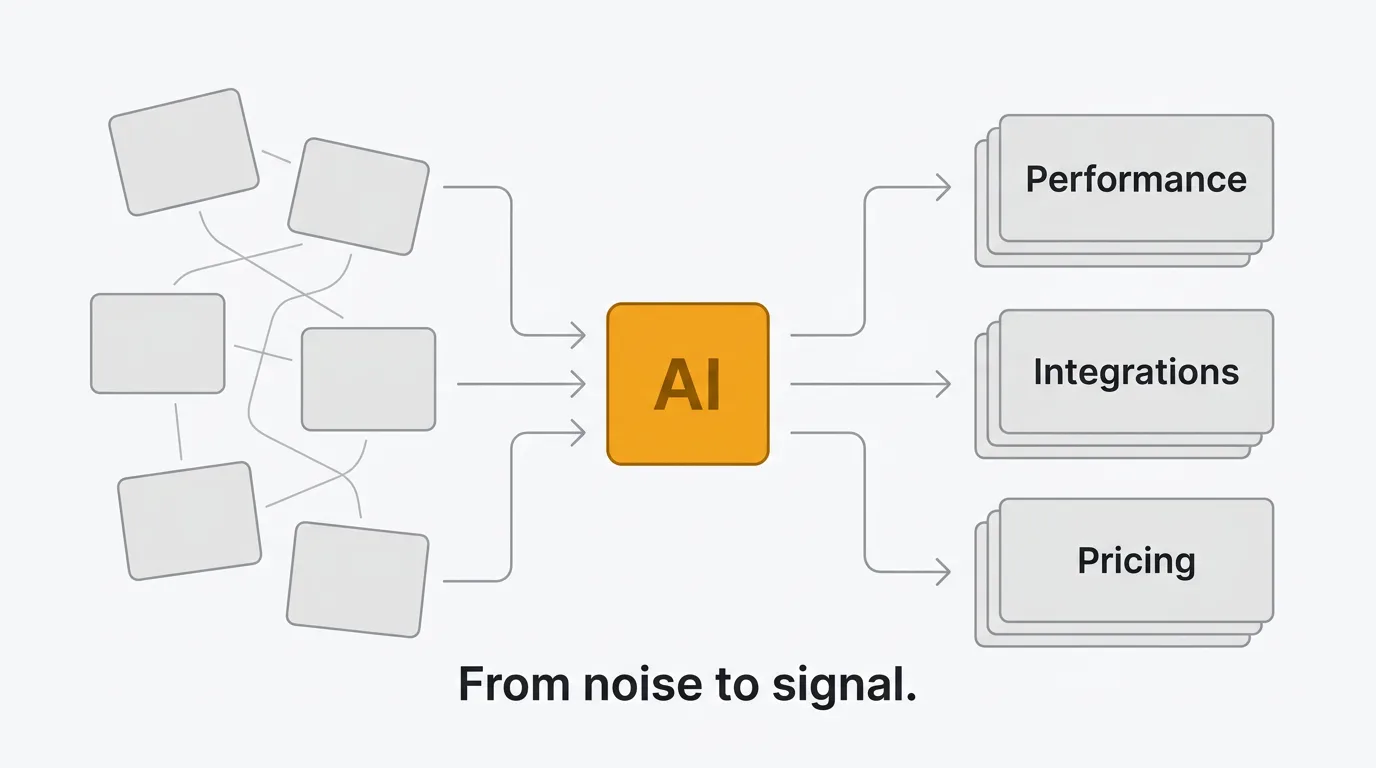
Most teams handle this manually. Someone reads each post, tags it, checks if it's a duplicate, routes it to the right team, and updates the status. That process works at 50 posts per month. It breaks at 500. At 5,000, it's impossible without a dedicated team.
AI changes the math. Not by replacing the humans who make product decisions, but by handling the repetitive work that prevents those humans from getting to the decisions in the first place. Sorting, tagging, deduplicating, summarizing, routing — these are tasks where AI is reliably good and getting better. The judgment calls (what to build, what to defer, what to say no to) still belong to your team.
Here's what AI can actually do with customer feedback today, how the major tools implement it, and what to look for when evaluating AI-powered feedback analysis.
What AI can do with customer feedback
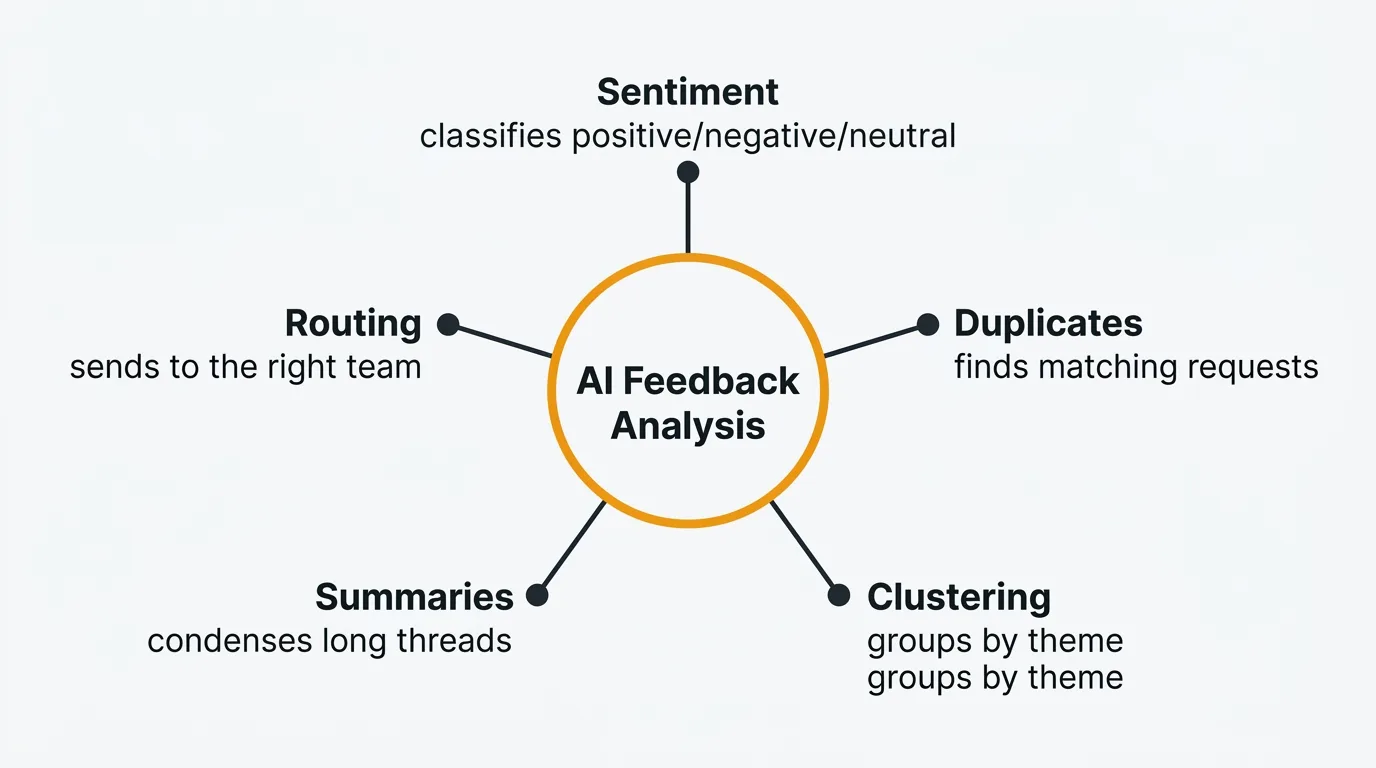
AI capabilities in feedback tools fall into five categories. Each solves a specific bottleneck in the feedback workflow.
Sentiment analysis
Sentiment analysis classifies feedback as positive, negative, or neutral. Modern implementations go beyond simple polarity. They detect frustration, urgency, and satisfaction levels within individual posts.
This matters for triage. A feature request from a happy customer exploring new use cases is different from the same request from a frustrated customer considering alternatives. Sentiment data lets you prioritize not just by what users want, but by how they feel about the current state.
Automated sentiment analysis runs on every post as it comes in. No manual tagging required. Your team sees a sentiment breakdown across all feedback at a glance, and can filter to surface the most frustrated users first.
The limitation: sentiment models work well on clear, direct feedback. They struggle with sarcasm, cultural nuance, and context-dependent language. A post saying "great, another update that breaks my workflow" is negative, but a naive model might flag "great" as positive. Modern LLM-based sentiment analysis handles these cases better than older keyword-based approaches, but it's not perfect.
Duplicate detection
Duplicate feedback is one of the biggest time sinks in feedback management. Users don't search before posting. They describe the same problem in different words. "Add dark mode," "please support dark theme," "the app is too bright at night," and "need a night mode option" are all the same request.
Without AI, someone on your team has to catch these manually. That means reading every new post, remembering (or searching for) similar ones, and merging them. At scale, duplicates pile up. You end up with 15 posts about the same feature, each with a handful of votes, instead of one post with the true demand signal.
AI duplicate detection compares new submissions against your existing feedback using semantic similarity, not just keyword matching. It understands that "dark mode" and "the app is too bright at night" are related even though they share no words. When a match is found, the system suggests a merge. Your team reviews the suggestion and accepts or dismisses it in one click.
The result: cleaner boards, accurate vote counts, and a true picture of what your users want most.
Topic clustering
Topic clustering groups feedback into themes automatically. Instead of maintaining a manual taxonomy of tags and hoping your team applies them consistently, AI identifies natural groupings in your feedback data.
You might discover that 30% of recent feedback relates to mobile experience, 20% is about integrations, and 15% is about pricing. These clusters update as new feedback arrives. You see emerging themes before they become obvious.
This is particularly useful for quarterly planning. Instead of reading through hundreds of posts to identify patterns, you get a structured view of what your users care about, broken down by theme, with the volume and sentiment of each cluster.
The caveat: clustering quality depends on volume. With fewer than 50 posts, the clusters may be noisy or too broad. The feature gets more useful as your feedback grows.
Summarization
Long feedback threads are hard to process. A popular feature request might have 40 comments from different users, each adding context, use cases, or workarounds. Reading and synthesizing all of that takes time.
AI summarization generates concise overviews of feedback threads. A good summary includes the core request, the main arguments for and against, key quotes from users, and any suggested solutions. Your product manager gets the substance of a 40-comment thread in a paragraph.
This is useful for stakeholder communication. When your CEO asks "what are users saying about X," you can share a generated summary with key quotes instead of a link to a long thread.
Smart routing
Smart routing uses content analysis to send feedback to the right team automatically. A bug report about the billing system goes to the payments team. A feature request about API endpoints goes to the platform team. A complaint about onboarding goes to the growth team.
This replaces the manual triage step where someone reads each post and decides who should see it. Routing rules based on keywords are brittle — they miss posts that describe the problem without using the expected terms. AI-based routing understands intent, not just keywords.
Smart routing works best when combined with your existing tools. Feedback about infrastructure can create a Linear issue for the platform team. Feedback about UX can notify the design channel in Slack. The feedback doesn't just get categorized — it gets to the right people.
AI feedback tools compared
Most feedback tools have added AI features in the past two years. The implementations vary significantly in scope, pricing, and approach.
Quackback
Quackback is open source (AGPL-3.0) and connects to any OpenAI-compatible provider — OpenAI, Azure OpenAI, Cloudflare AI Gateway, or any compatible service.
The AI capabilities include duplicate detection with merge suggestions, sentiment analysis on every post, and post summaries with key quotes and next steps. When the system detects a potential duplicate, it shows the reasoning so your team can make an informed decision.
What makes Quackback distinct is the MCP server. It implements the Model Context Protocol, which lets AI agents in Claude, Cursor, and Windsurf interact with your feedback directly. More on that in the next section.
Because Quackback is open source and self-hostable, your feedback data and the AI that processes it stay under your control.
Canny Autopilot
Canny's AI suite, Autopilot, focuses on feedback discovery from support conversations. It monitors conversations in Intercom, Zendesk, Help Scout, Gong, and 10 public review sites, then extracts feature requests and links them to existing posts on your board.
Autopilot also generates smart replies to prompt users for clarification and summarizes comment threads. Credits were initially capped but are now uncapped on all plans.
The strength of Canny's approach is capturing feedback that would otherwise stay buried in support tickets. The limitation is that Autopilot operates within Canny's UI — there's no way for external agents or tools to interact with it programmatically beyond the standard API. For a broader comparison, see Quackback vs Canny.
Productboard AI
Productboard includes AI via a credits system on the Spark plan ($15/maker/month annual or $19/maker/month monthly). Each maker gets 250 credits per month. The AI features include insight extraction from support tickets, semantic search across feedback, auto-linking of related insights, and summarization.
The focus is on connecting customer feedback to product strategy — identifying patterns across hundreds of notes and linking them to features in your product hierarchy. This fits Productboard's positioning as a product management platform rather than a standalone feedback tool.
The trade-off is credit limits. A team of five makers gets 1,250 credits per month. Teams that process high volumes of feedback may find this constraining. See Quackback vs Productboard for a full breakdown.
Comparison table
| Capability | Quackback | Canny | Productboard |
|---|---|---|---|
| Sentiment analysis | Included | Limited | Included via credits (250/maker/mo) |
| Duplicate detection | Included | Autopilot (discovers related feedback) | No |
| Summarization | Included | Autopilot (uncapped) | Included via credits (250/maker/mo) |
| Feedback discovery | Via inbox | Autopilot (support + review sites) | From support tickets |
| AI agent access (MCP) | Yes | No | No |
| Pricing model | Open source, self-hostable | Included in plan | Included via credits (250/maker/mo) |
| Merge suggestions | Yes, with reasoning | No | No |
AI agents in feedback management
AI agents represent a new category in feedback tooling. Instead of AI features embedded within a product's UI, agents are autonomous programs that interact with your tools through standardized protocols.
The Model Context Protocol (MCP) is the standard that makes this possible. MCP defines how AI agents connect to external tools and data sources. Think of it as a universal API for AI agents. Claude, Cursor, and Windsurf all support MCP natively.
Quackback's MCP server is an early implementation of this protocol in the feedback tool category. When you connect an AI agent to a feedback tool via MCP, the agent can:
- Search feedback — Query your board by keyword, status, sentiment, or topic. The agent understands natural language queries like "find all frustrated users asking about API improvements."
- Triage requests — Categorize incoming feedback, assign tags, and update statuses based on content analysis.
- Write responses — Draft responses to feature requests. Your team reviews and approves before publishing.
- Create changelog entries — When a feature ships, the agent can draft a changelog post referencing the feedback that drove it.
- Merge duplicates — Identify and merge duplicate posts with attribution.
The practical requirement for any MCP-based agent workflow is auditability. Every action should be logged and attributed so your team can see what the agent did, when, and why. Look for tools that treat agent actions as suggestions for human review, not autonomous decisions.
The practical impact: your team spends less time on administrative feedback tasks and more time on product decisions. An agent can process a backlog of 200 unreviewed posts in minutes, surfacing the ones that need human attention and handling the routine triage automatically. The results still vary — agents work well on straightforward categorization and duplicate detection, but struggle with ambiguous requests that require product context to interpret correctly.
This is early. MCP was released in late 2024 and adoption is still growing. The pattern is promising — AI agents that operate across your tools have the potential to be more useful than AI features locked inside a single product. But the tooling is still maturing. Expect rough edges, especially around error handling and multi-step workflows.
BYOK vs vendor-controlled AI
There are two approaches to AI in feedback tools. Each has real trade-offs.
Bring your own key (BYOK) is one approach. You provide an API key from your LLM provider (OpenAI, Azure OpenAI, or any OpenAI-compatible service), and AI features use your key directly. You pay your provider at their rates.
Vendor-controlled AI is the model most other tools use. Canny, Productboard, and Featurebase run AI on their infrastructure and charge you for it, either through add-on pricing, per-use credits, or by bundling it into higher-tier plans.
Advantages of BYOK
- Cost transparency. You see exactly what each API call costs. No markup.
- Provider choice. Switch between OpenAI, Azure, or other compatible providers based on performance, cost, or compliance requirements.
- No vendor lock-in on AI. If a better model comes out, you point your key at it. You're not waiting for the feedback vendor to upgrade.
- Data control. Your feedback data goes to the LLM provider you choose, under the terms you've agreed to. Not through an intermediary.
- No usage caps. No credit system, no tier limits. Run as much analysis as you need.
Advantages of vendor-controlled AI
- Simpler setup. No API key to configure. AI features work out of the box.
- Optimized prompts. The vendor can tune prompts and post-processing for their specific data model. They control the full pipeline.
- No separate billing. One invoice for everything.
- Potentially better integration. When the vendor controls both the AI and the product, they can build tighter loops (like Canny's Autopilot discovering feedback from support conversations).
Which is better?
For most teams, BYOK wins on cost and flexibility. OpenAI API pricing has dropped significantly — a typical feedback analysis call costs fractions of a cent. Credit-based AI (Productboard's 250 credits per maker per month) or per-resolution fees (Featurebase at $0.49 each) for the same underlying capability can add up, especially at scale.
Vendor-controlled AI makes more sense when the vendor is doing something proprietary that requires deep integration with their data model. Canny's Autopilot, which scans support conversations across multiple platforms to discover feedback, is a good example. That workflow requires infrastructure the vendor maintains.
The ideal is BYOK for standard analysis tasks (sentiment, duplicates, summaries) and vendor-specific AI for workflows that genuinely require it. If you're evaluating tools and data ownership matters, see our guide to open source feedback tools — most open source options use BYOK or let you run models locally.
Getting started with AI feedback analysis
If your team is still processing feedback manually, here's how to introduce AI without disrupting your existing workflow.
Step 1: Centralize your feedback. AI works best on structured data. If your feedback is scattered across Slack threads, emails, and spreadsheets, consolidate it into a single tool first. A feedback board with an inbox gives AI something to work with.
Step 2: Start with duplicate detection. This delivers the most immediate value. Duplicate posts are the biggest source of noise in any feedback board. Turn on duplicate detection, let it surface matches for a week, and review the suggestions. Most teams find 15-30% of their existing posts are duplicates.
Step 3: Add sentiment analysis. Once duplicates are merged, sentiment analysis gives you a clearer picture of user satisfaction across topics. Filter by negative sentiment to find the areas causing the most frustration.
Step 4: Use summaries for stakeholder communication. Generate summaries of your top feature requests and share them in product reviews. This saves the "let me pull together the feedback on X" step that delays decisions.
Step 5: Explore AI agents. If you are already using Claude, Cursor, or Windsurf, check whether your feedback tool supports MCP. Start with read-only access (searching and summarizing feedback) before enabling write actions (triaging, responding).
Step 6: Measure the impact. Track how long feedback sits before triage, how many duplicates are caught, and how often your team references AI-generated summaries. These metrics tell you whether AI is saving time or just adding another tool to manage.
Frequently asked questions
Is AI accurate enough for customer feedback analysis?
For structured tasks like sentiment classification and duplicate detection, modern LLMs are reliable. Sentiment analysis accuracy on clear, direct feedback typically exceeds 90%. Duplicate detection with semantic similarity catches matches that keyword-based search misses entirely. Summarization quality is high for factual, straightforward threads. Where AI falls short is nuance — sarcasm, cultural context, and domain-specific jargon can trip up any model. The practical approach is to use AI for the first pass and have your team review the output. Most feedback tools present AI results as suggestions, not final decisions.
How much does AI feedback analysis cost?
It depends on the pricing model. Some tools, including Quackback, connect to your own LLM provider, so a sentiment or duplicate check costs fractions of a cent. With vendor-controlled AI, costs are higher: Productboard includes 250 AI credits per maker per month, and Featurebase charges $0.49 per AI resolution.
Can AI replace my product manager for feedback triage?
No. AI handles the mechanical parts of triage well: detecting duplicates, classifying sentiment, routing to the right team, and generating summaries. These are pattern-matching tasks. What AI cannot do is make product judgment calls — deciding whether a feature request aligns with your strategy, weighing trade-offs between competing requests, or understanding the political context of feedback from a key account. AI reduces the time your product manager spends on administrative triage so they can spend more time on decisions that require human judgment. The best feedback tools present AI output as suggestions for human review, not autonomous actions. For tools that support AI agents via MCP, every agent action is logged and attributable, giving your team full oversight of what the AI did and why.

Authored by James Morton
Founder of Quackback. Building open-source feedback tools.
Try Quackback
The open-source feedback platform. Boards, voting, and roadmaps.
Get startedStar on GitHub305