
Every product team knows feedback matters. Few collect it well.
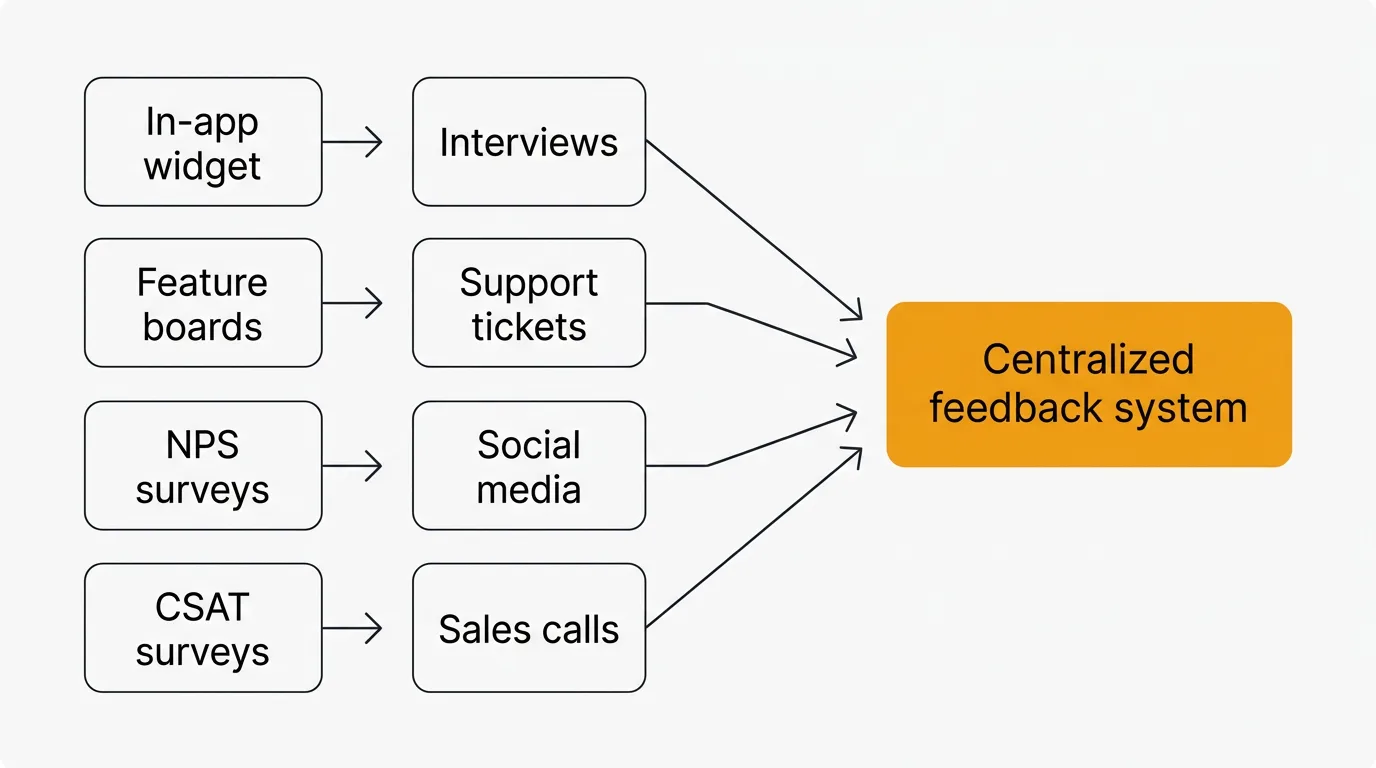
To collect customer feedback, combine an in-app widget for in-context input with a public feature request board so users can vote on ideas. Layer on NPS and CSAT surveys, customer interviews, support ticket analysis, social and review monitoring, and sales call feedback to cover both quantitative demand and qualitative depth. The methods only pay off if you route everything into one system and close the loop on what you build.
The most common failure modes: you don't collect enough feedback, so decisions are based on gut instinct. You collect too much feedback but never act on it, so users stop giving it. Or you use the wrong channels, so you hear from the loudest users instead of the most representative ones.
Good feedback collection is systematic. You need the right methods for the right moments, a way to organize what comes in, and a process to turn insights into product decisions. This guide covers eight methods that work, when to use each, and how to avoid the mistakes that make feedback programs fail.
8 methods to collect customer feedback
1. In-app feedback widgets
In-app widgets are the lowest-friction way to collect feedback. Users stay inside your product. They don't need to open a new tab, find your feedback page, or remember to email you later. The context is fresh — they're reacting to something they just experienced.
A good widget lets users submit ideas, report problems, and vote on existing requests without leaving the page they're on. The feedback arrives with context: which page the user was on, what they were doing, and who they are.
In-app collection consistently produces higher response rates than email surveys or external forms. The reason is simple. You're asking for feedback at the exact moment the user has something to say.
The Quackback widget embeds directly into your product and connects submissions to your feedback board automatically. Users see existing requests and can vote instead of creating duplicates. Quackback is open source and self-hosted free, with a managed Quackback Cloud option.
Best for: Continuous feedback collection from active users. Catching issues and ideas in the moment.
2. Feature request boards
A public feedback board gives users a dedicated place to submit ideas, vote on requests from other users, and track the status of their suggestions. It turns feedback collection from a one-way channel into a conversation.
Voting is what makes boards valuable. Instead of guessing which requests matter most, you see demand quantified. Ten users asking for the same integration in separate emails is noise. Ten votes on a single request is signal.
Public boards also reduce duplicate work. When a user searches the board and finds their idea already submitted, they vote on it instead of creating a new ticket. Your team spends less time triaging and more time building.
Feedback boards with voting give you a structured way to capture demand. Users can follow requests and get notified when the status changes, which keeps them engaged over time.
Best for: Ongoing feature prioritization. Building a backlog informed by real user demand.
3. NPS surveys
Net Promoter Score surveys ask one question: "How likely are you to recommend this product to a friend or colleague?" Users respond on a 0-10 scale. The score categorizes them as detractors (0-6), passives (7-8), or promoters (9-10).
NPS is a trailing indicator. It measures loyalty and overall sentiment, not specific feature requests. The score itself is less useful than the follow-up question: "What's the primary reason for your score?" That open-ended response is where the actionable feedback lives.
Run NPS surveys quarterly or after major milestones. Don't run them too frequently — survey fatigue is real, and a declining response rate undermines the data. Use the NPS calculator to compute your score and benchmark it against industry averages.
Best for: Measuring overall product sentiment over time. Identifying detractors before they churn.
4. CSAT surveys
Customer Satisfaction surveys measure how users feel about a specific interaction or experience. Unlike NPS, which captures general loyalty, CSAT is contextual. You ask "How satisfied were you with this experience?" right after a support conversation, onboarding flow, or feature interaction.
CSAT surveys use a 1-5 scale. Scores of 4 and 5 are considered satisfied. The metric is straightforward to calculate and easy for users to complete — most CSAT surveys take under five seconds.
The key is timing. Send a CSAT survey immediately after the interaction you want to measure. A survey sent two days after a support conversation captures a different (and less accurate) signal than one sent immediately after resolution.
Use the CSAT calculator to compute your satisfaction percentage and track it over time.
Best for: Measuring satisfaction with specific touchpoints. Evaluating support quality, onboarding effectiveness, and feature usability.
5. Customer interviews
Interviews give you something surveys and boards cannot: depth. A 30-minute conversation with a user reveals context, motivation, and workflow details that no quantitative method captures.
The best interview subjects are users who recently churned, users who recently converted, and power users who use your product differently than you expected. Each group tells you something distinct. Churned users tell you what's missing. Recent converts tell you what convinced them. Power users tell you what to double down on.
Structure interviews loosely. Start with open-ended questions about their workflow and goals. Avoid leading questions. Don't ask "Would you use feature X?" — ask "How do you currently solve problem Y?" The former gives you a polite yes. The latter gives you insight.
Five interviews often surface patterns that thousands of survey responses miss. The trade-off is that interviews don't scale. They're expensive in time, and the sample is small. Use them to generate hypotheses, then validate those hypotheses with quantitative methods.
Best for: Understanding user workflows, motivations, and pain points. Exploring problems you don't fully understand yet.
6. Support ticket analysis
Your support team already collects feedback. Every ticket, chat conversation, and email contains signal about what's broken, confusing, or missing. Most teams treat support conversations as individual problems to solve. The opportunity is in the aggregate.
Tag support tickets by theme. Track which issues come up most frequently. Look for patterns in the language users use — if twenty users describe the same problem differently, that's a sign your product's mental model doesn't match theirs.
Support ticket analysis doesn't require any new tooling or user-facing changes. The data already exists. You just need a process to extract patterns from it. Start by reviewing the top ten ticket categories each month. Ask your support team which questions they're tired of answering. Those are your highest-impact improvements.
Best for: Identifying usability issues, documentation gaps, and recurring pain points. No additional user effort required.
7. Social media and review monitoring
Users say things on Twitter, Reddit, G2, and Capterra that they won't say to you directly. Social and review monitoring captures unfiltered feedback — complaints, praise, and comparisons with competitors.
This channel is particularly useful for understanding how users describe your product to others. The language they use reveals how they perceive your positioning, what they consider your strengths, and where they think you fall short.
Set up alerts for your product name, common misspellings, and competitor names. Review sites like G2 and Capterra are especially valuable because users write structured reviews that cover specific aspects of the product. A pattern of "great product but onboarding is confusing" across fifteen reviews is actionable data.
The limitation is selection bias. People who leave public reviews or post on social media are not representative of your entire user base. They skew toward the very satisfied and the very frustrated. Use this channel to surface issues you might otherwise miss, not as your primary source of truth.
Best for: Understanding public perception. Catching issues that users don't report directly. Competitive intelligence.
8. Sales call feedback
Your sales team hears every objection, every comparison, and every feature gap that stops a deal from closing. This is feedback from people who evaluated your product and decided it didn't quite meet their needs — or decided it did, despite specific gaps.
Create a lightweight process for sales reps to log the top reason a deal was lost or the top feature request from a won deal. Don't ask for detailed write-ups. A single field — "What was the primary objection or missing feature?" — is enough to start capturing patterns.
Lost deal analysis is especially valuable. If you're consistently losing to a competitor because of a specific integration or capability, that's a prioritization signal that no amount of user voting will surface. Your existing users don't know what your prospects need.
Best for: Understanding why prospects choose competitors. Identifying gaps in your product for new market segments.
How to choose the right feedback method
No single method covers everything. Each has different strengths, and the best programs combine several.
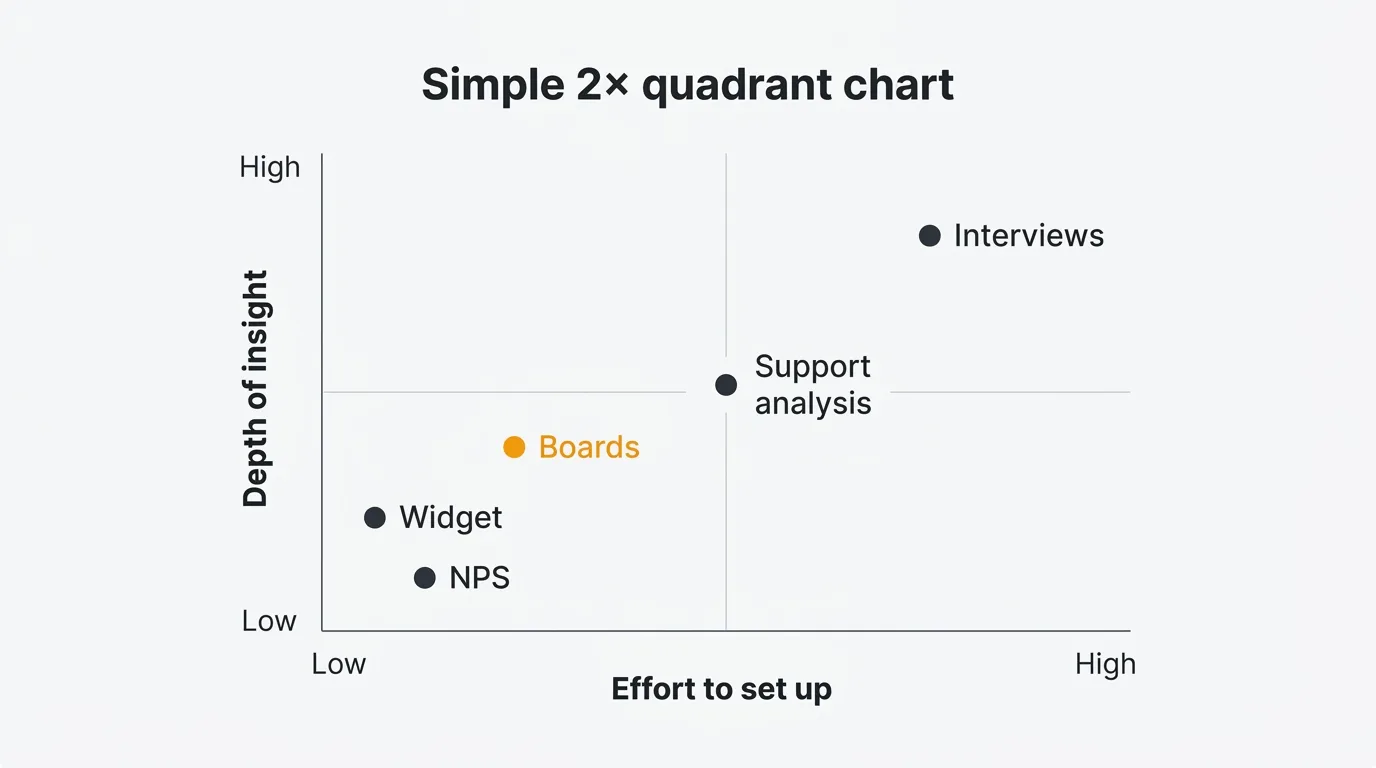
| Method | Best for | Effort to set up | Ongoing effort | Signal type |
|---|---|---|---|---|
| In-app widgets | Continuous collection from active users | Low | Low | Quantitative + qualitative |
| Feature request boards | Prioritizing features by demand | Low | Medium | Quantitative |
| NPS surveys | Tracking loyalty over time | Low | Low | Quantitative |
| CSAT surveys | Measuring specific interactions | Low | Low | Quantitative |
| Customer interviews | Deep understanding of user needs | Medium | High | Qualitative |
| Support ticket analysis | Finding recurring pain points | Low | Medium | Qualitative |
| Social media monitoring | Public perception and competitive intel | Medium | Medium | Qualitative |
| Sales call feedback | Understanding prospect objections | Low | Medium | Qualitative |
Start with the methods that match your stage. Early-stage products benefit most from customer interviews and an in-app widget. As you grow, add a feature request board to scale feedback collection beyond conversations. NPS and CSAT surveys layer on once you have enough users to make the data statistically meaningful.
Turning feedback into action
Collecting feedback without acting on it is worse than not collecting it at all. Users who submit ideas and never hear back stop contributing. Over time, your feedback channels go silent — not because users have nothing to say, but because they've learned that saying it doesn't matter.
Prioritize ruthlessly. Not every request deserves a response, but every request deserves consideration. Group requests by theme. Weight them by frequency, user segment, and strategic alignment. A request from five enterprise customers is different from the same request from five free-tier users. AI can speed up the grouping: Quackback's AI features are built in, and the MCP server lets you query and triage feedback directly from your own tools.
Close the loop. When you build something a user requested, tell them. When you decide not to build something, explain why. Closing the loop is the single most effective way to keep users engaged with your feedback program. Users who see their input lead to action become repeat contributors.
Communicate changes publicly. A public roadmap shows users what you are working on and what is coming next. It reduces "when will you build X?" questions and builds confidence that feedback is heard. A changelog announces what you shipped and notifies users who voted for those features. Together, they complete the feedback loop: request, prioritize, build, announce.
Review regularly. Set a cadence — weekly or biweekly — to review incoming feedback as a team. Don't let requests pile up for months. The faster you triage, the faster you can act, and the more responsive your product feels to users.
Common feedback collection mistakes
Asking for feedback everywhere but acting on it nowhere. Multiple feedback channels create the illusion of listening. If you have a feedback widget, a support inbox, a Slack channel, and a feature request board, but no process to consolidate and prioritize across them, you'll miss patterns and frustrate users who submit the same request in multiple places.
Surveying too often. Survey fatigue is real. If users see a popup every time they log in, they stop responding — or worse, they give low-quality answers just to dismiss the prompt. Be intentional about when and how often you ask. NPS once a quarter. CSAT immediately after specific interactions. In-app widgets always available but never intrusive.
Only listening to the loudest users. The users who submit the most feedback are not necessarily representative of your user base. Vocal users tend to be power users with specific, sometimes niche, needs. Balance their input with data from broader channels like NPS surveys and support ticket analysis. Look at who isn't giving feedback, too — silent churn is the most expensive kind.
Treating all feedback equally. A feature request from a $50,000/year enterprise account and a request from a free-tier user carry different weight. That doesn't mean you ignore the free-tier user, but your prioritization framework should account for business impact. Segment your feedback by user type, plan, and revenue.
Never explaining why you said no. Saying no to a request is fine. Ignoring it is not. Users respect transparent prioritization. When you explain that a request doesn't align with your current focus, or that you're solving the underlying problem a different way, users understand. When you say nothing, they assume you don't care.
Try Quackback — open source with a managed cloud option. Start free. Get started | View on GitHub
Frequently asked questions
How often should I collect customer feedback?
Cadence depends on the method. Keep in-app widgets and feature request boards always-on. Run NPS surveys quarterly. Trigger CSAT surveys immediately after the interaction you measure. Schedule customer interviews monthly or around milestones. Aim for continuous input without overwhelming users — declining response rates mean you are asking too often.
What is the best way to collect feedback for a SaaS product?
Start with two channels: an in-app feedback widget and a public feature request board with voting. The widget captures feedback in context; the board lets users vote on requests, giving you qualitative input and quantitative demand. Layer on NPS, support analysis, and interviews as you grow. See our best customer feedback tools guide.
How do I get more users to give feedback?
Reduce friction. The easier it is to submit feedback, the more you get. An in-app widget beats a separate feedback page. A one-click vote beats a multi-field form. Beyond mechanics, show users that feedback leads to action. Publish a roadmap so they can see priorities. Ship a changelog that references their requests. When users see the loop close, they contribute more. For a broader framework on building a feedback program, see our user feedback guide.
Should I use multiple feedback collection methods at once?
Yes, but consolidate them into a single system. Running five feedback channels that feed into five separate tools creates fragmentation. You lose the ability to see patterns across channels, and users get inconsistent experiences. Pick a primary system — like a feedback board — and route input from other channels (support tickets, sales calls, social mentions) into it. That gives you multiple collection points with a single source of truth for prioritization.

Authored by James Morton
Founder of Quackback. Building open-source feedback tools.
Try Quackback
The open-source feedback platform. Boards, voting, and roadmaps.
Get startedStar on GitHub305