
Customer experience management is the practice of designing, measuring, and improving every interaction a customer has with your product. Most teams treat it as a department or a dashboard. The teams that do it well treat it as a feedback loop.
Analytics tell you what happened. Feedback tells you why. A customer who abandons onboarding at step three is a data point. A customer who tells you that step three is confusing and the help docs are wrong is a diagnosis. Customer experience management without feedback is pattern recognition without understanding. You see the symptoms but miss the cause.
This guide covers how to build a CX management strategy grounded in customer feedback. You will learn why feedback is the foundation of CX, how to build a structured feedback process across touchpoints, which tools and metrics matter, and how to close the loop so customers know their input shaped your product.
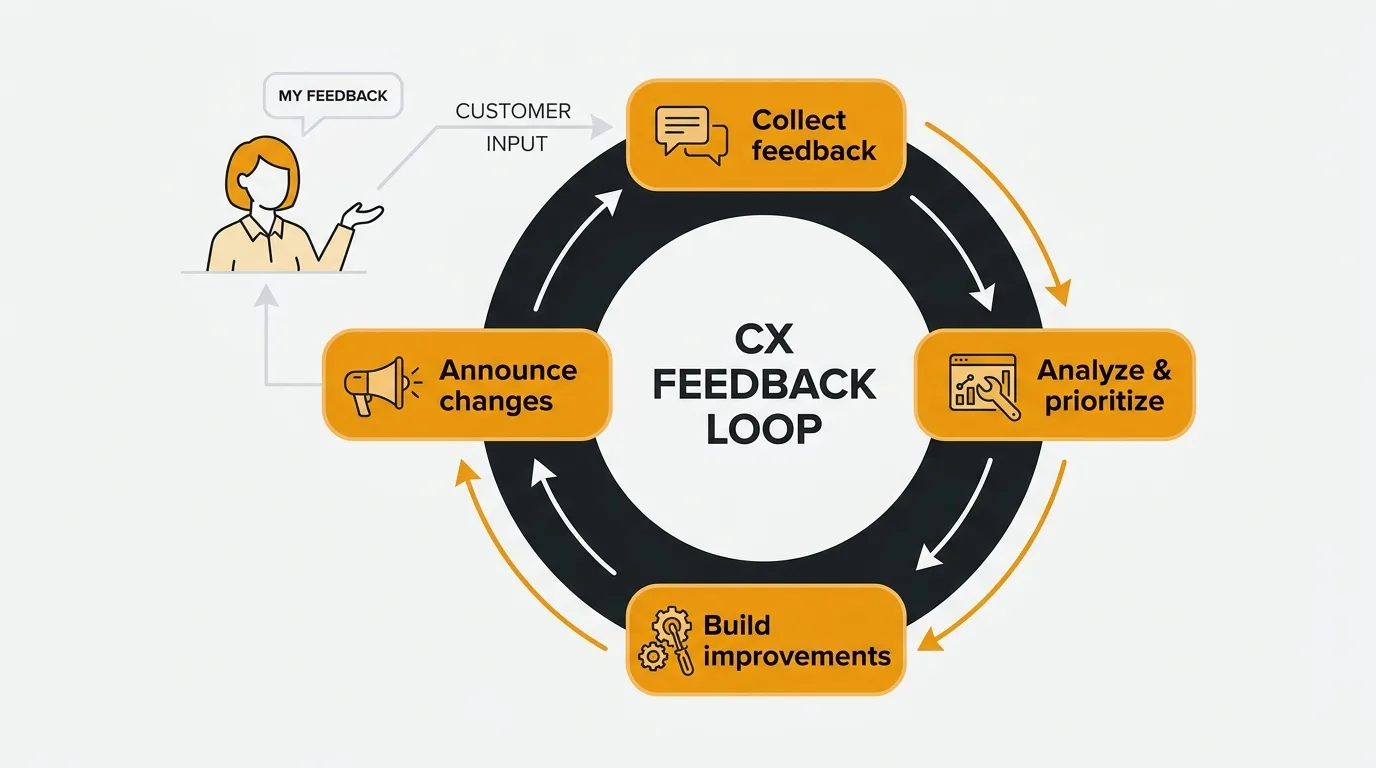
Customer experience management is the practice of designing, measuring, and improving every interaction a customer has with your product across the full lifecycle. The strongest CX programs run on a structured feedback loop: collect input across touchpoints, quantify demand with voting, act on it through your roadmap, and close the loop in your changelog. Analytics tell you what happened; feedback tells you why, which is the signal most CX programs are missing.
What is customer experience management
Customer experience management — often shortened to CX management or CXM — is the systematic process of understanding, designing, and improving every touchpoint a customer has with your company. It spans the full lifecycle: awareness, evaluation, purchase, onboarding, usage, support, renewal, and advocacy.
It is not customer service. Customer service is reactive — a customer has a problem, you solve it. Customer experience management is proactive. You study the entire journey, identify where friction exists, and improve the experience before customers need to ask for help. Customer service is one touchpoint within CX. CX management is the system that encompasses all touchpoints.
The connection to feedback is fundamental. You cannot improve what you do not measure. And you cannot measure experience with analytics alone. Behavioral data shows you what customers do. Feedback shows you what they think, what frustrates them, and what they wish existed. A digital customer experience management strategy that ignores direct customer input is operating on half the signal.
The best CX programs combine quantitative data (what happened) with qualitative feedback (why it happened) and use both to inform decisions. The feedback layer is where most programs are weakest — not because teams do not care about customer input, but because they lack a structured system to collect, organize, and act on it.
Why feedback is the foundation of CX
Every CX improvement starts with understanding the gap between what customers expect and what they experience. Feedback is the most direct way to measure that gap.
Analytics miss intent. You can see that 40% of users drop off during onboarding. You cannot see why. Was the flow too long? Was a required field confusing? Did the user get distracted and plan to come back? Analytics give you the "what." Feedback gives you the "why." Without both, your team is guessing at solutions.
Feedback captures unmet needs. A customer who submits a feature request is telling you what they expected your product to do but could not. This is experience data. It reveals the gap between their mental model and your product's reality. Aggregated across hundreds of customers, feature requests become a map of unmet expectations — exactly the input a CX management strategy needs.
Frustration shows up in feedback before it shows up in churn. A customer who writes a negative comment on your feedback board is still engaged. A customer who quietly cancels is gone. Feedback is a leading indicator of experience problems. By the time a CX issue appears in your churn metrics, you have already lost the customers it affected. Monitoring feedback sentiment lets you catch problems while they are still fixable.
Feedback creates accountability. When a customer submits a suggestion and your team updates its status — from "under review" to "planned" to "shipped" — that is a visible act of responsiveness. It demonstrates that customer input shapes the product. This accountability loop is the core of effective customer experience management. Customers who see their feedback acknowledged stay engaged longer, give higher satisfaction scores, and become advocates.
Here is a concrete example. Suppose your analytics show a 30% drop-off on your pricing page. Without feedback, your team might guess: "The pricing is too high." Or: "The page loads too slowly." Or: "The tiers are confusing." With feedback, a customer tells you: "I could not figure out which plan includes API access. The comparison table does not mention it." That is a different problem with a different solution — one that analytics alone would never surface. The fix is not a price change or a performance optimization. It is a clearer comparison table.
This pattern — analytics reveal the "what," feedback reveals the "why" — repeats across every CX touchpoint. The teams that combine both signals make better decisions than teams that rely on either one alone.
Building a CX management strategy with feedback
A customer experience management strategy does not require an enterprise CX platform or a dedicated team of analysts. It requires a structured process for collecting feedback, understanding it, and acting on it. Here is how to build one.
Collect feedback across touchpoints
Customer experience spans multiple moments. Your feedback collection should too. Different touchpoints surface different types of signal.
In-app feedback captures reactions at the moment of experience. A user hits a confusing workflow and can report it without leaving the page. An embedded feedback widget reduces friction and preserves context — you know what page the user was on and what they were doing.
Feature request boards capture what customers wish your product could do. A public feedback board with voting surfaces demand and lets customers see that others share their needs. This is experience data — it reveals the gap between what your product offers and what customers expect.
Post-interaction surveys measure satisfaction at specific touchpoints. A CSAT survey after a support conversation measures service quality. An NPS survey measures overall loyalty. The open-ended follow-up question on these surveys often contains the most actionable CX insight.
Support conversations are feedback in disguise. Every ticket about a confusing setting, every chat asking how to accomplish a basic task — these are experience signals. Integrating your support tools with your feedback system turns reactive conversations into proactive CX data.
Centralize feedback in one place
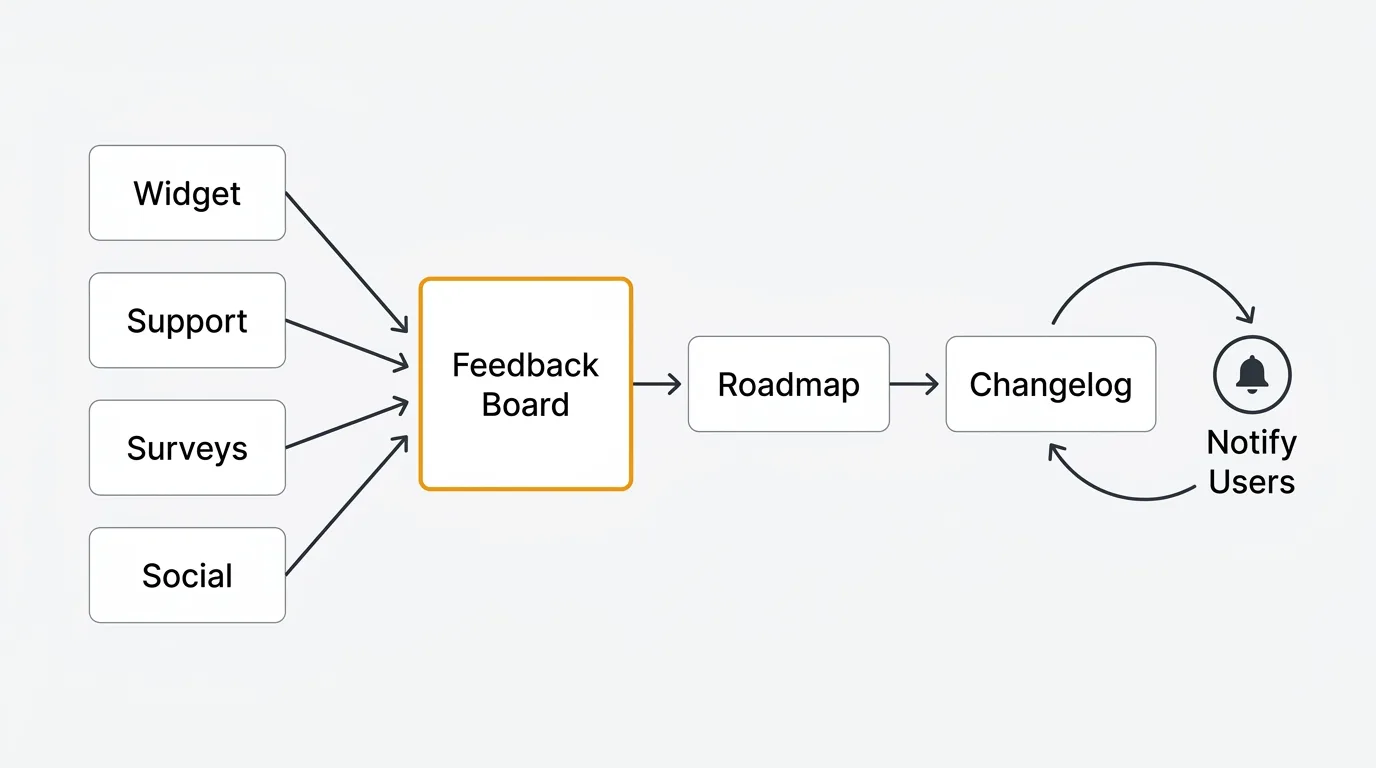
Feedback scattered across a dozen tools is invisible. A feature request in Intercom, a complaint on Twitter, a suggestion in a support ticket, and a vote on your feedback board might all describe the same experience problem. If they live in separate systems, the pattern never surfaces.
Route all feedback channels into a single system. A feedback board works well as the hub because it creates a searchable, votable backlog. Support integrations pipe in ticket themes. Widget submissions land directly on the board. Sales call notes get logged as internal posts. When everything is in one place, patterns emerge.
Here is what a centralized feedback architecture looks like in practice:
| Source | Integration | What it captures |
|---|---|---|
| In-app widget | Direct submission to board | Real-time product friction |
| Support tickets (Zendesk, Intercom) | Auto-tag and forward themes | Recurring pain points |
| Sales calls | Manual internal post by sales rep | Prospect objections and unmet needs |
| Social media | Manual or automated forward | Public sentiment and brand issues |
| NPS/CSAT surveys | Open-ended responses piped to board | Satisfaction drivers and detractors |
| Feedback board (public) | Native | Feature requests and votes |
The goal is not to pipe every message verbatim. It is to ensure that experience patterns from any channel surface in one place where your product team can see them, quantify them, and act on them. For more on setting up this system, see our guide to collecting customer feedback.
Quantify with voting
Not all experience problems are equal. Voting lets your customers tell you which ones matter most. A feature request with 200 votes represents a different level of urgency than one with 3. A usability complaint that dozens of users have upvoted is a higher priority than one submitted by a single user.
Voting transforms qualitative feedback into quantitative CX signal. It gives your team a defensible basis for prioritization — not opinion, not the loudest stakeholder in the room, but measured demand from the people who use your product.
Connect feedback to your roadmap
Feedback that does not connect to product decisions is wasted. The bridge between customer input and product action is your roadmap. When your team accepts a feedback item and moves it to "planned," it should appear on a public roadmap that customers can see. This does two things: it tells customers their input matters, and it aligns your team around experience-driven priorities.
The connection also helps you prioritize. When you can see that 150 users voted for "improve onboarding flow" and 8 users voted for "add dark mode," the data makes the priority obvious. This is more reliable than internal stakeholder opinions and faster than commissioning a formal study. For frameworks on how to prioritize what you build, see our guides on RICE scoring and MoSCoW prioritization.
Close the loop
Closing the loop is the most important step in CX management and the one most teams skip. When you ship a feature that customers requested, tell them. When you fix a usability issue that users reported, announce it in your changelog. When you decide not to build something, explain why.
Closing the loop converts a one-directional feedback channel into a relationship. Customers who see the cycle — submit, vote, track, ship, announce — develop trust in the process. They give better feedback. They stay longer. They tell others. This is where customer experience management stops being a process and starts being a competitive advantage. For a detailed guide on building this cycle, see our customer feedback loop guide.
CX maturity: Where does your team stand?
Not every team needs a full CX management platform on day one. The right approach depends on your current maturity level. Here is a framework for assessing where you are and what to do next.
Level 1: Reactive. You fix problems when customers complain. There is no structured feedback collection. Support handles issues one at a time. CX improvements happen accidentally, not systematically. Next step: Set up a feedback board and start collecting input in one place.
Level 2: Collecting. You gather feedback through surveys, a suggestion box, or a feedback board. But the feedback sits in a backlog that nobody owns. It does not connect to your product roadmap. Next step: Assign ownership. One person reviews new feedback weekly and updates statuses.
Level 3: Prioritizing. You collect and organize feedback. Voting surfaces demand. Your team references feedback data when making product decisions. But customers do not know what happened to their input. Next step: Publish a public roadmap. Connect feedback statuses to your roadmap so customers see progress.
Level 4: Closed-loop. You collect feedback, prioritize it, build based on it, and announce what shipped. Customers who submitted ideas get notified. The customer feedback loop is complete. Your changelog references the feedback that motivated each change. Next step: Measure the loop. Track time-to-close, submission volume trends, and the correlation between feedback-driven features and retention.
Most teams are at Level 1 or 2. Getting to Level 3 is a process change, not a technology investment. Getting to Level 4 is where tools like Quackback make the difference — the automation of notifications, status syncing, and changelog generation is what makes the closed loop sustainable at scale.
Customer experience management tools
CX management is not a single tool. It is a stack of tools that cover different parts of the customer journey. Here is how the categories fit together.
Analytics tools (Amplitude, Mixpanel, PostHog). These track behavioral data — what users do inside your product. Page views, feature adoption, funnel conversion, retention curves. They answer the "what" question: what is happening across the customer journey. They do not answer why.
Survey tools (Typeform, SurveyMonkey). These handle structured feedback collection: NPS, CSAT, CES, and custom questionnaires. They are good for measuring sentiment at specific touchpoints and benchmarking over time. They do not handle ongoing feature requests, voting, or public roadmaps. For templates, see our NPS survey template and customer satisfaction survey template.
Feedback and prioritization tools (Quackback, Canny). These handle the layer between raw customer input and product decisions: feedback boards, voting, status tracking, roadmap, and changelog. Quackback is the strongest option in this category — open source, free to self-host, with AI-powered triage, duplicate detection, and sentiment analysis, and integrations including Slack, Intercom, Zendesk, Jira, and Linear. An MCP server also exposes your feedback to AI assistants, so you can ask questions across your CX backlog in natural language. It handles the feedback layer of CX management: collecting what customers want, quantifying demand through voting, and closing the loop when you ship. For a broader comparison, see our guide to the best customer feedback tools in 2026 or a direct look at Quackback vs Canny.
Support tools (Zendesk, Intercom, Help Scout). These manage reactive customer interactions: tickets, live chat, and help center content. Every support interaction contains CX data. The best setup routes patterns from support conversations into your feedback board so experience insights are not trapped in resolved tickets.
The feedback layer is where most CX stacks have a gap. Teams invest in analytics and support but lack a structured system for collecting, prioritizing, and acting on direct customer input. Filling that gap — with a feedback board, voting, and a closed-loop process — is the highest-leverage improvement most teams can make to their customer experience management strategy.
CX metrics that connect to feedback
Metrics keep your CX program honest. The ones that matter most are the ones that connect to what customers are actually telling you.
Net Promoter Score (NPS). Measures loyalty on a 0-10 scale. Useful as a trend indicator — a declining NPS is an early warning. The follow-up question ("What's the primary reason for your score?") is where the actionable CX insight lives. Track NPS quarterly and segment by customer type. Use our NPS calculator to compute your score.
Customer Satisfaction Score (CSAT). Measures satisfaction with a specific interaction on a 1-5 scale. Deploy immediately after support conversations, onboarding completion, or major feature interactions. CSAT is contextual — it tells you how a specific touchpoint performs, not how customers feel overall. Use our CSAT calculator to track it.
Customer Effort Score (CES). Measures how easy it was for a customer to accomplish a task. "How easy was it to resolve your issue?" on a 1-7 scale. High effort correlates strongly with churn. If customers consistently report that a specific workflow is difficult, that is a CX problem worth prioritizing regardless of what your analytics show.
Feature request volume. The total number of feature requests submitted per period. Rising volume indicates engaged users who trust the feedback channel. Declining volume is a warning — either your product is meeting all needs (unlikely) or customers have stopped expecting their input to matter. Track this alongside the ratio of requests that move to "planned" or "shipped."
Time to close the loop. The elapsed time from when a customer submits feedback to when they receive a status update. This measures the health of your CX feedback process. A short time to close signals that the team is responsive. A long time signals that feedback is collecting dust. The best teams respond to new submissions within days, not months.
Here is a practical CX metrics dashboard you can set up with existing tools:
| Metric | Source | Review cadence | Action threshold |
|---|---|---|---|
| NPS | Quarterly survey | Quarterly | Drop of 5+ points triggers investigation |
| CSAT | Post-interaction survey | Weekly | Score below 4.0 triggers process review |
| CES | Post-task survey | Monthly | Score above 5 (on 7-point scale) flags friction |
| Feature request volume | Feedback board | Weekly | 20%+ decline signals engagement problem |
| Time to first response | Feedback board | Weekly | Over 5 business days triggers triage review |
| Feedback-to-ship ratio | Feedback board + changelog | Monthly | Below 10% suggests backlog debt |
You do not need all six metrics on day one. Start with NPS and feature request volume. Add the others as your CX process matures. The key is regular review — metrics you check quarterly are lagging indicators. Metrics you check weekly are actionable. For a deeper dive into feedback analysis, see our guide on AI-powered customer feedback analysis.
Try Quackback — open source with a managed cloud option. Start free. Get started | View on GitHub
Frequently asked questions
What is customer experience management?
Customer experience management is the practice of designing, measuring, and improving every interaction a customer has with your product, from first awareness through renewal. Unlike reactive customer service, it is proactive: you study the journey and fix friction before customers ask. The foundation is direct customer feedback. See our Voice of the Customer guide.
What tools do I need for customer experience management?
Most teams need four categories: analytics (Amplitude, Mixpanel) for behavioral data, surveys (Typeform) for sentiment, a feedback and prioritization tool (Quackback) for collecting and acting on customer input, and a support tool (Zendesk, Intercom) for reactive interactions. The feedback layer is where most stacks have a gap. You do not need a dedicated CX platform to start.
How is digital customer experience management different from traditional CX?
Digital customer experience management focuses on online touchpoints: product UI, onboarding flows, in-app messaging, and support chat. Traditional CX includes physical interactions like retail and in-person onboarding. The principles are the same, but digital CX adds richer behavioral data (analytics, session recordings) alongside feedback, making it easier to correlate what users say with what they do.
How do I start a customer experience management strategy with limited resources?
Start with the feedback loop. Set up a feedback board where customers submit ideas and vote, connect it to your support tool, review feedback weekly, and publish a changelog when you ship. This lightweight cycle (collect, prioritize, build, communicate) needs no dedicated CX team or expensive software. Scale the tooling as volume grows.
Here is a week-one action plan:
- Day 1: Set up a feedback board with Quackback (free to self-host, under 5 minutes to deploy)
- Day 2: Connect your support tool (Zendesk, Intercom, or Help Scout) so ticket themes route to the board
- Day 3: Add an in-app feedback widget so users can submit without leaving your product
- Day 4: Review existing support tickets from the past month and create feedback posts for recurring themes
- Day 5: Share the board with your team. Assign one person as the triage owner. Set a weekly 15-minute review meeting.
This is enough to start the CX feedback cycle. No enterprise platform required. For a broader overview of feedback tools, see our guide to the best customer feedback tools.

Authored by James Morton
Founder of Quackback. Building open-source feedback tools.
Try Quackback
The open-source feedback platform. Boards, voting, and roadmaps.
Get startedStar on GitHub305