
At 50 users, a feedback tool is a product decision. At 5,000 users, it is an infrastructure decision.
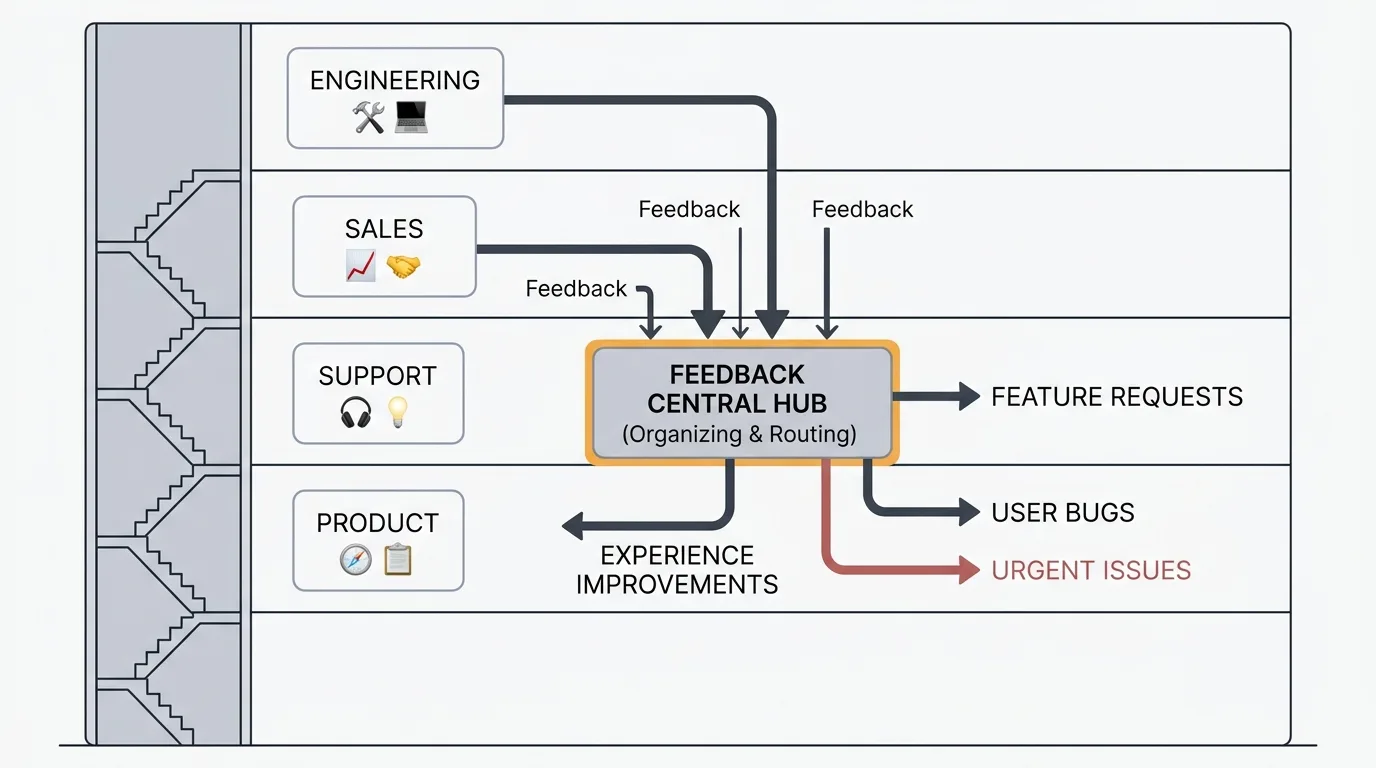
Enterprise feedback management is the practice of collecting, routing, and prioritizing feedback across multiple products, distributed teams, and thousands of users under compliance and security constraints. Large teams need SSO/SAML, audit trails, role-based access control, multi-product architecture, data residency control, and AI-assisted triage. The leading tools are UserVoice, Productboard, Aha! Ideas, and Pendo, with open-source options like Quackback for teams that require self-hosting.
Enterprise feedback management is not just "feedback management but bigger." The requirements change fundamentally when your organization has multiple products, distributed teams, compliance obligations, and thousands of users generating feedback across dozens of channels. A tool that works for a 10-person startup will not work for a 500-person enterprise — not because of volume alone, but because of the organizational complexity around that volume.
This guide covers what enterprises actually need from a feedback tool, where the current landscape falls short, and how to evaluate options.
How enterprise feedback differs
Multiple products and business units
A startup has one product with one feedback board. An enterprise has five products across three business units, each with its own PM team, its own user base, and its own priorities. Feedback needs to flow to the right team without manual routing.
This requires multi-workspace or multi-board architecture with per-product permissions. A request about Product A should not clutter the backlog of the team building Product B. But cross-product insights — users asking for integrations between Product A and Product B — need to surface to both teams.
Distributed decision-making
In a startup, one PM reads all the feedback and makes prioritization decisions. In an enterprise, dozens of PMs across multiple teams need access to feedback relevant to their domain, with the ability to triage, categorize, and escalate without stepping on each other.
This means role-based access control with granular permissions. A PM should see their product's feedback. A VP of Product should see all feedback with the ability to filter by product, team, or customer segment. A support agent should be able to submit feedback on behalf of a customer but not change statuses or priorities.
Compliance and security requirements
Enterprise procurement involves security reviews, compliance questionnaires, and vendor assessments. Your feedback tool will be evaluated on:
SSO and SAML. Non-negotiable for most enterprises. Users authenticate through the company's identity provider (Okta, Azure AD, Google Workspace). No separate credentials for the feedback tool.
Audit trails. Who changed what, when, and why. Every status change, comment edit, and vote should be logged with a timestamp and user identity. Regulated industries (healthcare, finance) require this for compliance.
Data residency. Where does the data live? For enterprises subject to GDPR, CCPA, or industry-specific regulations, the answer matters. Some tools store data only in the US. Others offer EU hosting. Self-hosted tools let you control data residency entirely.
SOC 2 compliance. Many enterprise procurement teams require vendors to hold SOC 2 Type II certification. This demonstrates that the vendor follows established security practices for data handling, access control, and incident response.
Data encryption. Encryption at rest and in transit. Some enterprises require customer-managed encryption keys for particularly sensitive data.
Volume and scale
An enterprise with 10,000 active users might receive 500 to 2,000 feature requests per month across all products. The feedback tool needs to handle this volume without performance degradation, and the team needs workflows that prevent this volume from becoming overwhelming.
At enterprise scale, manual triage breaks down. Zonka Feedback's AI in Feedback Analytics report found that 93% of CX leaders struggle with fragmented feedback scattered across multiple systems, and 87% still rely on manual verbatim analysis — combing through spreadsheets while critical issues slip through. AI-powered categorization, duplicate detection, and sentiment analysis become practical necessities rather than nice-to-have features. A PM cannot manually review 500 requests per month and still have time to build product.
What to look for in an enterprise feedback tool
Must-have capabilities
SSO/SAML integration. Employees sign in with their corporate credentials. This is the first thing enterprise security teams check, and the first reason they reject a tool.
Role-based access control. At minimum: admin, PM, contributor, viewer roles with per-product scoping. Better: custom roles with granular permissions for specific actions (triage, comment, change status, export data, manage users).
Multi-product support. Separate boards or workspaces per product with cross-product visibility at the leadership level. Each product team operates independently, but executives see the full picture.
API access. Enterprises integrate feedback data into their existing toolchain — BI dashboards, data warehouses, CRM systems. A comprehensive API is essential for these workflows.
Bulk operations. Merge 50 duplicate requests. Re-categorize 200 posts after a product reorganization. Change the status of everything in a deprecated category. At enterprise scale, one-at-a-time operations are not viable.
Differentiating capabilities
AI-powered triage. Automatic categorization, sentiment analysis, and duplicate detection. Reduces the manual effort of processing high-volume feedback from hours to minutes. See our guide on AI customer feedback analysis for how this works in practice.
Customer segmentation. Weighting feedback by customer value, plan tier, ARR, or usage level. A request from a $500K/year customer should be surfaced differently than a request from a free trial user. This requires integration with your CRM or billing system.
Advanced analytics. Trend analysis over time, feedback volume by product area, sentiment shifts, and executive dashboards. Leadership needs aggregate views, not individual tickets.
Workflow automation. Auto-assign feedback based on product area. Auto-notify stakeholders when a high-priority request arrives. Auto-escalate requests that receive a spike in votes. At enterprise scale, manual routing is the bottleneck.
Self-hosting option. Some enterprises require feedback data to stay on their own infrastructure for regulatory or security reasons. A self-hosted option eliminates data residency concerns entirely and gives the security team full control over the deployment.
The enterprise feedback tool landscape
UserVoice
The longest-standing enterprise feedback tool. UserVoice has served enterprise customers since 2008 and built deep features around enterprise workflows: NPS integration, revenue-linked prioritization, and contributor licensing (only PMs need paid seats, not end users).
Strengths: Mature enterprise features, revenue-weighted prioritization, established track record with large organizations.
Limitations: Expensive. Pricing starts around $799/month for the Premium plan, and enterprise pricing requires a sales conversation. The UI feels dated compared to newer tools. No self-hosting option.
Best for: Large organizations that need revenue-linked prioritization and are comfortable with premium pricing.
For lower-cost options, see the best UserVoice alternatives or our Quackback vs UserVoice comparison.
Productboard
Productboard positions itself as a product management platform rather than a feedback tool. It spans the full workflow from feedback collection to strategy alignment to roadmapping.
Strengths: Strategy alignment features (objectives, key results, product hierarchy), Salesforce and CRM integrations, portal for customer-facing feedback.
Limitations: Pricing scales per "maker" (PM seats), starting at $20/maker/month for Essentials. Enterprise features like SSO and advanced permissions require the Enterprise plan (custom pricing). The breadth of features creates complexity — teams often use only a fraction of the platform.
Best for: Enterprise product organizations that want feedback, roadmapping, and strategy alignment in one platform.
For a full pricing breakdown, see our Productboard pricing guide or the Quackback vs Productboard comparison.
Aha! Ideas
Aha! Ideas is the feedback component of the Aha! product management suite. It integrates tightly with Aha! Roadmaps and Aha! Develop for a complete product lifecycle tool.
Strengths: Deep roadmapping integration, customizable scoring frameworks (RICE, WSJF, custom), proxy voting for sales and CS teams, enterprise-grade permissions.
Limitations: The Aha! ecosystem is large and complex. Adopting Aha! Ideas typically means adopting the full Aha! suite to get the most value. Pricing starts at $59/user/month.
Best for: Teams already using or willing to adopt the full Aha! product suite.
For details on the tiers, see our Aha! pricing guide or the Quackback vs Aha! comparison.
Pendo
Pendo combines product analytics with in-app feedback collection. Its strength is connecting user behavior data (feature usage, session recordings, funnel analytics) with qualitative feedback.
Strengths: Behavioral analytics integrated with feedback, in-app guides and tooltips, session replay. Strong for understanding not just what users request, but how they actually use the product.
Limitations: Pendo is primarily an analytics tool. Its feedback features are less developed than tools built specifically for feedback management. Pricing is usage-based and can be expensive at scale — custom pricing only, typically five figures annually.
Best for: Enterprises that want to correlate product usage data with qualitative feedback.
For more on costs, see our Pendo pricing guide or the Quackback vs Pendo comparison.
Open-source alternatives
For enterprises that require self-hosting, data sovereignty, or want to avoid vendor lock-in, open-source feedback tools are increasingly viable.
Quackback is open source (AGPL-3.0) with a managed cloud option. Self-hosting includes SSO/OIDC, role-based access control, AI-powered feedback analysis, an MCP server for AI agent integrations, 25 integrations, and analytics dashboards, with no feature gates. On Quackback Cloud, those capabilities sit on named plans (SSO and audit log on Enterprise; workflows on Business).
Consider Quackback if you need enterprise capabilities (SSO, RBAC, audit trails, multi-board architecture), and you want the choice between self-hosting for full data residency control or a managed cloud for zero operational overhead.
The trade-off with self-hosting is infrastructure responsibility. Your team manages the deployment, updates, and backups, which the Quackback docs walk through in detail. For organizations with DevOps capacity, this is a reasonable trade-off for full data control. For teams that want managed infrastructure, Quackback Cloud removes that overhead.
For a broader comparison, see our guide to open-source feedback tools.
Common enterprise challenges
Feedback silos
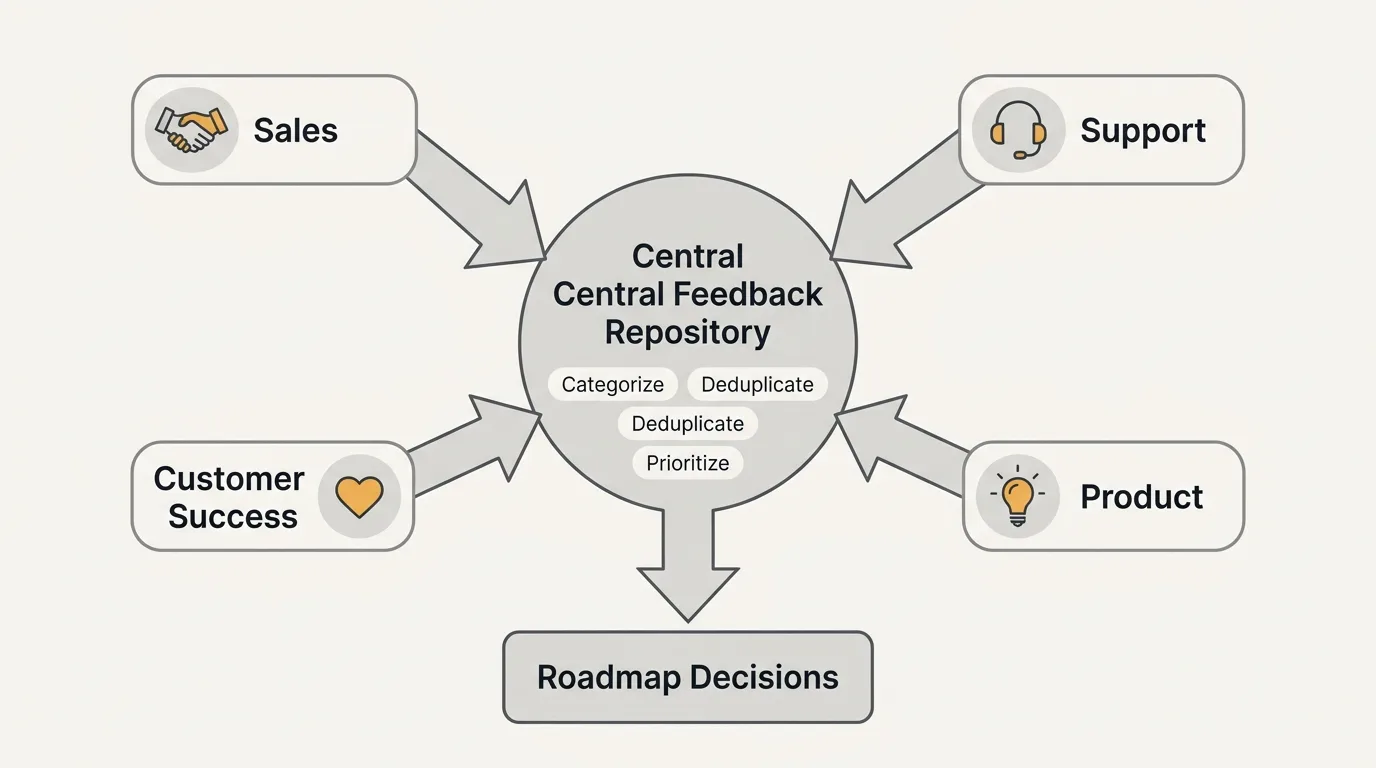
The most common problem in enterprise feedback management is fragmentation. Customer success logs feedback in Salesforce. Support logs it in Zendesk. Sales logs it in Gong call notes. Product gets feature requests through a feedback portal. Each team has a partial picture, and nobody has the full picture.
Solving this requires either consolidating feedback into a single tool (expensive and politically difficult) or building integrations that surface relevant signals across systems. The integration approach is usually more practical — connect your feedback tool to Slack, Zendesk, Salesforce, and Jira so feedback flows from source systems into a central repository without requiring every team to change their workflow.
Stakeholder alignment
In an enterprise, feature prioritization involves multiple stakeholders with competing interests. Sales wants features that close deals. Support wants features that reduce ticket volume. Engineering wants features that reduce technical debt. Product needs to balance all of these against the company's strategic direction.
A feedback tool helps by making demand visible and quantifiable. Instead of "sales says customers want X," you have "47 customers representing $2.3M in ARR have requested X, with 12 of those flagged as at-risk renewals." Data does not eliminate politics, but it grounds the conversation.
Change management
Adopting a new feedback tool in a 500-person organization is a change management exercise, not a software deployment. People need to understand why they should use the new tool, how it fits into their existing workflow, and what happens to the feedback they submit.
Successful rollouts usually start with one product team, prove the value, and expand from there. Company-wide mandates without a pilot phase tend to produce low adoption and resentment.
Building an enterprise feedback program
Start with a pilot
Pick one product team with a clear feedback problem. Deploy the tool for that team, configure it for their specific workflow, and measure results over 60 to 90 days. Success metrics: feedback volume, time to triage, duplicate reduction, and user satisfaction with the feedback process.
Define your taxonomy
Before scaling beyond the pilot, establish a shared taxonomy for categories, statuses, and priority levels. If Product A uses "Enhancement" and Product B uses "Feature Request" for the same thing, cross-product analysis becomes impossible.
Integrate with existing systems
Connect the feedback tool to the systems your teams already use. The most impactful integrations:
- Slack — for incoming feedback from team channels and customer conversations
- Jira or Linear — for linking feedback to engineering work
- CRM (Salesforce, HubSpot) — for customer context and revenue data
- Support (Zendesk, Intercom) — for surfacing feedback from support conversations
Establish governance
Who can change statuses? Who can merge posts? Who can export data? Who reviews feedback for each product area? Define these roles and document them. In an enterprise, ambiguity about ownership leads to either duplicated effort or neglected feedback.
Report to leadership
Executives want aggregate metrics, not individual feature requests. Build a reporting cadence that surfaces: total feedback volume and trends, top requested features by customer segment, feedback-to-feature conversion rate, and customer satisfaction with the feedback process.
Try Quackback — open source with a managed cloud option. Start free. Get started | View on GitHub
Frequently asked questions
How much does enterprise feedback management software cost?
Pricing varies widely. UserVoice starts around $799/month. Productboard Enterprise requires custom pricing, typically four to five figures annually. Aha! Ideas starts at $59/user/month. Pendo uses custom pricing. Open-source tools like Quackback are free to self-host, with costs limited to your own infrastructure.
Do I need a dedicated feedback tool or can I use Jira?
Jira is a project management tool, not a feedback tool. It lacks public portals, user voting, duplicate detection, and feedback-specific analytics. Use a dedicated feedback tool for collection and prioritization, then sync selected items to Jira for engineering execution.
How do I handle feedback across multiple products?
Use a tool that supports multi-board or multi-workspace architecture. Each product gets its own board with its own team permissions. Cross-product insights surface through shared tags, executive dashboards, or a unified search that spans all boards.
What is the difference between a feedback tool and a survey tool?
A feedback tool (Quackback, Canny, UserVoice) captures ongoing, unsolicited feedback such as feature requests and bug reports that users submit anytime. A survey tool (SurveyMonkey, Typeform) sends structured questionnaires at specific moments. Enterprises typically need both for continuous signal collection and targeted research.
Is self-hosting worth the operational overhead?
For enterprises with strict data residency rules, regulated industries (healthcare, finance, government), or a preference for vendor independence, yes. Self-hosting eliminates data sovereignty concerns and gives the security team full control. Otherwise, a SaaS tool with SOC 2 compliance and managed cloud is usually sufficient.

Authored by James Morton
Founder of Quackback. Building open-source feedback tools.
Try Quackback
The open-source feedback platform. Boards, voting, and roadmaps.
Get startedStar on GitHub305