
Good product decisions start with user feedback. Not intuition, not competitor analysis, not the loudest voice in the room. What your users tell you — directly and indirectly — is the most reliable signal for what to build next.
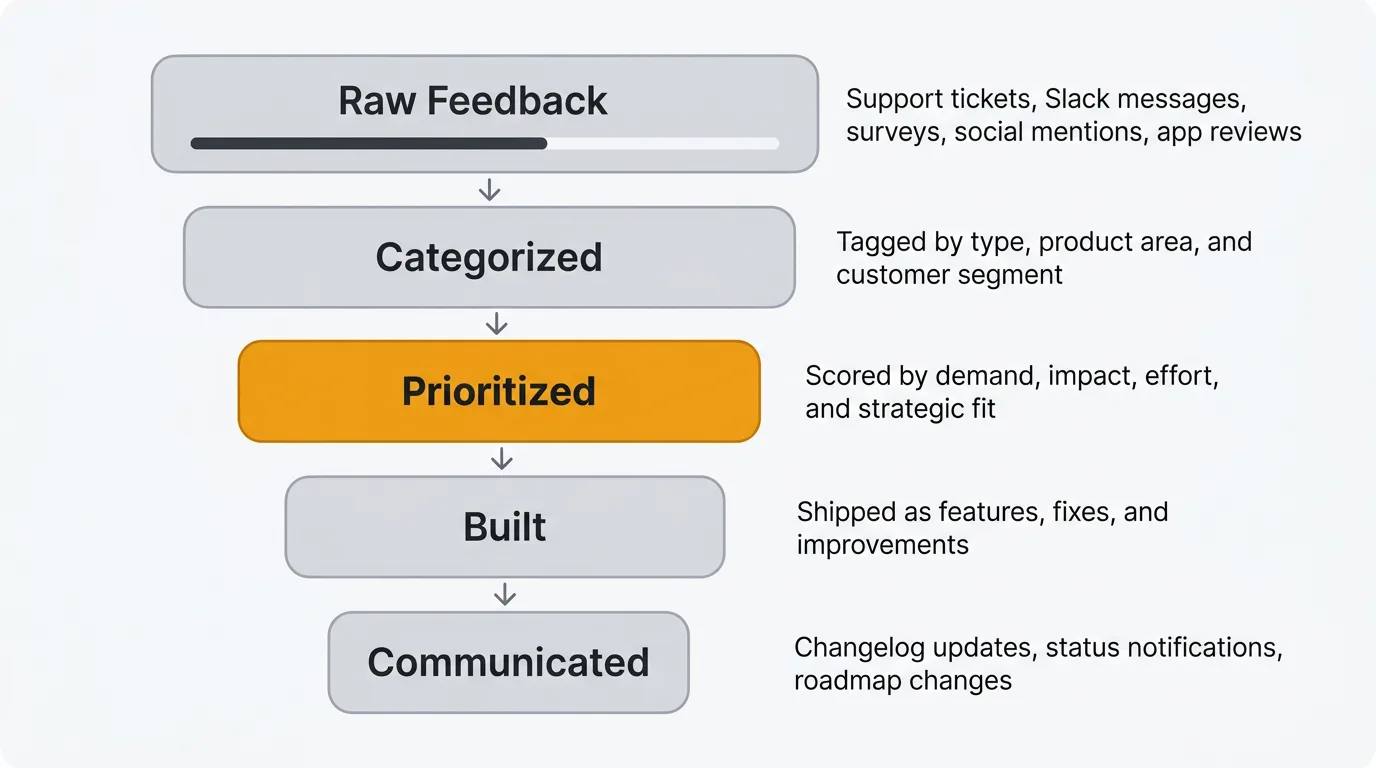
Most product teams know this. The problem is execution. Feedback arrives through dozens of channels: support tickets, Slack messages, sales call notes, social media, app store reviews, NPS surveys, and in-app widgets. Without a system, it scatters across tools and inboxes. Patterns go unnoticed. Feature requests pile up with no way to gauge demand. Users who took the time to share their thoughts never hear back.
This guide covers what user feedback actually is, the types that matter, how to collect and analyze it, and how to build a feedback loop that turns raw input into better products.
What is user feedback?
User feedback is any qualitative or quantitative signal from users about your product. It includes what people say (feature requests, complaints, praise), what they do (usage patterns, drop-off points, support tickets), and how they feel (satisfaction scores, sentiment).
Some feedback is solicited. You ask for it through surveys, interviews, and feedback forms. Some is unsolicited. Users volunteer it through support channels, social media, and review sites. Both types carry signal, but they require different approaches to collect and interpret.
The distinction between qualitative and quantitative feedback matters. Quantitative feedback — NPS scores, CSAT ratings, usage metrics — tells you what is happening and how much. Qualitative feedback — open-ended comments, interview transcripts, feature request descriptions — tells you why. You need both. Numbers without context lead to wrong conclusions. Stories without scale lead to building for edge cases.
Types of user feedback
Not all feedback is the same. Understanding the different types helps you collect each one deliberately and analyze it appropriately.
Feature requests
Users telling you what they want your product to do. These range from vague ("it would be nice if it was faster") to specific ("add CSV export to the analytics dashboard"). Feature requests are the most common type of feedback product teams deal with, and the hardest to manage at scale. Without a system to capture, deduplicate, and prioritize them, they become noise.
Bug reports
Something is broken and a user noticed. Bug reports are feedback about quality. They tell you where your product fails to meet the baseline expectation of working correctly. Treat them differently from feature requests — bugs are about what you already promised, not what you could build next.
General satisfaction
How users feel about your product overall. This is typically measured through structured surveys. NPS (Net Promoter Score) asks how likely users are to recommend your product. CSAT (Customer Satisfaction Score) asks how satisfied users are with a specific interaction or experience. These scores are useful for tracking trends over time, less useful for deciding what to build.
Usability feedback
Feedback about how easy or difficult your product is to use. This surfaces through user interviews, session recordings, support tickets ("I can't figure out how to..."), and usability testing. Usability feedback often reveals problems users have learned to work around — problems they might never report as bugs or feature requests.
Churn feedback
What users tell you when they leave. Exit surveys, cancellation flows, and win/loss analyses capture this. Churn feedback is uniquely valuable because it comes from people who decided your product isn't worth paying for anymore. The reasons they give — too expensive, missing features, switched to competitor, no longer needed — are direct inputs for retention strategy.
Praise and positive feedback
Users telling you what works. It is easy to dismiss positive feedback as less actionable than complaints. That is a mistake. Praise tells you what to protect. It reveals which features and experiences users value most. When you know what keeps people around, you can avoid accidentally breaking it during redesigns or deprioritizing it on your roadmap.
How to collect user feedback effectively
The goal is not to maximize the volume of feedback. It is to build a system that captures representative signal from across your user base, with enough context to act on it.
Most teams default to one or two channels and end up with blind spots. A public feedback board captures feature requests from engaged users but misses the frustrations of users who never visit the board. NPS surveys track sentiment trends but tell you nothing about what to build. Support tickets reveal what is broken but not what is missing.
The right collection strategy layers channels by signal type:
Continuous passive collection. Always-on channels that capture feedback without requiring you to ask. In-app widgets, feedback boards with voting, and support ticket tagging fall into this category. These channels build up signal over time and are your primary source for prioritization data.
Periodic structured collection. Surveys (NPS quarterly, CSAT after key interactions) that measure specific dimensions at regular intervals. These give you trend data and benchmarks. Keep them short — every additional question reduces completion rates.
Deep qualitative collection. User interviews, sales call debriefs, and churned-user conversations. These are expensive but irreplaceable for understanding context, motivation, and workflow. Schedule them around specific product decisions, not on a fixed cadence.
Ambient collection. Social media mentions, app store reviews, community forums, and competitor comparison sites. You are not asking for this feedback. It exists whether you look at it or not. Monitor it for signals you would miss through direct channels.
The common mistake is treating all channels equally. Weight them differently based on what you are trying to learn. For feature prioritization, voting data from a feedback board is more useful than NPS scores. For retention strategy, churn interviews and support ticket patterns matter more than feature votes.
For a detailed breakdown of eight specific collection methods with implementation guidance, see the guide to collecting customer feedback. For practical email and in-app templates, see how to ask for customer feedback.
How to analyze user feedback
Collecting feedback is the easy part. The hard part is making sense of it. A thousand feature requests in a spreadsheet are not useful until you find the patterns.
Categorize and tag feedback
Every piece of feedback should be tagged by type (feature request, bug, usability issue), product area (onboarding, billing, reporting), and customer segment (enterprise, SMB, free tier). Consistent tagging lets you filter and aggregate. Without it, you are searching through raw text every time someone asks "what are our users saying about X?"
Look for patterns, not individual requests
A single user asking for dark mode is an anecdote. Fifty users asking for it is a pattern. Resist the urge to build based on individual requests, no matter how articulate or how important the requester is. Aggregate feedback before making prioritization decisions.
This does not mean ignore outliers. Sometimes a single request reveals a fundamental gap. But the default should be to look for clusters.
Use voting to gauge demand
Feature voting boards let your user base signal what matters most to them. Votes are an imperfect proxy for demand — they skew toward power users and people who happen to find the board — but they are far better than guessing. When a feature request has 200 votes and another has 3, that difference is meaningful.
Combine vote counts with qualitative data. A highly-voted request with detailed comments explaining use cases is a stronger signal than one with many votes but no context.
AI-assisted analysis
Manual analysis does not scale. When you have thousands of feedback items across multiple channels, AI can handle the parts that are tedious for humans but straightforward for machines.
Duplicate detection identifies when multiple users report the same issue in different words. This prevents your backlog from inflating with redundant items and gives you accurate counts of how many users want a specific thing.
Sentiment analysis classifies feedback as positive, negative, or neutral automatically. This lets you monitor overall sentiment trends and flag negative spikes early.
Summarization condenses long comment threads and feedback clusters into key themes and actionable takeaways. Instead of reading 50 comments on a feature request, you get a summary with representative quotes.
Quackback's AI features handle all three — duplicate detection, sentiment analysis, and summarization — using your own OpenAI-compatible API key. The MCP server also lets AI agents search your feedback, triage requests, and surface insights directly within tools like Claude, Cursor, or Windsurf. For a deeper look at how AI is changing feedback analysis, see our guide on AI customer feedback analysis.
Building a feedback loop
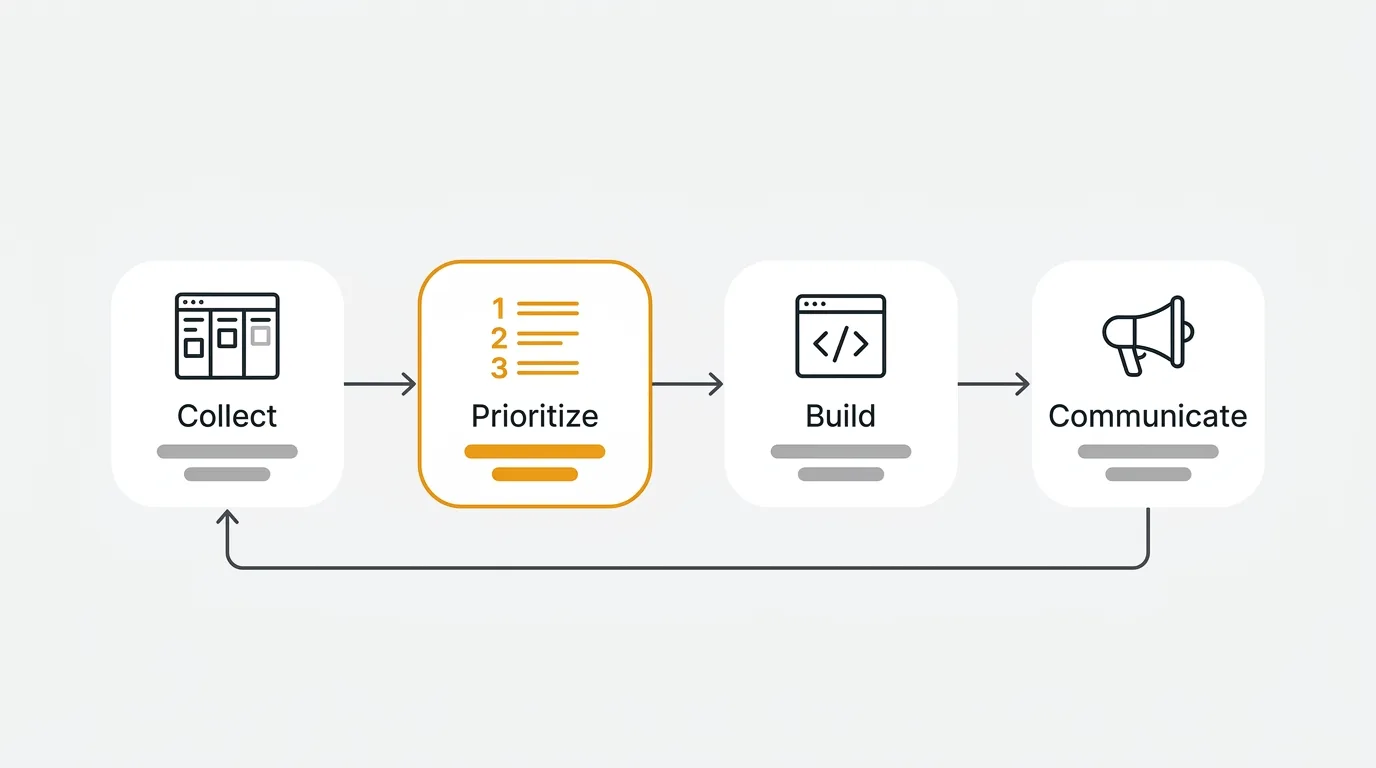
Collecting and analyzing feedback only matters if it changes what you build. A feedback loop is the system that connects user input to product output and back again. It has four stages. For a deeper dive into each stage with implementation guidance, see our guide on the customer feedback loop.
1. Collect
Gather feedback from all channels into a single system. Feedback boards, in-app widgets, support integrations, and surveys should all feed into one place. The goal is a unified view of what your users are telling you, regardless of where they said it.
2. Prioritize
Decide what to build based on feedback volume, strategic alignment, effort, and impact. Not every popular request belongs on your roadmap. Some requests conflict with your product vision. Some are technically expensive for limited payoff. Use feedback as a major input, not the sole decision-maker.
3. Build
Ship the features, fixes, and improvements you prioritized. This stage is your normal product development process. The feedback loop doesn't change how you build — it changes what you choose to build and why.
4. Communicate
Tell users what you built and why. This is the stage most teams skip, and it is the most important for sustaining the loop. When users see their feedback resulted in a shipped feature, they give more feedback in the future. When they never hear back, they stop contributing.
A public roadmap shows users what you are planning and working on. It sets expectations and reduces duplicate requests for things already in progress. A changelog announces what you shipped. Connect the two: when a feature moves from "planned" to "shipped," notify the users who requested it. That notification is the moment where feedback becomes a relationship.
Closing the loop also builds trust. Users who see their input acknowledged — even when the answer is "we considered this but decided against it" — respect the transparency. Silence is what kills feedback culture.
User feedback best practices
Separate collection from evaluation. The person (or system) collecting feedback should not be filtering it. Capture everything first. Evaluate later. If your support team decides what is "real feedback" and what is not, you lose signal. A feature request that sounds impractical today might make sense after the next platform change.
Respond, even briefly. Even a one-line acknowledgment ("Logged this, thanks") tells the user their input was received. Automated responses work for initial receipt. Follow up with a human response when you make a decision about the request. The median time between a user submitting feedback and getting a response is a metric worth tracking. If it is measured in weeks, your users have noticed.
Track velocity, not just volume. The most useful feedback metric is not "how many requests did we receive" but "how quickly do requests move from submission to decision." A feature request that sits untouched for six months sends a message that feedback does not matter. Aim to triage new feedback within one week and make a disposition decision (build, defer, decline) within one quarter.
Segment before you prioritize. A feature request from a churning enterprise account, the same request from a trial user, and the same request from a power user who is not going anywhere each tell you something different. Attach user metadata (plan, revenue, tenure, usage frequency) to feedback at the point of collection so you can filter later without re-investigating.
Make declining transparent. Saying no is fine. Saying nothing is not. When you decline a request, publish the reason. "We are solving this problem differently with X" or "this conflicts with our focus on Y for the next two quarters" builds more trust than silence. Teams that do this consistently find that users continue contributing even when their specific requests are rejected.
Frequently asked questions
How do you measure the ROI of a user feedback program?
Track three things: feature adoption rates for feedback-driven features versus internally-driven ones, churn reduction among users whose feedback was addressed, and time-to-resolution for reported issues. Most teams find that features built from aggregated user feedback see higher adoption than features built from internal assumptions. You can also measure feedback loop velocity — the time from feedback submission to shipped feature — as a leading indicator of how well your system works.
How much user feedback is enough?
There is no universal number. The right volume depends on your product's maturity and user base size. Early-stage products need deep qualitative feedback from a small number of users. Mature products need quantitative signals from a broad base to spot trends. The more important question is whether your feedback is representative. If you only hear from enterprise customers, you are blind to what your SMB users need. Diversify your channels to diversify your feedback sources.
What is the difference between user feedback and user research?
User research is a structured discipline with specific methodologies — usability studies, A/B tests, jobs-to-be-done interviews, diary studies. User feedback is broader and often unstructured. Research is something you initiate. Feedback is something users give you, often unprompted. They complement each other. Feedback tells you what users want. Research helps you understand why they want it and whether building it would actually solve their problem.
Which tools should product teams use to manage user feedback?
It depends on your team size, budget, and whether you need self-hosting. For a breakdown of the current landscape, see the best customer feedback tools in 2026. If open source and data ownership matter to you, the open source feedback tools comparison covers the viable options. At minimum, you need a centralized place for feedback collection, voting to gauge demand, a public roadmap, and a changelog. Avoid managing feedback in spreadsheets or Slack — those systems break down fast.

Authored by James Morton
Founder of Quackback. Building open-source feedback tools.
Try Quackback
The open-source feedback platform. Boards, voting, and roadmaps.
Get startedStar on GitHub305