
Product management tools span a wide range. Some help you collect feature requests. Others help you plan what to build, track the work, or measure what happened after you shipped. No single tool covers the entire product lifecycle, and most teams use three or four in combination.
Pricing last verified March 2026. Vendors may change plans and pricing without notice. Check each vendor's pricing page for the latest figures.
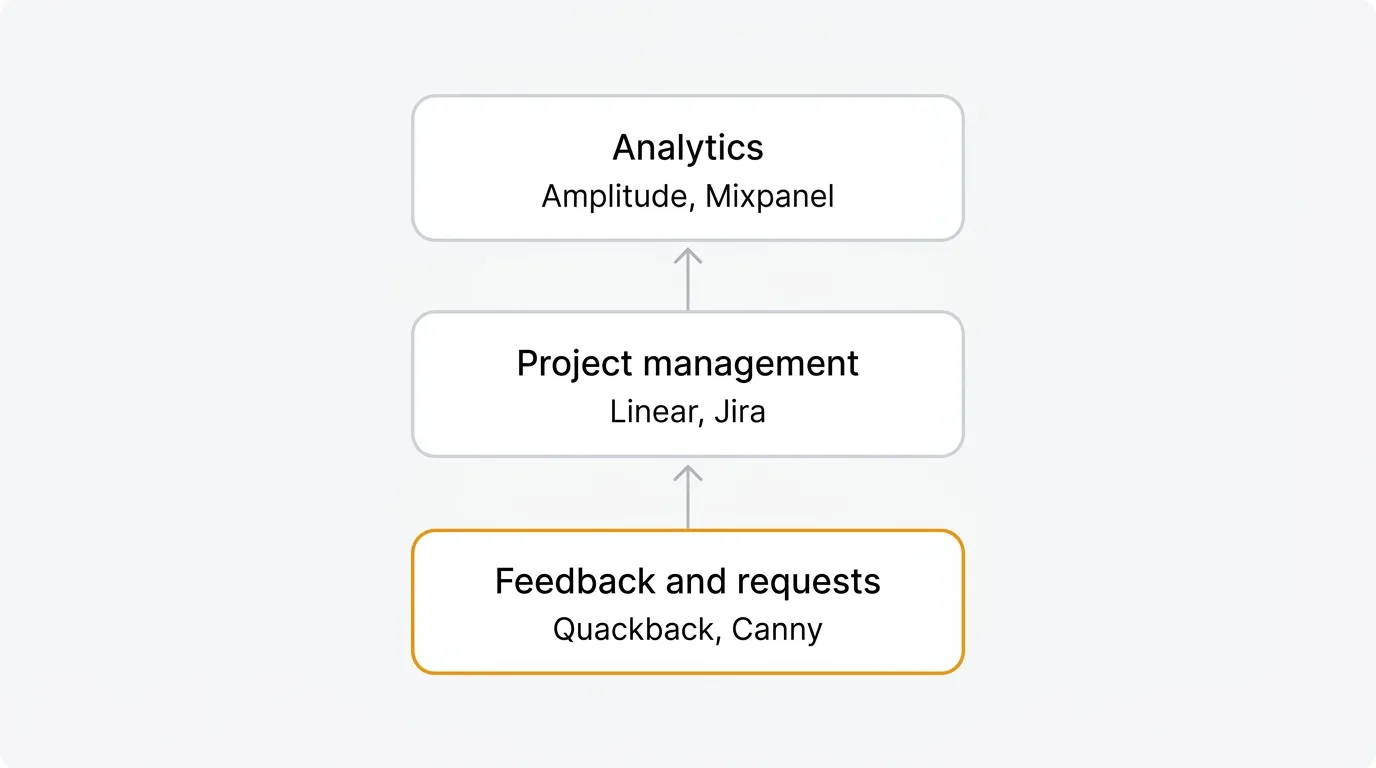
This guide covers the best product management tools in 2026, organized by what they do. Whether you are building your first tool stack or replacing something that no longer fits, this should help you narrow the field.
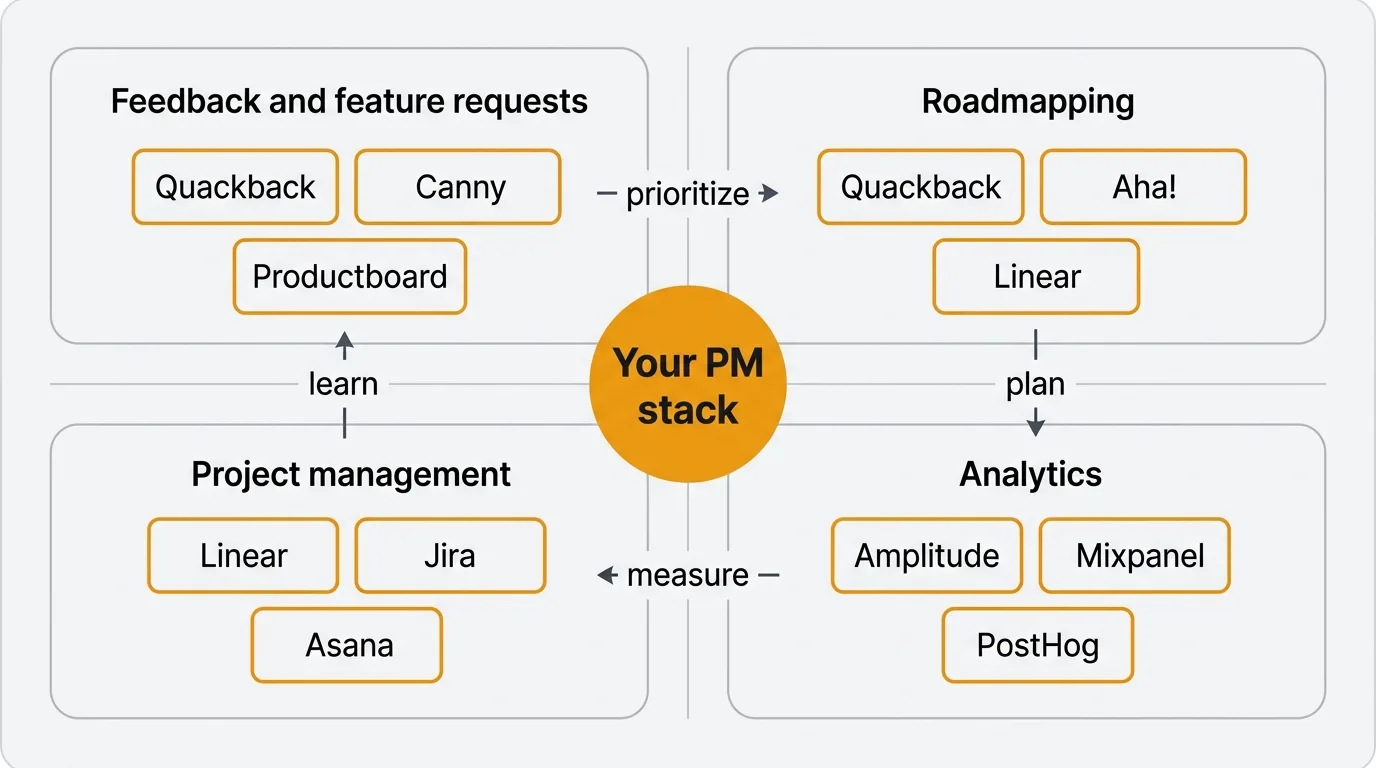
Feedback and feature request tools
Every product decision starts with input. Feature request tools give your users a place to tell you what they need and vote on what matters most. They replace the scattered Slack threads, support tickets, and spreadsheets that most teams start with.
Quackback
Quackback is an open-source feedback platform licensed under AGPL-3.0. It covers feature voting boards, a public roadmap, a changelog, and 25 integrations with tools like Slack, Linear, Jira, GitHub, Intercom, Zendesk, and Salesforce.
The AI layer handles duplicate detection, merge suggestions, sentiment analysis, and post summaries. The MCP server lets AI agents in Claude, Cursor, and Windsurf search your feedback, triage requests, write responses, and create changelog entries. Every agent action is attributed and auditable.
Self-host with Docker or deploy on Railway. Your data stays in your PostgreSQL database.
Pricing: Free and open source to self-host. Or let us run it: Quackback Cloud is fully managed (backups, updates, and uptime handled) from $29/mo on annual billing, with a 14-day free trial, no card required.
For deeper comparisons, see Quackback vs Canny, Quackback vs Productboard, and Quackback vs UserVoice. You can also read our guides to the best feature request tools and the best customer feedback tools in 2026.
Canny
Canny is a hosted feedback platform with voting boards, roadmaps, changelogs, and AI-powered feedback discovery from support conversations. Their AI suite, Autopilot, identifies feature requests in Intercom, Zendesk, Help Scout, and Gong conversations and links them to your board automatically.
In May 2025, Canny moved from per-admin billing to tiered pricing based on tracked users. A tracked user is anyone with a post, vote, or comment. Canny offers a free plan (25 tracked users) and paid tiers starting with Core at $19/mo. Costs increase as you cross tracked user thresholds, with auto-upgrades to the next tier.
Pricing: Free plan (25 tracked users). Core from $19/mo. Pro from $79/mo. Business is custom pricing.
Productboard
Productboard is a product management platform with feedback capabilities. It connects customer insights to product strategy through opportunity scoring, prioritization matrices, and driver-based roadmaps. You can capture feedback from Intercom, Zendesk, Salesforce, email, and Slack, then score features against custom drivers like revenue impact, user reach, and effort.
The trade-off is cost and complexity. Productboard revamped its pricing around a single Spark plan at $15/maker/month (annual) or $19/maker/month (monthly). AI is included via credits (250 per maker per month). Enterprise pricing for SSO and advanced features is custom.
Pricing: Spark at $15/maker/month (annual) or $19/maker/month (monthly). Enterprise is custom.
UserVoice
UserVoice pioneered the customer feedback category and still targets enterprise teams. The main differentiator is revenue-linked prioritization. Connect Salesforce or HubSpot, and UserVoice pulls in account-level ARR data so you can see the total revenue behind each feature request.
The pricing reflects the enterprise focus. Plans start at $16,000/year (~$1,333/mo) with annual billing. No per-seat charges. A 30-day free trial is available.
Pricing: Starting at $16,000/year (~$1,333/mo). Custom pricing based on volume. Annual billing required.
Roadmapping tools
A roadmap communicates what you are building, when, and why. Good roadmapping tools connect your plans to user demand, development capacity, and business objectives. They give your team alignment and give your users transparency.
Quackback roadmap
Quackback includes a public roadmap as part of its feedback platform. Feature requests flow directly into roadmap items with planned, in progress, and shipped statuses. When you move a request to "shipped," voters get notified automatically through the changelog. The roadmap is public by default, so your users can see what you are working on without asking.
This approach works well when your roadmap is driven primarily by user demand. Feature requests, vote counts, and user segments feed directly into what appears on the roadmap.
Aha!
Aha! is a dedicated roadmapping and product management platform. It supports strategy canvases, initiative tracking, feature prioritization with scoring, and visual roadmaps with timeline, list, and board views. It integrates with Jira, Azure DevOps, Rally, and other development tools.
Aha! is built for product organizations that need to connect roadmaps to company strategy, OKRs, and cross-team dependencies. The depth is significant, but so is the learning curve and cost.
Pricing: Roadmaps starts at $59/user/month. Ideas (feedback) is $39/user/month. Enterprise pricing available.
See how it compares: Quackback vs Aha!.
Linear
Linear is primarily a project management tool, but its roadmap features have matured. You can organize projects into initiatives, set target dates, and view progress across teams. Linear roadmaps are lightweight compared to Aha! but integrate tightly with the issue tracking you are already doing in Linear.
For teams that use Linear for project management, adding roadmapping within the same tool avoids context switching and keeps plans connected to actual work.
Pricing: Free for small teams. Standard at $8/user/month. Plus at $14/user/month.
Productboard
Productboard appears in this section too because its roadmapping capabilities are strong. Driver-based roadmaps let you tie features to strategic objectives and score them against custom criteria. The roadmap views include timeline, release, and board formats. If you need roadmaps that are deeply connected to customer feedback and business strategy, Productboard handles both.
Project management tools
Once you decide what to build, you need to track the work. Project management tools handle task assignment, sprint planning, issue tracking, and cross-team coordination.
Linear
Linear has become the default project management tool for many software teams. It covers issues, projects, cycles (sprints), and triage workflows. The interface is fast. Keyboard shortcuts handle most actions. Issue creation, status changes, and assignments feel immediate in a way that heavier tools do not.
Linear integrates with Slack, GitHub, GitLab, Figma, Sentry, and Zendesk. Its API is well-documented and widely used for custom workflows. Quackback integrates with Linear so feature requests can be pushed directly into your Linear workspace as issues.
Pricing: Free for small teams. Standard at $8/user/month. Plus at $14/user/month.
Jira
Jira is the most widely used project management tool in software development. It handles issue tracking, sprint planning, kanban boards, release management, and custom workflows. The flexibility is its strength and its weakness. You can configure Jira to do almost anything, which means most Jira instances end up heavily customized and hard to maintain.
For large engineering organizations with complex workflows, cross-team dependencies, and compliance requirements, Jira remains difficult to replace. Quackback integrates with Jira to push feature requests into your backlog.
Pricing: Free for up to 10 users. Standard at $7.75/user/month. Premium at $15.25/user/month. Enterprise is custom.
Asana
Asana covers project management for both technical and non-technical teams. It supports list, board, timeline, and calendar views. Workflows automate task routing and status changes. Portfolios let you track progress across multiple projects.
Asana works well for teams that need to coordinate across engineering, marketing, design, and operations. It is less developer-focused than Linear or Jira but more accessible to non-technical team members.
Pricing: Free for up to 10 users. Starter at $10.99/user/month. Advanced at $24.99/user/month. Enterprise is custom.
Notion
Notion is a flexible workspace that can function as a project management tool through its databases, views, and relations. Many teams use Notion for documentation, wikis, and lightweight project tracking. Its strength is versatility. You can build almost any workflow with databases, templates, and formulas.
The limitation is that Notion is not purpose-built for software development. It lacks native sprint planning, issue tracking conventions, and developer integrations that tools like Linear and Jira provide. It works best as a complement to a dedicated project management tool, handling documentation, specs, and team knowledge while Linear or Jira handles execution.
Pricing: Free for individuals. Plus at $10/user/month. Business at $15/user/month. Enterprise is custom.
Analytics tools
Analytics tools tell you what happened after you shipped. They measure feature adoption, user behavior, retention, and the impact of product changes. Without analytics, you are guessing whether what you built actually solved the problem.
Amplitude
Amplitude is a product analytics platform focused on behavioral analysis. It tracks user events, builds funnels, analyzes retention cohorts, and identifies the actions that correlate with long-term engagement. The charts and dashboards are built for product teams, not just data analysts.
Amplitude also offers experiment tracking (A/B testing) and a customer data platform. The free tier is generous for early-stage products.
Pricing: Free Starter plan (up to 50K monthly tracked users). Plus from $49/mo. Growth is custom.
Mixpanel
Mixpanel covers similar ground to Amplitude: event tracking, funnels, retention analysis, and user segmentation. Its query builder is flexible and the interface is clean. Mixpanel has traditionally been stronger on real-time analytics and easier to set up for smaller teams.
The choice between Amplitude and Mixpanel often comes down to preference and which analytics model fits your team. Both are capable.
Pricing: Free Starter plan (up to 20M events/month). Growth from $24/mo. Enterprise is custom.
PostHog
PostHog is an open-source product analytics platform. It bundles event analytics, session replays, feature flags, A/B testing, and surveys into one product. You can self-host or use their cloud. The open-source model means you can inspect the code, contribute, and avoid vendor lock-in.
PostHog is a good fit for engineering-led teams that value transparency and data ownership. The self-hosted option gives you full control over your analytics data.
Pricing: Free tier with generous limits. Paid usage-based pricing starts at low per-event rates. Self-hosting is free.
Pendo
Pendo combines product analytics with in-app guides and user onboarding. It tracks feature adoption, builds user segments based on behavior, and lets you create tooltips, walkthroughs, and announcements inside your product without code changes.
The analytics-plus-guidance approach is useful for teams that want to measure adoption and drive it at the same time. Pendo targets mid-market and enterprise teams.
Pricing: Free plan available with limited features. Growth, Portfolio, and Enterprise tiers require a sales call.
Prioritization frameworks and tools
Deciding what to build next is the hardest part of product management. Prioritization frameworks give you a structured way to evaluate ideas instead of relying on gut feeling or whoever argues loudest.
RICE scoring
RICE stands for Reach, Impact, Confidence, and Effort. You estimate how many users a feature will reach, how much impact it will have, how confident you are in those estimates, and how much effort it takes to build. The formula produces a score you can use to rank features against each other.
RICE works well because it forces you to be explicit about your assumptions. Two people can look at the same feature request and disagree on impact, but at least the disagreement is visible and specific. Use our RICE scoring calculator to apply the framework. For a deeper explanation, see our guide to the RICE framework explained.
ICE scoring
ICE stands for Impact, Confidence, and Ease. It is simpler than RICE. You score each dimension from 1 to 10 and multiply. ICE works well for quick prioritization when you need a lightweight framework. The trade-off is that it does not account for reach, which means a feature that delights 10 users can score the same as one that helps 10,000.
MoSCoW
MoSCoW categorizes features as Must-have, Should-have, Could-have, or Won't-have. It is less quantitative than RICE or ICE but useful for release planning and scope negotiations. MoSCoW works best when you have a fixed set of features and need to decide what makes the cut for a specific release or sprint.
Voting as data input
Prioritization frameworks are only as good as the data you feed them. Feature voting in feedback tools gives you a real signal for the "Reach" dimension of RICE. Instead of guessing how many users want a feature, you have actual vote counts broken down by user segment. Combine voting data with revenue signals and effort estimates from your engineering team, and you have a solid foundation for prioritization decisions.
How to build your PM tool stack
You do not need one tool for every category. Most early-stage teams do well with two: a feedback tool and a project management tool. Collect feature requests in one place, track work in another.
Start with feedback and project management. Pick a feedback tool that handles collection, voting, roadmapping, and changelog in one place. Pair it with Linear or Jira for issue tracking and sprint planning. An integration between the two means accepted feature requests flow into your development workflow without manual re-entry.
Add analytics when you need it. Once you have enough users that you cannot track behavior through direct conversations, bring in Amplitude, Mixpanel, or PostHog. This usually happens around the time you start worrying about retention and feature adoption rather than just shipping.
Skip dedicated roadmapping tools unless you need strategic alignment. If your roadmap is driven by user feedback and your team is small enough to stay aligned without formal planning tools, the roadmap feature built into most feedback tools (Quackback, Canny, Featurebase) is enough. Aha! and Productboard make sense when you have multiple product teams, company-wide OKRs, and cross-functional stakeholders who need visibility.
Avoid overlapping tools. Every tool you add creates another place where information lives. If your project management tool has a basic roadmap view, you may not need a separate roadmapping tool. If your feedback tool includes a changelog, you do not need a separate changelog product. Consolidation reduces context switching and keeps your team focused.
Re-evaluate annually. Your tool stack should grow with your team and product. What works for a five-person startup does not work for a fifty-person product organization. Review what is working and what is creating friction once a year.
Feedback tool comparison
If feedback and feature request management is the most important piece of your stack, here is how the main options compare.
| Feature | Quackback | Canny | Productboard | UserVoice | Featurebase |
|---|---|---|---|---|---|
| Voting boards | Yes | Yes | Yes | Yes | Yes |
| Public roadmap | Yes | Yes | Yes | No | Yes |
| Changelog | Yes | Yes | No | No | Yes |
| AI features | Yes (duplicate detection, sentiment, merge suggestions) | Yes (Autopilot) | Yes (included via credits, 250/maker/mo) | No | Yes (Fibi, $0.49/resolution) |
| MCP server | Yes | No | No | No | No |
| Open source | Yes (AGPL-3.0) | No | No | No | No |
| Self-hosting | Yes | No | No | No | No |
| Integrations | 20+ | 15+ | 20+ | 10+ | 12 |
| Free tier | Yes (self-host) | 25 tracked users | Limited | No | 1 seat |
| Starting price | Free self-hosted / $29/mo Cloud | Free (25 tracked users) | $15/maker/mo (annual) | $16,000/yr | $29/seat/mo |
Frequently asked questions
What tools do product managers use every day?
Most product managers use a combination of three to four tools daily. A feedback tool (Quackback, Canny, or Productboard) for reviewing feature requests and updating the roadmap. A project management tool (Linear or Jira) for tracking development work. An analytics tool (Amplitude or Mixpanel) for measuring feature adoption. And a communication tool (Slack or Notion) for internal alignment and documentation.
Do I need a dedicated roadmapping tool?
Not necessarily. If your team is small and your roadmap is driven by user feedback, the roadmap built into your feedback tool is usually sufficient. Most feedback platforms (Quackback, Canny, Featurebase) include a public roadmap that connects to feature requests and a changelog. Dedicated roadmapping tools like Aha! make sense when you have multiple product teams, strategic planning needs, and stakeholders across the organization who need visibility into long-term plans.
What is the best free product management tool?
It depends on what you need. For feedback and feature requests, Quackback is free and open source, with a self-hosted option you run on your own infrastructure. For project management, Linear offers a free tier for small teams. For analytics, both Amplitude and Mixpanel have free plans, and PostHog is open source with a generous free tier.
How do I prioritize feature requests without a framework?
You can start simple. Look at vote counts in your feedback tool to understand demand. Talk to your highest-value customers to understand urgency. Estimate effort with your engineering team. But as your product grows, a structured framework helps. RICE scoring is the most widely used. It accounts for reach, impact, confidence, and effort. Use our RICE scoring calculator to get started. The key is moving from "I think this is important" to "here is why this scores higher than that."

Authored by James Morton
Founder of Quackback. Building open-source feedback tools.
Try Quackback
The open-source feedback platform. Boards, voting, and roadmaps.
Get startedStar on GitHub305