 Quackback
Customer Insights Tools: A Framework for Picking the Right One
Most customer insights tool roundups are one giant list. Here is a framework to pick by insight type: qualitative feedback, research, behavioral, or VoC.
 James MortonUpdated 17 min read
On this page
Search for "customer insights tools" and you find the same article twenty times. A flat list of products. Canny next to Mixpanel next to Dovetail next to Qualtrics. Each one pitched as a way to "understand your customers". None of the lists tell you that those products solve entirely different problems and rarely belong in the same shortlist.
This post groups tools instead of ranking them. Four categories, four questions, four jobs. Once you know which question you are trying to answer, picking a tool becomes an afternoon of trials rather than a month of demos.
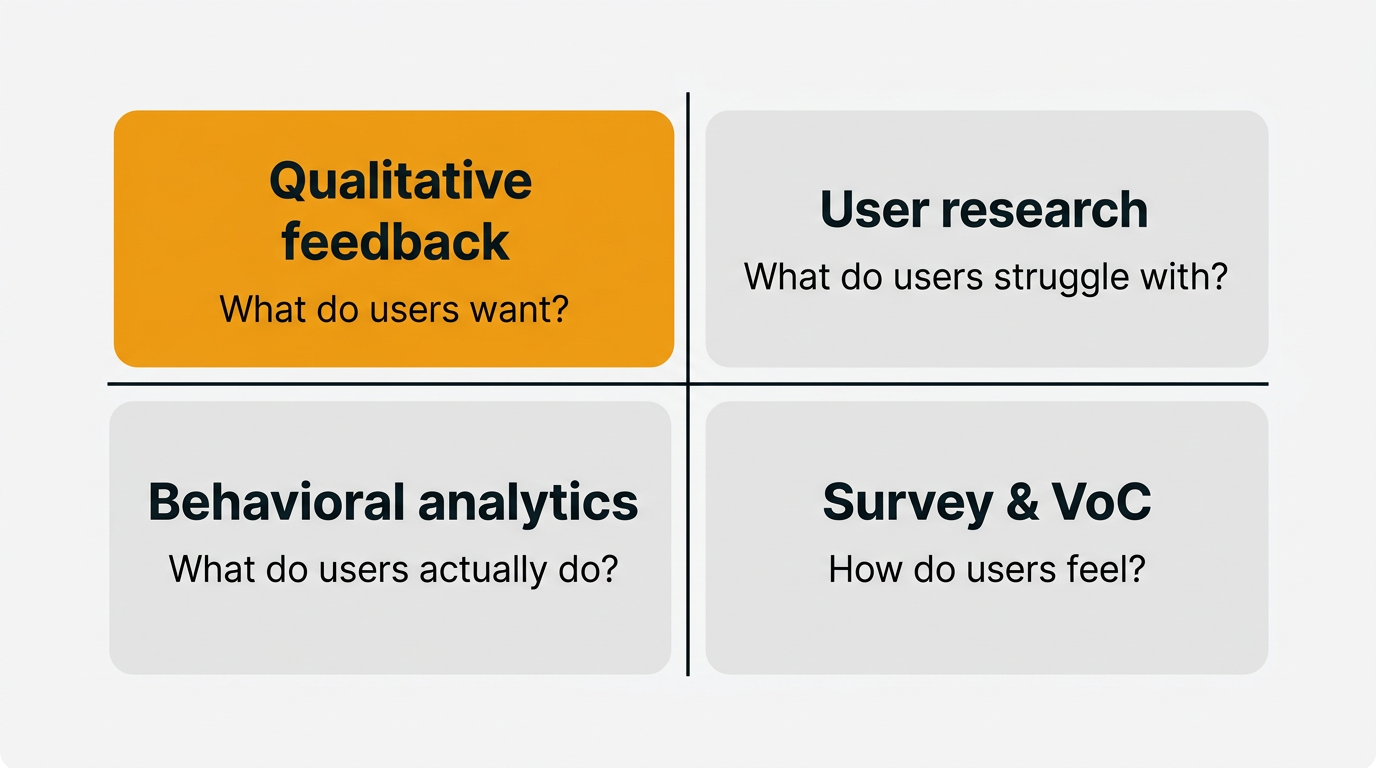
Customer insights tools fall into four categories that solve different problems: qualitative feedback (what users want), user research (what users struggle with), behavioral analytics (what users do), and survey / VoC (how users feel). Pick the category that answers the question you cannot currently answer, not the longest feature list. Most teams should start with qualitative feedback, then add a second category once they feel a specific gap.
What "customer insights" actually means (and does not)
An insight is not a data point. It is an interpretation of data that changes what you do next. "Three hundred users clicked upgrade this week" is data. "Users click upgrade when they hit the export limit, but churn when they discover export is throttled after upgrading" is an insight. Data is the raw material. Insight is the finished thought.
Most products marketed as customer insights tools are, strictly speaking, customer data tools. They collect, store, and visualize. The interpretation is still up to you. That is fine, as long as you know what you are paying for. Trouble starts when a team buys a behavioral analytics platform expecting it to tell them what features to build, then blames the tool when it does not.
The other trap is treating insight as one thing. A churned user telling you they left because onboarding was confusing is a different kind of insight than a funnel chart showing a forty percent drop at step three. Both are useful. Neither is a substitute for the other. Picking a tool means picking which kind of insight you need first.
So the first decision is not "which tool". It is "which question". You have four honest options.
Four categories of insights tools
Here is the framework the rest of the post uses. Four categories. Four questions. Every tool worth considering slots into one of these boxes, and the boxes rarely overlap cleanly.
| Category | Typical tool | Primary question it answers | Data type |
|---|---|---|---|
| Qualitative feedback | Quackback, Canny, Productboard | What do users want to be different? | Submitted text, votes |
| User research | Dovetail, Maze, UserTesting | What do users struggle with in my product? | Interviews, task tests |
| Behavioral analytics | Hotjar, Mixpanel, Fullstory | What do users actually do? | Events, sessions |
| Survey / VoC | Typeform, Sprig, Qualtrics | How do users feel, and how widely? | Structured responses |
Read the questions carefully. "What users want" comes from people writing to you unprompted. "What users struggle with" comes from watching them try to do a thing. "What users do" comes from counting their clicks. "How users feel" comes from asking them on a scale from one to ten. Each question has a best-fit tool category.
Use qualitative feedback when you need to prioritize a backlog. Use research when you need to redesign a flow. Use behavioral analytics when you need to debug a funnel. Use survey and VoC when you need to measure sentiment or benchmark over time. If you catch yourself using one category to answer a different category's question, stop and revisit the framework.
Qualitative feedback tools
This is the category most product teams should start with, and the one most often conflated with "analytics". Qualitative feedback platforms collect unsolicited input from your users and help you turn it into prioritized themes. Someone writes "I wish I could bulk edit tags" in a widget, that message lands in an inbox, it gets tagged and grouped with similar messages, and eventually it shows up as a candidate on your roadmap.
The question these tools answer is: what do users want to be different? Not what they do. Not what they struggle with. What they wish were true. That distinction matters because the people who take the time to write feedback are self-selecting into a specific signal: intent to see change. If you are early in product development and trying to decide what to build next, that signal is worth more than any funnel chart.
Representative tools in this category include Quackback, Canny, and Productboard. All three share a basic shape: a submission channel (widget, portal, or API), an inbox where feedback lands, voting or prioritization, and a path from feedback to roadmap. Where they differ is in pricing model, extensibility, and how much AI they apply to triage.
Quackback is the open source option in the category. It is AGPL-3.0 licensed, self-hosted, and free to run, which matters when your whole support team wants to read the feedback inbox. AI triage is included. It ships with an MCP server so your AI assistant can query feedback directly, which is a reasonably new capability in this space and one that changes how you work with the data. The embeddable widget handles in-app collection.
Canny is the default pick for teams that want hosted and simple and do not care about self-hosting. It is focused, well-designed, and has been around long enough that most product people recognize the pattern. The tradeoff is per-seat pricing and a feature set that is intentionally narrow. Productboard sits further upmarket, pulling in prioritization frameworks and roadmap views that overlap with general product management tools. It is more opinionated and more expensive.
If you are trying to pick within this category specifically, the best customer feedback tools for 2026 post goes deeper on the tradeoffs. For feature requests specifically, best feature request tools narrows the lens further. And the feedback analysis use case page walks through how feedback turns into themes in practice.
One honest warning. Qualitative feedback tools tell you what people who wrote in want. They do not tell you what silent users want. They do not tell you whether the requesters are representative of your whole base. You will always need a second source to sanity check. Usually that second source is either research or a survey.
User research platforms
User research platforms are designed for a completely different activity: sitting down with users, watching them attempt tasks, and cataloging what they say and do. The question they answer is: what do users struggle with when they use my product? It is a question about friction, not desire.
Representative tools here include Dovetail, Maze, and UserTesting. Each serves a slightly different role, which is the first thing to sort out before you pick one.
Dovetail is a research repository. You feed it interview recordings, transcripts, and notes, and it helps you tag, cluster, and search across them. It is where you go when you have done thirty interviews over six months and need to remember what anyone said about pricing. Dovetail does not run the research, it stores and analyzes it. AI tagging works well as long as you feed it structured inputs.
Maze is an unmoderated testing platform. You upload a prototype or point it at a live URL, write task instructions, bring your own participants, and it runs them through the flow while recording clicks, heatmaps, and open-ended responses. The advantage is speed. You can test a flow with fifty users overnight. The disadvantage is that you lose the ability to ask follow-ups.
UserTesting is a moderated and unmoderated testing platform with a large recruited panel. You pay for access to participants matched to your target demographic. It is what you use when you have no existing users to recruit from, or when you want an outsider's view of a mature product. Expensive, but thorough.
Pick research tools when you have a specific design or flow you want to stress test. Skip them when you are at the "what should I build next" stage, because research is most useful when you have a hypothesis to test, not a blank page to fill. The user interview questions post has a starter kit of questions to run before you commit to a tool, and continuous discovery habits covers the rhythm of running weekly interviews.
A common misstep is buying Dovetail before you are actually doing the research. An empty research repository is an expensive to-do list. Run six interviews first, then see if you wish you had a better way to organize the transcripts.
Behavioral analytics
Behavioral analytics tools answer a different question entirely: what do users actually do inside my product? Not what they say they do. Not what they want to do. What they do. The gap between the three is often embarrassing, and that is usually where the useful insight lives.
Representative tools include Hotjar, Mixpanel, and Fullstory, though Amplitude and Contentsquare cover similar ground. Within the category, there are two sub-types worth knowing.
Session replay and heatmap tools like Hotjar and Fullstory record what individual users do on specific pages. You can watch a session back, see where someone hovered, where they rage-clicked, where they left. This is the tool you reach for when you have a specific page you suspect is broken and you want to see why. Heatmaps aggregate many sessions into click density maps, which are useful for landing pages and onboarding flows.
Event-based product analytics like Mixpanel and Amplitude track discrete actions across the whole product. You define events (user signed up, user created project, user invited teammate), tag them with properties, and then build funnels, retention charts, and cohort comparisons. This is the tool you reach for when you want to know whether a feature is being used, how often, and by which segment of users. It is the category that scales with your product and gets more valuable as you collect more data.
Behavioral analytics becomes necessary once you cannot see every user anymore. Below a couple of thousand active users, you can usually answer behavioral questions by watching a handful of recordings. Above that, you need aggregation.
What behavioral analytics cannot tell you is why. A funnel drop is a fact. The reason for the drop is an interpretation, and the interpretation usually requires either talking to users who dropped off or reading their feedback submissions. Behavioral analytics works best in combination with one of the other three categories, not on its own. Qualitative vs quantitative feedback is a useful companion read.
Survey and VoC tools
The fourth category is survey and voice of customer tools. The question they answer is: how do users feel, and how widely is that feeling shared? Sentiment and scale, in one question.
Representative tools include Typeform, Sprig, SurveyMonkey, and Qualtrics. There is a clean split within the category between in-product micro-surveys and traditional long-form surveys, and the split matters more than any feature comparison.
Sprig and the micro-survey features built into products like Intercom are designed to fire a one-question or two-question survey inside the product at a specific moment. "How did that onboarding feel?" triggered after a user completes setup. "Would you recommend us?" triggered at day fourteen. The point is that the question arrives while the experience is fresh, and the response rate is much higher than a survey sent by email three weeks later. Sprig has pushed hard on AI analysis of open-ended responses, which turns the micro-survey format into something closer to a continuous VoC stream.
Typeform, SurveyMonkey, and Qualtrics sit at the other end. You build a multi-step questionnaire, distribute a link, and wait for responses. This is the right tool for longer research surveys, post-purchase studies, NPS benchmarking, and anything that needs a controlled sample. Qualtrics is the enterprise-grade option with serious statistical tooling attached. SurveyMonkey is the default pick for general purpose. Typeform trades some rigor for a visual format users are more willing to finish.
Survey tools are where voice of customer programs often live in practice. The discipline of VoC is less about the tool and more about the cadence: collect regularly, segment ruthlessly, act on the themes that recur. For a deeper treatment of that discipline, the voice of customer guide walks through how to set up a program without drowning in spreadsheets. For sentiment specifically, customer satisfaction metrics covers the scoring frameworks (CSAT, CES, NPS) that survey tools usually capture.
The risk with survey tools is over-reliance on numerical scores. An NPS of 42 is a number. It is not, on its own, an insight. The follow-up comment ("I love the product but hate the mobile app") is the insight. Whatever survey tool you use, make sure the comment field is treated as a first-class input, not an afterthought. AI customer feedback analysis covers how to extract themes from survey comments at volume.
How to pick based on your stage and stack
Here is the opinionated part. The right combination of tools depends on where you are, not what you think looks complete on a shopping list.
| Stage | Must have | Nice to have | Skip |
|---|---|---|---|
| Pre-PMF / solo founder | Qualitative feedback, manual interviews | Lightweight survey | Behavioral analytics, research repo |
| Growing team (1–10k users) | Qualitative feedback, behavioral analytics | In-product micro-surveys | Enterprise VoC |
| Scaling (10k+ users) | Qualitative feedback, behavioral analytics, research platform | VoC surveys | — |
| Enterprise / regulated | All four categories | Dedicated CDP | — |
Pre-PMF means you are still learning what the product should be. Buying a behavioral analytics tool at this stage is premature. You do not have enough users for the charts to be meaningful, and the charts would not tell you what to build anyway. What you need is a channel for users to tell you what is wrong, which means a feedback collection system and the habit of actually reading it. Add weekly customer interviews. That is the stack. Skip the rest.
Growing means you are past the first product-market fit signals and shipping features to a real base. You start seeing patterns you cannot keep in your head. A funnel tool now earns its keep, because you cannot eyeball engagement from memory anymore. Qualitative feedback is still the primary input for roadmap decisions. Add in-app feedback collection so you catch users while they are inside the product, not after they have left.
Scaling means research starts to pay off. You have enough users to recruit from, enough designers to justify dedicated research tooling, and enough complexity that you cannot intuit what is breaking. Add a research platform. Run quarterly VoC surveys to benchmark sentiment over time.
Enterprise or regulated means you probably need all four, plus attribution across touchpoints (customer data platforms). The framework still holds: if you cannot name the question a tool answers in one sentence, you do not need it yet.
Building an insights workflow without buying everything
The surprise for most teams is how far you can get with one tool plus a workflow. Tooling is the cheap part. Habit is the expensive part. Here are three concrete starter stacks for different team sizes.
Solo founder or seed stage. One qualitative feedback tool with an inbox, one shared Google Doc of interview notes, and a weekly thirty minute ritual of reading the inbox and tagging themes. That is it. If you pick an open source feedback tool, monthly spend is your hosting bill. The discipline is doing the reading. A lightweight customer feedback loop covers how to close the loop with users who wrote in, which is the single most useful action at this stage.
Growing team of five to twenty. Same qualitative feedback tool, now with proper tagging and a weekly triage meeting. Add a behavioral analytics tool for funnels and retention. Add one in-product micro-survey that fires at a key moment. That is three tools. A product manager should spend two hours a week in the feedback inbox and one hour a week in the funnel tool. If nobody on the team has those hours blocked, you do not have an insights problem, you have a calendar problem.
Scaling team of twenty plus. Add a research repository, a VoC survey tool, and a research ops function to run the interviews. Each category gets a clear owner. Product managers read feedback. Designers run research. Growth reads analytics. A VoC lead runs the surveys. The framework becomes organizational, not individual.
Across all three stacks, the workflow is the same three steps: collect, interpret, act. Collection is the part tools do well. Interpretation is partly tool, partly human. Action is entirely human. If your team is stuck, it is almost never because of missing tooling. It is because the insights are not reaching the people who make the build decisions. The feedback management discipline covers that handoff.
Pick the category that matches the question you cannot currently answer. Use one tool in that category for ninety days. Measure whether your decisions got sharper. If they did, add a second category. If not, the problem was never the tool.
If qualitative feedback is the category you are missing, Quackback is built for it. AI triage is included, and the MCP server lets your AI assistant query feedback directly. Run it self-hosted for free or use Quackback Cloud if you would rather not manage infrastructure.
Try Quackback — open source with a managed cloud option. Start free. Get started | View on GitHub
Frequently asked questions
What is the difference between customer insights tools and customer feedback tools?
Customer feedback tools are a subset of customer insights tools. Feedback tools capture unsolicited input from users, one of four insight categories. The broader insights term also covers user research platforms, behavioral analytics, and survey or VoC tools. Ask which specific question a vendor's tool answers before buying.
Do I need more than one customer insights tool?
Eventually, yes. Each of the four categories answers a different question, and no single product covers all four well. Most teams start with one tool, usually qualitative feedback, and add a second category once they feel a specific gap. Run one tool for ninety days before adding another.
What is the best customer insights tool for a startup?
A qualitative feedback tool plus a commitment to run weekly user interviews. At the startup stage, the bottleneck is decisions, not data volume. Collect unsolicited feedback, read it regularly, and turn it into build decisions. Self-hosted open source options like Quackback are free to run while you are small.
What is the difference between qualitative feedback tools and user research platforms?
Qualitative feedback tools collect input users submit unprompted, about things they want changed. User research platforms run structured studies with users you recruit, about specific flows or prototypes. Feedback tools answer "what do users want", research platforms answer "what do users struggle with". Most mature product teams use both.
Can an open source tool replace a paid insights platform?
In the qualitative feedback category, yes. Self-hosted options cover the core workflow (collection, triage, voting, roadmap), often with AI triage and MCP access. In behavioral analytics and user research, open source options are narrower. A practical pattern is open source for feedback, paid tools for analytics.
How do you turn customer insights into product decisions?
Three steps. Collect systematically across at least one category. Tag and group incoming data so themes emerge instead of individual requests. Review the top themes on a regular cadence with the people who make roadmap decisions in the room. Most teams fail at the last step, not the first two.
Written by James Morton. Founder of Quackback, the open-source platform for customer feedback and support.
Quackback is open-source software for customer feedback and support
Feedback boards, a public roadmap, a changelog and a support inbox in one place. Free to start, no card needed.
Keep reading
Customer Engagement Tools for Product Teams (Not Marketing)
Most customer engagement tool lists target marketers. Here is the stack product teams actually need — widgets, feedback, changelogs, onboarding, and voting.
Best Product Management Tools in 2026
A guide to the best product management tools in 2026. From feedback collection to roadmapping to analytics — tools for every stage of the product lifecycle.
Feature Voting: How to Let Users Prioritize Without a Popularity Contest
Feature voting turns user requests into ranked demand data. Learn single vs weighted voting, how to stop gaming and vote fragmentation, and how to act on votes.