Your feedback lives in one tool. Your engineers live in another. Every time a request becomes real work, someone copies it across by hand, strips out the context, and forgets to tell the person who asked. The request gets built. The customer never finds out.
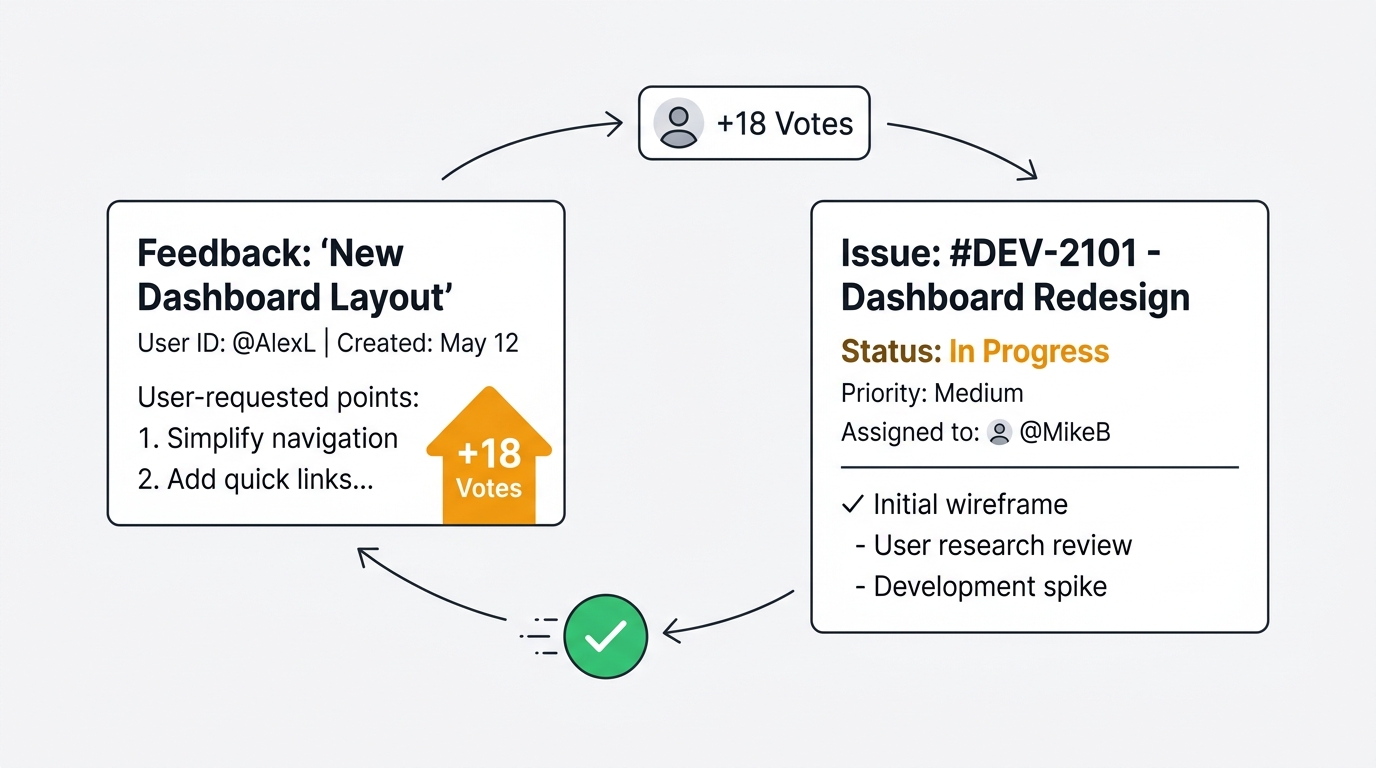
That broken handoff is where most feedback dies. Not at collection, where teams invest heavily, but at the seam between the feedback board and the issue tracker. This guide covers how to close that seam: one-way push versus genuine two-way sync, how to connect Linear, Jira, and GitHub without losing user context, how to map feedback statuses to tracker workflows, and how to notify the requester automatically when their feature ships.
Two-way sync keeps a feedback post and its linked issue in lockstep across both directions: the issue inherits the vote count and user context from the feedback, and when an engineer closes the issue, the feedback post updates and every voter is notified automatically. One-way push only sends data into the tracker, so the loop never closes. Quackback offers genuine two-way sync across Linear, Jira, GitHub, GitLab, Asana, ClickUp, and Shortcut.
Why connect feedback to your issue tracker at all
Feedback that lives only on a feedback board is half a system. The product team can see what users want, but engineers plan and build in Linear, Jira, or GitHub. If those two worlds never connect, three things break.
Engineers lose the "why." A ticket that reads "add bulk export" tells a developer nothing about who asked, how many people care, or what problem it solves. The demand signal stays trapped on the feedback board while the work happens somewhere it cannot see.
Product managers maintain two systems by hand. Without a connection, a PM updates the feedback post when planning starts, updates the tracker when work begins, and updates the post again when it ships. Most of the time the second and third updates never happen, so the board drifts out of date and stops being trustworthy.
Customers never hear back. The request gets built, the issue closes, and the person who asked finds out by accident months later, if at all. That silence is the single biggest reason users stop giving feedback. Closing the customer feedback loop is what turns a one-time request into a retained, engaged user.
Connecting your tracker fixes all three at once. The demand context travels with the work, the systems stay in sync without manual effort, and the requester gets told when it ships.
One-way push vs two-way sync
Most feedback tools advertise an "integration" with your issue tracker. Read the fine print, because there are two very different things hiding behind that word.
One-way push sends data in a single direction. You click a button on a feedback post and a new issue appears in your tracker. That is the end of the relationship. If an engineer later closes the issue, nothing happens on the feedback board. The PM still has to notice, update the post by hand, and tell the voters. One-way push saves you the copy-paste at creation time, but the loop stays open.
Two-way sync keeps both records aligned continuously. Creating the issue carries the feedback context into the tracker. Then, when the issue's status changes in either system, the change propagates to the other. Move a Linear issue to Done and the linked feedback post flips to Shipped on its own. Mark a feedback post as Planned and the connected issue can reflect that too. The two records describe the same work from two angles, and neither goes stale.
| One-way push | Two-way sync | |
|---|---|---|
| Creates issue with context | Yes | Yes |
| Issue close updates the post | No | Yes |
| Voters notified on ship | Manual | Automatic |
| Board stays accurate | No | Yes |
| Manual PM upkeep | High | None |
The difference matters most at the moment a feature ships, because that is when you have a reason to re-engage every person who asked for it. One-way push wastes that moment. Two-way sync captures it automatically.
How to sync feedback to Linear
Linear organizes work into issues that move through workflow states, and every state belongs to one of five types: backlog, unstarted, started, completed, and canceled. That structure maps cleanly onto a feedback lifecycle, which is what makes the sync reliable.
To connect the two with Quackback's Linear integration:
- Authorize Linear over OAuth. Connect your Linear workspace from the integrations page. There are no API keys to rotate or store.
- Map teams and projects. Choose a default Linear team, project, and labels for each feedback board, so new issues land in the right backlog already categorized.
- Create an issue from a feedback post. One click pre-fills the Linear issue with the post title, description, and vote count, and lets you set team, project, and cycle before submitting.
From there the sync runs on its own. When an engineer moves the issue from In Progress to Done, the linked feedback post transitions to Shipped, and every voter receives an email. The PM never touches the board. The demand context, including how many people requested the feature, sits on the Linear issue where the engineer planning the cycle can actually see it.
How to push to Jira without losing user context
The usual complaint about Jira integrations is that the ticket arrives naked. A title, maybe a description, and nothing about who asked or why it matters. That happens because most integrations push only the text and drop everything else.
The fix is field mapping. Jira sorts every status into one of three categories, To Do, In Progress, and Done, and lets you map external data onto issue fields. The Quackback Jira integration uses that to carry the full demand signal across:
- Vote count maps to a custom field, so you can sort your Jira backlog by how many users requested each item.
- Tags map to Jira labels, so feedback arrives categorized.
- Board maps to a Jira project, so requests route to the right team automatically.
- A backlink to the original feedback post lets anyone in Jira jump to the user comments and discussion.
The payoff shows up in sprint planning. Instead of guessing which candidate tickets users actually want, the team sorts by vote count and prioritizes on evidence. And because Jira transitions are one-way links between statuses, the integration listens for the transition into a Done-category status and uses that as the signal to update the feedback post and notify the requester. Connect your Jira Cloud site over OAuth, map the fields once, and the context flows on every issue you create.
GitHub Issues as a user-facing roadmap
GitHub is home for developer tools and open-source projects, but it is a hostile front door for non-technical users. Filing a well-formed issue with the right labels and a reproducible example is a skill most of your users do not have, so they stay silent and you lose the signal.
A feedback board solves the front-door problem. Users submit and vote in a friendly interface, and you promote the most-wanted requests into GitHub Issues when you decide to act. The issue is created with the post content, mapped labels and milestones, and a backlink to the board. When a maintainer or contributor closes the issue, the feedback post flips to Shipped and voters are notified.
This split lets your public roadmap do double duty. Contributors see exactly which user requests each open issue addresses, complete with vote counts and milestones, while users follow progress on a board they can actually navigate. You keep engineering work in GitHub, where it belongs, without forcing every user to learn the GitHub Issues workflow first. Private repositories work the same way once you authorize access during setup.
Mapping feedback statuses to tracker workflows
Two-way sync only works if the two systems agree on what each status means. A feedback post has its own lifecycle, usually something like Open, Under Review, Planned, In Progress, and Shipped. Each tracker has its own vocabulary. The job of the integration is to map between them so a status change in one is unambiguous in the other.
Here is how Quackback maps a typical feedback lifecycle onto each tracker's native states:
| Feedback status | Linear | Jira | GitHub |
|---|---|---|---|
| Planned | Backlog / Todo | To Do category | Open + milestone |
| In Progress | In Progress (started) | In Progress category | Open + assignee |
| Shipped | Done (completed) | Done category | Closed |
The key design choice is to map on status category, not on a specific named state. Linear teams rename "Done" to anything they like, Jira admins create custom statuses, and GitHub only has open and closed. By keying on the underlying category, the sync keeps working even when a team customizes its workflow. You define the mapping once during setup, and from then on a transition into any completed-category state counts as "shipped." This is the same principle that keeps the sync reliable across every supported tracker, from ClickUp custom statuses to Asana task completion.
Auto-notifying the requester on ship
The whole point of two-way sync is the last step, and it is the one teams skip most often without it: telling the person who asked.
When a linked issue closes in your tracker, the status change propagates to the feedback post, and Quackback emails every voter and subscriber a branded notification that their requested feature shipped. No PM has to remember. No one writes the email. The action that engineers take anyway, closing the issue, becomes the trigger for a customer touchpoint.
That single automated email does real work. A user who requested a feature six months ago and forgot about it gets a reason to come back and try the product again. A prospect who was told "it's on the roadmap" gets proof you delivered. Teams that close this loop see feedback volume go up, because users learn that submitting a request actually leads somewhere. The same notification fires for feedback captured anywhere upstream, including requests that started life in a Slack channel and flowed through to a shipped Linear issue.
Where Quackback fits
If you have evaluated feedback tools, you have probably found that "issue tracker sync" usually means one-way push to a single tool. Quackback's difference is genuine two-way sync across a wide set of trackers, with the demand signal carried on the issue and the requester notified on close.
- Seven trackers, one model. Linear, Jira, GitHub, GitLab, Asana, ClickUp, and Shortcut all sync both ways, with the same vote-count-and-context behavior on every one.
- Context travels with the work. Every created issue carries the vote count, user comments, and a backlink, so engineers plan with real demand data in front of them.
- Self-hosted or managed. Quackback is open source under AGPL-3.0. Self-host it free or use the managed Cloud.
- AI and a roadmap built in. Duplicate detection keeps your board clean before issues are ever created, and the public roadmap and changelog close the loop for users who do not get the email.
Try Quackback — open source with a managed cloud option. Start free. Get started | View on GitHub
Frequently asked questions
What is the difference between one-way push and two-way sync?
One-way push creates an issue in your tracker from a feedback post and stops there. Two-way sync keeps both records aligned continuously, so closing the issue updates the feedback post and notifies voters automatically. Only two-way sync closes the feedback loop without manual work.
Does Quackback support two-way sync with Linear, Jira, and GitHub?
Yes. Quackback offers genuine two-way sync with Linear, Jira, GitHub, GitLab, Asana, ClickUp, and Shortcut. Issues carry the vote count and user context, and closing a synced issue updates the linked feedback post and notifies every voter by email.
How do feedback statuses map to issue tracker workflows?
Quackback maps on status category rather than a specific named state. A feedback "Shipped" status corresponds to Linear's completed type, Jira's Done category, or a closed GitHub issue. Keying on category keeps the sync working even when a team customizes its workflow.
Can I keep user context on the issue when I push to Jira?
Yes. The Jira integration maps vote count to a custom field, tags to labels, and the board to a project, and adds a backlink to the original post. Your Jira backlog carries the demand signal so the team can prioritize by how many users requested each item.
Will the person who requested a feature know when it ships?
Yes. When a linked issue closes in your tracker, the feedback post transitions to Shipped and every voter and subscriber receives a branded email automatically. The engineer closing the issue is the only action required to trigger the notification.

Authored by James Morton
Founder of Quackback. Building open-source feedback tools.
Try Quackback
The open-source feedback platform. Boards, voting, and roadmaps.
Get startedStar on GitHub305