Most product teams already collect feedback. It arrives in support tickets, Slack threads, sales calls, and email. The problem is not collection. The problem is that the feedback never lands anywhere users can see it, vote on it, or watch it move. A feedback board fixes that by giving every idea one home that both your users and your team look at.
This guide covers what a feedback board is, how public and private boards differ, how to structure one, how to handle moderation and duplicates, and how to drive submissions so the board fills itself. It also covers the failure mode every team worries about: the board that turns into a graveyard.
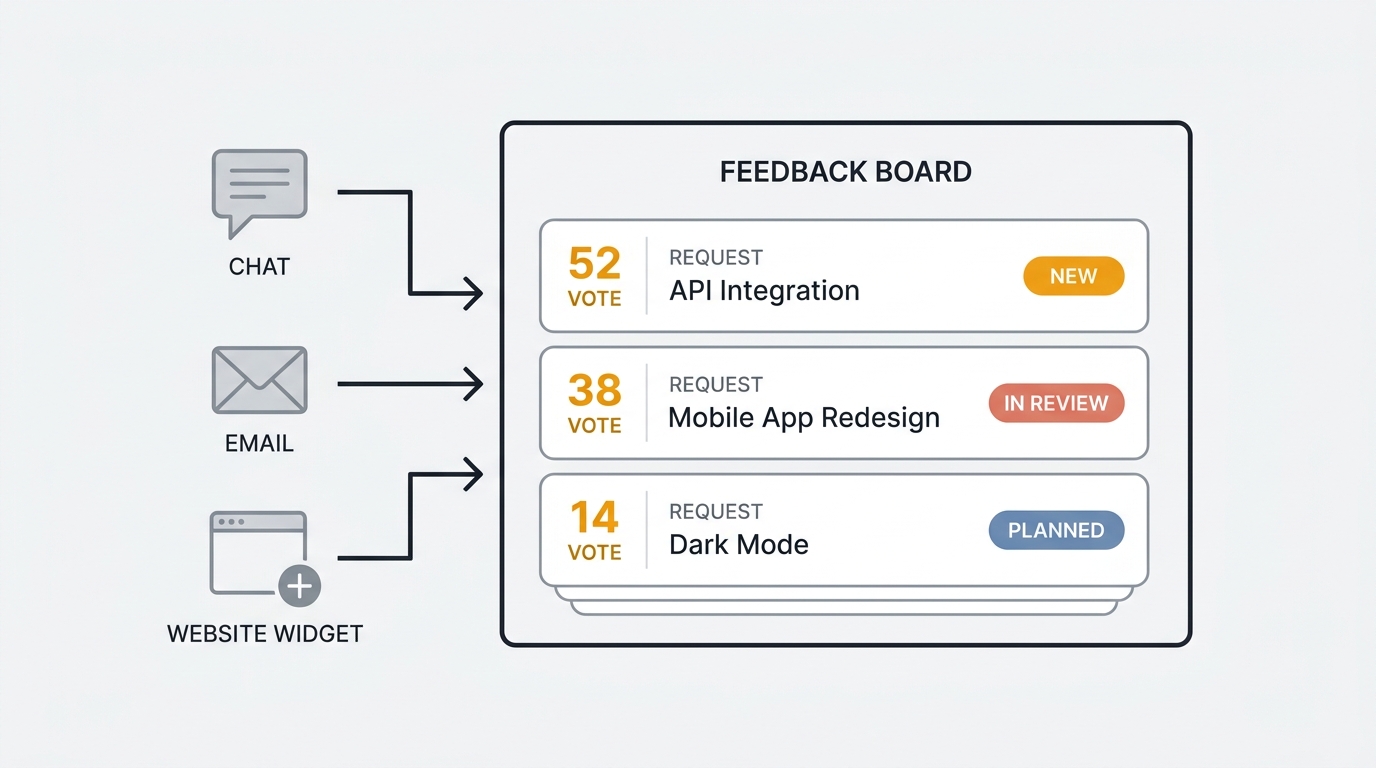
A feedback board is a dedicated space where users submit ideas, vote on each other's requests, and follow their status over time. It replaces scattered tickets and threads with one ranked, visible list of what people want. The board surface itself is simple. What makes it work is keeping submissions flowing in and statuses flowing back out.
What is a feedback board
A feedback board is an online space where users submit product ideas, feature requests, and bug reports, vote on existing submissions, and track each one through a visible status. Each post shows its title, description, vote count, comments, and current state. Posts are grouped by board or category so the list stays legible as it grows.
The board does three things a form or an inbox cannot. It lets users see what others have already asked for, so they vote instead of duplicating. It quantifies demand through votes, so the most-wanted ideas rise to the top on their own. And it shows status, so a submitter knows whether their idea is under review, planned, or shipped without asking anyone.
That combination is what separates a board from the tools it replaces. A spreadsheet collects. A support inbox routes. A board collects, ranks, and communicates back. For the broader shift away from one-directional collection, see our guide to the digital suggestion box.
Public vs private boards
The first decision when setting up a board is who can see it. Both models are valid, and many teams run both.
Public boards are visible to anyone, logged in or not. They are the default for customer-facing products. A public board does double duty: it collects feedback, and it signals to prospects that you listen. When a potential customer searches for a feature and finds it already requested and marked "planned," that transparency can close the sale. Public boards also reduce support volume, because users discover that an issue is already reported and tracked before they open a ticket.
Private boards restrict access to authenticated users or specific segments. They suit internal teams, beta programs, and enterprise products where feedback may reference unreleased plans or sensitive accounts. A private board keeps roadmap discussion out of competitors' view while still giving the right people a place to submit and vote.
You do not have to choose one. A common setup is a public board for general feature requests and a private board for enterprise customers or your internal team. Quackback supports multiple feedback boards per project, each public or private, so you can segment by audience without running separate tools.
| Public board | Private board | |
|---|---|---|
| Who can view | Anyone | Authenticated users or segments |
| Best for | Customer feature requests, prospects | Internal teams, beta, enterprise |
| Doubles as | Trust and sales signal | Controlled feedback channel |
| Reduces support load | Yes | Partially |
| Risk | Competitors see your plans | Lower reach, fewer submissions |
How to structure a feedback board
A board with no structure becomes as hard to read as the spreadsheet it replaced. Three primitives keep it legible: statuses, categories, and tags.
Statuses show where each idea sits in your process. A simple, honest set works best: open, under review, planned, in progress, shipped, and declined. Statuses are the single most important element of a board, because they are what users check. A board where everything sits at "open" forever tells users their input goes nowhere. Statuses are also where the board connects to your public roadmap, the workflow layer downstream of the board surface.
Categories (or separate boards) split feedback by product area or audience. Keep the list short. Five to eight categories is usually enough. Too many and users cannot decide where to post, so they post wrong or not at all. Common splits are by feature area (Dashboard, API, Integrations) or by type (Feature requests, Bugs).
Tags add a second, flexible dimension on top of categories. A post lives in one category but can carry several tags: "mobile," "enterprise," "quick win." Tags let your team filter the board down to exactly the slice they care about during triage without forcing users to think about them at submission time. In Quackback, tags are colored and support bulk management so the board stays readable past a few hundred posts.
The goal of all three is the same: a stranger should be able to scan the board and understand what people want and what you are doing about it in under a minute.
Moderation, duplicates, and merging
Every active board accumulates noise. The same request appears under three titles. Spam slips in on public boards. Off-topic posts wander in. Left alone, the noise buries the signal, and your vote counts stop meaning anything.
Duplicates are the main threat. When "add dark mode," "dark theme please," and "night mode for the dashboard" exist as three separate posts, your most-wanted feature looks like three middling ones. The fix is merging: combine the posts into one and roll their votes together so the count reflects real demand. Doing this by hand works at low volume and collapses at high volume, because someone has to notice the duplicates first.
This is where AI earns its place on the board. Quackback runs automatic duplicate detection at submission time and surfaces merge suggestions with reasoning your team can accept or dismiss in one click. It also generates theme summaries that pull recurring requests across many posts into a single readable picture, so a product manager can process a hundred submissions without reading every one. The board stays clean without a person babysitting it.
Moderation covers the rest: removing spam, hiding off-topic posts, and setting whether new submissions appear immediately or after review. Public boards usually need light moderation. Private boards rarely need any. Whichever you choose, the rule is to keep it fast. A submission that sits in a moderation queue for a week teaches users not to bother.
It is worth noting that not every tool handles this. Fider, the other AGPL-3.0 open-source board, has no built-in duplicate detection, so similar posts fragment and you merge by hand. Several hosted tools gate merging behind higher paid tiers. If you expect volume, deduplication is the capability to check for first. Fider feature details last verified May 2026. Vendors may change plans without notice.
Driving submissions so the board fills itself
A board only works if feedback reaches it. The most common reason boards die is not that users have nothing to say. It is that asking them to leave your product, find the board, and create an account is too much friction for an idea they had in passing. Remove the friction by bringing the board to where users already are.
An embeddable widget is the highest-leverage channel. A feedback widget lets users submit an idea or vote without leaving your app. They click a button, type a sentence, and they are done. Quackback's widget posts straight to the right board, supports anonymous or identified submissions, and ships with iOS and Android SDKs. In-app capture consistently produces more feedback than any standalone portal, because it meets users in the moment they have the thought.
Slack and email ingestion capture feedback that never starts as a board post. A customer mentions a missing feature in Slack, or someone replies to a product email with a request. Normally that signal evaporates. Quackback ingests from Slack and email and turns those messages into board posts automatically, so the board fills from channels your users already use without anyone copy-pasting.
Integrations route feedback from your support and issue tools. Connect Intercom or Zendesk so support conversations become board posts, and Linear or Jira so accepted ideas become tickets with two-way status sync. The fewer manual steps between a user's words and a tracked post, the more feedback you capture.
Combine these and the board stops being a destination users have to visit. It becomes the place every channel drains into. For customer-facing teams, our feature requests use case walks through the full setup.
Feedback board vs suggestion box vs forum
These three get conflated, but they behave differently, and choosing the wrong one shapes the feedback you get.
A suggestion box is one-directional. Users drop ideas in; only the receiving team sees them. There is no voting, no visible status, and no way for a submitter to know what happened. It collects, and that is all. The classic suggestion box reliably goes quiet because users learn their input disappears.
A forum is many-directional and open-ended. Users post threads, reply to each other, and discuss freely. Forums are good for community and support, but they do not rank or resolve. A popular thread is not a prioritized request, and a forum has no concept of status, so nothing closes. Threads sprawl and the same topic recurs endlessly.
A feedback board sits in between by design. It is structured like a suggestion box (submit an idea) but two-directional like a forum (vote, comment) with one addition neither has: status. Every post moves through a visible lifecycle and the people who submitted or voted get notified when it does. That single addition is what closes the loop.
| Suggestion box | Forum | Feedback board | |
|---|---|---|---|
| Users submit ideas | Yes | Yes | Yes |
| Users see others' ideas | No | Yes | Yes |
| Voting / ranking | No | No | Yes |
| Visible status | No | No | Yes |
| Closes the loop | No | No | Yes |
| Best for | Anonymous intake | Community discussion | Prioritized product feedback |
If you want the prioritized, closeable signal a product team can act on, the board is the right surface.
Keeping the board from becoming a graveyard
The fear is real and the failure is predictable. A team launches a board with enthusiasm, submissions flow for a month, then statuses stop updating, replies stop coming, and within a quarter the board is a dead page nobody visits. The board did not fail because the format is wrong. It failed because nobody owned it. Four habits keep a board alive.
Give it an owner. One person is responsible for triage, not for building everything users ask for, but for making sure every new submission gets acknowledged and routed. A board with no owner becomes a board with no maintenance.
Set a triage cadence. Review new posts on a fixed rhythm, weekly or biweekly. Merge duplicates, update statuses, and reply to questions in the same session. Consistency matters more than frequency. Users learn that the board moves.
Update statuses visibly, including the no. When you decline a request, change its status and post a one-line reason. "We considered this and decided not to pursue it because X" is more respectful than silence, and it teaches users that the board is honest.
Close the loop automatically. When a post moves to planned or shipped, everyone who submitted or voted on it should be notified without you doing it by hand. This converts a board from a collection point into a relationship. A user who requested a feature and gets told it shipped feels heard, and heard users keep coming back. For the full mechanics, see our customer feedback loop guide.
The board's structure does the prioritizing for free once submissions and statuses keep moving. Your job is to keep both in motion.
Choosing a tool for your board
Most boards rest on one of three foundations. General-purpose forms collect but cannot vote, rank, or show status, so they reproduce the suggestion box problem. Hosted feedback tools like Canny solve the board mechanics well but price on tracked users, so your bill grows as more users submit, and none offer self-hosting. Canny uses tracked-user pricing with a free plan capped at 25 tracked users; pricing last verified May 2026. Vendors may change plans without notice. Purpose-built boards designed for the submit-vote-status workflow fit most teams.
Quackback is the open-source option in that group. It is licensed under AGPL-3.0, free to self-host, and offers a managed cloud version. The board ships with voting, threaded comments, custom statuses, categories, and colored tags. AI duplicate detection, theme summaries, and Slack and email ingestion keep the board clean and fill it without manual upkeep. An MCP server lets AI agents search, triage, and merge posts, and integrations with two-way issue-tracker sync route feedback into your development workflow. Because it is open source, your feedback data stays in your own database. For a side-by-side look at the alternatives, see our roundup of the best feature request tools.
Try Quackback — open source with a managed cloud option. Start free. Get started | View on GitHub
Frequently asked questions
What is a feedback board?
A feedback board is a dedicated space where users submit ideas, vote on each other's requests, and track each one through a visible status. It replaces scattered tickets and threads with one ranked list, so the most-wanted ideas surface on their own and submitters can see what happened to theirs.
Should a feedback board be public or private?
Use a public board for customer feature requests; it collects feedback and signals to prospects that you listen. Use a private board for internal teams, beta programs, or enterprise feedback that references sensitive plans. Many teams run both. Quackback supports multiple public or private boards per project.
How do I stop my feedback board from becoming a graveyard?
Give it one owner, set a weekly or biweekly triage cadence, update statuses visibly (including declines), and notify submitters automatically when posts ship. Boards die from neglect, not format. Keeping submissions and status updates in motion is what keeps users contributing.
What is the difference between a feedback board and a forum?
A forum supports open discussion but cannot rank ideas or track status, so threads sprawl and nothing closes. A feedback board adds voting to surface demand and statuses to show progress, with notifications that close the loop. Use a forum for community, a board for prioritized product feedback.
How do I get more submissions on my feedback board?
Bring the board to users instead of asking them to find it. An in-app feedback widget captures ideas without leaving your product, and Slack and email ingestion turn messages into board posts automatically. Removing friction at the moment of the idea drives far more submissions than a standalone portal.

Authored by James Morton
Founder of Quackback. Building open-source feedback tools.
Try Quackback
The open-source feedback platform. Boards, voting, and roadmaps.
Get startedStar on GitHub305