
Most teams collect feedback. Few close the loop.
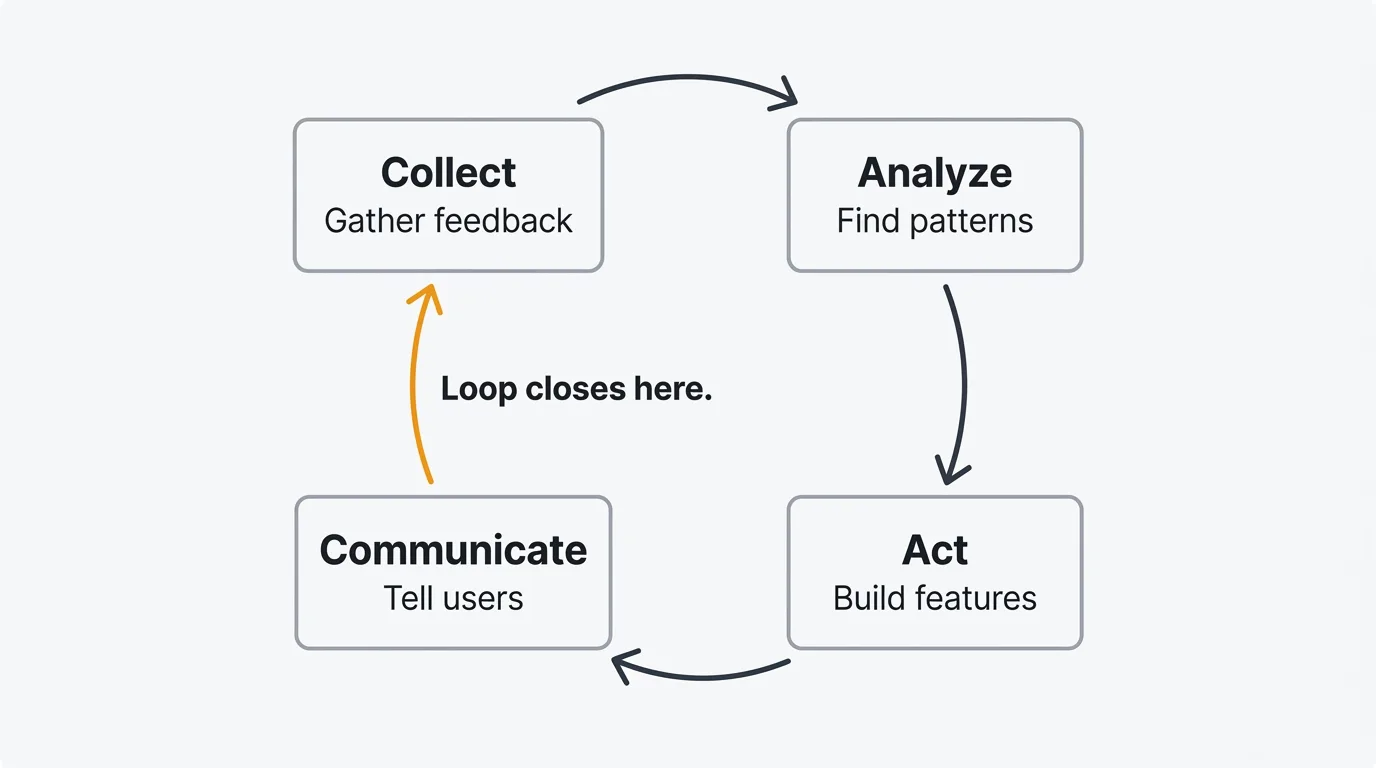
The pattern is familiar. You set up a feedback widget, launch a survey, or create a feature request board. Submissions pour in. Some get read. A few get discussed. But the person who submitted the idea rarely hears what happened to it. Did you build it? Did you decide against it? Did anyone even read it?
When users feel ignored, they stop contributing. The feedback dries up. You lose the most valuable input your product team has — direct signal from the people who use your product every day. Not because they stopped having opinions, but because they stopped believing those opinions mattered to you.
Closing the feedback loop fixes this. It means taking every piece of input through a full cycle: collection to analysis to action to communication. It turns feedback from a one-way channel into a conversation. And it is the single most reliable way to build a product culture where users actively help you make better decisions.
A customer feedback loop closes when users see their input reflected in your product. You close it by carrying every piece of feedback through four stages: collect, analyze, act, and communicate. The communication stage is the one most teams skip, and it is the one that turns feedback into a conversation, lifts retention, and improves the quality of what users send you next.
What is a customer feedback loop?
A customer feedback loop is a structured process for turning user input into product improvement and communicating that improvement back to the users who requested it. It has four stages.
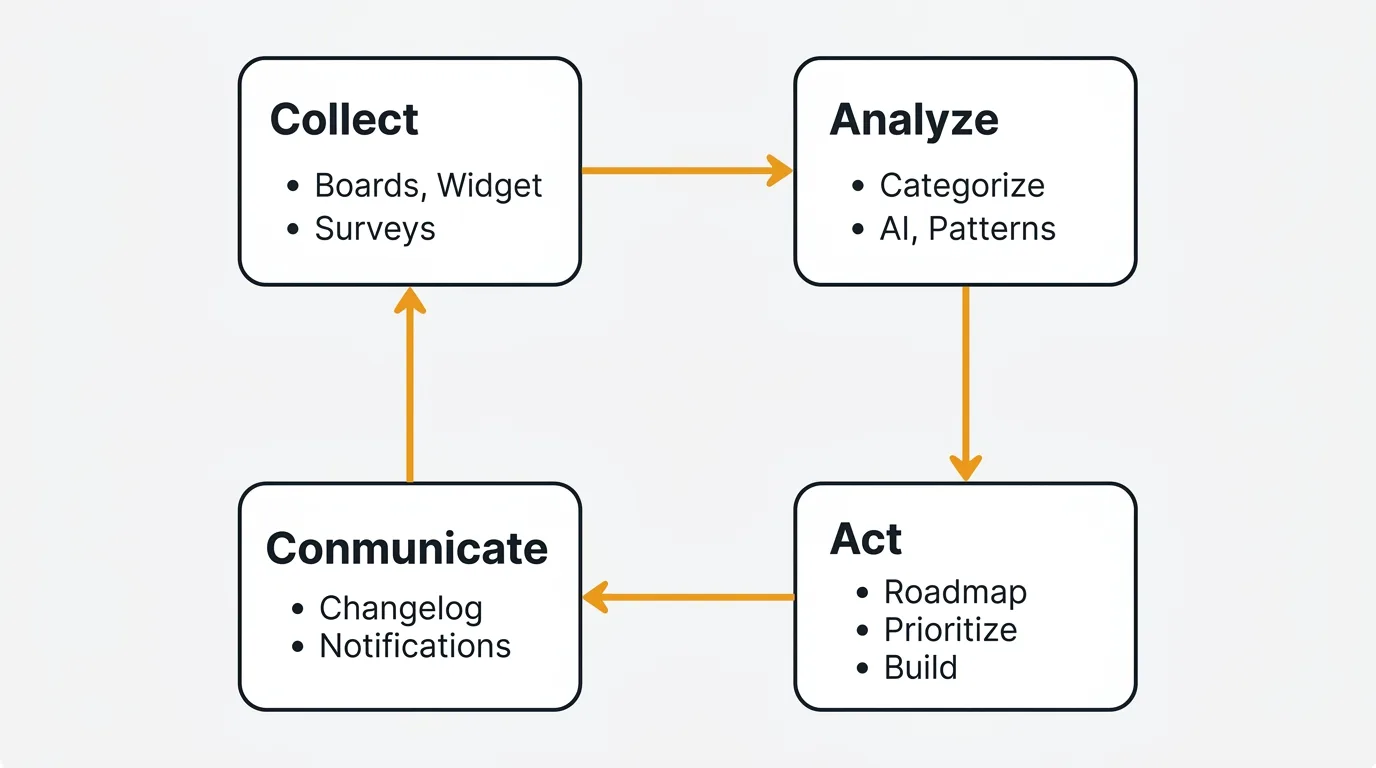
Collect — Gather feedback from users through multiple channels. Boards, widgets, surveys, support conversations, interviews.
Analyze — Organize, categorize, and prioritize what you've collected. Find patterns. Separate signal from noise.
Act — Make product decisions based on what you learned. Build features, fix bugs, adjust priorities.
Communicate — Tell users what you did and why. Announce changes. Notify people whose requests were addressed. Explain decisions, including the ones where you said no.
The loop is the critical part. Without communication, you have a feedback funnel, not a feedback loop. Information flows in one direction — from users to your team — and nothing flows back. The loop closes when users see their input reflected in your product and your decisions.
This distinction matters more than it sounds. Teams that close the loop get more feedback, better feedback, and higher retention. Teams that don't close the loop slowly lose the trust that makes feedback programs work.
The four stages
Stage 1: Collect
Good collection meets users where they already are. No single channel captures everything, so you need a combination.
Feedback boards give users a dedicated space to submit ideas, browse existing requests, and vote on what matters most. A public feedback board with voting turns collection into a collaborative process. Users discover that someone else has already requested their idea, so they vote instead of creating a duplicate. You get cleaner data and a clearer picture of demand.
In-app widgets capture feedback at the moment of experience. An embedded widget in your product lets users share thoughts without leaving the page they are on. The friction is minimal — a button click and a few sentences. The context is rich — you know which page they were on, what they were doing, and who they are.
Surveys provide structured, quantitative data. NPS surveys track loyalty trends over time. CSAT surveys measure satisfaction after specific interactions. Keep surveys short and well-timed. Every additional question reduces your completion rate.
Support conversations are feedback whether you treat them that way or not. Every ticket about a confusing workflow, every chat asking how to do something, every email requesting a feature — these are data points. Integrating your support tool with your feedback system lets you capture this signal without asking your support team to manually copy and paste.
Customer interviews go deeper than any other method. A 30-minute conversation reveals context, motivation, and nuance that no survey can capture. Use them to explore problems you don't fully understand. For a deeper walkthrough of each channel, see the complete guide to collecting customer feedback. If you want templates for phrasing your feedback requests across each of these channels, see how to ask for customer feedback.
The goal in the collection stage is not to maximize volume. It is to create consistent, low-friction channels that produce high-quality input. A hundred thoughtful feature requests are more useful than ten thousand one-word survey responses.
Stage 2: Analyze
Raw feedback is not useful until you find the patterns. A backlog of a thousand feature requests tells you nothing until you categorize, aggregate, and prioritize.
Categorize every piece of feedback. Tag it by type (feature request, bug report, usability issue), product area (onboarding, billing, analytics), and customer segment (enterprise, SMB, free tier). Consistent tagging lets you filter and slice the data. Without it, every question about "what are users saying about X" requires a manual search.
Find patterns, not individual requests. A single user asking for CSV export is an anecdote. Forty users asking for it is a pattern. Resist the urge to build based on one compelling request from a loud or important customer. Aggregate first. Patterns are what you act on.
Use AI to accelerate analysis. AI-powered duplicate detection catches requests that describe the same problem in different words. Sentiment analysis surfaces posts with strong negative or positive signals so you can prioritize responses. These features do not replace human judgment, but they reduce the manual work of sifting through hundreds of submissions. Quackback includes AI analysis that runs over your structured feedback as it comes in.
Prioritize with a framework. Gut-based prioritization breaks down at scale. Use a structured approach like RICE (Reach, Impact, Confidence, Effort) to score and rank requests. The RICE calculator helps you apply this framework consistently across your backlog. Structured prioritization makes your decisions defensible — when a stakeholder asks why you chose feature A over feature B, you have a clear rationale.
Look for what users don't say. Feedback is biased toward users who are engaged enough to give it. Analyze usage data alongside submitted feedback. Features with low adoption but no complaints might have discoverability problems. High-churn segments that never submit feedback might have needs you are not addressing.
Stage 3: Act
Analysis without action is academic. This is where the feedback loop produces value — you change your product based on what you learned.
Build what the data supports. The features and fixes you prioritize should reflect the patterns you found in the analysis stage, not the most recent request or the loudest stakeholder. When your backlog is well-organized and consistently prioritized, deciding what to build next becomes a matter of reading the top of the list rather than debating in a meeting.
Update your roadmap. A public roadmap is both a planning tool and a communication tool. When you move a request to "Planned" or "In Progress," every user who voted for it sees that progress is happening. The roadmap creates accountability. If something sits in "Planned" for six months with no movement, that is visible — and it should prompt a conversation about whether the priority is real.
Don't wait for perfection. Some teams delay action because they want to build the complete solution. In feedback-driven development, shipping an 80% solution and iterating based on reactions is usually better than spending months on the perfect version. Users who requested a feature would rather see a good version soon than a perfect version eventually.
Address bugs and usability issues quickly. Not all feedback leads to new features. Some of the highest-impact actions are fixing bugs, improving confusing flows, and smoothing rough edges. These changes don't make headlines, but they compound. A product that reliably works well earns more trust than a product that ships flashy features on top of a broken foundation.
Stage 4: Communicate
This is the stage most teams skip, and it is the stage that makes the entire loop work.
Publish a changelog. When you ship a feature, fix a bug, or make a meaningful change, announce it. A changelog gives users a single place to see what has changed. It demonstrates momentum. It shows users that the product they rely on is actively improving.
Notify voters and requesters. When you resolve a feature request, the people who voted for it should hear about it. Automatic notifications close the loop at the individual level. The user who submitted a request six months ago gets an email saying it shipped. That user now knows their feedback led to action, and they are far more likely to give feedback again.
Explain decisions, including the no. Closing the loop does not mean building everything users ask for. It means responding to what they ask for. When you decide not to build a request, say so. Explain the reasoning. "We've decided not to build this because it conflicts with our direction on X" is a closed loop. Silence is not.
Connect the change to the feedback. When you announce a feature in your changelog, reference the feedback that drove it. "You asked for CSV export — here it is" lands better than a generic release note. It reinforces the connection between user input and product output. Users see that the loop is real.
Communication transforms your relationship with users from transactional to collaborative. Users stop seeing feedback as shouting into a void and start seeing it as a partnership. That shift changes the quality, volume, and tone of everything they share with you.
Why closing the loop matters
The benefits of closing the feedback loop go beyond making users feel heard. They show up in metrics.
Retention improves. Users who see their feedback acknowledged and acted on stay longer. They have a reason to stay beyond the current feature set — they believe the product will keep getting better in ways that matter to them. Closing the loop is a retention mechanism that costs nothing to implement.
Trust compounds over time. Every closed loop builds credibility. When you consistently communicate decisions — both the yes and the no — users trust your prioritization process. They give you the benefit of the doubt when you say no to their request because they have seen you say yes to others. Trust makes every future product decision easier.
Feedback quality increases. Users who see their input lead to action submit better feedback. They write more detailed descriptions. They provide more context. They think harder about what they're asking for because they know someone will actually read it and consider it seriously. This creates a virtuous cycle: better feedback leads to better decisions, which leads to more trust, which leads to even better feedback.
Internal alignment gets easier. When product decisions are visibly connected to user feedback, internal debates become more productive. Instead of arguing about whose intuition is right, teams can point to the data. "Users are asking for this, here's the demand, here's the prioritization score" is a better starting point than "I think we should build this."
Common mistakes
Collecting without acting
The most common failure mode. You set up boards, widgets, and surveys. Feedback flows in. Your backlog grows. But nothing changes. No features get built based on feedback. No one responds to requests. The collection infrastructure becomes a monument to good intentions and broken promises. Users eventually realize that submitting feedback has no effect, and they stop.
Waiting too long to close the loop
Some teams close the loop eventually — but six months after the feature ships. By then, the user who requested it has moved on, found a workaround, or churned. Timeliness matters. The connection between "I asked for this" and "they built it" weakens with every week that passes. Notify users as soon as the change ships, not when you get around to it.
Only closing the loop for big features
Small fixes and improvements deserve communication too. If a user reported a confusing error message and you improved it, tell them. If someone flagged a bug and you fixed it, let them know. Closing the loop on small items demonstrates that you are paying attention to details, not just headline features. It also encourages users to report the small things, which is where a lot of product quality lives.
Treating the loop as a one-time process
Feedback loops are continuous, not one-and-done. Some teams run a feedback initiative — a big survey, a round of interviews, a week of triaging the backlog — and then go quiet for months. Users learn the cadence and stop engaging between initiatives. Build a feedback loop that runs continuously, not in bursts. Always-on channels like feedback boards and in-app widgets help, but only if someone is reviewing and responding to what comes in.
Ignoring negative feedback
It is tempting to focus on feature requests and ignore complaints, criticism, and low satisfaction scores. Negative feedback is uncomfortable. It is also where the highest-leverage improvements often hide. A user who gives you a detailed explanation of why they are frustrated is giving you a gift. Acknowledge it. Act on it when appropriate. And close the loop by telling them what you did.
Tools for feedback loops
Closing the feedback loop manually — tracking every request in a spreadsheet, sending individual emails when features ship, updating a static roadmap document — works at small scale. It does not work when you have hundreds or thousands of users submitting feedback across multiple channels.
Purpose-built tools automate the mechanical parts of the loop so your team can focus on the judgment parts: deciding what to build, how to prioritize, and what to communicate.
Look for a tool that covers all four stages in one place: collection (boards, widgets), analysis (AI-assisted categorization and deduplication), action (roadmap management), and communication (changelog with automatic notifications to voters). Quackback is one option that handles the full loop — boards and widgets for collection, AI for analysis, a public roadmap for action, and a changelog that notifies users when their requests ship. The key is that the loop closes without manual work, regardless of which tool you choose.
Quackback is open source (AGPL-3.0) and self-hosted for free, with a managed Quackback Cloud if you would rather not run it yourself. Its MCP server also lets you query and update feedback from an AI assistant, which is useful for closing the loop without leaving your editor. For a broader comparison of tools that support this workflow, see the best customer feedback tools in 2026 and how Quackback stacks up against Canny.
Try Quackback — open source with a managed cloud option. Start free. Get started | View on GitHub
Frequently asked questions
How long should it take to close a feedback loop?
It depends on the feedback type. Bug reports often resolve within days; large feature requests can take weeks or months. Speed matters less than communicating at every stage: acknowledge on arrival, update the status when you prioritize, and notify the user when the change ships.
What is the difference between an open and closed feedback loop?
An open feedback loop is one where user input flows in but nothing flows back, so users never hear what happened. A closed feedback loop completes the cycle by communicating the outcome to the people who contributed. "Closed" refers to communication, not to building every request.
How do I measure whether my feedback loop is working?
Track feedback volume and quality over time, survey response rates, the share of items that get a status update within a set window (such as 7 days), and retention for users who submit feedback versus those who do not. Rising engagement signals the loop is creating value.
What are the four stages of a customer feedback loop?
The four stages are collect, analyze, act, and communicate. You gather input across channels, find patterns and prioritize them, ship changes based on what you learned, and tell users what you did. The communicate stage is what closes the loop.
What tools help you close the customer feedback loop?
Purpose-built feedback platforms automate the mechanical work: feedback boards and widgets collect input, AI categorizes and deduplicates it, a public roadmap tracks action, and a changelog notifies voters when requests ship. Quackback covers all four stages, with a deeper user feedback guide on building the program.

Authored by James Morton
Founder of Quackback. Building open-source feedback tools.
Try Quackback
The open-source feedback platform. Boards, voting, and roadmaps.
Get startedStar on GitHub305