
Most product managers have heard of MCP by now. The term shows up in release notes, AI tool documentation, and increasingly in conversations about how AI agents interact with the tools teams already use. But the explanations are almost always written for developers, filled with protocol diagrams and code snippets that do not help you understand what MCP means for your workflow.
This guide is different. It explains what an MCP server is, how it works, and why it matters — from the perspective of someone who manages products, not someone who builds protocols.
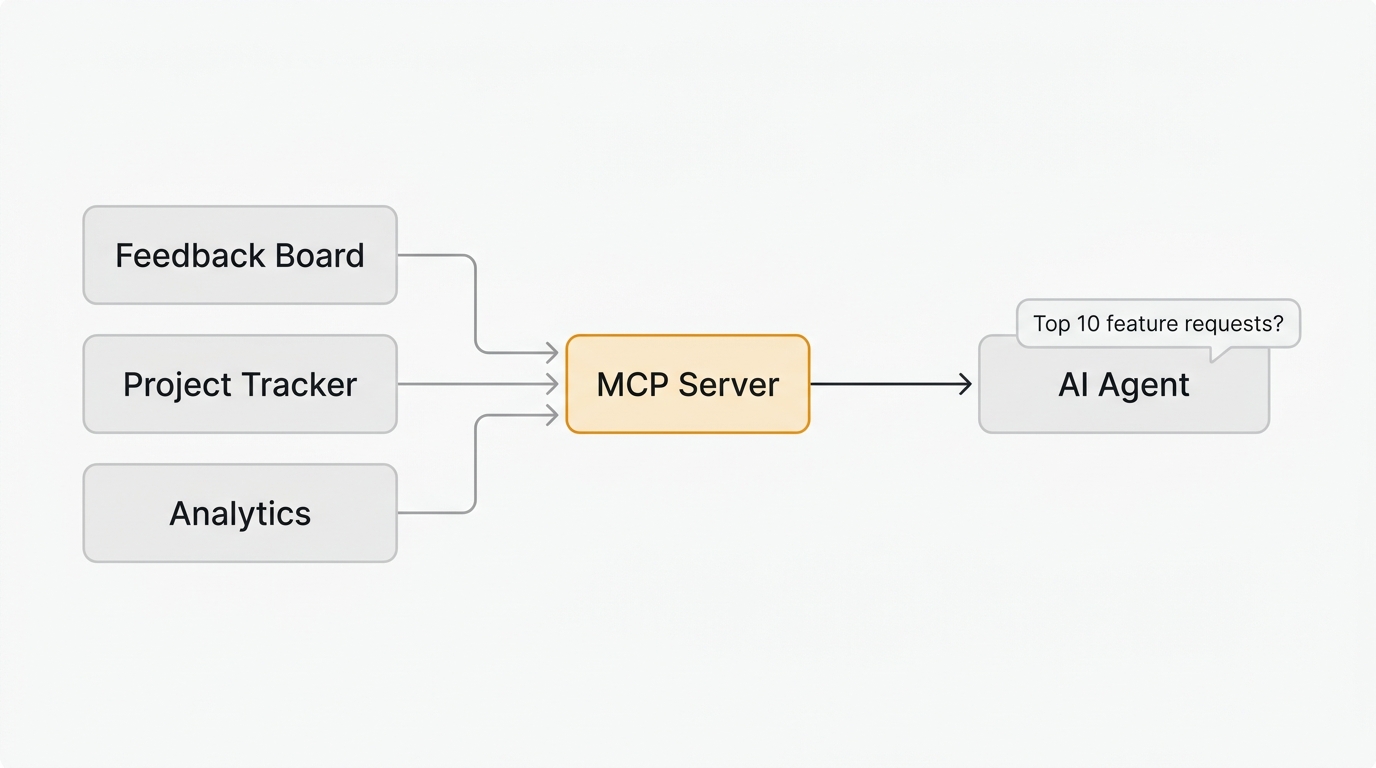
An MCP server is a small program that connects an AI agent to one of your tools, exposing that tool's data and actions through the Model Context Protocol, an open standard created by Anthropic. It lets an AI assistant like Claude or Cursor read your feedback, roadmaps, and analytics, and take actions across them, without anyone writing custom integration code. Think of it as a USB-C port for AI: one universal connector instead of a custom cable for every tool.
What is an MCP server
The Model Context Protocol (MCP) is an open standard created by Anthropic that defines how AI models connect to external tools and data sources.
An MCP server is a small program that sits between your tool (like a feedback board, project tracker, or analytics platform) and an AI agent (like Claude, Cursor, or ChatGPT). It translates your tool's capabilities into a format the AI can understand and use.
Think of it like a USB-C port. Before USB-C, every device had its own connector. You needed a different cable for your phone, your laptop, and your monitor. USB-C created a universal standard. MCP does the same thing for AI integrations. Instead of building a custom connection between every AI tool and every SaaS product, MCP provides a single protocol that works everywhere.
Here is what that looks like in practice. Without MCP, if you wanted Claude to read your feedback board, you would need to write custom code to call your tool's API, parse the response, and format it for the AI. With MCP, your tool exposes a server, Claude connects to it, and the AI can read your data immediately.
How MCP servers work
An MCP server does three things:
-
Exposes tools. It declares a list of actions the AI can take — like "search feedback," "list feature requests," or "update a roadmap item." Each tool has a name, a description, and defined inputs.
-
Handles requests. When the AI decides it needs data from your tool, it calls the appropriate MCP tool. The server processes the request, fetches data from your tool's API or database, and returns the result.
-
Returns structured data. The AI receives clean, structured information it can reason about, summarize, or use to take further actions.
The AI agent decides when to use each tool based on context. If you ask Claude "What are the most requested features this month?" and it has access to your feedback board's MCP server, it will call the search or list tool, read the results, and summarize them for you. You do not tell it which API endpoint to hit. The AI figures that out from the tool descriptions.
The three roles in an MCP system
| Role | What it does | Example |
|---|---|---|
| Host | The application where you interact with the AI | Claude Desktop, Cursor, VS Code |
| Client | Manages the connection between host and server | Built into the host application |
| Server | Exposes your tool's data and actions to the AI | Quackback MCP server, Linear MCP, Jira MCP |
As a product manager, you interact with the host. The client and server work in the background. You type a question or instruction in Claude, and the MCP infrastructure handles the rest.
Why product teams care about MCP
MCP is not just a developer tool. It changes how product managers interact with their data across multiple tools. Here is why that matters.
Your data stays connected without custom code
Product teams typically use five to ten tools daily. A feedback board, a project tracker, an analytics platform, a CRM, a support tool. Each contains a slice of the information you need to make decisions. MCP lets an AI agent read from all of them in a single conversation.
Instead of opening five browser tabs and manually cross-referencing data, you ask your AI assistant a question and it pulls the relevant information from each tool.
AI agents can take action, not just answer questions
MCP servers do not just expose read-only data. They can also expose write operations. An AI agent connected to your feedback tool's MCP server can:
- Search and filter feature requests by status, votes, or tags
- Summarize the top requests for a sprint planning meeting
- Update the status of a roadmap item from "planned" to "in progress"
- Draft a changelog entry when a feature ships
- Link a support ticket to an existing feature request
This turns your AI assistant from a chatbot into a tool that operates across your product stack.
The feedback loop gets faster
The biggest bottleneck in most product teams is not deciding what to build. It is the time between collecting feedback, organizing it, prioritizing it, building it, and telling users what shipped. MCP compresses that cycle.
When your AI agent can read your feedback board, check vote counts, scan your roadmap, and draft release notes — all in one interaction — the feedback loop that used to take days happens in minutes.
MCP servers for product management
The MCP ecosystem is growing fast. Here are the categories of MCP servers most relevant to product teams:
Feedback and roadmap tools
These let AI agents read customer feedback, feature requests, voting data, and roadmap status.
Quackback ships with a built-in MCP server that exposes tools covering boards, posts, votes, comments, roadmap items, and changelog entries. Because it is built into the product (not a third-party wrapper), it stays in sync with every release. It works the same whether you run Quackback Cloud or self-host the open source build, so connecting your whole team is straightforward.
Other feedback tools have third-party MCP servers built by the community. Canny and Productboard both have community-maintained servers on GitHub. The difference is that third-party servers can fall behind the official API, while a built-in server is always current.
For a deeper look at how this works in practice, see MCP Server for Feedback Management.
Project tracking
Linear, Jira, Asana, and ClickUp all have MCP servers. These let AI agents read issues, update statuses, create tickets, and query sprint data. Combined with a feedback tool MCP server, an AI agent can trace a feature request from user submission through your roadmap to the shipped issue in your tracker.
Analytics and monitoring
PostHog, Amplitude, and other analytics platforms are adding MCP support. This lets AI agents pull usage data, conversion metrics, and behavioral patterns directly into conversations about what to build next.
Communication
Slack and email MCP servers let AI agents draft messages, search conversation history, and post updates. Useful for automating status updates to stakeholders when roadmap items change.
How to set up an MCP server
Setting up an MCP server does not require writing code. Most servers install through a configuration file that tells your AI host where to find the server.
Step 1: Choose your AI host
The most common hosts for product managers are:
- Claude Desktop — Anthropic's desktop app, supports MCP natively
- Claude Code — Anthropic's CLI tool, ideal if you also write code
- Cursor — AI code editor popular with technical PMs
Step 2: Install the MCP server
Each tool publishes its own installation instructions. For example, Quackback's MCP server is HTTP-based (Streamable HTTP) and runs as part of your self-hosted instance. To connect it to Claude Code, run:
claude mcp add --transport http --scope user quackback https://your-quackback-instance/api/mcpClaude Code handles the OAuth authentication flow automatically — it opens your browser, you log in to your Quackback instance, and the connection is established. If you prefer API key authentication, add the --header flag:
claude mcp add --transport http --scope user -H "Authorization: Bearer qb_YOUR_API_KEY" quackback https://your-quackback-instance/api/mcpAPI keys use the qb_ prefix followed by 48 hex characters. You can generate one from your Quackback settings under Developers. No custom code required.
Step 3: Start using it
Once connected, you interact with your tools through natural language. Ask Claude:
- "What are the top 10 most-voted feature requests?"
- "Summarize the feedback we received this week"
- "Move the 'dark mode' request to 'in progress' on the roadmap"
- "Draft a changelog entry for the features we shipped this sprint"
The AI reads the tool descriptions from the MCP server, decides which tools to call, and executes the request.
For a step-by-step walkthrough with screenshots, see the Quackback MCP integration guide.
Real examples: MCP in a product workflow
Here is how a product manager might use MCP-connected tools in a typical week.
Monday: Sprint planning
You open Claude and ask: "What are the highest-voted feature requests that are not on the roadmap yet?" The AI queries your feedback board via MCP, cross-references against your roadmap, and returns a prioritized list with vote counts and customer segments.
Wednesday: Stakeholder update
You ask: "Summarize the feedback trends from the past two weeks and draft a Slack message for the product team." The AI reads recent feedback, identifies patterns, and drafts a concise update you can review and send.
Friday: Ship and close the loop
A feature ships. You tell the AI: "We just shipped dark mode. Update the roadmap item to 'complete,' draft a changelog entry, and notify the users who requested it." The AI executes three actions across your feedback tool, roadmap, and changelog — tasks that would normally take 15 minutes of switching between tools.
MCP vs traditional API integrations
| Traditional API | MCP Server | |
|---|---|---|
| Setup | Write code for each integration | One config line per tool |
| Discovery | Read API docs, build requests | AI discovers tools automatically |
| Maintenance | Update code when APIs change | Server maintainer handles updates |
| Interaction | Code or Zapier/Make workflows | Natural language in your AI assistant |
| Flexibility | Fixed workflows you define | AI decides which tools to use based on context |
MCP does not replace APIs. Your MCP server still uses the underlying API to communicate with your tool. The difference is that you never interact with the API directly. The AI does that for you.
What to look for in an MCP server
Not all MCP servers are equal. When evaluating an MCP server for your product stack, consider:
Coverage. Does it expose the operations you need? A server with read-only access to feature requests is less useful than one that also supports status updates, vote queries, and changelog publishing.
Maintenance. Is it built into the product or maintained by a third party? Built-in servers stay current with every release. Third-party servers may lag behind API changes.
Security. How does authentication work? Does the server require API keys, OAuth tokens, or session credentials? Can you scope permissions to read-only if needed?
Documentation. Does each tool have clear descriptions? The AI uses these descriptions to decide when and how to call each tool. Poor descriptions lead to poor AI behavior.
Quackback's MCP server is HTTP-based (Streamable HTTP) and exposes tools and resources across feedback boards, voting, roadmaps, changelogs, and the admin inbox. It authenticates via API key (qb_ format) or OAuth and supports both read and write operations. See the full MCP documentation for details.
The MCP ecosystem is growing fast
The Model Context Protocol launched in late 2024. In its first-year ecosystem update, Anthropic reported more than 10,000 active public MCP servers, and community directories list thousands more. Major platforms — Google Cloud, Cloudflare, Figma, Atlassian — have published their own MCP servers or integration guides.
For product teams, this means the tools you already use are becoming AI-accessible. The question is not whether to adopt MCP, but which tools in your stack support it and how to connect them.
The highest-leverage starting point for most product teams is connecting their feedback tool. That is where user intent lives — the raw signal about what to build, fix, and improve. When your AI agent can read that signal directly, every downstream decision gets better.
Quackback is built for that starting point. Its MCP server ships in every instance, so an AI agent can read and act on your feedback as soon as you connect it. Compare how that built-in approach stacks up against community wrappers in Quackback vs Canny and Quackback vs Productboard.
Try Quackback — open source with a managed cloud option. Start free. Get started | View on GitHub
Frequently asked questions
What does MCP stand for?
MCP stands for Model Context Protocol. It is an open standard created by Anthropic that lets AI models connect to external tools and data sources through a universal interface.
Is an MCP server the same as an API?
No. An API requires you to write code for each integration. An MCP server exposes tools in a standardized format that any AI agent can discover and use automatically, without custom code. The MCP server itself uses the underlying API internally, but you never interact with it directly.
Do I need to be a developer to use MCP servers?
No. Most MCP servers connect through a short JSON config entry. Product managers use them through AI assistants like Claude, Cursor, or ChatGPT without writing code.
Which AI tools support MCP?
Claude Desktop, Claude Code, Cursor, Windsurf, Cline, and many others support MCP natively. The ecosystem is growing rapidly since the protocol launched in late 2024.
Does Quackback have an MCP server?
Yes. Quackback ships with a built-in HTTP-based (Streamable HTTP) MCP server as part of every self-hosted instance. It exposes tools and resources for reading feedback, managing feature requests, updating roadmaps, and publishing changelog entries. Connect to it at your-instance/api/mcp using an API key (qb_ format) or OAuth. It works with Claude, Cursor, and any MCP-compatible client. Learn more about the Quackback MCP integration.

Authored by James Morton
Founder of Quackback. Building open-source feedback tools.
Try Quackback
The open-source feedback platform. Boards, voting, and roadmaps.
Get startedStar on GitHub305