
The average product manager uses somewhere between five and ten tools every day. A feedback board for feature requests. A project tracker for sprint work. An analytics platform for usage data. A communication tool for stakeholder updates. A documentation system for specs and decisions. Each tool holds a piece of the picture you need to make good product decisions, and none of them talk to each other natively.
MCP changes that. It connects all of these tools to your AI assistant through a single protocol, so you can query, analyze, and act across your entire stack from one conversation.
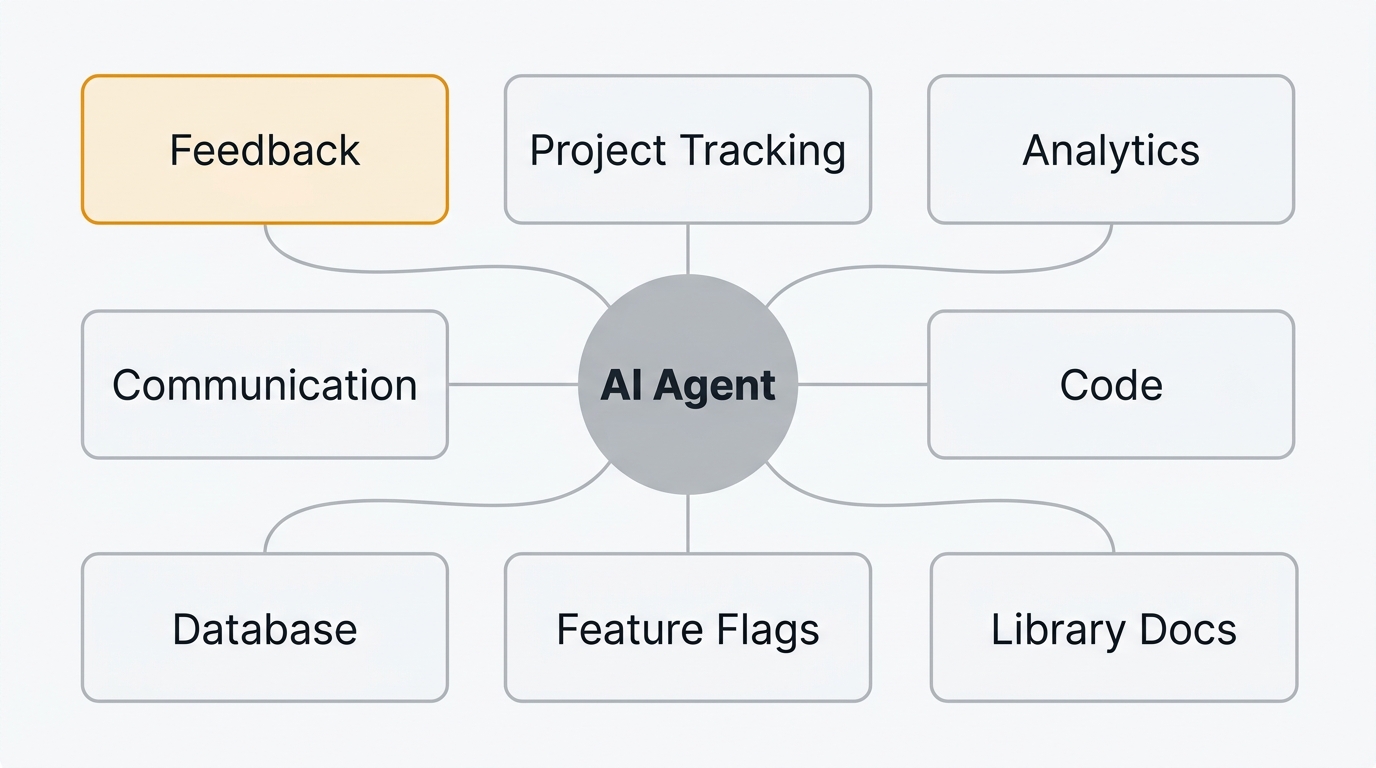
The best MCP servers for product managers connect your feedback tool, project tracker, analytics, communication, and docs to AI assistants like Claude and Cursor through one protocol. The nine worth installing are Quackback (feedback and roadmaps), Linear, Jira, Slack, PostHog, GitHub, Notion, Supabase/Postgres, and Context7. Each entry below covers what it does, key operations, and how to install it.
What is MCP
MCP stands for Model Context Protocol. It is an open standard that lets AI agents connect to external tools and data sources through a universal interface. Instead of writing custom API integrations, you install an MCP server for each tool and your AI assistant discovers its capabilities automatically.
If you want the full explanation, read What Is an MCP Server? A Guide for Product Teams. For this guide, what matters is this: MCP servers turn your AI assistant into an operator that can read, write, and act across every tool in your stack.
The product manager's MCP stack
Product work spans several categories of tooling. The MCP servers worth installing map directly to those categories:
| Category | Tool | What it gives the AI |
|---|---|---|
| Feedback and roadmap | Quackback | Feature requests, votes, roadmap items, changelogs |
| Project tracking | Linear | Issues, cycles, projects, team workloads |
| Enterprise PM | Jira | Epics, stories, sprints, Confluence docs |
| Communication | Slack | Messages, channels, threads, search |
| Analytics | PostHog | Events, funnels, feature flags, session replays |
| Development | GitHub | Issues, PRs, code search, project boards |
| Documentation | Notion | Pages, databases, knowledge base |
| Database | Supabase / Postgres | Direct SQL queries on product data |
| Library docs | Context7 | Up-to-date docs for any framework or library |
The rest of this guide covers each one: what it does, what operations it exposes, who it is best for, and how to install it.
1. Quackback — feedback, feature requests, roadmaps, changelogs
Quackback is an open-source feedback management platform. It handles feedback boards, feature request voting, public roadmaps, and changelogs. The Quackback MCP server is built directly into the product — not a third-party wrapper — which means it stays current with every release. Unlike closed tools such as Canny or Productboard, the MCP layer ships and versions with the app itself.
What it does as an MCP server: Gives your AI agent full read-write access to your feedback stack. The agent can search feature requests, check vote counts, triage incoming feedback, update roadmap statuses, draft changelog entries, and detect duplicate posts. It exposes tools and resources across every core feature. The server uses Streamable HTTP and authenticates with an API key (qb_ prefix) or OAuth.
Key operations:
- Search and filter feedback — find feature requests by keyword, status, tag, or vote count
- Triage incoming posts — categorize, tag, and set status on new feedback
- Manage roadmap items — move items between stages (planned, in progress, complete)
- Draft changelogs — create changelog entries when features ship
- Detect and merge duplicates — identify similar posts and merge them to consolidate votes
Best for: Product managers who want their AI assistant to operate across the full feedback lifecycle — from collecting requests to shipping features and closing the loop with users.
How to install:
Quackback's MCP server is HTTP-based (Streamable HTTP), built into every instance — whether you self-host or use Quackback Cloud. No npm package to install. In Claude Code, run:
claude mcp add --transport http --scope user quackback https://your-quackback-instance/api/mcpClaude Code handles OAuth authentication automatically. If you prefer API key auth instead:
claude mcp add --transport http --scope user -H "Authorization: Bearer qb_YOUR_API_KEY" quackback https://your-quackback-instance/api/mcpFor Cursor, add the config to .cursor/mcp.json with the URL and auth header.
For a deeper walkthrough of the feedback-specific capabilities, see MCP Server for Feedback Management. For full setup documentation, see the Quackback MCP integration guide.
Try Quackback — open source with a managed cloud option. Start free. Get started | View on GitHub
2. Linear — project tracking and issue management
Linear is a project tracker built for speed. Its official MCP server is a remote server that lets AI agents interact with your issues, cycles, projects, and team data directly.
What it does as an MCP server: Gives the AI read and write access to your Linear workspace. Create issues, update statuses, query sprint data, and search across projects.
Key operations:
- Create and update issues — file bugs or feature work directly from a conversation
- Query cycles and projects — pull current sprint scope, completed work, and blockers
- Search across the workspace — find issues by keyword, assignee, label, or status
Best for: Product managers and technical PMs who use Linear for sprint planning and want to connect sprint data with feedback signals.
How to install:
claude mcp add --transport http linear https://mcp.linear.app/mcpThen run /mcp in Claude Code to complete the OAuth flow. See how Quackback connects to Linear: Quackback Linear integration.
3. Jira — enterprise project management
Jira is the default project tracker in most enterprises. Atlassian's official remote MCP server gives AI agents access to issues, epics, sprints, and Confluence pages.
What it does as an MCP server: Lets the AI read and create Jira issues, query sprint boards, and search across projects. Some implementations also expose Confluence documentation.
Key operations:
- Search issues with JQL — use Jira Query Language through natural language
- Create and update issues — file tickets with full metadata (priority, labels, story points)
- Read Confluence pages — pull specs, PRDs, and decision docs into the conversation
Best for: Product managers in enterprise environments where Jira is the system of record for all project work.
How to install:
claude mcp add --transport http atlassian https://mcp.atlassian.com/v1/mcp/authv2Then run /mcp to authenticate with OAuth. See how Quackback connects to Jira: Quackback Jira integration.
4. Slack — team communication and history
Slack is where most product decisions actually get discussed. A Slack MCP server gives your AI agent access to channels, threads, and message history. The original reference server was archived in 2025; Slack now ships an official MCP server, and maintained community alternatives exist.
What it does as an MCP server: Lets the AI search conversation history, read threads, and post messages. Useful for pulling context from past discussions and automating status updates.
Key operations:
- Search message history — find past conversations about a feature, decision, or customer
- Read channel and thread content — pull full discussion context into your prompt
- Post messages — send updates to channels when roadmap items change or features ship
Best for: PMs who want to automate stakeholder communication and use Slack history as a knowledge source for product decisions.
How to install: Slack's official MCP server is managed by your workspace admin, who approves the connection from the Slack admin console. Follow the Slack MCP server docs for the current setup. See how Quackback connects to Slack: Quackback Slack integration.
5. PostHog — product analytics and feature flags
PostHog is an open-source analytics platform that covers product analytics, session replays, and feature flags. Its official MCP server lets AI agents query usage data directly.
What it does as an MCP server: Gives the AI access to event data, funnels, user properties, and feature flag configurations. The AI can answer questions about product usage without you opening the PostHog dashboard.
Key operations:
- Query events and trends — ask about feature adoption, conversion rates, or usage patterns
- Check feature flag status — see which flags are active, their rollout percentages, and targeting rules
- Analyze user behavior — pull session data and funnel analysis into product conversations
Best for: Data-driven PMs who want to combine quantitative analytics with qualitative feedback data in the same conversation.
How to install:
claude mcp add --transport http posthog https://mcp.posthog.com/mcpAuthenticate with a PostHog personal API key.
6. GitHub — issues, PRs, and code search
GitHub needs no introduction. Its official MCP server gives AI agents access to repositories, issues, pull requests, and code search.
What it does as an MCP server: Lets the AI read issues, check PR status, search code, and interact with project boards. Useful for PMs who work closely with engineering and want visibility into development progress.
Key operations:
- Search issues and PRs — find open bugs, feature branches, or stale pull requests
- Read PR details — check review status, CI results, and linked issues
- Query project boards — see what is in progress, in review, or shipped
Best for: Technical PMs who want to connect product planning (feedback and roadmap) with engineering execution (issues and PRs).
How to install:
The fastest path is GitHub's hosted remote server:
claude mcp add --transport http github https://api.githubcopilot.com/mcp/You can also run it locally with the official Docker image (ghcr.io/github/github-mcp-server). See how Quackback connects to GitHub: Quackback GitHub integration.
7. Notion — docs, databases, and knowledge management
Notion is where many product teams keep PRDs, meeting notes, decision logs, and research. The official Notion MCP server gives AI agents access to your workspace.
What it does as an MCP server: Lets the AI search pages, read database entries, and query your knowledge base. Useful for pulling product specs and context into conversations.
Key operations:
- Search across your workspace — find PRDs, meeting notes, or decision documents by keyword
- Read page content — pull full documents into the conversation for analysis or summarization
- Query databases — access structured data like feature trackers, OKR tables, or research logs
Best for: PMs who use Notion as their source of truth for product documentation and want the AI to reference it directly.
How to install:
claude mcp add --transport http notion https://mcp.notion.com/mcpThen run /mcp to authorize with OAuth. See how Quackback connects to Notion: Quackback Notion integration.
8. Supabase / Postgres — database access for custom queries
Sometimes the data you need is not in a SaaS tool. It is in your database. The Supabase and Postgres MCP servers give AI agents direct SQL access to your data.
What it does as an MCP server: Lets the AI run read-only SQL queries against your database. Useful for ad-hoc analysis, pulling customer data, or checking product metrics that are not surfaced in your analytics tool.
Key operations:
- Run SQL queries — ask questions about your data in natural language, and the AI writes and executes SQL
- Explore schema — the AI can discover tables and columns to answer questions you did not anticipate
- Pull customer data — look up specific accounts, usage patterns, or subscription details
Best for: PMs at startups and growth-stage companies who need quick data access without waiting for an analyst or building a dashboard.
How to install:
claude mcp add supabase -- npx @supabase/mcp-server-supabase9. Context7 — documentation lookup for any library
Context7 is not a product management tool in the traditional sense. It is an MCP server that gives your AI agent access to current documentation for any library, framework, or SDK.
What it does as an MCP server: Fetches live documentation for libraries when the AI needs to reference it. This ensures the AI is working with current syntax and APIs rather than relying on potentially outdated training data.
Key operations:
- Resolve library documentation — look up docs for any framework or tool by name
- Query specific topics — find documentation on a specific method, configuration, or concept
- Stay current — always pulls the latest published docs rather than relying on stale training data
Best for: Technical PMs who write specifications or acceptance criteria that reference specific libraries, and want the AI to validate technical details against current docs.
How to connect multiple MCP servers
The real value of MCP for product managers is not any single server. It is running multiple servers simultaneously so your AI assistant can operate across your entire stack.
Both Claude Code and Cursor support multiple MCP servers in the same session. When you connect several servers, the AI can cross-reference data between tools in a single conversation.
In Claude Code, configure all your servers in .mcp.json:
{
  "mcpServers": {
    "quackback": {
      "type": "http",
      "url": "https://your-instance.example.com/api/mcp",
      "headers": {
        "Authorization": "Bearer qb_YOUR_API_KEY"
      }
    },
    "linear": {
      "type": "http",
      "url": "https://mcp.linear.app/mcp"
    },
    "github": {
      "type": "http",
      "url": "https://api.githubcopilot.com/mcp/"
    },
    "notion": {
      "type": "http",
      "url": "https://mcp.notion.com/mcp"
    }
  }
}
Most of the major servers are now remote (Streamable HTTP) and authenticate with OAuth, so there is no npm package to install. In Cursor, add servers through the MCP settings panel or .cursor/mcp.json. Each server appears as a separate connection, and all are available to the AI simultaneously.
Once connected, you do not need to tell the AI which server to use. Ask a question, and it will determine which tools to call based on context. Ask "What feature requests came in this week that are not on the roadmap?" and the AI will query your feedback tool and your project tracker in the same response.
For a deeper explanation of how MCP clients manage multiple servers, see What Is an MCP Server?.
Building a PM workflow with MCP
Here is a practical example of how multiple MCP servers work together in a single workflow. This scenario uses Quackback, Linear, Slack, and GitHub.
The scenario: weekly prioritization
Every week you need to review new feedback, decide what to build next, and communicate priorities to the team. Without MCP, this means opening four tools, exporting data, cross-referencing manually, and writing updates by hand.
With MCP, the entire workflow happens in one conversation:
Step 1: Review feedback. Ask the AI: "What are the top 10 most-voted feature requests from the last two weeks that are not on the roadmap?"
The AI queries your Quackback feedback board, filters by vote count and date, checks each request against your roadmap, and returns a ranked list.
Step 2: Check engineering capacity. Ask: "What is the current cycle load in Linear? How many points are unassigned?"
The AI queries Linear for the current cycle, calculates capacity, and tells you how much room there is for new work.
Step 3: Create work items. Tell the AI: "Create a Linear issue for the top-voted request. Link it to the feedback post in Quackback and move the roadmap item to planned."
The AI creates the Linear issue, updates the Quackback roadmap status, and links the two together.
Step 4: Notify the team. Tell the AI: "Post a summary of this week's prioritization decisions to the #product channel in Slack."
The AI drafts a message based on the decisions you just made and posts it to Slack.
Four tools. One conversation. What used to take an hour of context-switching takes five minutes.
Frequently asked questions
Do I need to be a developer to use MCP servers?
No. Most MCP servers install with a single command or config file edit. Product managers use them through AI assistants like Claude Desktop, Cursor, or Claude Code without writing any integration code.
Can I use multiple MCP servers at the same time?
Yes. AI clients like Claude Code and Cursor support multiple MCP servers simultaneously. You can connect your feedback tool, project tracker, analytics platform, and communication tools in the same session. The AI decides which server to query based on your question.
Are MCP servers free?
Most MCP servers are open source and free to install. The underlying tools they connect to (Linear, Jira, PostHog) have their own pricing, but the MCP server layer itself is typically free. Quackback is entirely open source — both the product and its MCP server.
What is the difference between an MCP server and a Zapier integration?
Zapier connects tools through predefined triggers and actions, running automatically when a rule fires. MCP servers give AI agents direct, real-time access so the agent decides what to read and which actions to take based on context. MCP is conversational and adaptive; Zapier is rule-based and static.
Does Quackback have an MCP server?
Yes. Quackback ships with a built-in MCP server exposing tools and resources for feedback, feature requests, roadmaps, voting, and changelogs. It uses Streamable HTTP with API key or OAuth auth and works with Claude, Cursor, and any MCP client. Being built in, it stays current with every release.

Authored by James Morton
Founder of Quackback. Building open-source feedback tools.
Try Quackback
The open-source feedback platform. Boards, voting, and roadmaps.
Get startedStar on GitHub305