
Feature voting is how product teams separate signal from noise. Instead of guessing what to build next, you let your users tell you. A voting board gives every user a voice and gives your team a quantified view of demand. The ideas with the most votes rise to the top.
But not all voting implementations are equal. Some tools count raw upvotes. Others weight votes by user segment or revenue. Some let anyone vote anonymously. Others require authentication. A one-click upvote captures far more signal than a multi-step form.
This guide compares seven feature voting tools in 2026, evaluated specifically on voting capabilities. For a broader comparison, see our guide to the best feature request tools or our best customer feedback tools roundup.
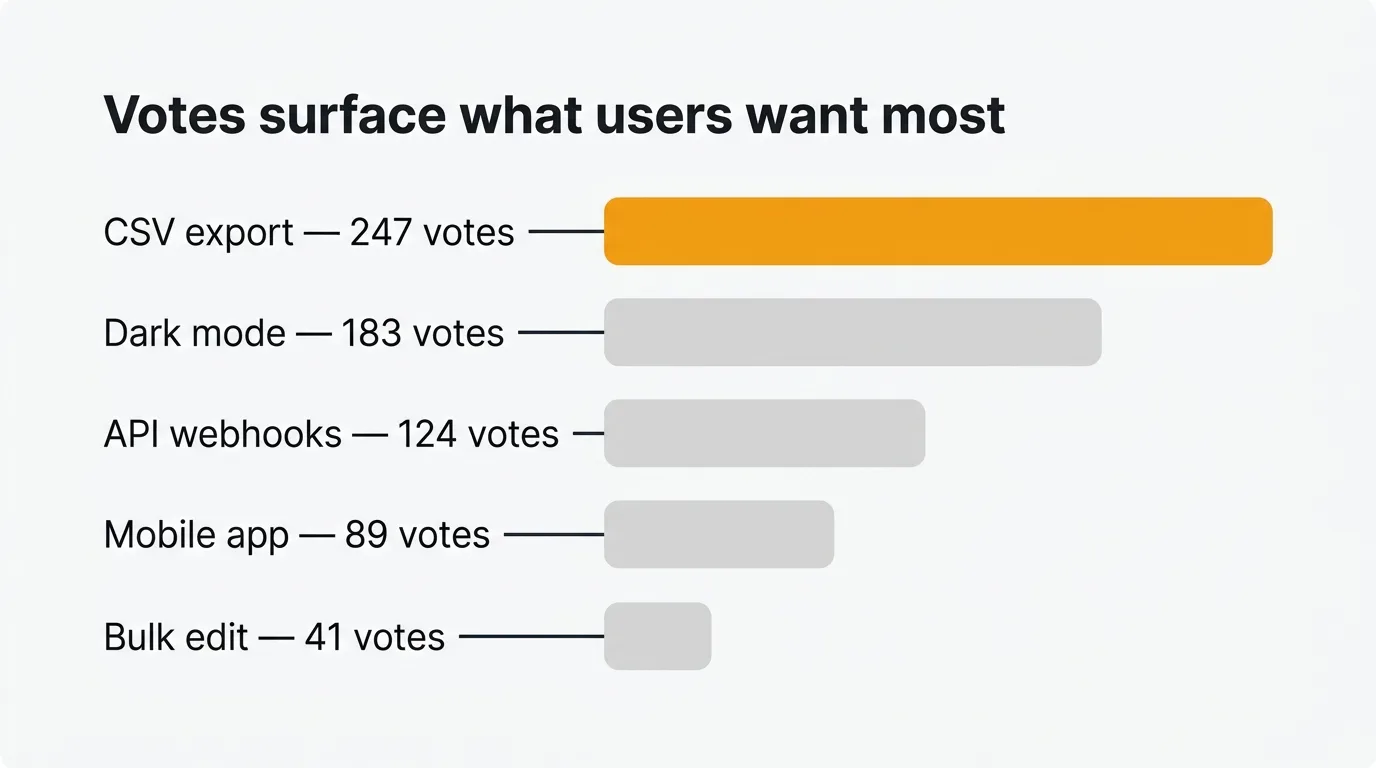
The best feature voting tool depends on how you use vote data. Quackback keeps vote counts accurate with AI duplicate detection, and is open source with a managed cloud option. Canny discovers implicit votes from support conversations. Featurebase segments voters by customer plan. The seven tools ranked:
- Quackback — Open source, AI deduplication, MCP server.
- Canny — Hosted boards, AI vote attribution from support tools.
- Featurebase — Voter segmentation by plan, support inbox.
- Fider — Open source, minimal upvoting, no analytics.
- Nolt — Simple board, flat-rate pricing.
- Upvoty — Affordable boards with changelog from $15/mo.
- Sleekplan — Embeddable widget with impact scoring.
Pricing last verified March 2026. Vendors may change plans and pricing without notice. Check each vendor's pricing page for the latest figures.
- Quackback — Open source and self-hosted. AI deduplication keeps vote counts accurate.
- Canny — Hosted voting boards with AI that attributes votes from support conversations.
- Featurebase — Voter segmentation by plan and company. Combines voting with support inbox.
- Fider — Open source, minimal voting board. Basic upvoting with no analytics.
- Nolt — Simple voting board with flat-rate pricing. No per-voter billing.
- Upvoty — Affordable voting boards with voter notifications and changelog from $15/mo.
- Sleekplan — Embeddable in-app voting widget with impact scoring beyond raw vote counts.
1. Quackback
Best for: Teams that want open-source feature voting with AI-powered deduplication.
Quackback is an open-source feature voting platform licensed under AGPL-3.0. The voting board is the core of the product. Users submit feature requests, upvote ideas with a single click, and follow posts for status notifications. Votes are tallied in real time and surface the most-requested features to the top.
What sets Quackback apart is the AI layer. Duplicate detection identifies when a new request matches an existing one before it splits your vote count. Merge suggestions let your team combine related requests with one click, consolidating votes into a single thread. This solves the biggest problem with feature voting at scale: fragmented demand signals.
The feedback board supports nested comments on every post, so voters can explain why they care about a feature. Status tracking keeps voters informed. When a feature ships, the changelog notifies every user who voted for it. The public roadmap shows what you are building next.
Self-host with Docker or deploy on Railway, or use Quackback Cloud if you would rather not run infrastructure. Your vote data stays in your PostgreSQL database. An MCP server lets AI assistants query and triage vote data directly, which no other tool in this list offers.
Voting features:
- One-click upvoting with real-time vote counts
- AI duplicate detection prevents vote fragmentation across similar requests
- Merge suggestions consolidate votes from related posts
- Voter notifications when statuses change or features ship
- Trending indicators based on recent vote velocity
- Voter analytics showing who voted, when, and on what
- Anonymous voting support
Pricing: Free and open source (AGPL-3.0). Self-host at no cost, or use Quackback Cloud for a managed option from $29/mo, with a 14-day free trial.
Pros:
- AI deduplication keeps vote counts accurate and consolidated
- Open source with full data ownership, plus a managed cloud option
- Complete voting-to-shipping workflow: votes, roadmap, changelog, notifications
- MCP server lets AI assistants triage and query vote data directly
Cons:
- Self-hosting requires Docker or Railway setup
- Younger product than incumbents like Canny
Try Quackback — open source with a managed cloud option. Start free. Get started | View on GitHub
2. Canny
Best for: Mid-size SaaS teams that want hosted voting boards with AI-powered feedback discovery.
Canny has offered feature voting since 2017. Users submit ideas and upvote them on a clean board. Votes drive a prioritization score that helps your team sort by demand. The Autopilot AI suite discovers feature requests in support conversations from Intercom, Zendesk, Help Scout, and Gong, attributing votes accordingly.
The pricing model is the concern for voting at scale. Canny bills by tracked users, and anyone who votes is a tracked user. The more people vote, the higher your bill. Canny's free plan caps at 25 tracked users. As your voter count grows, you cross tier thresholds and get auto-upgraded.
Voting features:
- One-click upvoting with vote counts
- Voter identification tied to user profiles
- Vote-based prioritization scoring
- Autopilot discovers votes from support conversations
- Status change notifications to voters
- No anonymous voting (users must authenticate)
- Vote limits tied to tracked-user tier thresholds
Pricing: Free plan (25 tracked users). Core from $19/mo. Pro from $79/mo. Business is custom pricing.
Pros:
- Mature voting interface with a large user base
- AI discovers implicit votes from support tools
- Good prioritization views combining votes with other signals
Cons:
- Every voter is a tracked user that increases your bill
- No anonymous voting
- Tiered pricing auto-upgrades you when you exceed tracked user limits
- No self-hosting
For a detailed breakdown, see our Quackback vs Canny comparison.
3. Featurebase
Best for: Teams that want feature voting alongside customer support and a help center.
Featurebase combines feature voting boards with a support inbox, help center, and live chat. Posts show vote counts, status labels, and comment threads. The Fibi AI agent can submit votes on behalf of customers during support conversations.
Featurebase ties votes to user segments. Filter by customer plan, company size, or other attributes to see which segments want a feature most. Per-seat pricing means costs scale with team size, not voter count.
Voting features:
- One-click upvoting with vote counts
- User segmentation on votes (filter by plan, company, attributes)
- AI agent submits votes from support conversations
- Status notifications to voters
- Voter analytics on paid plans
- No anonymous voting on free plan
- No vote limits per user
Pricing: Free plan (1 seat, limited features). Growth at $29/seat/month. Professional at $59/seat/month. Enterprise at $99/seat/month.
Pros:
- Voter segmentation connects votes to customer data
- AI agent captures votes from support interactions
- Combines voting with support and help center
Cons:
- Per-seat pricing adds up for larger teams
- Post merging locked to higher tiers (vote consolidation requires upgrade)
- No self-hosting or open source
- User segmentation requires paid plan
For more detail, see our Quackback vs Featurebase comparison.
4. Fider
Best for: Developers who want a minimal, self-hosted voting board with zero overhead.
Fider is the other open-source option for feature voting. Built with Go and PostgreSQL, it provides a clean voting board where users submit ideas and upvote them. Setup takes minutes with Docker.
Users click to upvote. Posts sort by vote count. Comments let voters discuss ideas. Custom statuses communicate progress. That is the full scope of Fider's voting capabilities.
There is no AI deduplication, no voter segmentation, no trending indicators, and no changelog to notify voters when features ship. Fider moved to an open-core model in v0.33.0, putting some features behind the paid cloud tier. Development has slowed.
Voting features:
- One-click upvoting with vote counts
- Comments on voted posts
- Custom statuses for voted features
- Anonymous voting via email-only sign-in
- REST API access to vote data
- No vote limits
- No voter analytics or segmentation
Pricing: Free and open source for self-hosting. Cloud free tier limited to 250 feedback items. Cloud Pro at $49/month.
Pros:
- Lightweight and fast to deploy
- Open source (AGPL-3.0)
- Simple voting experience with no learning curve
- Multi-language support for international voting boards
Cons:
- No AI duplicate detection (votes fragment across similar posts)
- No changelog or voter notifications when features ship
- No voter segmentation or analytics
- Development has slowed
See our Quackback vs Fider comparison for a side-by-side breakdown.
5. Nolt
Best for: Small teams that want a simple voting board they can set up in minutes.
Nolt provides a clean, minimal voting board. Users submit ideas, upvote them, and leave comments. A basic roadmap view groups voted features by status. Voters get notifications when statuses change. Setup takes minutes.
The flat pricing is appealing. Essential is $29/month for one board (billed annually) with no per-user billing. Your voter count can grow without increasing costs. The concern is stagnation. Nolt has seen minimal updates over the past two years. There is no AI duplicate detection, no changelog, and no voter analytics beyond basic counts.
Voting features:
- One-click upvoting with vote counts
- Status notifications to voters
- Private and password-protected voting boards
- SSO for voter authentication
- No vote limits
- No voter analytics or segmentation
- No anonymous voting without SSO workarounds
Pricing: Essential at $29/month for 1 board (annual). Pro at $69/month for 5 boards. Enterprise is custom.
Pros:
- Simple, clean voting interface
- Flat pricing with no per-voter costs
- Quick to set up
Cons:
- No changelog (voters are not notified when features ship)
- No AI duplicate detection
- Minimal updates since 2022
- Per-board pricing multiplies costs if you have multiple products
- No self-hosting
See how it compares: Quackback vs Nolt.
6. Upvoty
Best for: Budget-conscious teams that want affordable voting boards with a roadmap and changelog.
Upvoty offers feature voting boards at a lower price point than most competitors. Plans start at $15/month. Users submit ideas, upvote them, and get notified when statuses change. Boards can be embedded in your app or accessed via a custom domain.
The voting experience covers the essentials: one-click upvotes, vote counts, status labels, and a roadmap view. There is a changelog for announcing shipped features, which closes the loop for voters. The trade-off is depth. No AI duplicate detection, no voter segmentation, and no way to weight votes by customer value.
Voting features:
- One-click upvoting with vote counts
- Voter notifications on status changes
- Embeddable voting widget
- Changelog for notifying voters about shipped features
- Custom domain for voting boards
- No voter segmentation
- No vote limits
Pricing: Starts at $15/month. Higher tiers available for more boards and features.
Pros:
- Affordable starting price for a voting board
- Includes changelog to close the voter loop
- Simple to set up and embed
Cons:
- No AI duplicate detection
- Limited integrations
- No voter segmentation or weighted voting
- No self-hosting or open source
See our Quackback vs Upvoty comparison for a full breakdown.
7. Sleekplan
Best for: Teams that want an embeddable voting widget with built-in satisfaction surveys.
Sleekplan packages feature voting into an in-app widget alongside a roadmap, changelog, and satisfaction surveys. Voters never leave your product to submit or upvote ideas. Paid plans include AI features for analyzing vote patterns.
The voting board supports impact scoring beyond raw vote counts. Posts are scored based on voter engagement and recency, surfacing features with momentum rather than just all-time popularity.
The free plan is limited to a feedback board and changelog with one seat. Roadmap and AI features require the Starter plan at $13/month. Post merging and user segmentation need the Business plan at $38/month.
Voting features:
- One-click upvoting with vote counts
- Impact scoring beyond raw vote tallies
- In-app voting widget (no redirect to external board)
- Changelog with subscriber notifications
- AI-powered vote analysis on paid plans
- No vote limits
- Post merging on Business plan ($38/mo)
- No anonymous voting on free plan
Pricing: Free Indie plan (1 seat, limited features). Starter at $13/month. Business at $38/month. Enterprise is custom.
Pros:
- Embeddable widget keeps voting in-app
- Impact scoring adds nuance beyond raw vote counts
- Affordable starting price
- Built-in surveys complement voting data
Cons:
- Post merging (vote consolidation) requires Business plan
- Widget-first approach means the standalone portal is less polished
- Cannot submit votes on behalf of users
- No self-hosting
See how it compares: Quackback vs Sleekplan.
Comparison table
| Voting feature | Quackback | Canny | Featurebase | Fider | Nolt | Upvoty | Sleekplan |
|---|---|---|---|---|---|---|---|
| One-click upvote | Yes | Yes | Yes | Yes | Yes | Yes | Yes |
| Anonymous voting | Yes | No | Paid plans | Email-only | No | No | Paid plans |
| Vote limits | None | Tracked-user tier limits | None | None | None | None | None |
| Vote notifications | Yes (status + changelog) | Yes (status) | Yes (status) | No | Yes (status) | Yes (status + changelog) | Yes (changelog) |
| Trending indicators | Yes (vote velocity) | No | No | No | No | No | Yes (impact scoring) |
| Voter analytics | Yes | Yes | Paid plans | No | No | No | Paid plans |
| AI duplicate detection | Yes | Yes (Autopilot) | No | No | No | No | No |
| Vote merging | Yes | Yes | Paid plans | No | No | No | Business plan |
| Voter segmentation | Yes | Yes (Pro+) | Paid plans | No | No | No | Business plan |
| Embeddable widget | Yes | Yes | Yes | No | No | Yes | Yes |
| Open source | Yes | No | No | Yes | No | No | No |
| Self-hosting | Yes | No | No | Yes | No | No | No |
| MCP / API access | Yes (MCP + API) | API | API | REST API | API | API | API |
| Starting price | Free | Free (25 tracked users) | $29/seat/mo | Free | $29/mo | $15/mo | Free |
How to implement feature voting effectively
Setting up a voting board is the easy part. Making it work for your team and your users takes more thought.
Reduce friction to zero. Every extra click between your user and the upvote button reduces participation. One-click voting is the baseline. If your tool requires account creation before voting, you lose casual voters. Anonymous voting or lightweight authentication captures a broader signal.
Solve the duplicate problem early. Without deduplication, the same request appears under five different titles, each getting a fraction of the votes. Your most-requested feature might look like five mediocre ones. AI duplicate detection (Quackback and Canny) catches this automatically. If your tool lacks it, merge duplicates weekly.
Weight votes, do not just count them. Raw vote counts favor features wanted by your largest user segment, often your free tier. Filter by customer plan, company size, or ARR. Ten votes from enterprise customers paying $50,000/year carry different weight than ten from free-trial users. Quackback and Featurebase let you segment voters this way.
Close the loop with voters. Users who vote and never hear back stop voting. When you ship a feature, voters should know. When you decline one, explain why. Tools with automatic status notifications and a changelog handle this for you.
Set expectations about what votes mean. A voting board is not a democracy. Votes inform your decisions but do not dictate them. Some features with fewer votes may be strategically important. Communicate this upfront.
Review vote data regularly. Set a weekly or biweekly review. Look at new submissions and vote velocity. A feature that received 50 votes over two years carries different urgency than one that received 50 this week. Trending indicators in Quackback and Sleekplan surface this automatically.
Frequently asked questions
What is a feature voting tool?
A feature voting tool lets your users submit product ideas and upvote the ones they care about. Votes create a ranked list of demand that your team uses to inform prioritization. Most also include status tracking, a public roadmap, and notifications so voters know when features ship.
Should feature voting be anonymous or require authentication?
It depends on your use case. Anonymous voting lowers friction and works well for public-facing products. Authenticated voting ties votes to user profiles and customer segments, giving you richer analytics and preventing manipulation. Quackback supports both. If you serve B2B customers and need to know which accounts are voting, authentication is worth the friction.
How do I prevent duplicate votes from skewing results?
Duplicates are the biggest threat to accurate vote data. When the same feature appears under multiple posts, votes split and your top request looks less popular than it is. Use a tool with AI duplicate detection that catches duplicates at submission time. If your tool lacks this, review new submissions weekly and merge related posts manually.
What is the best free feature voting tool?
Quackback is the best free option. It is open source and free to self-host, and Quackback Cloud offers a managed option from $29/mo with a 14-day free trial. You get AI duplicate detection, voter notifications, a public roadmap, and a changelog. Fider is another free self-hosted option but covers only basic voting.

Authored by James Morton
Founder of Quackback. Building open-source feedback tools.
Try Quackback
The open-source feedback platform. Boards, voting, and roadmaps.
Get startedStar on GitHub305