
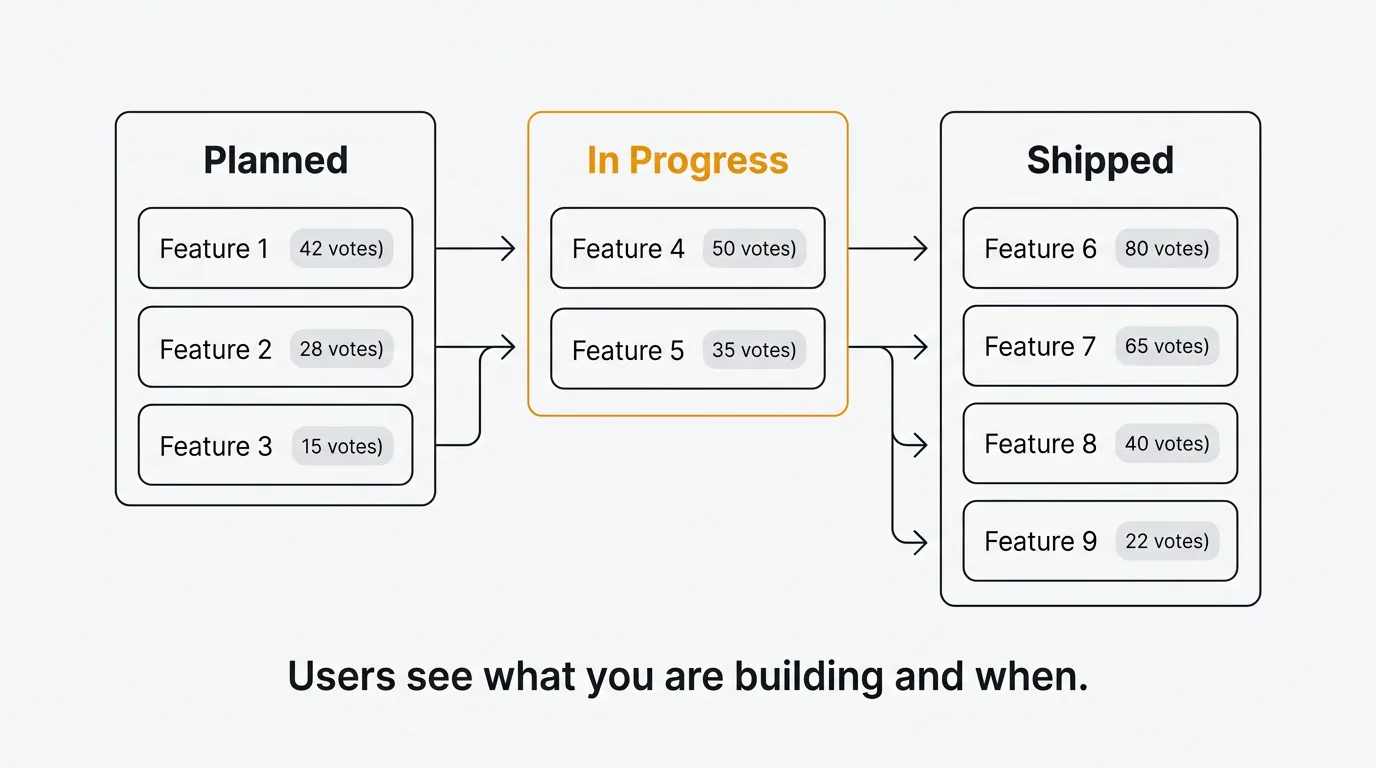
The best public roadmap tool depends on how closely you want your roadmap tied to user feedback. Quackback links every roadmap item to its source feature request and vote count, with automatic changelog notifications when items ship. Productboard suits enterprise orgs that need strategic objective mapping, and Aha offers the most advanced roadmap visualization. Here are all seven ranked:
Pricing last verified March 2026. Vendors may change plans and pricing without notice. Check each vendor's pricing page for the latest figures.
- Quackback — Open source and self-hosted, with a managed cloud option. Every roadmap item backed by live vote and feedback data.
- Canny — Hosted roadmap with voting directly from the roadmap view. Public and private visibility.
- Productboard — Enterprise driver-based roadmaps tied to strategic objectives and scoring.
- Featurebase — Kanban roadmap connected to feedback, support inbox, and changelog.
- Nolt — Basic status-grouped view with flat-rate pricing. No kanban or timeline.
- Upvoty — Affordable roadmap with voting on planned items and changelog from $15/mo.
- Aha! — Enterprise roadmapping with Gantt timelines, dependency mapping, and capacity planning.
A public roadmap tells your customers what you are building and when. Teams that publish roadmaps get fewer "when is this coming?" support tickets, build trust with users who can see their feedback being acted on, and create accountability that keeps development focused.
The problem is not the idea. It is the tooling. Most teams either skip the public roadmap or build one in Notion that goes stale within weeks. A good public roadmap tool makes it easy to share your plans, link them to customer feedback, and keep statuses current without adding maintenance burden.
Here are seven public roadmap tools in 2026, compared on roadmap capabilities: public visibility, kanban views, feedback linking, custom statuses, embeddable widgets, and status notifications. We built each public roadmap in a trial account and verified every pricing figure against the vendor's published plans in March 2026.
1. Quackback
Best for: Teams that want an open-source public roadmap where every item is backed by real user feedback and vote data.
Quackback is an open-source product feedback platform (AGPL-3.0). The public roadmap is not a standalone kanban board. It is a live view of your feedback data. Every roadmap item links back to its source feature request, showing vote counts, comments, and status history. Your customers see exactly why something is planned and how much demand it has.
The roadmap uses kanban-style columns with custom statuses. Move a feature request from "Planned" to "In Progress" and your roadmap updates automatically. Move it to "Shipped" and every voter gets notified through the changelog. No manual status syncing between your feedback board and your roadmap. They are the same data.
AI duplicate detection keeps your roadmap clean by preventing the same request from appearing under multiple titles. The MCP server lets AI agents in Claude, Cursor, or Windsurf update roadmap items, triage incoming feedback, and draft changelog entries for shipped features.
Self-host with Docker or deploy on Railway. With 25 integrations including Slack, Linear, Jira, and GitHub, roadmap status changes flow into your development workflow.
Key roadmap features:
- Kanban board with custom statuses that sync with your feedback board
- Every item linked to its source feature request, votes, and comments
- Automatic voter notifications when items ship (via changelog)
- No manual roadmap maintenance; statuses update from your feedback workflow
- MCP server for AI agents to update roadmap items
- 25 integrations: Slack, Linear, Jira, GitHub, Intercom, Zendesk, Salesforce
Pricing: Free and open source (AGPL-3.0). Self-host at no cost, or use Quackback Cloud as a managed option.
Pros:
- Roadmap items are backed by live vote and comment data, not static cards
- Status changes flow through feedback, roadmap, and changelog automatically
- Open source and self-hosted, with a managed cloud option
Cons:
- Self-hosting requires running your own infrastructure
- Newer than incumbents, so fewer prebuilt roadmap templates
Publish your public roadmap with Quackback — open source and self-hosted. Deploy in under five minutes. Get started free | View on GitHub
2. Canny
Best for: Mid-size SaaS teams that want a hosted public roadmap connected to feedback boards and support tools.
Canny's roadmap displays items organized by status columns, each linked to its feedback post with vote counts visible. Users can vote directly from the roadmap view, not just from the feedback board. The roadmap supports both public and private visibility, so you can share different views with customers and internal stakeholders.
Status changes trigger email notifications to voters. Autopilot, Canny's AI suite, discovers feature requests from support conversations and can surface items that should be on your roadmap but are not yet represented.
The roadmap is functional but limited in layout options. There is no timeline view, no dependency mapping, and no embeddable roadmap widget. The pricing model changed in May 2025 to tiered pricing based on tracked users. Users who interact with your roadmap count as tracked users.
Key roadmap features:
- Public and private roadmaps with status columns
- Voting directly from the roadmap view
- Items linked to feedback posts with vote counts
- Email notifications on status changes
Pricing: Free plan (25 tracked users). Core from $19/mo. Pro from $79/mo. Business is custom pricing.
Pros:
- Roadmap tightly connected to feedback boards with vote data
- Public/private visibility controls for different audiences
Cons:
- No timeline view, dependency mapping, or embeddable roadmap widget
- Tiered tracked-user pricing means costs increase as you cross user thresholds
- Removing branding requires Business plan
- No self-hosting
For a detailed breakdown, see our Quackback vs Canny comparison.
3. Productboard
Best for: Enterprise product organizations that need a strategic roadmap tied to prioritization frameworks and company objectives.
Productboard takes a different approach. Instead of a simple kanban board, it offers driver-based roadmaps tied to strategic objectives with custom scoring criteria. You can build multiple views for different audiences: a timeline for executives, a feature view for product managers, and a customer portal for users.
The customer portal lets users see planned features and vote on them. The strength is the strategic layer: score features against custom drivers, connect them to company objectives, and present a coherent roadmap.
The trade-off is cost and complexity. For teams that need a public roadmap without the full product management suite, Productboard is more than you need.
Key roadmap features:
- Driver-based roadmaps tied to company objectives
- Multiple views (timeline, board, list) for different audiences
- Customer portal with voting on planned features
- Prioritization scoring with custom frameworks
Pricing: Spark at $15/maker/month (annual) or $19/maker/month (monthly). AI included via credits (250/maker/month). Enterprise is custom.
Pros:
- Most sophisticated roadmap and prioritization on this list
- Multiple views for different stakeholders
Cons:
- Per-maker pricing grows with team size
- Customer portal is limited compared to purpose-built roadmap tools
- Overkill if you only need a public roadmap; no self-hosting
See our Quackback vs Productboard comparison for a full feature-by-feature breakdown.
4. Featurebase
Best for: SaaS teams that want a kanban roadmap connected to feedback, support, and a help center in one tool.
Featurebase's public roadmap uses a kanban layout with customizable status columns. Each card links to its source feedback post with vote counts, so users browsing your roadmap can see the demand behind every planned feature.
The roadmap connects to Featurebase's support inbox. When a customer submits a feature request through support or via Fibi (the AI agent), it can appear on your roadmap once triaged. Status changes trigger notifications, and shipped items automatically generate changelog entries.
The all-in-one approach keeps your roadmap, feedback, and support data in one place. The limitation is roadmap flexibility. Custom statuses are available, but there are no timeline views, grouped-by-objective layouts, or dependency mapping.
Key roadmap features:
- Kanban layout with custom status columns
- Items linked to feedback posts and vote counts
- Status change notifications and changelog integration
- Fibi AI agent triages support conversations to roadmap items ($0.49/resolution)
Pricing: Free (1 seat). Growth at $29/seat/month. Professional at $59/seat/month. Enterprise at $99/seat/month.
Pros:
- Roadmap items inherit vote data and discussion from feedback boards
- Support-to-roadmap pipeline through AI agent
Cons:
- No timeline view, dependency mapping, or advanced layouts
- Per-seat pricing adds up for larger teams
- No self-hosting or open source
See how it compares: Quackback vs Featurebase.
5. Nolt
Best for: Small teams that want a basic public roadmap view with flat pricing and minimal setup.
Nolt's roadmap groups feedback posts by status. It is not a kanban board; it is a filtered view of your feedback board organized by status labels. Status changes send email notifications to voters.
For teams with a small number of planned features, this is adequate. The concern is what happens when items ship. Nolt has no changelog, so the roadmap's lifecycle ends at "Done." There is no built-in way to announce shipped features or notify the users who were following them. The roadmap also has no timeline view, no embeddable widget, and no dependency mapping.
Key roadmap features:
- Status grouping view with items linked to feedback posts
- Status notifications to voters via email
- Custom statuses, domain, and branding
Pricing: Essential at $25/month (1 board). Pro at $69/month (5 boards). Enterprise is custom.
Pros:
- Quick to set up with flat pricing
- Status view gives users visibility into what is planned
Cons:
- No changelog to announce shipped items
- Status grouping, not a true kanban board
- No timeline, embedding, or dependency features
- Minimal product updates since 2022
- No self-hosting
For more, see our Quackback vs Nolt comparison.
6. Upvoty
Best for: Budget-conscious teams that want a public roadmap with voting and a changelog at the lowest price point.
Upvoty provides a public roadmap with status columns where users can vote directly on planned items. Status changes notify voters. When items ship, the changelog announces them. The roadmap can be accessed via a custom domain.
At $15/month, Upvoty is the most affordable roadmap tool here. The complete loop (roadmap to changelog with voter notifications) works. The trade-off is layout flexibility. The roadmap is a basic status board. No timeline view, no grouped-by-objective layouts, no dependency mapping, and no embeddable roadmap widget.
Key roadmap features:
- Status columns with voting directly on roadmap items
- Status notifications to voters
- Changelog for announcing shipped items
- Custom domain and branding
Pricing: Starts at $15/month. Higher tiers for more boards and features.
Pros:
- Most affordable roadmap tool on this list
- Full loop: roadmap, voting, changelog, and notifications
Cons:
- Basic status board with no timeline or advanced layouts
- No AI features and limited integrations
- No self-hosting or open source
See our Quackback vs Upvoty comparison for a full breakdown.
7. Aha
Best for: Enterprise product teams that need a full-featured roadmapping platform with strategic planning capabilities.
Aha is a dedicated roadmapping platform with the most sophisticated capabilities on this list: Gantt-style timelines, strategic initiative grouping, capacity planning, dependency mapping, and multiple layouts. You can build roadmaps for different audiences and share them as live web pages.
The Ideas portal is the public-facing component. Customers submit ideas and vote on them, and ideas link to features on your roadmap. Aha Roadmaps is a standalone product, separate from the broader suite (Aha Ideas, Aha Develop).
At $59/user/month, Aha is over-engineered for teams that need a simple public roadmap. For enterprise organizations managing multiple products with cross-team dependencies, the depth is justified.
Key roadmap features:
- Timeline, board, list, and workflow views
- Strategic initiative grouping and dependency mapping
- Capacity planning and release scheduling
- Ideas portal with voting and feedback linking
- Shareable roadmap links with view-only access
Pricing: Aha Roadmaps at $59/user/month. Aha Ideas at $39/user/month. Enterprise is custom.
Pros:
- Most advanced roadmap visualization and planning on this list
- Dependency mapping and capacity planning
Cons:
- Expensive; Ideas portal and Roadmaps are separate products
- Steep learning curve
- No self-hosting or open source
See how it compares: Quackback vs Aha!.
Comparison table
| Feature | Quackback | Canny | Productboard | Featurebase | Nolt | Upvoty | Aha |
|---|---|---|---|---|---|---|---|
| Public roadmap | Yes | Yes | Customer portal | Yes | Yes | Yes | Yes (shareable links) |
| Kanban view | Yes | Status columns | Board view | Yes | No | Status columns | Yes |
| Linked feedback | Yes (votes, comments) | Yes (votes) | Yes (insights) | Yes (votes, comments) | Yes (votes) | Yes (votes) | Yes (ideas portal) |
| Custom statuses | Yes | Limited | Yes | Yes | Yes | Limited | Yes |
| Embeddable widget | Yes (feedback widget) | No | No | No | No | No | No |
| Status notifications | Yes (via changelog) | Yes (email) | Yes (email) | Yes (email) | Yes (email) | Yes (email) | Yes (email) |
| Timeline view | No | No | Yes | No | No | No | Yes |
| AI features | Yes (duplicate detection, sentiment, merge) | Yes (Autopilot) | Yes (included via credits) | Yes (Fibi) | No | No | Yes (limited) |
| Open source | Yes (AGPL-3.0) | No | No | No | No | No | No |
| Self-hosting | Yes | No | No | No | No | No | No |
| Starting price | Free | Free (25 tracked users) | $15/maker/mo (annual) | $29/seat/mo | $25/mo | $15/mo | $59/user/mo |
How to build a public roadmap that works
Publishing a public roadmap is easy. Maintaining one that builds trust is harder. Here are the practices that matter.
Use outcomes, not feature names. Customers do not care that you are "refactoring the notification service." They care that you are "making notifications faster and more reliable." Frame roadmap items in terms of the user outcome, not the implementation detail.
Keep statuses current. A roadmap with stale statuses is worse than no roadmap. If an item has been "In Progress" for six months, users lose trust in the entire board. Set a weekly review cadence. Transparency about delays builds more trust than silence.
Link every item to feedback. The most effective public roadmaps show users that their feedback directly influenced what is being built. When a roadmap item links to the original feature request with 200 votes, every voter feels heard.
Close the loop with a changelog. A roadmap without a changelog has a gap at the end. When an item moves to "Shipped," announce it. Notify every user who voted or commented. This turns your roadmap into a retention tool.
Curate what you show. Not everything belongs on a public roadmap. Internal infrastructure work and sensitive competitive moves should stay private. A public roadmap full of items that never ship erodes trust faster than having no roadmap at all.
Choose the right level of commitment. Some teams use "Exploring," "Planned," and "In Progress" to signal confidence. Others use "Now, Next, Later" to avoid date commitments. For more on roadmap strategy, see our guides on technology roadmaps and IT roadmaps.
Connect to your development workflow. Use integrations with Jira, Linear, or GitHub to keep roadmap statuses in sync with development progress. Manual status updates get forgotten. Automated ones stay current.
Frequently asked questions
What is a public roadmap?
A public roadmap is a shared view of what your product team plans to build, what is in progress, and what has shipped. It is visible to your customers on a dedicated page or embedded in your product. Items typically display in a kanban board with status columns, linked to feature requests so users can see the votes behind every planned item.
Should I use a public roadmap or keep it internal?
A public roadmap builds trust and reduces "when is this shipping?" questions. The risk is that published plans create expectations. If you frequently change direction, a public roadmap can erode trust. The middle ground is keeping your date-specific roadmap internal and publishing a "Now, Next, Later" view publicly. Quackback lets you control which items are public versus private.
How do I link my roadmap to customer feedback?
Use a tool where feedback and roadmap live in the same product, so promoting a feature request to your roadmap carries its votes, comments, and context. When you ship it, voters get notified through the changelog. Quackback, Canny, and Featurebase support this natively.
What is the best free public roadmap tool?
Quackback is the best free option. It is open source and free to self-host. You get a public roadmap with kanban views, feedback boards with voting, a changelog with voter notifications, and built-in AI. Among hosted tools, Canny's free plan caps at 25 tracked users.

Authored by James Morton
Founder of Quackback. Building open-source feedback tools.
Try Quackback
The open-source feedback platform. Boards, voting, and roadmaps.
Get startedStar on GitHub305