
The suggestion box has been around for decades. Drop a note in the slot and hope someone reads it. The digital version made the slot a web form and the box a database, but the fundamental problem remained: suggestions go in and nothing comes out.
The best teams have moved past the suggestion box entirely. They use feedback boards with voting, status tracking, and public roadmaps. The shift is not about technology. It is about closing the loop between the people who submit ideas and the people who build the product.
This guide covers why traditional suggestion boxes fail, how modern feedback boards solve each failure, what to look for in a suggestion box alternative, and practical setups for customer-facing, internal, and product discovery use cases.
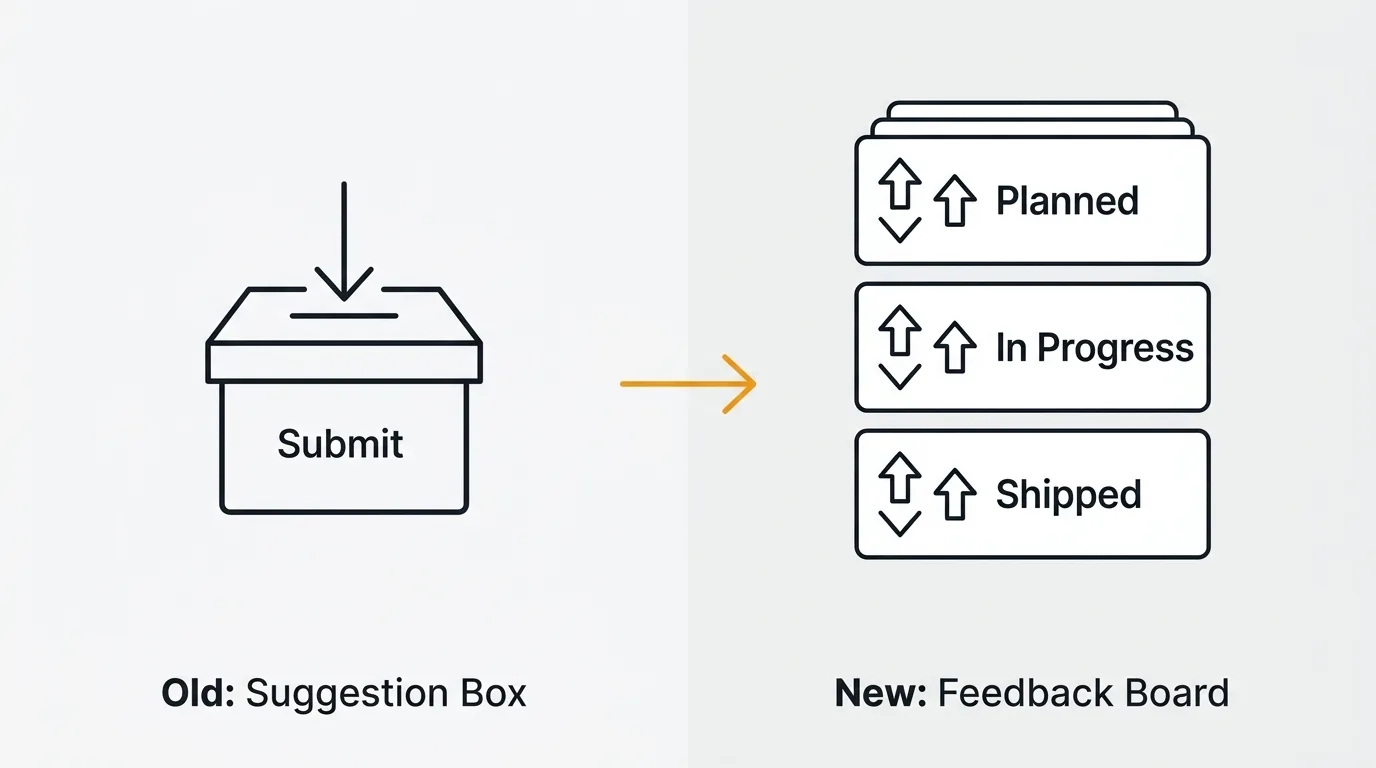
What is a digital suggestion box
A digital suggestion box is an online tool that lets customers or employees submit ideas, feature requests, or feedback through a form or portal. It replaces the physical box with a web interface. At its simplest, it is a Google Form connected to a spreadsheet. At its most sophisticated, it becomes something closer to a feedback board — with voting, categorization, and status tracking.
The term covers a wide range of tools: free online suggestion box platforms, anonymous feedback tools, dedicated suggestion box software, and general-purpose form builders repurposed for feedback collection. The common thread is that users submit input and someone on the receiving end is supposed to do something with it.
The problem is that "supposed to" does most of the work in that sentence.
Why traditional suggestion boxes fail
Whether physical or digital, suggestion boxes share structural flaws that limit their usefulness.
No prioritization. Every suggestion carries equal weight. A request submitted by one person looks the same as an idea that a hundred people care about. Without a mechanism to surface demand, the team reviewing suggestions has no way to distinguish signal from noise. They end up building based on whoever wrote the most persuasive note or whoever submitted most recently.
No transparency. The person who submits a suggestion has no visibility into what happens next. Did anyone read it? Is the team considering it? Was it rejected? This black hole erodes trust. Users who submit ideas and hear nothing stop submitting. Over time, the suggestion box goes quiet — not because people have nothing to say, but because they have learned that saying it is pointless.
No follow-through. Most suggestion boxes lack any workflow for turning a suggestion into action. There is no triage process, no status tracking, no assignment to a team. Suggestions accumulate in a spreadsheet or inbox that nobody owns. A quarterly review meeting pulls out a few interesting ones, but the rest are forgotten.
No way to measure demand. If five people submit variations of the same idea through separate form submissions, you have five rows in a spreadsheet that may not even look related. There is no aggregation, no deduplication, no vote count. The most requested feature and the least requested feature are indistinguishable.
No conversation. A suggestion box is one-directional. The submitter writes something and walks away. There is no mechanism for the team to ask clarifying questions, for other users to add context, or for the submitter to see that others share the same need. The richest signal — the conversation around an idea — never happens.
These problems apply equally to a physical employee suggestion box, a virtual suggestion box on your intranet, and a customer suggestion box on your website. The format is not the issue. The architecture is.
Here is what the suggestion box lifecycle actually looks like at most companies:
- Team launches suggestion box with enthusiasm
- Suggestions flow in during the first month
- Team reviews suggestions sporadically — no clear owner, no process
- Submitters hear nothing back
- Submission rate drops as users learn that input is ignored
- The suggestion box becomes a dead page that nobody visits
- Someone asks "why aren't we getting feedback?" and the cycle repeats
The pattern is predictable because it is structural. The tool is designed for collection, not action. Fixing this requires a different architecture, not a better form.
From suggestion box to feedback board
The evolution from suggestion box to modern feedback tool happened in stages. Each stage solved a specific failure of the previous one.
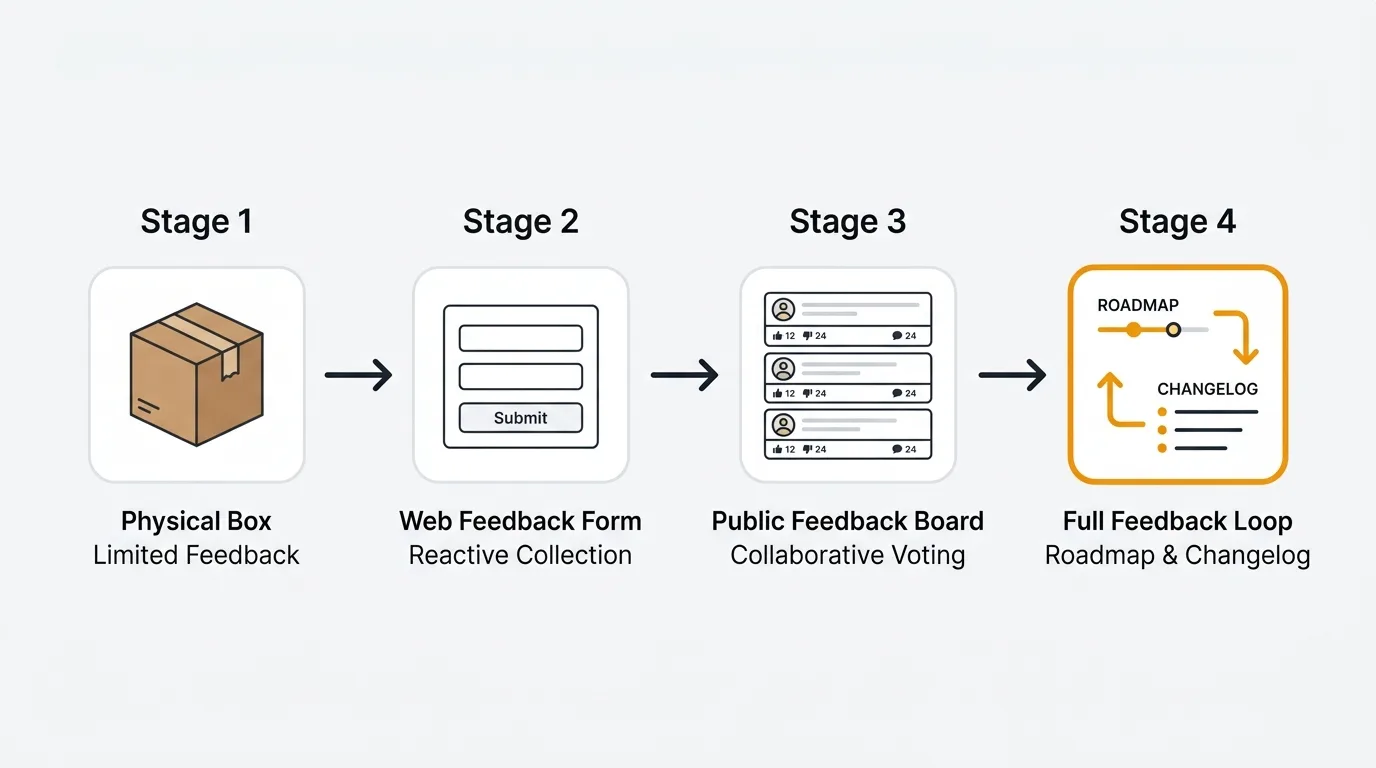
Stage 1: Physical suggestion box. Anonymous, unstructured, one-directional. Someone empties the box periodically and skims what is inside. No prioritization, no tracking, no follow-up.
Stage 2: Digital suggestion box. A form on a website or intranet that collects submissions into a database or spreadsheet. Easier to search and sort than paper, but still lacks prioritization, transparency, and conversation. Most online suggestion box tools stop here.
Stage 3: Feedback board with voting. Users submit ideas to a public or private board. Other users can see existing submissions and vote on the ones they care about. Duplicates are reduced because users find existing requests before creating new ones. Demand becomes quantifiable. Ten votes on a single request is a clearer signal than ten separate form submissions. Feature voting transforms a pile of suggestions into a ranked list of priorities.
Stage 4: Feedback board with roadmap and closed loop. The board connects to a public roadmap that shows what the team is working on and what is coming next. When a suggestion moves from "under review" to "planned" to "shipped," the people who submitted and voted on it get notified. The team publishes a changelog that announces what was built and why. The loop closes: submit, vote, track, ship, announce.
Stage 4 is where the best product teams operate today. It solves every failure of the traditional suggestion box: prioritization through voting, transparency through status tracking, follow-through via roadmap integration, demand measurement through vote aggregation, and conversation through comments and updates.
What to look for in a modern suggestion box alternative
If you are evaluating tools to replace a suggestion box — whether for customers, employees, or both — here is what matters.
Voting. Users should be able to vote on existing ideas instead of creating duplicates. Voting surfaces demand and reduces noise. Without it, you are back to manually counting similar submissions in a spreadsheet.
Transparency. Every submission should have a visible status: open, under review, planned, in progress, shipped, or declined. Users should be able to track the status of their ideas without asking.
Status tracking and notifications. When the status of a suggestion changes, the people who submitted or voted on it should be notified automatically. This is what closes the loop. It turns a one-directional submission into an ongoing relationship.
Anonymous option. Some feedback — especially employee feedback — is more honest when anonymous. An anonymous feedback tool option encourages submissions that people would not attach their name to. Look for tools that support anonymous posting without requiring it for all submissions.
Integrations. Your suggestion box alternative should connect to the tools your team already uses. Slack notifications for new submissions. Jira or Linear integration so accepted ideas become tickets. Intercom or Zendesk integration so support conversations feed into your feedback board. The fewer manual steps between submission and action, the more likely action happens.
Public or private boards. A customer suggestion box is usually public — users see what others have submitted and can vote. An employee suggestion box may need to be private or restricted to specific teams. The right tool supports both.
Search and deduplication. As volume grows, duplicate suggestions become a real problem. AI-powered duplicate detection catches redundant submissions and merges them, keeping your board clean and your vote counts accurate.
Categorization and tagging. You need a way to organize suggestions by theme, product area, or urgency. Without categories, a board with 200+ suggestions becomes as hard to navigate as a spreadsheet. Tags let your team filter by what matters — "UX issues" versus "new features" versus "billing questions."
Here is a quick evaluation checklist you can use when comparing tools:
| Capability | Suggestion box | Feedback board |
|---|---|---|
| Collect submissions | Yes | Yes |
| Users see existing ideas | No | Yes |
| Voting / prioritization | No | Yes |
| Status tracking | No | Yes |
| Notifications on updates | No | Yes |
| Public roadmap | No | Yes |
| Duplicate detection | No | Yes |
| Conversation / comments | No | Yes |
| Anonymous option | Sometimes | Configurable |
If a tool only checks the "Suggestion box" column, it will reproduce the same problems you are trying to solve.
Online suggestion box ideas for your team
The right setup depends on who you are collecting feedback from and what you plan to do with it.
For customer-facing products
Set up a public feedback board where customers can submit feature requests, report usability issues, and vote on ideas from other users. Link it from your app's navigation or help menu so users can find it without searching. Connect an in-app feedback widget so users can submit ideas without leaving your product. Publish a public roadmap so customers can see what you are building next.
This setup replaces the traditional customer suggestion box with something that actively reduces support volume. When users can see that an issue is already reported and planned, they stop opening support tickets about it.
For internal teams
Create a private board for employee suggestions about processes, tools, and workplace improvements. Enable anonymous submissions so employees can raise sensitive topics without hesitation. Review the board in a regular meeting — weekly or biweekly — and update statuses so employees see that their input is being considered.
The employee suggestion box fails most often because submissions are never acknowledged. A board with visible statuses and a regular review cadence solves this.
A practical setup for an internal suggestion board:
- Categories: Processes, Tools, Workplace, Culture, Other
- Review cadence: Biweekly during team leads meeting
- Response SLA: Every new submission gets a status update within 5 business days
- Owner: One person is responsible for triaging — not necessarily acting on every suggestion, but ensuring every submission is acknowledged
- Transparency rule: When a suggestion is declined, post a brief explanation. "We considered this and decided not to pursue it because [reason]" is more respectful than silence.
For product discovery
Use a feedback board during early-stage product development to validate ideas before committing resources. Share it with beta users or a customer advisory board. The voting data tells you which problems matter most to the people who will use your product. This is more reliable than internal opinions and faster than running formal surveys.
The feedback board becomes a lightweight form of continuous discovery. Instead of scheduling formal user interviews for every question, you have an always-on channel where users tell you what matters. You still need interviews for depth, but the board handles breadth — surfacing which problems to investigate further. For more on validating product assumptions early, see our value hypothesis guide.
Suggestion box tools compared
Teams replacing a suggestion box typically consider three categories of tools.
General-purpose forms (Google Forms, Typeform). These are free or cheap and quick to set up. They work as a basic digital suggestion box — users fill out a form, submissions land in a spreadsheet. But there is no voting, no status tracking, no public board, and no way for users to see what others have submitted. Every suggestion is isolated. You get collection without any of the mechanisms that make feedback useful. A free online suggestion box built on Google Forms is better than nothing, but not by much.
Project management tools (Jira, Trello, Asana). Some teams repurpose a Kanban board as a suggestion box. Users submit tickets, the team moves them through columns. This works for internal teams where everyone has access to the tool. It fails for customer-facing use cases because project management tools are not designed for public submission, voting, or transparency. They also introduce significant friction — asking a customer to create a Jira ticket is not a realistic feedback channel.
Purpose-built feedback boards (Quackback, Canny, Featurebase). These tools are designed specifically for the suggestion-to-roadmap workflow. Quackback provides feedback boards, voting, status tracking, a public roadmap, changelog, and AI-powered triage — open source and free to self-host. Canny and Featurebase are hosted alternatives with similar core features. A purpose-built feedback board beats a form because it adds prioritization, transparency, and closed-loop communication. It beats a project management tool because it is designed for the people submitting ideas, not just the people building the product.
For most teams, the jump from a form-based suggestion box to a feedback board is the highest-leverage change you can make. The technology difference is small. The process difference is transformative.
How to migrate from a suggestion box to a feedback board
If you already have a suggestion box with existing submissions, here is how to transition without losing data or momentum.
Step 1: Export existing suggestions. Pull all submissions from your current tool — whether it is a Google Sheet, a Typeform response list, or an email inbox. You need the suggestion text, the submitter (if known), and the date.
Step 2: Deduplicate and categorize. Before importing, group similar suggestions together. Five variations of "add dark mode" should become one feedback post with a note that multiple users requested it. This is the manual version of the deduplication that a feedback board handles automatically going forward.
Step 3: Import into your feedback board. Create posts for each unique suggestion. If you know how many people submitted the same idea, add proxy votes so the vote count reflects historical demand. Quackback supports bulk import and proxy voting for exactly this scenario.
Step 4: Update statuses. Any suggestion that is already in progress, planned, or completed should have its status set before you make the board visible. Users should see an active, maintained board on day one — not a fresh import with everything marked "open."
Step 5: Announce the switch. Tell your users (or employees) that the suggestion box has been replaced and where to find the new feedback board. Explain what is different: they can now vote, see statuses, and get notified when their ideas ship. Link to the board from wherever the old suggestion box lived.
Step 6: Retire the old tool. Remove the form, close the inbox, archive the spreadsheet. Having two collection points splits submissions and creates confusion. One board, one source of truth.
Frequently asked questions
Is a suggestion box anonymous?
It depends on the tool. A physical suggestion box is anonymous by default — there is no name attached to a slip of paper. Digital suggestion boxes vary. Some require users to log in, which ties submissions to an identity. Others support anonymous feedback. The best approach is to make anonymity optional: let users choose whether to attach their name. This is especially important for an employee suggestion box, where honest feedback about management or processes may not surface if names are required. Quackback supports anonymous posting alongside identified submissions, so users can choose their comfort level.
What is the best online suggestion box?
For most teams, a purpose-built feedback board is a better choice than a traditional suggestion box tool. Quackback is the strongest option if you want voting, status tracking, a public roadmap, and AI triage in an open-source package you can self-host. Canny and Featurebase are good hosted alternatives. If you just need a basic form to collect submissions without voting or tracking, Google Forms works — but you will outgrow it quickly once volume increases. For a broader comparison, see our guides to the best customer feedback tools and best feature request tools.
How do I create a digital suggestion box?
Start by deciding who you are collecting feedback from (customers, employees, or both) and whether submissions should be public or private. For the simplest option, create a Google Form with a single open-text field and share the link. For something more useful, set up a feedback board with Quackback — you can deploy it in under five minutes. Add categories to organize submissions by topic, enable voting so users can support existing ideas, and configure status tracking so submitters see progress. Connect it to Slack for notifications and to Jira or Linear so accepted suggestions flow into your development workflow.
How do I measure whether my suggestion box replacement is working?
Track three metrics. First, submission volume over time — a healthy feedback board should see steady or growing submissions, not the declining curve of an ignored suggestion box. Second, time to first response — how quickly does a new submission get a status update? Aim for under 5 business days. Third, close rate — what percentage of submissions eventually reach a terminal status (shipped, declined, or merged)? If your backlog grows indefinitely without resolution, you have a suggestion box wearing a feedback board's clothes. For more metrics, see our guide on how to ask for customer feedback.
What is the difference between a suggestion box and a feedback board?
A suggestion box collects input. A feedback board collects, organizes, prioritizes, and communicates. With a suggestion box, users submit ideas into a queue that only the receiving team can see. There is no voting, no status tracking, and no way for submitters to know what happened to their idea. A feedback board adds voting to surface demand, statuses to show progress, comments for conversation, and notifications to close the loop. The suggestion box is a mailbox. The feedback board is a conversation. For more on building a complete feedback process, see our customer feedback loop guide.

Authored by James Morton
Founder of Quackback. Building open-source feedback tools.
Try Quackback
The open-source feedback platform. Boards, voting, and roadmaps.
Get startedStar on GitHub262