
You shipped a feature. Now you need people to know about it. The hard part is not the announcement itself — it is getting users to read it, understand it, and actually use what you built.
Most product update announcements fail because they describe what changed, not why it matters. "We added bulk export" tells users nothing. "Export all your data in one click — no more downloading records one by one" tells them exactly what they gain. The framing determines whether your announcement gets read or ignored.
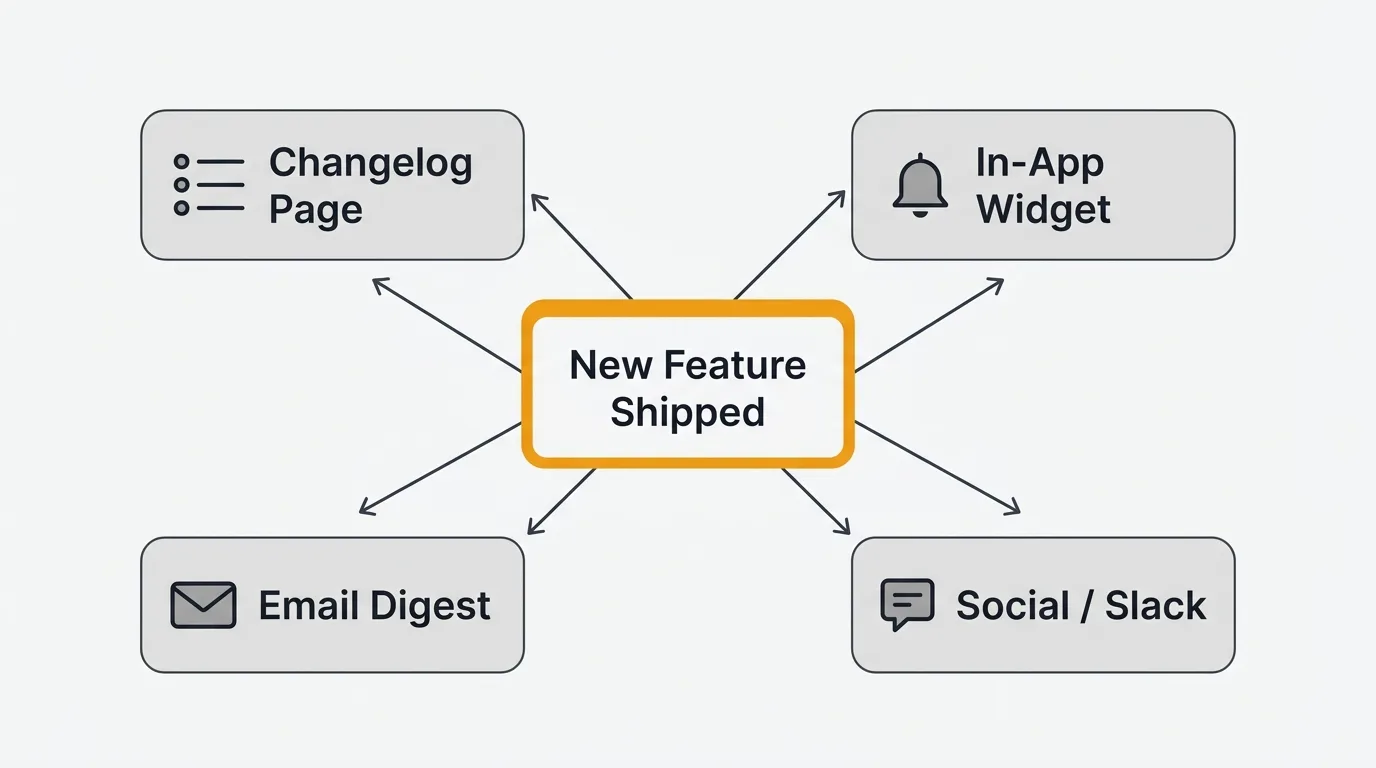
To announce a product update that users read, lead with the benefit instead of the feature name, include a short visual, and publish across the channels your users already use — a changelog page, in-app widget, email, and community. The framing decides whether the announcement drives adoption or gets ignored, so write "what can you do now" before "what changed."
Why product announcements matter
A well-executed product update announcement does more than inform — it drives behavior. When users understand what changed, they adopt the feature. Adoption reduces support tickets because users find the solution before they open a request. It also builds trust: customers who see a steady stream of improvements believe the product is worth staying with.
Announcements also close the customer feedback loop. When a user submits a feature request, votes on a roadmap item, or files a bug report, they are investing in your product. Publishing an announcement that connects the shipped work back to that input shows users their feedback had an effect. That connection — "you asked, we built it" — is one of the most effective retention signals available to a product team.
Done consistently, announcements also create an internal artifact. Your team accumulates a visible record of what shipped, when, and why. New hires, investors, and sales teams can see momentum without digging through code commits.
10 real product update examples
1. Linear
Linear's changelog entries are short and benefit-first. Each entry leads with a single sentence that names what changed and what users can now do. Below that is a GIF showing the feature working — no static screenshots, no walls of text. The GIFs do the explaining so the copy does not have to.
What works: The visual does the heavy lifting. Users understand in under ten seconds whether the update applies to them.
Key takeaway: Match your format to how your users consume information. If your product is visual, your announcements should be visual.
2. Stripe
Stripe's release notes are written for developers. Each entry includes the exact API version, the change type (breaking, non-breaking, deprecated), and a migration path when needed. There is no marketing language — just the technical detail developers need to decide whether to act.
What works: Stripe respects its audience's time. Developers can scan for the version number and read only what affects them.
Key takeaway: Know who is reading. Developer-facing products need technical specificity. Consumer-facing products need plain language.
3. Notion
Notion publishes a "What's New" page that reads more like a friendly product newsletter than a changelog. The tone is conversational, updates are grouped by theme, and many entries include embedded demos you can interact with inline. The page is updated regularly rather than versioned.
What works: The embedded demos lower the barrier to trying new features. You do not have to navigate away — you see it working right there.
Key takeaway: If your product has a lot of casual users, a lower-friction format with embedded media outperforms a technical changelog.
4. Vercel
Vercel uses two tiers. Major releases get a full blog post with context, architecture decisions, and performance data. Minor updates go into a changelog with shorter entries. The two formats serve different audiences: engineering leaders read the blog posts, developers scan the changelog.
What works: Not every update deserves the same treatment. Investing editorial effort where it matters most — major releases — makes those announcements land harder.
Key takeaway: Build a tiered announcement strategy. Save long-form for the updates that move deals and retain power users.
5. GitHub
GitHub's changelog blog publishes detailed technical write-ups for every meaningful update. Entries often include before-and-after comparisons, API references, and links to the relevant documentation. The tone is authoritative but not dry — each post explains the reasoning behind the change.
What works: GitHub has a highly technical, opinionated user base. Users do not just want to know what changed — they want to understand why. The reasoning builds credibility.
Key takeaway: If your users are technically sophisticated, share the thinking behind decisions. It signals that you take their craft seriously.
6. Figma
Figma's announcements lean heavily on video. Major feature releases come with narrated walkthroughs that show the feature being used in a realistic design workflow, not a contrived demo. The storytelling centers on designer problems — "you've been dealing with this friction for years" — before showing the solution.
What works: Figma sells to a visual audience that values craft. Video announcements match the medium to the message.
Key takeaway: Use the format your audience already consumes. Designers watch videos. Developers read documentation. Match accordingly.
7. Slack
Slack surfaces new features inside the product itself through tooltips and modals that appear at the right moment — when you hover over a new button, or when you open a feature that has been updated since your last session. The announcement finds you; you do not have to find it.
What works: In-app announcements reach users when they are already in context. The relevance is immediate.
Key takeaway: For features that live inside a specific workflow, in-app announcements beat email. The user is already there.
8. Intercom
Intercom uses in-app banners that target specific user segments. A banner for a new reporting feature only shows to users on plans that include reporting, who have logged in within the past 30 days, and who have not already seen it. The targeting is precise enough that the announcements feel relevant rather than spammy.
What works: Untargeted announcements train users to ignore them. Targeted announcements feel like useful information.
Key takeaway: Segmentation is the difference between an announcement that drives adoption and one that trains users to dismiss your notifications.
9. Loom
Loom sends a monthly email digest that groups multiple small updates under a single subject line. Instead of sending a separate email for every minor improvement, they batch them and send one. The email is scannable — each update gets a headline, one sentence, and a link.
What works: Frequent small updates do not need individual announcements. Batching them reduces notification fatigue while keeping users informed.
Key takeaway: Cadence matters. A monthly digest for incremental improvements respects your users' inboxes.
10. Cal.com
Cal.com is open source, and their changelog reflects that. Updates are published publicly with community context — references to GitHub issues, contributor credits, and links to the discussions that shaped the decision. The community can comment directly.
What works: For an open-source product, the community is part of the product team. Announcements that invite discussion strengthen that relationship.
Key takeaway: If your users are also contributors, your changelog can be a forum, not just a notice board. Quackback takes the same open-source approach — it is AGPL-3.0 and self-hostable, so your changelog, roadmap, and the feedback behind it stay on infrastructure you control.
Product update announcement template
Use this structure for any update, from a minor bug fix to a major release. Copy it, fill in the blanks, and adjust the length to match the significance of the change.
## [Benefit, not feature name]
Example: "Export all your data in one click" not "Bulk export released"

**What changed**
One or two sentences describing the specific change. Be concrete.
Example: "You can now export all your records as a CSV or JSON file from the
Settings page. Previously, export was limited to 100 records at a time."

**Why it matters**
One sentence on the user benefit.
Example: "If you run regular data backups or work with external tools, this
removes the manual workaround entirely."

**How to use it**
Step 1: Navigate to Settings > Data > Export
Step 2: Choose your format (CSV or JSON)
Step 3: Click Export — your file downloads immediately

[Link to full documentation]

[Screenshot or GIF placeholder — show the feature in action]

---
Was this update useful? [Leave feedback] [thumbs up] [thumbs down]
The headline is the most important line. Users scan headlines before deciding whether to read. A benefit-first headline — "Export all your data in one click" — answers the user's first question: "Does this affect me?" A feature-name headline — "Bulk export released" — does not.
Distribution channels
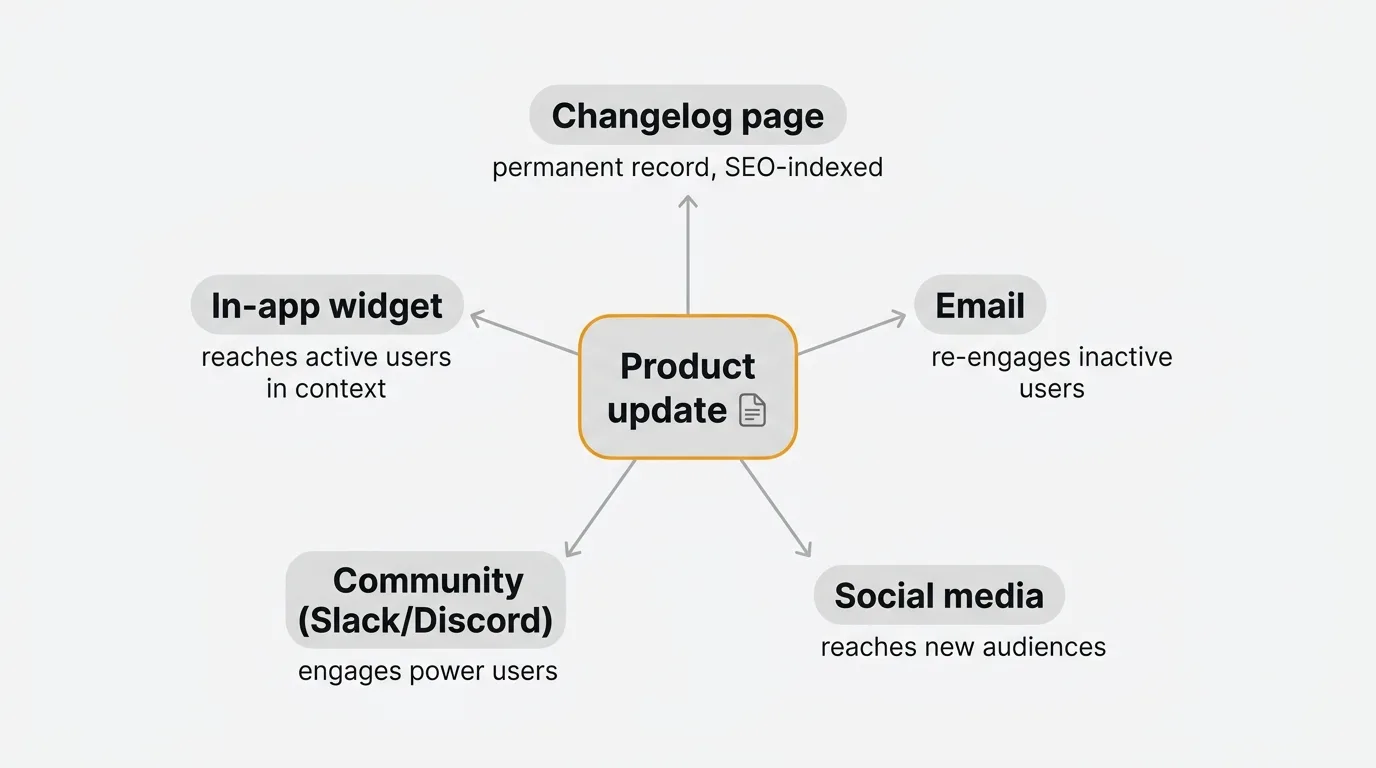
Where you publish matters as much as what you write. Each channel reaches a different audience in a different context.
Changelog page A public changelog page is your permanent record. It is indexed by search engines, linkable from support tickets, and discoverable by users who want to see whether the product is actively maintained. Every update should appear here. The downside is that users have to find it — it does not reach them. When we built Quackback's own changelog, we tied each entry back to the feedback and roadmap items that prompted it, so readers see the request, the vote, and the shipped result on one page — the "you asked, we built it" loop made concrete.
In-app widget or notification In-app announcements reach users when they are actively using your product. They work best for features that are relevant to the current context. The risk is notification fatigue: if you push every minor update in-app, users will start dismissing them without reading. Reserve in-app for updates that are genuinely relevant to the user's current plan or workflow. Quackback's changelog feature lets you embed a widget that surfaces updates inside your product without building a custom notification system. It is open source and self-hostable, so you keep ownership of the changelog and the feedback behind it.
Email Email reaches users who have not logged in recently — exactly the audience you want to re-engage with a significant update. It works well for major releases and monthly digests. The downside is deliverability and inbox competition. Keep subject lines specific and avoid "Product Update" as a subject line — it is one of the fastest ways to get ignored.
Social media Twitter/X, LinkedIn, and Bluesky work for announcements that have broad appeal or are significant enough to attract attention beyond your current user base. Major releases, open-source milestones, and story-driven updates perform well. Minor bug fixes do not.
Community channels (Slack, Discord) If you have a community, announce there. Community members are your most engaged users. They are also the most likely to give you immediate feedback on whether the update solved their problem. Direct the conversation — post the announcement, ask a specific question, and stay in the thread.
For a structured approach to choosing and combining channels, the best changelog tools comparison covers tools that handle multi-channel distribution.
Best practices
Lead with the benefit. Every announcement should answer "what can I do now that I could not do before?" before explaining how the feature works. Users do not care about implementation details — they care about what changes for them.
Include a visual. A GIF or screenshot reduces the cognitive load of understanding a new feature. Users do not have to navigate to the feature and explore — they can see it working in ten seconds and decide whether to try it.
Keep it scannable. Use short paragraphs, headings, and bullet points. Most users will not read every word. Design your announcement so they can extract the key information in a scan.
Link to documentation. Your announcement is an introduction, not a manual. Point users to the documentation where they can get the full picture. If the feature is complex, a "getting started" guide link is more useful than a detailed how-to in the announcement itself.
Ask for feedback. End every announcement with a way for users to respond — a thumbs up/down, a comment box, or a direct reply link. This signals that you care whether the update was useful, and it gives you data on whether the feature landed. For a complete approach to closing the loop, see the guide on building a customer feedback loop.
Maintain a consistent cadence. Users who know to expect updates — weekly, biweekly, or monthly — are more likely to read them than users who receive announcements unpredictably. Cadence signals that the product is actively maintained.
For teams building a repeatable release notes workflow, the release notes template covers the full structure from draft to publish.
Publish your next update with Quackback
Quackback turns the loop in this guide into a workflow: collect feedback, prioritize it on a public roadmap, ship it, and announce it through a built-in changelog and in-app widget. It is open source (AGPL-3.0) and self-hostable, and the MCP server lets you publish changelog entries straight from your existing tools or an AI assistant. With 25 integrations and SSO/OIDC, it fits the stack you already run.
Try Quackback — open source with a managed cloud option. Start free. Get started | View on GitHub
Frequently asked questions
How long should a product update announcement be?
Match the length to the significance of the change. A minor bug fix needs one sentence and a changelog link. A major release warrants a few short paragraphs: what changed, why it matters, how to use it. If you pass 300 words, you are writing documentation, not an announcement.
How often should you publish product updates?
A consistent cadence matters more than a specific frequency. Many SaaS teams publish minor updates weekly and major announcements monthly. Small, frequent updates signal that the product is alive and improving, so do not wait for something "significant enough." Silence between major releases is a retention risk.
Should every update get its own announcement?
No. Batch minor updates into a digest instead of announcing every small change. The rule of thumb: if the update changes what a user can accomplish, it deserves its own announcement. Under-the-hood changes like performance or refactoring belong in a batch digest or technical changelog.

Authored by James Morton
Founder of Quackback. Building open-source feedback tools.
Try Quackback
The open-source feedback platform. Boards, voting, and roadmaps.
Get startedStar on GitHub305