
Ideas come from everywhere. Slack messages, support tickets, sales calls, user interviews, your own backlog. Without a system, most of them disappear. The good ones get buried in threads. The same idea surfaces three times from different people. Nothing connects to what actually gets built.
Idea management software gives you a structured place to collect, evaluate, and act on ideas — from customers, employees, or both. This guide compares ten tools across the full idea lifecycle: collection, organization, evaluation, prioritization, implementation, and communication.
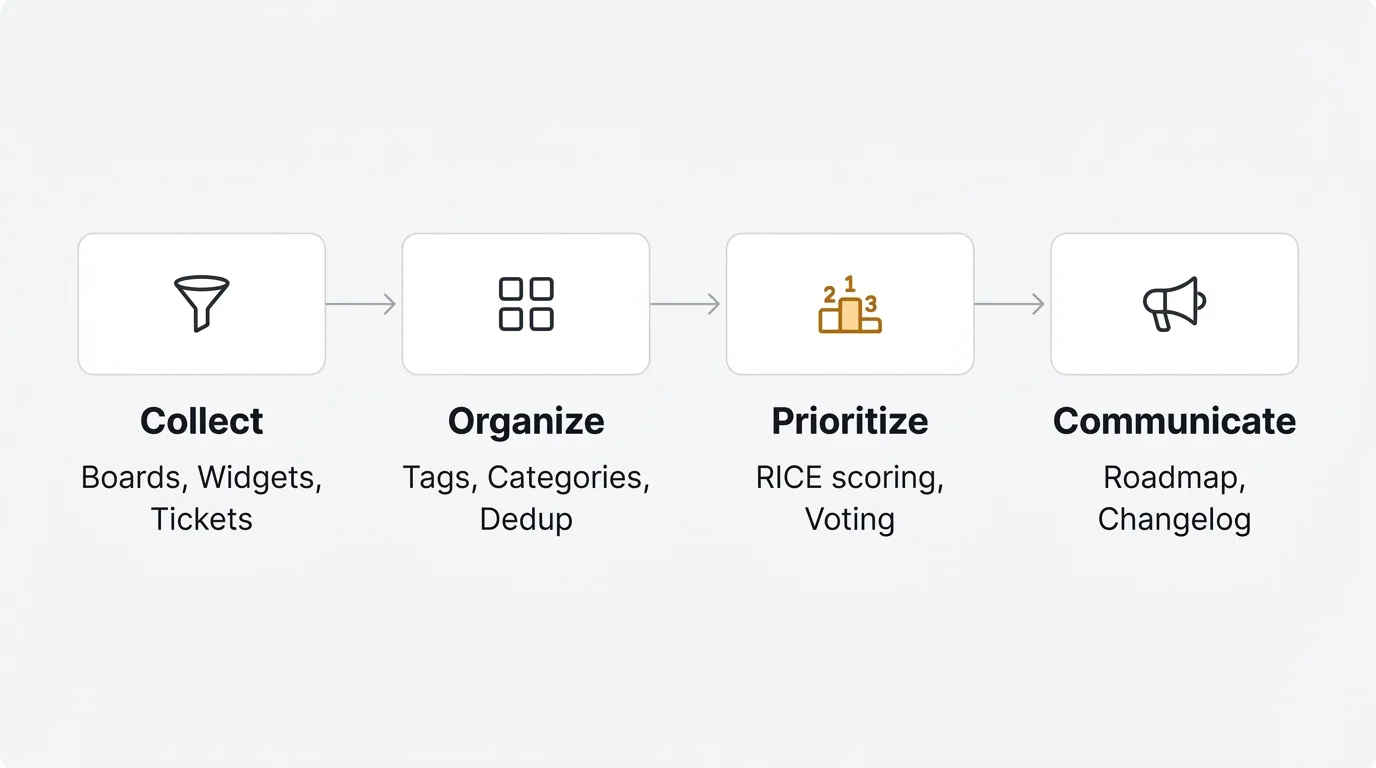
For most product teams, Quackback is the strongest option: open source, free to self-host, available as a managed cloud, with AI triage and a full feedback-to-roadmap workflow. Canny and Featurebase are the best hosted alternatives for teams that want a SaaS product without infrastructure overhead. Enterprise teams running formal innovation programs should look at IdeaScale or Brightidea.
Pricing last verified January 2026. Vendors may change plans and pricing without notice. Check each vendor's pricing page for the latest figures.
What is idea management software?
Idea management software helps organizations collect, evaluate, and act on ideas from customers, employees, or other stakeholders. It replaces ad-hoc channels — email inboxes, Slack threads, spreadsheets — with a structured process that every idea moves through.
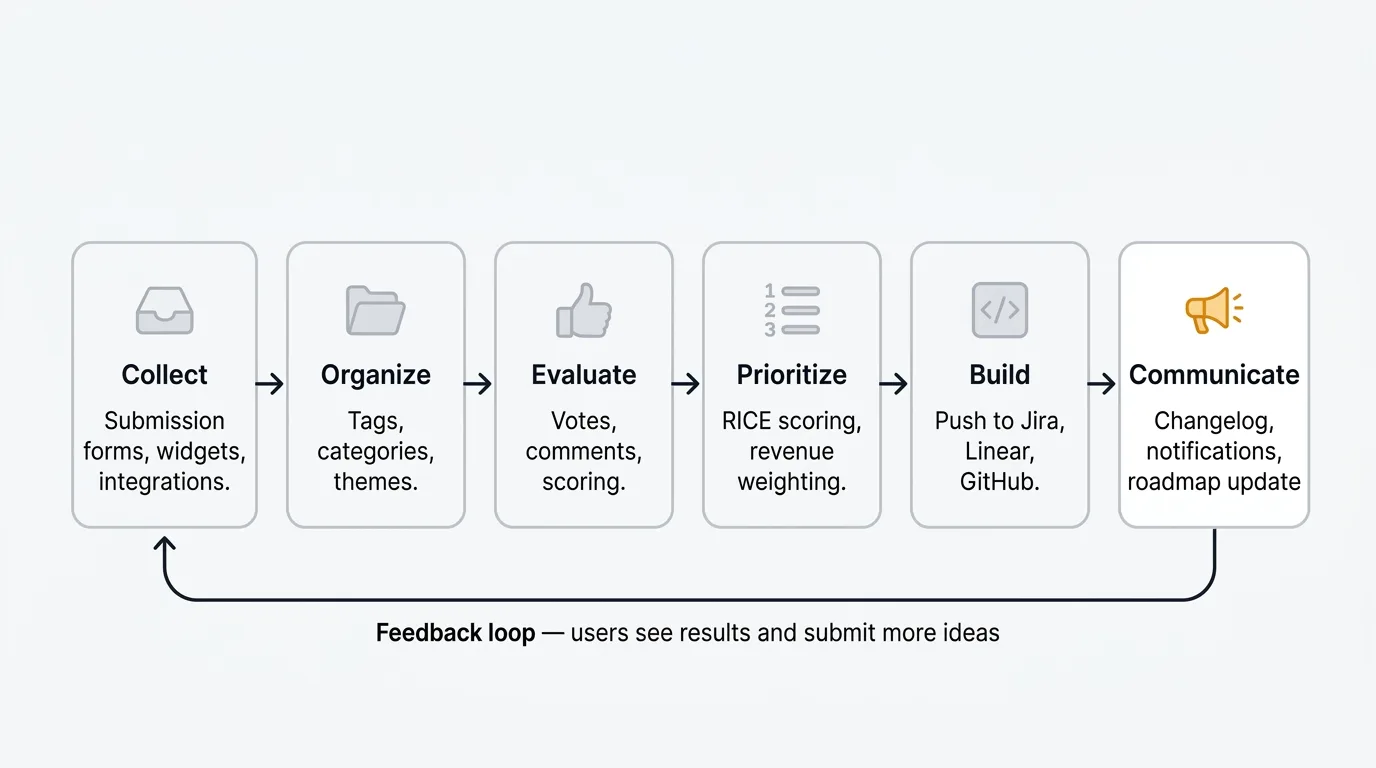
The idea lifecycle has six stages. Collection is where ideas enter the system: through submission forms, integrations with support tools, or direct capture from conversations. Organization groups ideas by theme, product area, or status. Evaluation lets stakeholders vote, comment, or score ideas against criteria. Prioritization uses that data to surface the ideas worth building. Implementation connects accepted ideas to development workflows. Communication closes the loop, notifying the people who submitted or supported an idea when something changes.
Good idea management software handles all six stages. Most tools handle some of them well and leave gaps in others. The right choice depends on where your ideas come from, how your team evaluates them, and how tightly you need to connect feedback to your development process.
What to look for
Idea collection channels. Ideas should be easy to submit from wherever your users and teams already are. Look for submission forms, in-app widgets, integrations with support tools (Intercom, Zendesk), and the ability to submit ideas on behalf of users. The more friction there is in submission, the fewer ideas you collect.
Voting and prioritization. A voting system surfaces demand, but raw vote counts are rarely enough. Look for tools that let you weight votes by customer segment, revenue, or other signals. Scoring frameworks like RICE (covered in our RICE framework guide) bring consistency to prioritization decisions. See our feature voting tools comparison for more on what good voting looks like.
Categorization and tagging. Ideas need to be organized to be useful. Tags, categories, and custom fields let you group related ideas and filter by product area, customer segment, or priority. Without this, a large idea backlog becomes as hard to navigate as the Slack thread it replaced.
Status tracking. Every idea should have a status that reflects where it is in the lifecycle: open, under review, planned, in progress, shipped, or declined. Status changes should trigger notifications to submitters and voters.
Public-facing portal. A public board where customers can submit ideas, vote on others, and see what is planned builds trust and reduces duplicate requests. Privacy controls matter too — some ideas should stay internal.
Analytics. Trend data on idea volume, vote velocity, and topic clusters helps product managers understand where demand is growing. AI-powered feedback analysis can surface patterns that manual review misses.
Integrations. Accepted ideas need to connect to your development workflow. Native integrations with Jira, Linear, and GitHub, plus communication tools like Slack, are the minimum. A REST API or webhooks let you build custom connections.
Pricing model. Idea management tools price in several ways: per seat, per tracked user, per board, or flat rate. Open-source tools let you self-host at a fixed infrastructure cost. Understand how costs scale before you commit.
1. Quackback
Best for: Product teams that want an open-source tool covering the full idea lifecycle — collection, voting, roadmap, changelog, and AI triage — without vendor lock-in.
Quackback is an open-source idea management platform licensed under AGPL-3.0. Users submit ideas through feedback boards, where each post collects votes, nested comments, and sentiment data. Ideas move through statuses from open to planned to shipped, visible on the public roadmap and announced via the changelog. The code is open and auditable, and your data stays in your own PostgreSQL database.
The AI layer is what separates Quackback from other tools in this category. Duplicate detection catches redundant ideas at submission time. Merge suggestions identify related posts with reasoning your team can accept or dismiss in one click. Sentiment analysis flags frustrated submitters. Post summaries surface key quotes and suggest next steps. AI is built in, with no add-on tier.
The MCP server is unique among idea management tools. It implements the Model Context Protocol, supported by Claude, Cursor, and Windsurf. An AI agent can search your idea backlog, triage incoming posts, write responses, create changelog entries, and merge duplicates. Every action is attributed and auditable.
Key features:
- Feedback boards with voting, categories, tags, and nested comments
- AI duplicate detection and merge suggestions
- Sentiment analysis and post summaries for faster triage
- Feature voting with anonymous mode supported
- Status tracking with automatic voter notifications
- Public roadmap and changelog
- MCP server for AI agent access
- 25 integrations including Slack, Linear, Jira, GitHub, Intercom, Zendesk, and Salesforce
- SSO/OIDC, webhooks, and full REST API
Pricing: Free and open source (AGPL-3.0). Self-host at no cost, or use Quackback Cloud for a managed option from $29/mo, with a 14-day free trial.
Pros:
- Covers the full idea lifecycle from collection through communication
- AI triage built in at no extra cost
- MCP server enables AI agents to act on ideas directly
- Free to self-host under AGPL-3.0
- Open source means no surprise pricing changes or paywalled features
Cons:
- Self-hosting takes more effort to set up than a hosted SaaS tool
- Smaller integration marketplace than the longest-running enterprise suites
Start collecting and organizing ideas with Quackback — open source with a managed cloud option. Start free. Get started | View on GitHub
2. Canny
Best for: Mid-size SaaS teams that want a hosted idea board with AI-powered feedback discovery from support channels.
Canny has been in this space since 2017. It covers the core workflow: users submit ideas through a public board, your team tracks them with statuses and categories, and voters get notified when things change. The AI suite, Autopilot, is the standout feature — it discovers ideas buried in support conversations across Intercom, Zendesk, Help Scout, and Gong, then creates posts automatically.
The pricing model changed in May 2025 from per-admin to tiered pricing based on tracked users. A tracked user is anyone with a post, vote, or comment attributed to them. Costs auto-upgrade when you cross tier thresholds, making cost forecasting harder as your product grows. Several customers have reported unexpected increases after this change.
For teams that want a hosted solution and can manage the scaling costs, Canny is a mature product with a large user base and a good integration ecosystem. The concern is pricing predictability at scale. See our Quackback vs Canny comparison for a full feature-by-feature breakdown.
Key features:
- Feedback boards with categories, statuses, and internal notes
- Autopilot AI discovers ideas from support conversations automatically
- Smart replies and comment summarization
- Public and private roadmaps linked to ideas
- Changelog with email notifications
- Integrations with Jira (Pro+), Linear, Slack, HubSpot, and others
Pricing: Free plan (25 tracked users). Core from $19/mo. Pro from $79/mo. Business is custom pricing.
Pros:
- Mature product with a large user base and good documentation
- AI extracts ideas from support tools, reducing manual capture work
- Solid integration ecosystem for routing ideas to development teams
Cons:
- Tracked-user pricing makes costs unpredictable at scale
- Auto-upgrades when you exceed tracked user thresholds
- Jira integration locked to Pro ($79/mo)
- No self-hosting option
- Removing "Powered by Canny" branding requires the Business plan
3. Aha! Ideas
Best for: Large product organizations that need structured idea scoring, approval workflows, and a dedicated ideas portal alongside a broader product management suite.
Aha! Ideas is the standalone version of Aha!'s idea management module. It provides a customer-facing ideas portal where users submit and vote on ideas, plus an internal layer with scoring models, category management, and workflow routing. Ideas move through configurable stages, and your team can score them against weighted criteria before promoting the best ones to your product roadmap.
The depth of configuration sets Aha! apart from simpler tools. You can define custom scoring formulas, route ideas to specific reviewers based on category, and merge duplicate submissions. The integration with the broader Aha! product suite means accepted ideas can become initiatives or features with a single click. The trade-off is complexity — Aha! Ideas is designed for organizations with formal product processes, not teams looking for a quick-to-deploy feedback board.
Pricing is per-user and positions Aha! in the enterprise tier. For smaller teams or those who only need idea collection, the cost and overhead are hard to justify.
Key features:
- Customer-facing ideas portal with voting and status updates
- Custom scoring models with weighted criteria
- Configurable workflow stages and approval routing
- Idea merging and duplicate management
- Integration with Aha! Roadmaps, Strategy, and Develop products
- White-label portal with custom domain and branding
- Integrations with Jira, Azure DevOps, Salesforce, Slack, and more
Pricing: Ideas Essentials from $39/user/month, Ideas Advanced from $59/user/month, billed annually with a three-user minimum. Enterprise pricing is custom. (Verified January 2026 against aha.io/ideas/pricing.)
Pros:
- Deep scoring and workflow configuration for formal idea processes
- Tight integration with Aha! product suite for teams already using it
- Enterprise-grade security and compliance capabilities
Cons:
- High per-user cost puts it out of reach for smaller teams
- Significant complexity for teams that just want a voting board
- No open source or self-hosting option
- Steep learning curve
See how it compares: Quackback vs Aha!.
4. Productboard
Best for: Product teams that need to connect customer ideas to strategic prioritization frameworks and driver-based roadmaps.
Productboard is a full product management platform. It captures ideas as "insights" from Intercom, Zendesk, Salesforce, email, and Slack, and links them to features in a prioritization matrix. The insights portal aggregates every customer who asked for the same thing in one place, so your team can see the breadth of demand before deciding what to build.
The differentiator is strategic prioritization. You can score ideas against custom drivers — revenue impact, user reach, effort — and build roadmaps tied to company objectives. If your team needs to connect raw customer ideas to a formal product strategy process, Productboard provides that layer. If you need a straightforward idea board with voting, it is more than you need. See our Quackback vs Productboard comparison for a detailed breakdown.
Key features:
- Insights portal captures ideas from support, sales, and email
- Feature prioritization with custom scoring frameworks (RICE, weighted, custom)
- Driver-based roadmaps tied to company objectives
- AI included via credits (250/maker/month) for summarization and semantic search
- Integrations with Jira, Azure DevOps, Slack, Salesforce, Zendesk, and Intercom
Pricing: Spark at $15/maker/month (annual) or $19/maker/month (monthly). Enterprise is custom.
Pros:
- Connects ideas to strategic prioritization and scoring
- Aggregates demand across support, sales, and email into one view
- AI included in the base plan via credits
- Enterprise-grade security and compliance
Cons:
- Per-maker pricing grows with team size
- AI credits (250/maker/month) may be limiting for heavy users
- Overkill if you only need idea collection and voting
- No self-hosting
5. IdeaScale
Best for: Large organizations running formal innovation programs with campaigns, workflows, and governance requirements.
IdeaScale is built for enterprise-scale idea crowdsourcing. Rather than a continuous feedback board, it structures idea collection around campaigns — time-bounded initiatives where employees or customers submit ideas on a specific topic. Ideas move through configurable pipeline stages: submission, review, refinement, selection, and implementation. Each stage can have its own reviewers, scoring criteria, and required fields.
The scale of IdeaScale's customer base — government agencies, large corporations, and nonprofits — reflects where it fits. If you are running a company-wide innovation challenge or a regulated public engagement process, IdeaScale has the governance features to support it. If you are a product team collecting customer feedback, the overhead of campaign management and multi-stage workflows is more than you need.
Pricing is custom and positions IdeaScale firmly in the enterprise market. There is no self-serve signup or published pricing tier.
Key features:
- Campaign-based idea collection with time-bounded challenges
- Multi-stage pipeline with configurable review and scoring workflows
- AI-assisted idea analysis and clustering
- Public and private idea communities
- Gamification features (points, leaderboards, badges) for engagement
- Reporting and ROI tracking for innovation programs
- Integrations with Microsoft Teams, Slack, Jira, and others
Pricing: Custom pricing. No public tiers. Contact sales.
Pros:
- Built for enterprise-scale innovation programs and campaigns
- Strong governance and workflow configuration
- Handles both employee innovation and customer feedback programs
Cons:
- No transparent pricing; requires a sales process
- Campaign-based model is a mismatch for continuous product feedback
- Significant setup and administration overhead
- Not suitable for small teams or startups
6. UserVoice
Best for: Enterprise support and product teams that need revenue-weighted prioritization and CRM-driven idea management at scale.
UserVoice pioneered the customer feedback category and still targets enterprise teams. The platform handles idea submission through a customer-facing portal, internal idea capture from sales and support teams, and revenue-weighted prioritization by connecting to Salesforce or HubSpot. You can distinguish "twelve enterprise accounts worth $2M want this" from "80 free-tier users want this."
The price reflects the positioning. UserVoice starts at roughly $16,000 per year with custom pricing based on feedback volume and integrations. There is no self-serve option and no public per-seat pricing. A 30-day free trial is available, but the sales process is required for any paid plan. For teams with the budget, the revenue-linked prioritization is genuinely useful. For everyone else, the cost is prohibitive.
Key features:
- Customer-facing idea portal with voting and status updates
- Internal idea capture from sales, support, and product teams
- Revenue-weighted prioritization linked to Salesforce or HubSpot ARR data
- Validation product ($199/mo) for microsurvey-based product research
- Enterprise security: SAML SSO, custom SLAs, compliance features
- Integrations with Salesforce, Zendesk, HubSpot, Slack, and Jira
Pricing: Starting at approximately $16,000/year. Custom pricing based on feedback volume and integrations. Annual billing required. (Verified January 2026; UserVoice does not publish tiered pricing.)
Pros:
- Revenue-linked prioritization connects ideas to business impact
- Internal capture keeps sales and support feedback in the same system
- Enterprise compliance and security features
Cons:
- Pricing excludes most teams outside enterprise budgets
- No self-serve signup or transparent pricing tiers
- Interface feels dated compared to newer tools
- No self-hosting
See how it compares: Quackback vs UserVoice.
7. Featurebase
Best for: Small to mid-size teams that want idea collection, changelog, and roadmap in one lightweight hosted tool with a free plan entry point.
Featurebase bundles feedback boards, a changelog, public roadmap, help center, and customer support inbox in a single product. The premise is that many ideas start as support conversations — a customer asks "can I do X?" and your team realizes X does not exist. Featurebase keeps the support conversation and the resulting idea connected.
The free plan is available but limited to one seat. Growth starts at $29/seat/month. Their AI agent, Fibi, can resolve customer questions and submit ideas to your boards on behalf of customers, at $0.49 per resolution. Post merging and user segmentation — both important for managing idea volume — are locked to higher tiers.
Key features:
- Feedback boards with voting, categories, and user segmentation (paid)
- AI agent captures ideas from support conversations ($0.49/resolution)
- Post merging to consolidate duplicate ideas (paid tiers)
- Unified support inbox with live chat, email, and ticketing
- Changelog and public roadmap
- 12 integrations: Linear, Jira, GitHub, ClickUp, Slack, Intercom, Zendesk, HubSpot
Pricing: Free plan (1 seat, limited features). Growth at $29/seat/month. Professional at $59/seat/month. Enterprise at $99/seat/month.
Pros:
- Captures ideas from support conversations automatically
- Keeps the support-to-idea pipeline in one product
- Modern interface with a relatively low entry price
Cons:
- Per-seat pricing adds up for larger teams
- AI resolutions at $0.49 each can become significant at volume
- Post merging and segmentation locked to higher tiers
- No self-hosting or open source
See how it compares: Quackback vs Featurebase.
8. Frill
Best for: Indie hackers, solo founders, and small SaaS teams that want a minimal, affordable idea board with roadmap and changelog.
Frill is a lightweight feedback tool that covers the basics: a public idea board where users submit and vote on ideas, a roadmap view, and a changelog. Setup takes minutes. The interface is clean. There are no complex workflows or scoring systems — ideas come in, you organize them, and you publish what you are building.
The appeal is simplicity and price. At $25/month, Frill is affordable for early-stage products where you want a professional-looking feedback board without the overhead of more complex tools. The trade-off is depth. There is no duplicate detection, no AI triage, no user segmentation, and limited integrations. If your idea volume grows beyond what one person can manually manage, you will outgrow Frill.
Key features:
- Public idea board with voting and custom statuses
- Roadmap view grouped by status
- Changelog with subscriber notifications
- Embeddable widget for in-app idea collection
- Custom domain and branding
- Integrations with Slack, Zapier, and a REST API
Pricing: Startup at $25/mo (50 ideas). Business at $49/mo (unlimited). Growth at $149/mo. Enterprise from $349/mo.
Pros:
- Simple to set up and use
- Affordable entry price for early-stage products
- Covers the core idea-to-roadmap workflow
- Embeddable widget for in-app collection
Cons:
- No duplicate detection or idea merging
- No AI features
- Limited integrations compared to larger platforms
- No self-hosting
See how it compares: Quackback vs Frill.
9. Brightidea
Best for: Corporate innovation teams running structured idea pipelines across large organizations with governance, reporting, and ROI tracking requirements.
Brightidea is an enterprise innovation management platform that has been in the market since 1999. It structures idea collection through what it calls a "pipeline" — a series of stages that each idea moves through from submission to implementation. Each stage has its own form, reviewer assignment, scoring criteria, and approval requirements.
The platform is designed for organizations running multiple simultaneous innovation programs across different business units. You can run an employee suggestion box, a product innovation challenge, and a process improvement program in parallel, each with its own pipeline and governance. Reporting tracks the number of ideas implemented and their estimated business value. Pricing is custom and enterprise-tier.
Key features:
- Pipeline-based idea management with configurable multi-stage workflows
- Campaign management for time-bounded innovation challenges
- Idea scoring, evaluation, and approval workflows
- Portfolio tracking across multiple innovation programs
- ROI and implementation tracking
- Integrations with Jira, Microsoft Teams, Salesforce, and others
- Enterprise security: SSO, SCIM provisioning, data residency options
Pricing: Custom pricing. Contact sales. No public tiers.
Pros:
- Built for complex, multi-program enterprise innovation management
- Strong pipeline and governance configuration
- Long track record with enterprise customers
Cons:
- No transparent pricing; requires a lengthy sales process
- Significant setup and administration overhead
- Overkill for product teams wanting a feedback board
- Interface is dated compared to modern tools
10. Nolt
Best for: Small teams that want the simplest possible idea collection board with predictable flat-rate pricing.
Nolt gives you a clean board where users submit ideas, vote on them, and leave comments. Custom statuses track each idea through your process. A basic roadmap view groups ideas by status. Setup takes under ten minutes.
The flat pricing is the main appeal. Essential is $29/month for one board (billed annually) with no tracked-user billing and no per-seat scaling. You know what you will pay regardless of how many users submit ideas. The concern in 2026 is stagnation — Nolt has seen minimal product updates since 2022. There is no duplicate detection, no changelog, no AI, and no bulk editing. If your idea volume grows, manual triage becomes the bottleneck.
Key features:
- Idea board with voting, custom statuses, and comments
- Roadmap view grouped by status
- SSO, private boards, and password-protected boards
- Custom domain and branding
- Integrations: Slack, Discord, Jira, Linear, Asana, Trello, GitHub, Zapier (Pro plan)
Pricing: Essential at $29/month for one board (annual). Pro at $69/month for five boards. Enterprise is custom.
Pros:
- Quickest setup of any tool on this list
- Flat pricing regardless of idea or user volume
- Clean, user-friendly interface
Cons:
- No duplicate detection — similar ideas pile up without consolidation
- No changelog to notify submitters when ideas ship
- Minimal product updates since 2022
- Per-board pricing multiplies costs across multiple products
- No self-hosting or AI features
See how it compares: Quackback vs Nolt.
Comparison table
| Feature | Quackback | Canny | Aha! Ideas | Productboard | IdeaScale | UserVoice | Featurebase | Frill | Brightidea | Nolt |
|---|---|---|---|---|---|---|---|---|---|---|
| Public portal | Yes | Yes | Yes | Yes | Yes | Yes | Yes | Yes | Yes | Yes |
| Voting | Yes | Yes | Yes | Yes | Yes | Yes | Yes | Yes | Yes | Yes |
| Roadmap | Yes | Yes | Yes | Yes | No | No | Yes | Yes | No | Yes |
| Changelog | Yes | Yes | No | No | No | No | Yes | Yes | No | No |
| AI triage | Yes (built in) | Yes | No | Via credits (250/maker/mo) | Yes | No | Via agent ($0.49/resolution) | No | No | No |
| Duplicate detection | Yes (AI) | Yes (AI) | Manual | Manual | Yes | No | Paid tiers | No | No | No |
| Open source | Yes (AGPL-3.0) | No | No | No | No | No | No | No | No | No |
| Self-hosting | Yes | No | No | No | No | No | No | No | No | No |
| MCP / agent access | Yes | No | No | No | No | No | No | No | No | No |
| Dev integrations | Jira, Linear, GitHub + 20 more | Jira (Pro+), Linear | Jira, Azure DevOps | Jira, Azure DevOps | Jira | Jira, Zendesk | Jira, Linear, GitHub | Zapier, API | Jira | Jira, Linear (Pro) |
| Starting price | Free | $19/mo | $59/user/mo | $15/maker/mo | Custom | ~$16k/year | $29/seat/mo | $25/mo | Custom | $29/mo |
Frequently asked questions
What is the difference between idea management software and a feedback tool?
The difference is mainly emphasis. Feedback tools focus on continuous customer input about an existing product: bugs, feature requests, satisfaction signals. Idea management software adds structured evaluation, scoring, and campaign-based collection for both product feedback and broader innovation. Many tools serve both. See the best customer feedback tools in 2026.
How do you prioritize ideas once you have collected them?
Start with voting data to surface demand, then layer in customer segment, attached revenue, and strategic fit. Frameworks like RICE (Reach, Impact, Confidence, Effort) add consistency; see our RICE framework guide. AI tools like Quackback automate duplicate detection, sentiment analysis, and cluster summaries.
What should I look for in an open-source idea management tool?
Look for self-hosting, data ownership, and code transparency. Quackback is the most full-featured open-source option: feedback boards, voting, roadmap, changelog, 25 integrations, and built-in AI, with your data in your own PostgreSQL database or a managed cloud. See open-source feedback tools and self-hosted feedback tools.
Do I need idea management software if I already use a project management tool?
Yes, they solve different problems. Project tools like Jira or Linear track committed work: tickets, sprints, tasks. Idea management software handles the fuzzy front end of capturing and evaluating ideas before they become work. Most idea tools, including Quackback, integrate with Jira and Linear so accepted ideas flow into your workflow.

Authored by James Morton
Founder of Quackback. Building open-source feedback tools.
Try Quackback
The open-source feedback platform. Boards, voting, and roadmaps.
Get startedStar on GitHub305