
Beamer started as a changelog and notification tool. It helps SaaS teams announce product updates through in-app widgets, notification centers, and standalone changelog pages. For pure announcement workflows, it does the job.
But if you also need feedback collection, feature voting, and roadmaps, Beamer doesn't cover it. You end up paying for two tools: one for announcements and another for feedback. Beamer's pricing reflects its announcement focus — paid plans start at $49/month and scale based on monthly active users, not the size of your team or the number of features you use.
The result is a tool that does one thing well but leaves gaps that most product teams need to fill. Teams that want a single tool for the full loop — collect feedback, prioritize, build, announce — find themselves looking elsewhere.
If you are re-evaluating Beamer, here are seven alternatives that cover more ground, cost less, or give you better control over your data.
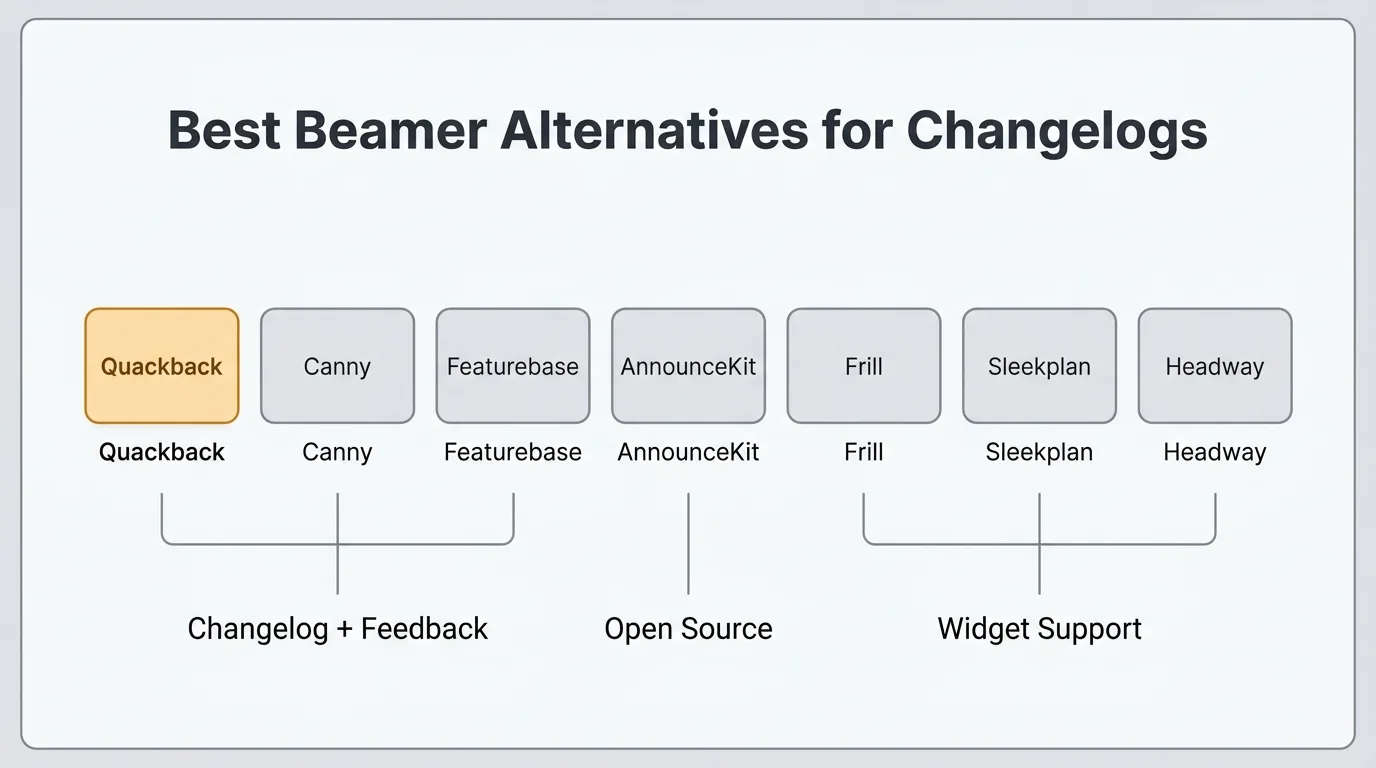
TLDR: The best Beamer alternatives ranked:
Pricing last verified March 2026. Vendors may change plans and pricing without notice. Check each vendor's pricing page for the latest figures.
- Quackback — Changelog + feedback + roadmap in one. Open source. Free.
- Canny — Feedback-focused with changelog feature. From $19/mo.
- Featurebase — Changelog + feedback + roadmap + support inbox. Free plan.
- AnnounceKit — Pure changelog alternative with segmentation. From $89/mo.
- Frill — Simple changelog + feedback boards. From $25/mo.
- Sleekplan — Widget-first with changelog and feedback. From $13/mo.
- Headway — Lightweight changelog tool. Free plan available.
Why teams switch from Beamer
The most common reasons teams look for a Beamer alternative:
- Changelog-only focus. Beamer is built around announcements. There is no feature voting, no feedback boards, no roadmap. If your team wants to close the loop with users — collecting what they want and showing them what you're building — you need a second tool.
- No feedback collection. Beamer lets users react to posts with emoji reactions, but it does not support structured feedback. You cannot capture feature requests, triage submissions, or track votes in Beamer. For teams that treat the changelog as part of a feedback workflow, this is a real gap.
- MAU-based pricing. Beamer charges based on monthly active users who see your widget or page. Costs can increase as your product grows, independent of how many features you actually use. Teams with large user bases pay more even if they only send one update a month.
- No open-source option. Beamer is a closed, hosted SaaS product. You cannot self-host it, audit the code, or migrate away without losing your announcement history. For teams that care about data ownership or vendor lock-in, this is a constraint.
- Need for an all-in-one solution. Most teams using Beamer pair it with a separate feedback tool like Canny or a feature voting board. Consolidating into a single product that handles the full workflow — collect, prioritize, build, announce — is cheaper and simpler to operate.
1. Quackback
Quackback is open source (AGPL-3.0), self-hosted, and free. It covers the complete product feedback loop that Beamer covers only a slice of: feedback boards with voting, a public roadmap, a changelog, SSO/OIDC, custom branding, and 25 integrations including Slack, Jira, Linear, GitHub, Intercom, Zendesk, and Salesforce.
The changelog works differently from Beamer's. When you ship a feature, you can notify every user who voted for it — automatically. Voters get a direct message that the thing they asked for is done. No manual list-building, no broadcast to everyone, no unsubscribes from users who didn't care.
The in-app widget lets users view your changelog, submit feedback, and vote on ideas without leaving your product. Beamer's widget is announcement-only. Quackback's widget is a two-way channel.
The AI features extend what you can do with the feedback you collect. Duplicate detection catches redundant posts before they pile up. Merge suggestions identify related requests with reasoning your team can accept or dismiss in one click. Sentiment analysis runs on every post. Summaries pull out key quotes and next steps. The AI connects to any OpenAI-compatible provider.
The MCP server is something no other tool on this list offers. It implements the Model Context Protocol, the standard that Claude, Cursor, and Windsurf support. Connect an AI agent and it gets full access to your feedback data: search posts, triage requests, write responses, create changelog entries, and merge duplicates. Every action is attributed and auditable.
Key features:
- Changelog with automatic voter notifications and in-app widget
- Feature request boards with voting, status tracking, and nested comments
- Public roadmap with planned, in-progress, and shipped views
- Built-in AI: duplicate detection, merge suggestions, sentiment analysis, post summaries
- MCP server for AI agents (search, triage, respond, create, merge)
- 25 integrations: Slack, Linear, Jira, GitHub, Intercom, Zendesk, Salesforce, and more
- SSO/OIDC, webhooks, full REST API
- Custom branding with themes, custom CSS, and your own domain
Pricing: Free and open source. Self-host with Docker or deploy on Railway at no cost.
Pros:
- Full changelog + feedback + roadmap workflow at no cost
- Automatic voter notifications on shipped features
- Built-in AI for duplicate detection, merge suggestions, sentiment, and summaries
- MCP server for AI agent access — unique in the category
- Open source — audit the code, fork it, own your data
- No MAU-based pricing surprises
Cons:
- Self-hosted only — no managed cloud option
- You manage your own infrastructure (Docker or Railway)
- Newer project with a smaller community than Beamer
Best for: Teams that want changelog, feedback, and roadmap in one open-source tool with no usage-based pricing.
For a detailed look at what Quackback's changelog can do, see the changelog feature page.
Try Quackback — open source and self-hosted. Deploy in under five minutes with Docker. Get started free | View on GitHub
2. Canny
Canny is one of the most established feedback tools in the category. It covers feature request boards, voting, roadmaps, changelogs, and AI-powered feedback discovery through its Autopilot feature. If you are switching from Beamer because you want feedback collection alongside announcements, Canny covers the feedback side well.
Canny's changelog is functional — you can publish release notes, notify users by email, and link changelog entries to the feature requests that drove them. The link between a feature request and the announcement it generated is a genuine advantage over Beamer's standalone widget approach.
Autopilot AI discovers feedback from support conversations in Intercom, Zendesk, Help Scout, and Gong, plus 10 public review sites. This is useful if your team fields large volumes of support tickets and wants to extract feature signals automatically.
The billing model uses tiered pricing based on tracked users — anyone who posts, votes, or comments on your board counts toward your tier. The Core plan starts at $19/mo for 100+ tracked users. Crossing a tier threshold triggers an auto-upgrade. For teams with large communities, costs can increase quickly.
Key features:
- Feedback boards with voting and prioritization
- Public and private roadmaps
- Changelog with email notifications
- Autopilot AI: feedback discovery from support conversations and review sites
- Integrations with Jira, Linear, Slack, Intercom, HubSpot, and more
Pricing: Free (25 tracked users). Core from $19/mo. Pro from $79/mo. Business is custom pricing.
Pros:
- Established product with a large user base
- Strong AI feedback discovery via Autopilot
- Changelog linked to source feature requests
- Good integration ecosystem
Cons:
- Tiered tracked-user pricing can increase costs as your community grows
- Auto-upgrades when you exceed tracked user limits
- No self-hosting or open source
- Jira integration requires the Pro plan ($79/mo)
Best for: SaaS teams that want feedback collection and a changelog in one hosted tool with AI-powered discovery.
See how it compares: Quackback vs Canny.
3. Featurebase
Featurebase bundles feedback boards, a changelog, roadmap, help docs, and a unified support inbox into one product. It has a free plan (1 seat, limited features) and is one of the more complete all-in-one options at the lower end of the price range.
Where Beamer is announcement-only, Featurebase is the opposite direction: it treats the support inbox and feedback board as equally important as the changelog. The Fibi AI agent can auto-resolve customer questions using context from your help center, feedback posts, and past conversations — and it can submit feature requests on behalf of users. AI resolutions cost $0.49 each, which adds up at volume.
Featurebase is closed source and hosted only. Per-seat pricing ($29–99/seat/month on paid plans) means costs grow with your team. Post merging and user segmentation are locked to higher tiers. But for teams that want a free starting point with feedback and announcement features in one place, it is a solid option.
Key features:
- Feedback boards with voting, status tracking, and user segmentation
- Changelog with scheduled posts and subscriber notifications
- Public roadmap
- Unified support inbox with live chat and email
- Fibi AI Agent for auto-resolving questions ($0.49/resolution)
- 12 integrations: Linear, Jira, GitHub, Slack, Intercom, Zendesk, and more
Pricing: Free (1 seat, limited). Growth at $29/seat/month. Professional at $59/seat/month. Enterprise at $99/seat/month.
Pros:
- Free tier available for getting started
- All-in-one: feedback, support, help docs, and changelog
- Surveys (NPS, CSAT) included on paid plans
- Growing fast with regular feature updates
Cons:
- Per-seat pricing adds up for larger teams
- AI resolutions are usage-based ($0.49 each)
- No self-hosting, no open source
- Post merging locked to higher tiers
Best for: Small teams wanting a free hosted option that combines changelog, feedback boards, and support in one product.
See how it compares: Quackback vs Featurebase.
4. AnnounceKit
AnnounceKit is the closest direct Beamer replacement on this list. It is purpose-built for product announcements — in-app widgets, standalone changelog pages, email notifications, and RSS feeds. If you want to replace Beamer with something that does the same thing better, AnnounceKit is worth a look.
The main advantages over Beamer are segmentation and targeting. You can show changelog entries to specific user segments based on plan, role, language, or custom attributes. You can run NPS surveys and reaction polls inside the widget. The analytics dashboard tracks views, clicks, and engagement per post.
AnnounceKit does not have feedback boards or feature voting. Like Beamer, it is a one-way announcement tool. If you need feedback collection alongside announcements, you will still need a second product.
Pricing starts at $89/mo for the Essentials plan (1 team member, no segmentation). The Growth plan at $149/mo adds user segmentation, Slack, and Intercom. The Scale plan at $399/mo adds SSO/SAML and Jira. NPS surveys are a separate product at $49/mo.
Key features:
- In-app widget with unread post badges and notification center
- Standalone changelog page with custom domain
- Email notifications and RSS feed for subscribers
- User segmentation for targeted announcements
- NPS surveys and reaction polls
- Analytics: views, clicks, and engagement per post
- Integrations: Slack, Intercom, HubSpot, Zapier, and more
Pricing: Essentials at $89/mo. Growth at $149/mo. Scale at $399/mo. NPS is a separate product at $49/mo.
Pros:
- Purpose-built for changelogs with polished widget UI
- User segmentation for targeted posts
- Built-in NPS surveys and reactions
- No MAU-based pricing — flat monthly rate
- Clean analytics per post
Cons:
- No feedback boards or feature voting
- More expensive than Beamer's entry plan at comparable feature levels
- No self-hosting or open source
- Still requires a second tool for feedback collection
Best for: Teams that want a pure changelog tool with better segmentation and targeting than Beamer.
See how it compares: Quackback vs AnnounceKit.
5. Frill
Frill covers both changelogs and feedback boards in a single hosted product. It is simpler than Featurebase or Canny but more complete than Beamer or Headway. You get a feedback board with voting, a public roadmap, and a changelog — the three core pieces of the product feedback loop.
The interface is clean and takes minutes to configure. Users submit ideas, vote on existing ones, and follow your roadmap through stages. When something ships, you publish a changelog entry and notify followers. There is no AI, no support inbox, and fewer integrations than Featurebase or Canny. But for teams that want a lightweight all-in-one tool without a steep learning curve, Frill is a practical choice.
Frill uses idea-based pricing on its lower plans. The Startup plan at $25/mo covers 50 ideas. The Business plan at $49/mo unlocks unlimited ideas. Both include the changelog, feedback boards, and roadmap. The Growth plan at $149/mo adds white labeling and advanced surveys.
Key features:
- Feedback board with voting and custom statuses
- Public roadmap with stage-based views
- Changelog with email notifications to followers
- In-app widget for feedback submission and changelog display
- Custom branding and domain on Business plan
- SSO on Business plan
- Integrations: Slack, Jira, Linear, Zapier
Pricing: Startup at $25/mo (50 ideas). Business at $49/mo (unlimited). Growth at $149/mo. Enterprise from $349/mo.
Pros:
- Covers feedback, roadmap, and changelog in one product
- Clean, easy to set up
- In-app widget included
- Reasonable entry price for small teams
Cons:
- Idea limits on the Startup plan ($25/mo)
- No AI features
- White labeling requires the Growth plan ($149/mo)
- Fewer integrations than Canny or Featurebase
- No self-hosting or open source
Best for: Small to mid-size teams that want a simple changelog and feedback board without the complexity of larger platforms.
See how it compares: Quackback vs Frill.
6. Sleekplan
Sleekplan takes a widget-first approach to feedback and announcements. Instead of directing users to a separate portal, Sleekplan embeds directly into your app as an in-app widget. Users can read your changelog, submit feedback, vote on ideas, and respond to satisfaction surveys without leaving your product.
The built-in CSAT and NPS surveys are a genuine differentiator. Most tools treat surveys as a separate concern. Sleekplan includes them natively, so you measure satisfaction alongside feature requests and changelog engagement. For teams switching from Beamer who want to add feedback collection and surveys without a major tool change, the embedded widget makes the transition low-friction.
The free Indie plan is limited: one seat, no roadmap, no surveys, no AI. The Starter plan at $13/mo unlocks the roadmap, surveys, and basic AI features. The Business plan at $38/mo adds post merging, user segmentation, and conditional surveys.
Key features:
- Changelog with scheduled posting and subscriber notifications
- Feedback board with voting, status updates, and impact scoring
- Roadmap (Starter plan and above)
- Built-in CSAT and NPS surveys
- Embeddable in-app widget, standalone site, or iframe
- 12 integrations: Jira, Linear, Slack, Intercom, GitHub, Zapier, and more
Pricing: Free Indie plan (1 seat, limited). Starter at $13/mo. Business at $38/mo. Enterprise is custom.
Pros:
- In-app widget reduces friction for feedback and changelog consumption
- Built-in NPS/CSAT surveys included
- Free tier available
- Affordable paid plans — cheaper than Beamer at comparable feature levels
Cons:
- Free plan is very limited (no roadmap, no surveys, no AI)
- Widget-first means the standalone portal is less polished
- Post merging requires the Business plan ($38/mo)
- No self-hosting, no open source
Best for: Teams prioritizing in-app changelog and feedback collection with built-in satisfaction surveys.
See how it compares: Quackback vs Sleekplan.
7. Headway
Headway is the lightest tool on this list. It is a standalone changelog product with an in-app widget, a hosted changelog page, email notifications, and a basic RSS feed. No feedback boards, no roadmap, no voting. Pure announcements.
Headway's appeal is simplicity and price. The free plan includes unlimited changelog entries and the in-app widget — with Headway branding. The Pro plan at $29/mo removes branding, adds a custom domain, Slack integration, and team management. Two plans, flat-rate, no MAU-based pricing.
For teams that want a Beamer replacement focused purely on announcements — and want to get started for free — Headway is worth considering. The feature set is narrower than Beamer's. There are no reactions, no NPS surveys, no detailed analytics per post. But if your only goal is to publish release notes and notify users, it does that reliably at a lower cost.
Key features:
- In-app widget with unread notification badge
- Hosted changelog page with custom domain (Pro)
- White labeling on Pro plan
- Integrations: Slack, Twitter/X (Pro only)
Pricing: Free (unlimited entries, Headway branding). Pro at $29/mo (removes branding, custom domain, Slack, team management).
Pros:
- Free plan with no entry limit and no MAU pricing
- Two simple plans — no complex tier structure
- Quick to set up and operate
Cons:
- No feedback boards, no roadmap, no voting
- No reactions, no NPS surveys, no email notifications
- No API or webhooks
- Very limited integrations (Slack and Twitter/X only on Pro)
- No self-hosting or open source
Best for: Teams that want a free, lightweight changelog widget with no MAU-based pricing and no complexity.
See how it compares: Quackback vs Headway.
Comparison table
| Beamer | Quackback | Canny | Featurebase | AnnounceKit | Frill | Sleekplan | Headway | |
|---|---|---|---|---|---|---|---|---|
| Starting price | $0 (limited) | Free | Free (25 users) | Free (1 seat) | $89/mo | $25/mo | Free (1 seat) | Free |
| Changelog | Yes | Yes | Yes | Yes | Yes | Yes | Yes | Yes |
| Feedback boards | No | Yes | Yes | Yes | No | Yes | Yes | No |
| Roadmap | No | Yes | Yes | Yes | No | Yes | Yes | No |
| Feature voting | No | Yes | Yes | Yes | No | Yes | Yes | No |
| In-app widget | Yes | Yes | Yes | Yes | Yes | Yes | Yes | Yes |
| User segmentation | Yes | Yes | Limited | Yes | Growth plan | Growth plan | Yes | No |
| AI features | No | Yes (built-in) | Autopilot | Fibi | AI editor | Smart Merge | Sleek Intelligence | No |
| Open source | No | Yes (AGPL-3.0) | No | No | No | No | No | No |
| Self-hosting | No | Yes | No | No | No | No | No | No |
How to choose
Start with what you actually need. If Beamer covered your use case and you just want something cheaper or with better segmentation, AnnounceKit or Headway are the most direct replacements.
If you want to replace Beamer and add feedback collection: Quackback gives you changelog, feedback boards, and a public roadmap in a single tool for free. You also get AI features and automatic voter notifications when features ship — something Beamer cannot do.
If you want a hosted all-in-one tool: Featurebase has the broadest feature set on a free plan. Canny is stronger on the feedback side. Frill is simpler with a lower learning curve.
If cost is the priority: Headway is free. Sleekplan starts at $13/mo. Quackback is free if you can self-host. None of them use MAU-based pricing.
If you want open source: Quackback is the only open-source option in this category that includes a changelog. You get the full workflow — feedback, roadmap, changelog — with no vendor lock-in, no pricing tiers, and no user limits.
For a broader look at changelog tools beyond this list, see Best Changelog Tools in 2026. For the feedback side of the equation, see Best Customer Feedback Tools in 2026.
Frequently asked questions
What is the best free alternative to Beamer?
Quackback is the most complete free alternative. It is open source and self-hosted — you get a changelog with automatic voter notifications, feedback boards with voting, a public roadmap, 25 integrations, SSO/OIDC, and built-in AI. Headway also has a free plan, but it covers only the announcement side with no feedback or roadmap. If you want the pure-changelog workflow, Headway is a simpler free start.
Can I replace Beamer with a tool that also collects feedback?
Yes. Several tools on this list cover both changelogs and feedback collection. Quackback, Canny, Featurebase, Frill, and Sleekplan all include feedback boards alongside changelog features. Quackback is the only one that is open source and free. If you want a hosted option with a free tier, Featurebase or Sleekplan are worth evaluating. For more on building a feedback workflow, see the guide to collecting customer feedback.
How does Beamer's pricing compare to alternatives?
Beamer's paid plans start at $49/mo and scale based on monthly active users. Most alternatives use flat-rate or per-seat pricing, which is more predictable. AnnounceKit starts at $89/mo (flat rate, no MAU pricing). Sleekplan starts at $13/mo. Headway has a free plan with Pro at $29/mo. Quackback is free to self-host with no usage-based pricing at all. For teams concerned about costs scaling with product growth, MAU-based pricing like Beamer's is worth examining closely before committing. See our release notes template and product update announcement guide for tips on running an effective changelog workflow regardless of which tool you choose.

Authored by James Morton
Founder of Quackback. Building open-source feedback tools.
Try Quackback
The open-source feedback platform. Boards, voting, and roadmaps.
Get startedStar on GitHub305