
Most changelogs are bad. They are commit log dumps pasted into a markdown file. They use inconsistent date formats, skip versions, and bury useful information under noise. Users stop reading them. Teams stop writing them.
The Keep a Changelog standard exists to fix this. It is a set of principles and a format for writing changelogs that are useful, consistent, and readable. If you maintain a product changelog for your SaaS product — or you want to start one — this guide covers the standard, the format, and how to apply it to your team's workflow. You will get the seven Keep a Changelog principles, a complete format reference with copy-paste examples, best practices from real SaaS companies, and a checklist for auditing your own changelog.
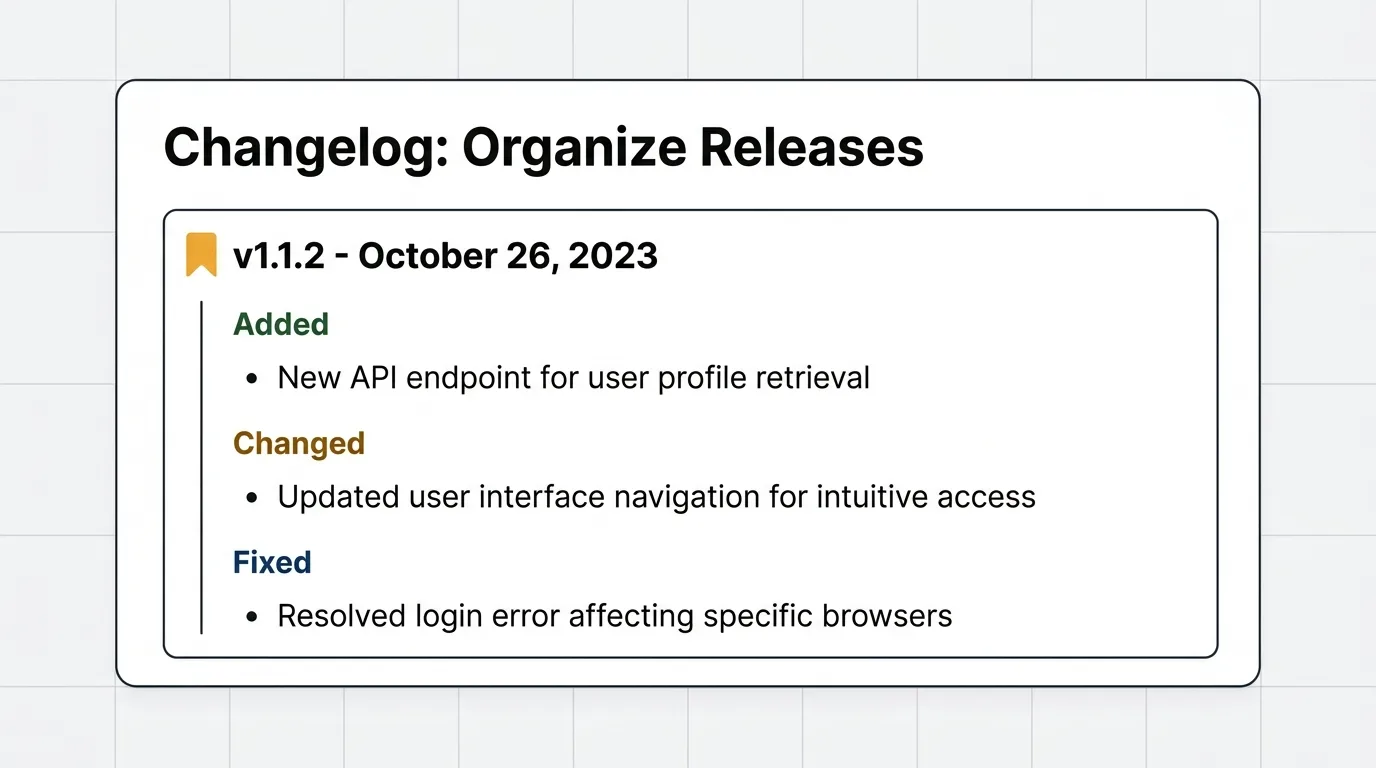
Keep a Changelog is an open standard, documented at keepachangelog.com, that defines a consistent format and seven principles for writing changelogs that are useful, readable, and built for humans rather than machines. It groups changes into six standard types (Added, Changed, Deprecated, Removed, Fixed, Security), lists the newest version first, and uses ISO 8601 dates. Follow it to keep your product changelog scannable and trustworthy.
What is a changelog
A changelog is a file or page that contains a chronological list of notable changes for each version of a project. It answers one question: what changed between this version and the last one.
A good product changelog serves three audiences simultaneously:
- Users learn what is new, what is fixed, and what they need to do differently.
- Your team tracks what shipped and when, creating an institutional record of product decisions.
- Support teams answer questions about recent changes without reading code diffs or pinging engineering.
A changelog is not a commit log. Commit logs are written for developers working on the codebase. Changelogs are written for people who use the product. The audience is different. The language should be different. The level of detail should be different.
Here is a quick test. Compare these two entries describing the same change:
| Commit log entry | Changelog entry |
|---|---|
fix: null ref in ReportFilterService#apply | Fixed a bug where reports failed to load when filtered by date range |
refactor: migrate to new auth provider | Single sign-on now supports SAML 2.0 in addition to OAuth |
feat: add CSV export endpoint | You can now export your roadmap items as a CSV file from the dashboard |
If your changelog reads like the left column, it is not a changelog. It is a developer artifact that happens to be public.
The Keep a Changelog standard
The Keep a Changelog standard, documented at keepachangelog.com, defines seven principles for writing good changelogs. These Keep a Changelog principles form the foundation for any product changelog worth reading.
1. Changelogs are for humans, not machines
Write for the people who use your product. Use plain language. Describe what changed from the user's perspective, not the developer's. "Fixed a bug where reports failed to load when filtered by date range" is useful. "Fix null ref in ReportFilterService#apply" is not.
2. Every version should have an entry
Do not skip versions. If a release shipped, it should have a changelog entry — even if the changes were minor. Gaps in the changelog erode trust. Users wonder what changed in the versions you skipped.
3. Group identical change types together
Do not mix bug fixes, new features, and deprecations in one undifferentiated list. Group them by type so users can scan for what matters to them. The Keep a Changelog format defines six standard types (covered in the next section).
4. Versions and sections should be linkable
Every version heading and every change type section should have an anchor link. Users should be able to link directly to a specific version or a specific section within a version. This matters for support tickets, internal discussions, and documentation references.
5. Most recent version comes first
Reverse chronological order. The newest changes appear at the top. Users care about what changed recently, not what changed two years ago. Do not make them scroll.
6. Show the release date for each version
Every version entry should include the date it was released. Use ISO 8601 format: YYYY-MM-DD. Not "March 24th" or "24/03/2026" or "03-24-2026." ISO 8601 is unambiguous across locales and cultures.
7. Follow Semantic Versioning
The Keep a Changelog standard recommends Semantic Versioning (semver.org). Version numbers communicate the nature of changes: major versions for breaking changes, minor versions for new features, and patch versions for bug fixes. When your versioning is meaningful, users can assess the significance of a release before reading the details.
These seven principles are simple. Most teams violate at least two of them. The value of the standard is not that it introduces novel ideas — it is that it codifies good practice in a way that is easy to follow consistently.
Quick audit: Score your current changelog
Rate your changelog against each principle (yes/no). If you score below five out of seven, your changelog has structural problems that this guide will help you fix.
| Principle | Yes / No |
|---|---|
| Written for users, not developers | |
| Every version has an entry | |
| Changes grouped by type | |
| Versions and sections are linkable | |
| Reverse chronological order | |
| Release dates in ISO 8601 | |
| Follows Semantic Versioning |
Changelog format
The Keep a Changelog format uses six standard change types to categorize every entry. This changelog format gives users a predictable structure they can scan quickly.
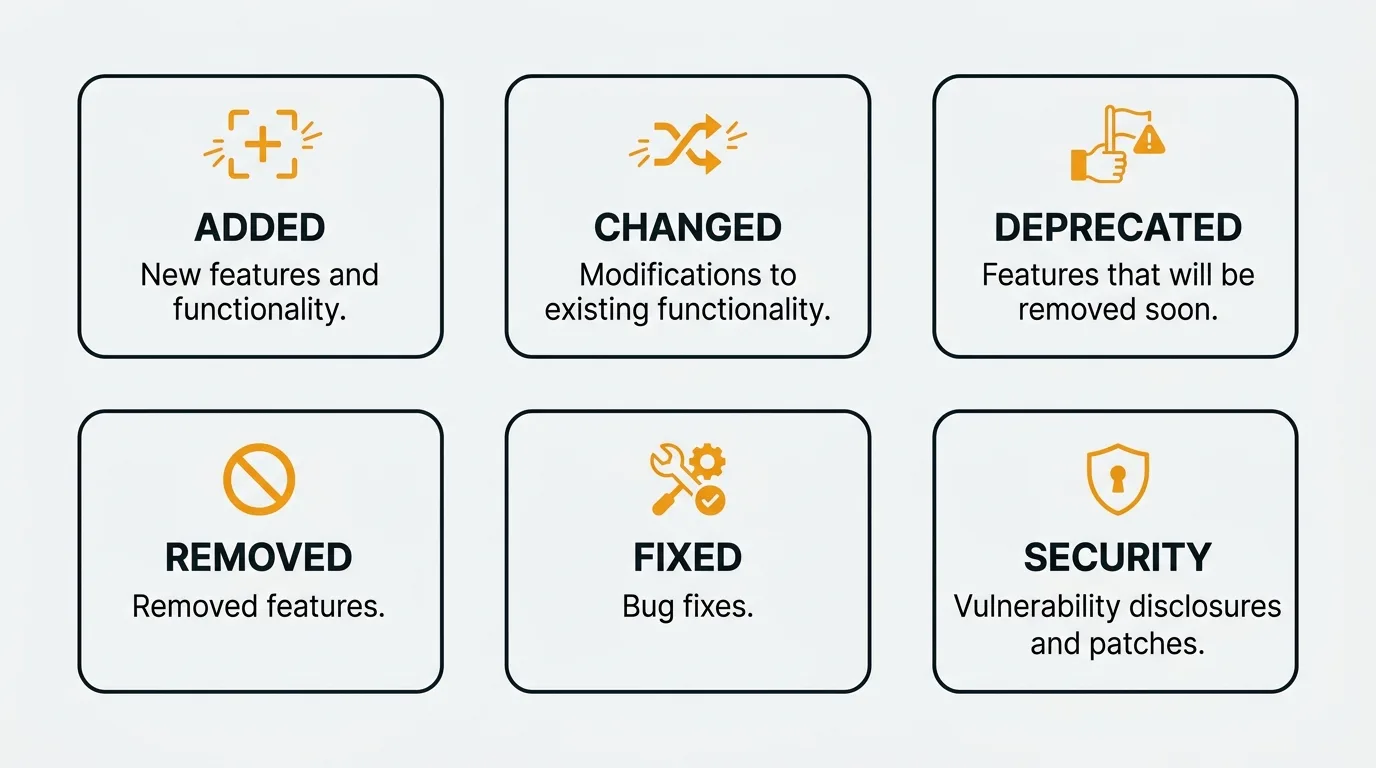
Added
New features and capabilities. Things that did not exist before this release.
### Added
- Team-level permissions for feedback boards
- CSV export for roadmap items
- Webhook support for changelog publish events
Changed
Changes to existing functionality. Behavior that worked one way before and works differently now.
### Changed
- Dashboard charts now default to 30-day view instead of 7-day
- Email notifications consolidated into a daily digest
Deprecated
Features that still work but are scheduled for removal. This is the early warning. Tell users what is going away, when, and what to use instead.
### Deprecated
- Legacy API v1 endpoints. Will be removed in v4.0. Migrate to v2 endpoints.
- CSV import via the settings page. Use the new bulk import API instead.
Removed
Features that were deprecated previously and are now gone.
### Removed
- Legacy API v1 endpoints (deprecated in v3.0)
- Support for Internet Explorer 11
Fixed
Bug fixes. Describe what was broken and what the correct behavior is now.
### Fixed
- Roadmap items no longer disappear when changing the sort order
- Email notifications now respect the user's timezone setting
Security
Changes that address security vulnerabilities. Call these out separately so security-conscious users and teams can find them immediately.
### Security
- Patched XSS vulnerability in the feedback comment field
- Upgraded dependency to address CVE-2026-1234
A complete changelog entry in Keep a Changelog format looks like this:
## [2.1.0] - 2026-03-24

### Added
- Team-level permissions for feedback boards
- Webhook support for changelog publish events

### Changed
- Dashboard charts now default to 30-day view

### Fixed
- Roadmap items no longer disappear when changing sort order
- Email notifications now respect timezone settings

### Security
- Patched XSS vulnerability in feedback comment field
The standard also recommends keeping an [Unreleased] section at the top of your CHANGELOG.md file. This is where changes accumulate between releases. When you cut a new version, move the unreleased items into a versioned entry with a date. This approach keeps the changelog up to date incrementally rather than requiring a rush of documentation at release time.
Changelog best practices for product teams
The Keep a Changelog standard covers the format. These practices cover the workflow — how product teams can maintain a changelog that stays useful over time.
Write entries as you ship, not after. If you wait until the end of the sprint or release cycle to write changelog entries, you will forget things. You will rush. The quality will suffer. Add entries to the Unreleased section when changes merge, not when the release goes out. A practical approach: make "update the changelog" a checkbox in your pull request template or definition of done. The person who ships the change writes the entry because they understand the context.
Write for your audience, not your team. Internal shorthand, ticket numbers, and component names mean nothing to users. "Fixed QB-4521" tells your team what happened. "Fixed a bug where the search bar returned no results for queries with special characters" tells your users what happened. Write the second one.
A useful rewriting exercise: read each entry and ask "would a customer who has never seen our codebase understand this?" If not, rewrite it.
Be specific about what changed and why it matters. "Performance improvements" is not a changelog entry. "Reduced page load time for dashboards with more than 1,000 items from 8 seconds to under 2 seconds" is a changelog entry. Specificity builds credibility. Here are more before/after examples:
| Vague entry | Specific entry |
|---|---|
| Bug fixes | Fixed a bug where CSV exports included deleted items |
| UI improvements | Redesigned the settings page with grouped sections and search |
| Performance improvements | API response times for list endpoints reduced from 1.2s to 200ms |
| New integrations | Added Slack integration: get notified in your channel when feedback status changes |
Do not dump your commit log. This is the most common anti-pattern. A changelog that lists every commit — including "fix typo," "update dependencies," and "WIP" — is noise. Curate the list. Include only changes that affect users. A useful filter: if the change is invisible to someone using your product, it does not belong in the changelog. Internal refactors, dependency updates, and CI pipeline changes are important work, but they are not changelog material.
Do not ignore deprecations. Removing a feature without warning is one of the fastest ways to lose user trust. The Deprecated category exists for a reason. Give users advance notice. Tell them the timeline. Tell them the alternative. A good deprecation entry follows this formula: "[Feature] is deprecated. It will be removed in [version/date]. Use [alternative] instead. [Link to migration guide]."
Use consistent date formats. ISO 8601 (YYYY-MM-DD). Always. Mixed date formats in a changelog look unprofessional and create confusion for international users.
Link to related documentation. When a changelog entry describes a new feature, link to the docs page that explains it. When a breaking change requires migration, link to the migration guide. The changelog is a summary. Let users go deeper when they need to. For tips on writing these entries as standalone announcements, see our guide on product update announcements.
Keep one canonical source. Do not maintain a changelog in three places — your marketing site, your GitHub repo, and your docs. Pick one source of truth and link to it from everywhere else.
Connect releases to user feedback. The best changelogs do not just announce what shipped — they explain what motivated the change. "Added CSV export for roadmap items (your #3 most requested feature)" tells users their input matters. This feedback-to-release connection turns a changelog from a product record into a relationship-building tool. For more on this approach, see our guide to the customer feedback loop.
Changelog examples from SaaS companies
Several SaaS companies maintain changelogs that are worth studying. Their approaches differ, but they all take the format seriously. The table below summarizes the key differences, followed by a deeper look at each. Publishing cadences observed as of May 2026 and may shift over time.
| Company | Audience | Format | Frequency | Key strength |
|---|---|---|---|---|
| Linear | Product teams, designers | Narrative blog-style | Weekly | Writing quality and design polish |
| Stripe | Developers | Structured by product area | Per-release | Precision and migration details |
| Notion | General users | Concise summaries | Biweekly | Scannability and brevity |
| Vercel | Developers | Deep-dive marketing | Per-release | Video walkthroughs and technical depth |
Linear publishes a changelog that reads more like a product blog. Each entry has a headline, a brief narrative explaining the feature and the design thinking behind it, and a polished screenshot. The writing is confident and direct. The result is a changelog that users subscribe to and read voluntarily — not because they need to, but because it is genuinely well-written. The takeaway: invest in writing quality. A changelog people want to read is a marketing asset.
Stripe organizes release notes by product area — Payments, Billing, Connect, Radar — and writes primarily for developers. Entries include exact endpoint names, parameter changes, and migration steps. Breaking changes appear at the top. The format prioritizes precision over narrative because Stripe's users are engineers integrating APIs who need exact details. The takeaway: match the level of technical detail to your audience. Developer-facing products need exact specs, not marketing copy.
Notion keeps its changelog concise. Entries are typically two or three sentences with a link to documentation for anyone who wants more detail. The format respects users' time. You can scan the entire changelog in a few minutes and understand what shipped. The takeaway: brevity works. Not every entry needs a paragraph. Link to docs for depth.
Vercel treats its changelog as both a communication tool and a marketing channel. Major features get video walkthroughs and technical deep dives. The entries are longer than most changelogs, but the depth gives developers confidence and makes complex features accessible. The takeaway: for significant features, a changelog entry can double as a launch post.
What these companies share is consistency. They publish regularly. They use a predictable format. They write for their specific audience. The format details differ, but the discipline is the same.
Changelog tools
You can maintain a changelog in a CHANGELOG.md file. For open-source libraries and developer tools, that is often enough. For SaaS products with non-technical users, you need more: a public changelog page, email notifications, in-app widgets, and a way to connect updates to user feedback.
The right tool depends on your context:
CHANGELOG.md in your repo. Best for open-source projects and developer tools where users already live in GitHub. Zero cost, version-controlled, and diffs are visible in pull requests. Combine with tools like standard-version or semantic-release to automate version bumping from Conventional Commits. Limitation: no email notifications, no in-app widget, no way for non-technical users to discover or subscribe to updates.
GitHub Releases. A step up from a markdown file. Each release gets a page with a description, downloadable assets, and contributor attribution. GitHub can auto-generate release notes from merged pull requests. Good for open-source projects. Still developer-centric — not suitable for communicating with end users who do not use GitHub.
Purpose-built changelog tools. For SaaS products where your audience includes non-technical users, a dedicated changelog tool adds the distribution layer: public changelog pages, email notifications, in-app widgets, RSS feeds, and integrations.
Quackback's changelog is built for product teams that want to close the loop between feedback and releases. When you publish a changelog entry, Quackback automatically notifies every user who voted or commented on the related feedback posts. You do not need to manually track who asked for what. The connection between feedback and releases is structural, not manual.
Quackback also generates draft changelog entries using AI, based on the feedback posts linked to a release. Your team reviews and edits the draft rather than writing from scratch. The result is a changelog that stays connected to the user requests that drove each change — which is what the Keep a Changelog principle of "changelogs are for humans" looks like in practice.
Quackback is open source (AGPL-3.0) and self-hostable for free, with a managed Quackback Cloud option when you would rather not run it yourself. You can add your whole team to the changelog workflow. An MCP server also lets AI assistants read your feedback and roadmap directly, so you can draft and link changelog entries without leaving your editor.
For a full comparison of changelog tools, see the best changelog tools guide.
Common changelog mistakes and how to fix them
Even teams that follow the Keep a Changelog standard make mistakes. Here are the patterns that undermine otherwise good changelogs.
The "what's new" page that never updates. You launch a changelog page, publish three entries with enthusiasm, then stop. The last entry is from six months ago. This is worse than having no changelog because it signals abandonment. Fix: assign changelog ownership to a specific person. Add "write changelog entry" to your release checklist. If you use Quackback, AI-generated drafts reduce the friction that causes this pattern.
The commit log dump. Your changelog lists every commit message verbatim. Users see entries like "bump version," "fix lint," and "WIP: refactor auth." This tells them nothing useful. Fix: curate entries during the release process. A 50-commit release might produce 5-8 changelog entries. Everything else is internal housekeeping.
The marketing changelog. Every entry reads like ad copy. "We are thrilled to announce our groundbreaking new dashboard." Users want to know what changed, not how excited you are about it. Fix: state the change, state the benefit, move on. Let the product speak for itself.
Inconsistent granularity. One version has 30 line items detailing every minor tweak. The next version has a single entry: "Various improvements." Users cannot predict what they will learn from any given entry. Fix: aim for 3-10 entries per release. Roll minor changes into summary items. Break major changes into separate entries.
No deprecation warnings. Features disappear without notice. Users discover the removal when their workflow breaks. Fix: always use the Deprecated category before using the Removed category. Give users at least one full version cycle of warning, ideally two or three.
Try Quackback — open source with a managed cloud option. Start free. Get started | View on GitHub
Frequently asked questions
What is the difference between a changelog and release notes?
A changelog is the cumulative record of all changes across every version, typically one file or page. Release notes document a single version or release. A changelog is made up of individual release notes entries. The terms are often used interchangeably, and the same principles apply to both.
Should every project have a changelog?
Any project with users should have a changelog. For open-source libraries, a CHANGELOG.md file in the repository is the convention. For SaaS products, a public changelog page serves the same purpose. Internal tools benefit from changelogs too — they reduce "what changed?" questions from colleagues and create a record of decisions. The overhead of maintaining a changelog is low if you write entries as you ship rather than retroactively.
How do you start a changelog for an existing project?
Start from the current version. Do not try to reconstruct the complete history of every change. Create a CHANGELOG.md or changelog page, document the current version, and maintain it going forward. If there are significant recent changes worth capturing, go back a few versions. But the goal is to build the habit of maintaining the changelog from now on, not to create a perfect historical record.
What is the difference between a changelog and a product roadmap?
A changelog looks backward — it documents what you already shipped. A product roadmap looks forward — it communicates what you plan to build next. They serve different purposes but work best together. When your roadmap shows an item as "shipped" and your changelog documents the details, users get a complete picture: what was promised, what was delivered, and how it works. For more on roadmaps, see our product roadmap examples guide.
What is the difference between Keep a Changelog and Conventional Commits?
Keep a Changelog is a standard for the changelog that users read. Conventional Commits is a standard for the commit messages developers read. They complement each other: tools like standard-version or semantic-release can draft a changelog from Conventional Commits, but you still rewrite each entry in plain language for users.

Authored by James Morton
Founder of Quackback. Building open-source feedback tools.
Try Quackback
The open-source feedback platform. Boards, voting, and roadmaps.
Get startedStar on GitHub305