 Quackback
Feedback Management: From Scattered Inputs to Clear Priorities
Feedback management is not a tool category. It is an operational workflow with four stages that turn scattered inputs into clear, shippable priorities.
 James MortonUpdated 16 min read
On this page
- What feedback management actually is (and why most definitions miss the point)
- The four stages: intake, organize, prioritize, close the loop
- Stage 1: Intake without fragmentation
- Stage 2: Organizing feedback into themes
- Stage 3: Prioritization frameworks that work
- Stage 4: Closing the loop with users
- Common failure modes
- What to look for in a feedback management system
- Frequently asked questions
Most teams do not have a feedback problem. They have a feedback workflow problem. Requests arrive through support tickets, Slack, sales calls, email, and the in-app widget. Volume is not the issue. The issue is that nobody has defined what happens between the moment a user complains and the moment something ships.
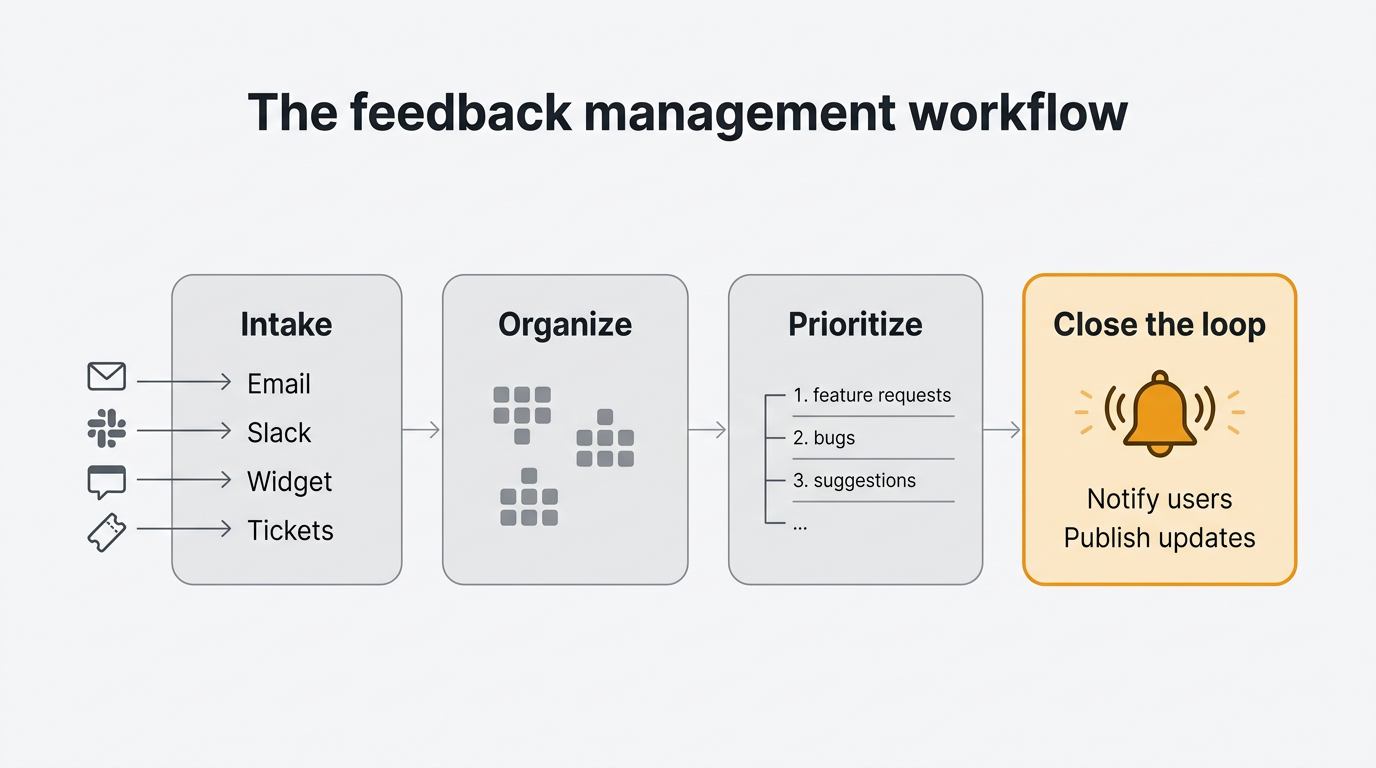
Feedback management is not a tool category. It is an operational workflow with four stages — intake, organize, prioritize, and close the loop. Most teams treat it as a storage problem ("we need somewhere to put all the feedback"), which is why their feedback piles up and nothing changes. This guide covers the workflow, the frameworks that make each stage work, and what to look for in a system that supports it.
What feedback management actually is (and why most definitions miss the point)
Feedback management is the operational practice of collecting user input, turning it into structured decisions, and communicating the outcome back to the people who sent it. That is the definition. It fits on a sticky note.
The definition is the easy part. Most articles that rank for this topic stop there, pivot to a tool roundup, and call it finished. That is why teams who read those articles still end up drowning in requests two months later. They bought a tool. They did not install a workflow.
Feedback management is not a category of software. It is a sequence of decisions someone on your team has to make, in order, every week, for every piece of feedback that comes in. Software supports that sequence. It does not replace it. Without the workflow, the tool becomes another inbox you avoid opening.
The rest of this guide is the workflow. Four stages, each with its own failure mode. You will recognize at least one as the one your team is stuck in right now.
The four stages: intake, organize, prioritize, close the loop
Every functioning feedback management system moves each input through four stages. If any stage is missing, the whole system degrades into a graveyard of tickets nobody reads.
Intake is the moment feedback enters your system of record. It arrives through a form, a widget, a ticket, an email, or a sales call. The goal is consolidation. One place, one format, one owner.
Organize is the moment raw text becomes something you can count. Tags, themes, duplicates merged, noise filtered. The goal is to turn 500 tickets into 40 distinct requests with known volume behind each one.
Prioritize is the moment you decide what ships next. This is where RICE, MoSCoW, ICE, and Kano earn their keep. The goal is a ranked list that survives a skeptical question from your CEO.
Close the loop is the moment you tell the people who sent the feedback what happened. Shipped, rejected, under consideration, scheduled for Q3. Users only bother writing things down when they believe it matters.
Here is the shape of it at a glance:
| Stage | Input | Output | Typical owner |
|---|---|---|---|
| Intake | Raw text from any channel | A single normalized record | Support or product ops |
| Organize | Normalized records | Themed, deduplicated requests | Product manager |
| Prioritize | Themed requests | Ranked roadmap items | Product manager |
| Close the loop | Roadmap items and ship events | Notifications, statuses, changelog | Product or marketing |
Four stages, four owners, four failure modes. We will take them one at a time. For how the loop connects to retention and trust, see our guide to the customer feedback loop.
Stage 1: Intake without fragmentation
The first stage is where most teams already feel the pain. Feedback arrives from everywhere. Support forwards a ticket. A sales rep drops a Slack message saying "the customer on the call today asked for X again". A founder replies to a user's email and forgets to tell anyone. The marketing team notices a tweet. Nobody has a single place where all of this lives.
The predictable result is five or six partial inboxes. Support queue, sales CRM, Slack, the product manager's private Notion doc, the in-app widget if one exists. None of these talk to each other. None contain the full picture. No decision made from any single one will be correct.
The fix is conceptually simple and operationally hard. Pick one system of record. Route everything else into it. The system of record is where prioritization decisions get made. Every other channel is a funnel, not a destination.
Concretely: your support tool forwards or syncs tickets tagged "feedback" into your feedback tool. Your sales team has a one-click way to log a request from a call. Your Slack workspace has a command or emoji that turns a message into a feedback entry. Your product has an in-app widget so users can submit without leaving the thing they are complaining about. Every submission, regardless of origin, lands in the same place with the same schema.
This is the problem the unified feedback inbox is built for. Every channel, one queue, one format, one owner. The in-app widget handles the last mile — users submit from inside your product with session context attached, so you do not chase them for screenshots or browser versions. We go deeper in our post on how to collect customer feedback.
Resist the urge to filter at this stage. You are not deciding what is important yet. You are making sure nothing gets lost. Filter too aggressively at intake and you will throw away weak signals that turn out to matter three months later.
Stage 2: Organizing feedback into themes
Once intake is unified, you hit the second problem. Raw feedback is noise. Five hundred tickets is not five hundred requests. It is maybe forty distinct requests, each mentioned between one and thirty times, wrapped in the language of whichever user happened to write that day. Until you turn the noise into signal, you cannot prioritize anything.
Organizing feedback is three jobs at once. First, duplicate detection. When twelve users ask for dark mode in twelve different phrasings, those twelve tickets collapse into one request with a count of twelve. Second, themes. A dark mode request, an accessibility audit, and a "too bright" complaint belong to the same theme. Third, a fixed taxonomy — a finite list of categories your team agrees on in advance. Not freeform tags that balloon to sixty entries, each used twice.
The fixed-taxonomy point is worth pausing on. Every team that tries freeform tagging finds the same failure mode. People tag inconsistently. "Bug" and "bugs" and "defect" and "broken" show up as separate tags. Within six months you have so many tags that filtering by any single one returns a misleading subset. A fixed taxonomy — ten to twenty categories, maintained by one owner — forces consistency, and the trade is always worth it.
This is also where AI earns its keep. Manual clustering of five hundred tickets is a week of work. An AI pass that groups similar tickets and proposes themes can turn that week into an hour, provided the human still makes the final call. AI assists, it does not decide. A product manager who accepts every AI cluster without reviewing will end up with a taxonomy that looks plausible and is subtly wrong. We cover the patterns in our guide to AI customer feedback analysis.
Tying it back to the stack: the feedback board is where organized requests live after intake, with duplicate detection built in. The MCP server lets AI agents help with clustering while keeping the human in the final decision seat.
One warning. Teams sometimes skip this stage and jump straight to prioritization. They look at the raw inbox, pick the three loudest requests, and build those. The loudest requests are not always the most common, and the most common are not always the most valuable. You need the organize stage to tell the difference between a small group shouting and a large group murmuring.
Stage 3: Prioritization frameworks that work
Now you have a clean list of distinct, themed, counted requests. Which one do you build next? This is where frameworks help, and where most teams overcomplicate the problem.
There are four frameworks you will run into repeatedly.
RICE scores each item by Reach, Impact, Confidence, and Effort. You divide the first three by the last, you get a number, you rank by the number. It works well when you have quantitative inputs and it punishes wishful thinking because low Confidence scores shrink the result. Read our RICE framework explainer for worked examples.
MoSCoW sorts items into Must-have, Should-have, Could-have, and Won't-have. It is the right framework when you are working within a fixed deadline and you need to draw a line between what ships and what waits. See our MoSCoW prioritization guide for the full method.
ICE is RICE minus Reach. Impact times Confidence divided by Effort. Faster to run than RICE and works well for smaller teams where you do not yet have reliable Reach numbers.
Kano classifies features by their effect on user satisfaction — basic expectations, performance features, and delighters. Less a ranking tool than a diagnostic, useful for avoiding the trap of shipping only basics or only delighters.
Here is the mistake almost every team makes. They pick two or three frameworks and run them in parallel. A RICE score, a MoSCoW bucket, and a Kano classification on every item. The output is a spreadsheet nobody can read, because three rankings give you three different "top" items. Frameworks force decisions, they do not defer them. Pick one as your primary. Use the others as spot checks when the primary feels wrong.
The second mistake is applying the framework to too many items. If your inbox has two hundred organized requests, you do not need RICE scores on all two hundred. You need them on the top thirty by volume and strategic fit. Pre-filter, then score.
A good prioritization-aware roadmap keeps the scored list, the public-facing ordering, and the sequencing in one place. The voting system gives you the Reach input directly — you do not have to guess how many users want something when they have voted on it.
This guide is category-generic. For larger organizations ranking across multiple product lines, the problem gets structurally harder because you are ranking portfolios, not features. We cover that in our post on enterprise feedback management.
Stage 4: Closing the loop with users
This is the stage everyone skips. It is also the stage that decides whether the first three had any long-term value.
Here is what closing the loop means in practice. A user submitted feedback. Three months later, you shipped something related. Maybe exactly what they asked for. Maybe something adjacent. Maybe you decided not to ship it. In every case, the user needs to hear back. Not because you owe them an answer, but because if you do not tell them, they will conclude you never read the original submission, and they will stop writing things down. They will just leave.
The closed loop has three parts. First, status updates on the original submission. When a request moves from "under review" to "planned" to "in progress" to "shipped", the submitter should see it. Second, direct notification when the feature ships. Not a marketing blast — a specific notification to the people who voted for or submitted that request. Third, a public record of what shipped, which is the job of the changelog.
A public roadmap lets users see what you are considering. A changelog lets them see what shipped. Voter notifications close the gap between "the feature exists" and "the person who asked knows about it". See our post on how to keep a changelog for the discipline.
The failure mode here is treating the loop as optional. You ship, push the deploy, move on. The original submitter has no idea. Six months later your feedback volume quietly drops, and nobody can figure out why. The answer is always the same: you stopped closing the loop, so users stopped opening it.
Common failure modes
You can have all four stages on paper and still have the system fall over. The failures are specific and repeatable.
The silo problem. Product has a feedback tool. Sales has a CRM. Support has a help desk. None talk to each other. Product ships a feature nobody asked for because it only saw a third of the signal. The fix is not another tool. Pick the product-side tool as the system of record and pipe the other two into it. An imperfect unified view beats a perfect siloed view every time.
The over-tagging problem. A product manager starts with ten tags. Six months later there are fifty. "UI", "Design", and "Visual" are three tags for the same thing. Filtering returns misleading subsets. The fix is a quarterly taxonomy cleanup: merge near-duplicates, retire unused tags, cap the total at twenty.
The "promised a date" problem. A public roadmap with specific dates is a promise you probably cannot keep. Something slips, the date moves, users feel lied to, nobody believes the next date. Publish horizons ("Now", "Next", "Later") instead of calendar dates. You commit to the direction, not the week.
The ghost inbox. Feedback arrives, gets filed, and is never looked at again. The inbox grows linearly forever. Users stop getting responses. Eventually nobody can face opening it. The fix is a weekly triage cadence, owned by one person, with a visible count of untriaged items. If the number grows for two weeks in a row, that is an incident, not a chore.
The dogpile problem. Ten customers ask for the same thing in ten different words. Without duplicate detection, each is a separate ticket. The feature looks like a niche request instead of a top-five demand. The fix is the organize stage doing its job — a tool that surfaces duplicates automatically. This is why feature request tracking is a discipline, not a spreadsheet.
Most teams suffer from two or three at once. If you recognize more than two, start with the ghost inbox. Nothing else works if the inbox is a graveyard.
What to look for in a feedback management system
If the workflow is on paper, the next question is which software supports it without getting in your way. Here is the checklist, split by priority.
Must have. Features that make the workflow possible at all.
- Intake unification. Every channel funnels into one queue. Email, widget, Slack, CRM, support tickets.
- Duplicate detection. Automatic, not manual. Without this, your prioritization inputs are systematically wrong.
- Public roadmap. Status visible to the people who submitted. Horizons, not dates.
- Voter notifications. When a requested feature ships, the people who voted hear about it automatically. The single most underrated feature in the category.
- Prioritization tooling. A place to attach scores and ordering without exporting to a spreadsheet.
Nice to have. Features that make the workflow faster once it is running.
- AI triage. Automatic clustering, theming, and duplicate suggestions. Human decides, AI does the grunt work.
- MCP server. A standardized way for AI agents to read and write to your feedback system. Emerging, not yet table stakes.
- SSO. Required for larger organizations.
- Integrations. Hooks into your existing stack without bespoke engineering.
- Import and export. You should be able to leave at any time with your data intact.
A few tools worth knowing about, in context and without ranking. Canny and Productboard are the category incumbents and cover most of the must-haves. HubSpot Service Hub and Zendesk bundle feedback features into larger support suites, useful if you already live in those ecosystems. Quackback is the open-source option — AGPL-3.0, self-hosted, AI included, 25 integrations, and the first MCP server in the category. Each makes different trade-offs. The right one depends on where your stack already lives and how much of the workflow you want to own.
The single most important predictor of success is not which tool you pick. It is whether your team runs the four-stage workflow every week. We have seen teams succeed on a spreadsheet and fail on the most expensive tool in the category. The workflow is the job. The tool just shapes it.
For an end-to-end view of the operational side, our use case page on feedback management walks through the concrete setup. If you are comparing open-source and hosted options directly, our Quackback vs Canny comparison covers the trade-offs.
Try Quackback — open source with a managed cloud option. Start free. Get started | View on GitHub
Frequently asked questions
What is the difference between feedback management and customer support?
Customer support is reactive: somebody has a problem now and you solve it. Feedback management is the layer above, turning patterns from those conversations into decisions about what to build next. Support says "my export is broken". Feedback management says "fifteen users reported export problems this quarter".
Do I need a dedicated feedback management tool?
Not always. A small team with fewer than fifty users can run the four-stage workflow on a spreadsheet and a shared inbox, provided somebody owns the weekly triage. The moment you cross about a hundred active users or start receiving feedback through more than two channels, a dedicated tool saves more time than it costs. The trigger is not company size — it is the moment the ghost inbox appears.
How do you prioritize customer feedback?
Pick one framework and run it consistently. RICE is the default recommendation for product teams with quantitative inputs. MoSCoW works better when you have a fixed deadline. ICE is faster and suits smaller teams. Whatever you choose, the critical rule is to apply it after you have organized and deduplicated the raw feedback, not before. Prioritizing raw tickets gives you the loudest requests, not the most valuable ones.
What is the best way to close the loop with customers on feedback?
Automate the notification. When a feature ships, the people who voted for or submitted the request should get a direct notification from the system, not a generic marketing email. Keep a public changelog so non-voters can see what changed. Use horizons rather than calendar dates on your public roadmap, so you can communicate intent without making promises you might miss.
How does AI help with feedback management?
AI is most useful in the organize stage. Duplicate detection, theme clustering, tag suggestions, and sentiment tagging all benefit from a model that can read natural language at scale. Use AI to propose, and use a human to decide. AI that makes unreviewed clustering decisions will produce a taxonomy that looks reasonable and is subtly wrong. We cover the concrete patterns in our AI feedback analysis guide.
Can a spreadsheet work for feedback management?
Yes, for a while. A spreadsheet handles intake and organization fine if you stay disciplined about the schema. It breaks down at duplicate detection (no clustering of near-identical records) and at closing the loop (no notification when a request ships). Once either matters, graduate to a tool. See our spreadsheet-based approach post.
Written by James Morton. Founder of Quackback, the open-source platform for customer feedback and support.
Quackback is open-source software for customer feedback and support
Feedback boards, a public roadmap, a changelog and a support inbox in one place. Free to start, no card needed.
Keep reading
Feature Request Tracking: The Complete Guide for Product Teams
A practical guide to feature request tracking. Components, frameworks, workflows, and how to turn scattered requests into a prioritized roadmap.
The Customer Feedback Loop: How to Close It and Why It Matters
How to build and close customer feedback loops. Collect, analyze, act, and communicate — four stages that turn user input into product improvement.
User Feedback: The Complete Guide for Product Teams
Everything product teams need to know about user feedback. Types, collection methods, analysis frameworks, and how to build a feedback-driven product culture.