
The way you ask for feedback determines the quality of what you get back. A vague request produces vague answers. A poorly timed request gets ignored. A request that feels like a chore produces resentful, low-quality responses — or no response at all.
Most teams understand that customer feedback matters. Fewer think carefully about the mechanics of asking for it. The channel, the timing, the phrasing, and the follow-up all shape what users tell you and whether they bother telling you anything at all.
This guide covers when to ask, how to phrase your requests, which channels work best, and provides copy-pasteable templates you can adapt for your product. If you are looking for a broader overview of feedback collection methods, see our guide to collecting customer feedback.
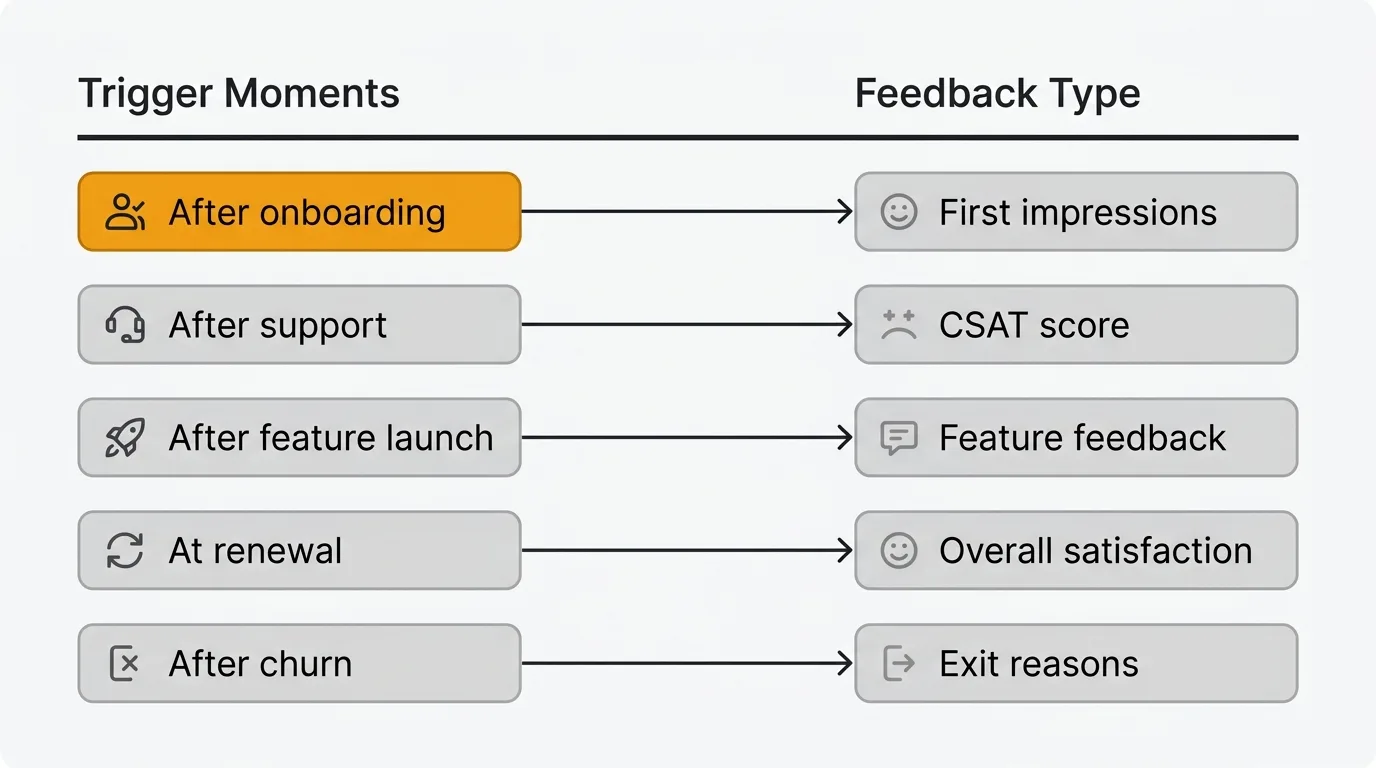
To ask for customer feedback effectively, time the request to a moment with fresh context (after onboarding, a support interaction, a feature launch, or churn), phrase one or two specific open-ended questions, and explain why you are asking. Choose the channel to match the goal: email for considered replies, in-app prompts for in-context reactions, and feedback boards for ongoing feature requests. Then close the loop so users see their input lead to change.
When to ask for feedback
Timing matters more than most teams realize. Ask too early and users don't have enough context to give useful input. Ask too late and the experience has faded from memory. Ask at the wrong moment and you interrupt a workflow, which generates annoyance rather than insight.
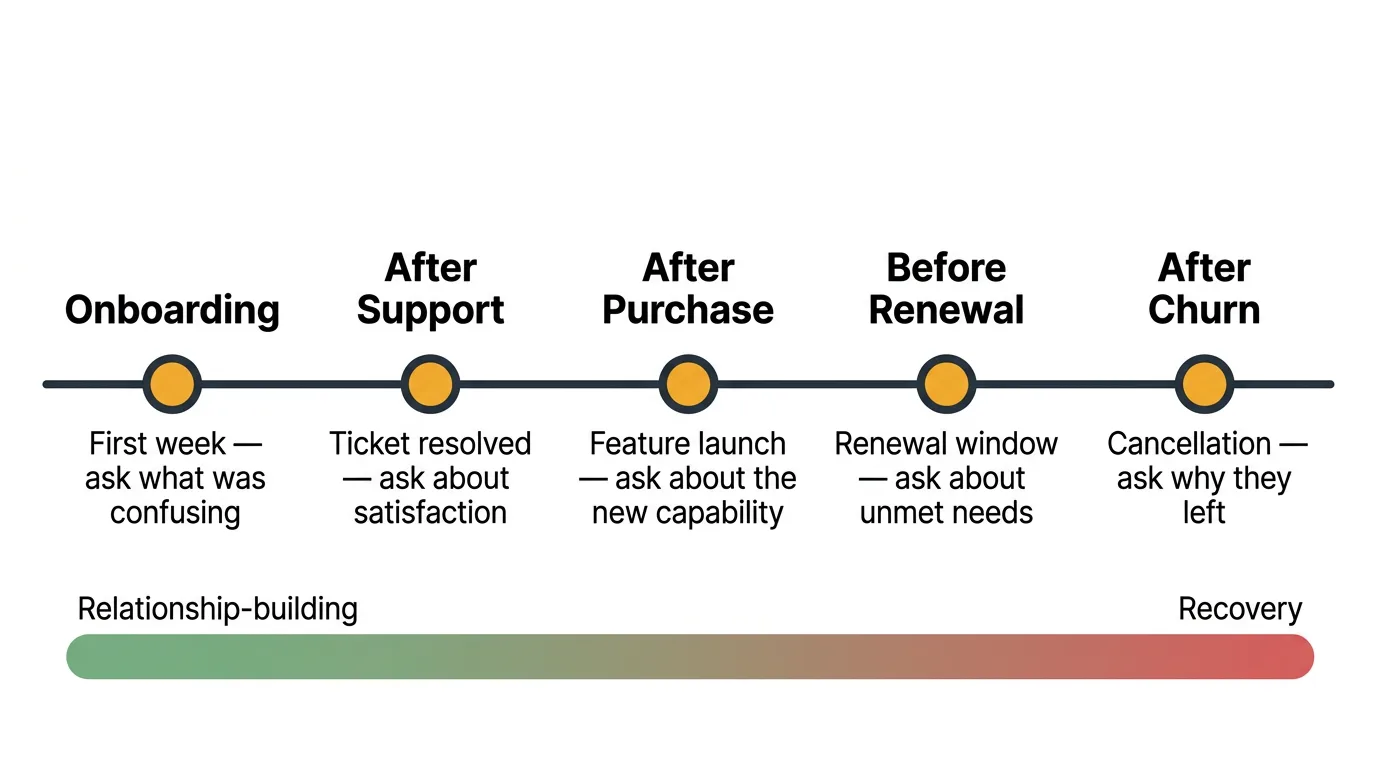
Here are the moments that consistently produce the highest-quality feedback.
After onboarding. The first few days of using your product are when users form their strongest opinions. They notice friction that long-time users have learned to work around. Ask within the first week, while the experience is still fresh. Focus on what was confusing, what was missing, and whether they found value quickly.
After a support interaction. Users who just received help from your team are primed to share their experience. This is the best moment for a CSAT survey — a quick satisfaction rating immediately after resolution. The context is specific and the feedback is actionable.
After a feature launch. When you ship something new, the users who try it have direct, relevant feedback about whether it solves their problem. Reach out within the first week of launch. Ask about specific aspects of the feature rather than general satisfaction.
At renewal time. Renewal conversations are natural feedback moments. Users are already evaluating whether your product is worth continuing to pay for. This is the right time for a broader conversation about overall satisfaction, unmet needs, and what would make the product more valuable.
After churn. Users who cancel have already made their decision, which paradoxically makes them more honest. They have nothing to lose by telling you the truth. Exit surveys and churn follow-ups produce some of the most actionable feedback you will ever receive. Don't skip this step because it feels uncomfortable.
Feedback request templates
These templates are starting points. Adapt the tone and specifics to match your product and audience. Each one targets a specific moment and feedback type.
Post-onboarding email
Subject: Quick question about your first week
Hi [name],
You have been using [product] for about a week now. I'd like to hear how it's going.
Two quick questions:
- What was the most confusing part of getting started?
- Is there anything you expected to find but didn't?
No need for a detailed write-up — a few sentences is plenty. Your answers help us improve the experience for the next person who signs up.
Thanks, [sender]
This template works because it is specific, short, and explains why you are asking. Two questions is the right number — enough to surface useful detail, few enough that users actually respond. In our experience, active users tend to respond at a modest rate, so send to a meaningful sample.
Feature feedback prompt
Subject: How's [feature name] working for you?
Hi [name],
We shipped [feature name] last week and I noticed you've been using it. I'd love to hear your take.
- Does it solve the problem you were hoping it would?
- Is there anything about it that feels clunky or unintuitive?
- What would make it more useful for your workflow?
Your feedback goes directly into how we iterate on this. We read every response.
Thanks, [sender]
Targeting users who actually used the feature is key. Sending this to your entire user base dilutes the signal. Only ask people who have relevant context. Response rates tend to run higher here because the request is specific and timely.
NPS follow-up
Subject: Thanks for your feedback — one more question
Hi [name],
You recently rated us a [score] out of 10. Thank you for taking the time.
I'm curious about the reasoning behind your score. What's the single biggest thing we could improve?
If there is nothing specific, that's fine too. But if something came to mind when you chose that number, I'd genuinely like to hear it.
Thanks, [sender]
The open-ended follow-up is where the real value of NPS lives. The score itself is a benchmark. The follow-up response tells you what to actually do about it. Response rates for NPS follow-ups vary by segment: in our experience detractors respond more often than promoters, because they have something specific they want to say. For more NPS question examples and distribution strategies, see our NPS survey template guide.
Bug report follow-up
Hi [name],
The issue you reported — [brief description] — has been fixed and the update is live.
Would you mind confirming it's working as expected on your end? And if there is anything else that's been frustrating you about [product area], I'd like to hear about it while we're in here making improvements.
Thanks for flagging this. Reports like yours help us catch things we'd otherwise miss.
[sender]
This template does double duty. It closes the loop on the original bug and opens the door for additional feedback. Users who see their reports addressed promptly are far more likely to report issues in the future.
Churn exit survey
Subject: We'd like to understand why
Hi [name],
We noticed you cancelled your [product] account. We're sorry to see you go.
If you have 30 seconds, it would help us to know the main reason:
- It didn't solve the problem I needed it to
- Too expensive for the value
- Switched to a different tool
- Missing a specific feature I need
- I no longer need this type of product
- Other
If you're open to sharing more detail, reply to this email. Every response is read by a real person.
Thanks for giving us a try, [sender]
Keep exit surveys short. Churned users have already decided to leave — a lengthy survey won't get completed. A single multiple-choice question followed by an optional open-ended reply strikes the right balance. Response rates here are low, but even a small number of responses is valuable because churned users are unusually candid.
In-app micro-survey
How would you rate your experience with [feature/area]?
[1] [2] [3] [4] [5]
(Optional) What would make this better?
Micro-surveys work because they respect the user's time. One rating and one optional text field. Show them contextually — after a user completes a specific action, not randomly during their session. In-app widgets like the Quackback widget support this kind of contextual feedback collection without requiring users to leave what they are doing. In our experience, contextual in-app micro-surveys consistently see the highest response rates of any channel.
Best channels for asking
The channel you choose affects who responds, how much detail you get, and how willing people are to be honest.
Email is best for longer, more considered feedback. Users can respond on their own schedule. Email response rates tend to be modest, so volume depends on your list size. Email works well for post-onboarding surveys, NPS follow-ups, and churn exit surveys. The limitation is that it pulls users out of context — they're remembering their experience rather than reacting to it in the moment.
In-app prompts capture feedback at the point of experience. Users are inside your product, interacting with the thing you want feedback on. This produces more specific, context-rich responses than email. An in-app widget lets users submit feedback, report issues, and vote on existing requests without leaving your app. In-app collection consistently gets higher response rates than any external channel.
Feedback boards are best for ongoing feature request collection. A public feedback board gives users a dedicated space to submit ideas, see what others have requested, and vote on the features they want most. Boards are passive — you set them up once and users contribute on their own terms. They're less useful for measuring satisfaction or collecting bug reports, but they're the best channel for understanding feature demand at scale. Quackback is open source (AGPL-3.0), so you can put the whole team on the board — and self-host it for free or run it on Quackback Cloud.
Support conversations are an underutilized feedback channel. Every support interaction is an opportunity to ask "Is there anything else about this area of the product that's been bothering you?" Your support team already has rapport with the user and context about their issue. A natural follow-up question at the end of a resolved ticket can surface insights that no survey would capture.
Social media is useful for monitoring unsolicited feedback, but less effective for actively soliciting it. Users who post about your product on Twitter, Reddit, or review sites are sharing unfiltered opinions. Monitor these channels for patterns, but don't rely on them as a primary feedback collection method. The sample is too skewed toward the very happy and the very frustrated.
How to phrase your ask
The words you choose shape the responses you get. Small changes in phrasing produce meaningfully different feedback.
Be specific about what you want to know. "How's everything going?" invites a shrug. "What was the most confusing part of setting up your first project?" invites a useful answer. The more specific your question, the more actionable the response. Don't ask users to do the work of figuring out what you need to hear.
Ask open-ended questions. Yes/no questions give you data points but no understanding. "Did you find onboarding easy?" tells you less than "What would have made onboarding easier?" Open-ended questions let users surface problems you didn't think to ask about. The best feedback often comes from questions that give users room to surprise you.
Keep it short. Every additional question reduces completion rates. If you're sending a survey, aim for three to five questions maximum. If you're sending an email, ask one or two things. If you need more detail, conduct an interview instead of adding questions to a survey. Respect your users' time and they'll be more willing to give it.
Explain why you're asking. Users respond at higher rates when they understand the purpose. "We're redesigning the onboarding flow and want to make sure we fix the right things" is more motivating than "Please take our survey." It frames the request as a collaboration rather than a chore. Tell users how their feedback will be used and they'll give you better answers.
Avoid leading questions. "How much do you love our new dashboard?" assumes a positive experience and makes users uncomfortable giving honest criticism. "What's your experience been with the new dashboard?" is neutral and invites honest feedback in either direction. Your goal is truth, not validation.
What to do after you ask
Collecting feedback is the beginning, not the end. What happens after a user shares their thoughts determines whether they'll share again.
Acknowledge every response. Even a brief reply — "Thank you, we've logged this" — tells users their feedback was received. Silence after someone takes the time to respond is the fastest way to kill future engagement. If you use a feedback board, automatic status updates handle this at scale.
Close the loop when you act. When you build something a user requested, tell them. When you fix a bug someone reported, let them know. This is the single most effective way to build a culture where users actively contribute feedback. For a deeper look at building this process, see our guide on the customer feedback loop.
Use voting to prioritize. Individual feedback requests can be hard to evaluate in isolation. When you aggregate requests on a feedback board with voting, demand becomes visible. Ten separate emails asking for the same thing are hard to track. Ten votes on a single request are easy to prioritize.
Communicate decisions publicly. A changelog that announces shipped features — especially ones tied to user requests — shows your entire user base that feedback leads to action. This encourages more users to contribute, even those who haven't submitted feedback before.
Track feedback trends over time. A single request is an anecdote. The same request appearing consistently over three months is a trend. Review your feedback regularly — weekly or biweekly — to spot emerging patterns before they become urgent problems. Quackback's MCP server lets you query and summarize incoming feedback from an AI assistant, so you can analyze trends without leaving the tools you already use.
Common mistakes
Asking for feedback but never acting on it. This is the most damaging mistake. Users who share their thoughts and never hear back stop contributing. Worse, they tell other users that providing feedback is a waste of time. If you are not ready to build a process around incoming feedback, you are better off not asking.
Surveying at the wrong moment. A pop-up survey that appears while a user is in the middle of completing a task generates frustration, not insight. Timing matters. Ask after a user completes an action, not during it. Ask after a support ticket is resolved, not while the user is still frustrated. The same question asked at the right moment versus the wrong one produces completely different results.
Making feedback requests feel transactional. Generic survey invitations that feel automated get treated accordingly — ignored or answered with minimal effort. Personalize your requests. Use the user's name. Reference their specific usage. Explain what you'll do with their input. The more it feels like a genuine conversation, the more thoughtful the response.
Only asking promoters and ignoring detractors. It is tempting to follow up with your happiest users because those conversations feel good. But the most valuable feedback often comes from users who are dissatisfied or who recently churned. Those conversations are harder, but they tell you what's actually broken. Make a deliberate effort to hear from the full spectrum of your user base.
Try Quackback — open source with a managed cloud option. Start free. Get started | View on GitHub
Frequently asked questions
How many feedback requests can I send before users get annoyed?
Limit proactive requests to about one per user per month, outside of transactional moments like a CSAT survey after a support ticket. The warning sign is declining response rates. User-initiated channels such as feedback boards sidestep the limit entirely.
What's the best way to ask for feedback from enterprise customers?
Enterprise customers respond better to direct, personal outreach than automated surveys. A short, specific email from their account manager, or feedback questions built into quarterly business reviews, outperforms a generic NPS blast. Give them a shared feedback board so no single account dominates the roadmap.
Should I offer incentives for completing feedback surveys?
Generally, no. Incentives raise response volume but lower quality, since people optimize for completion over honesty. The exception is user interviews, where a small reward fairly compensates for someone's time. For surveys, reduce friction, explain why you are asking, and close the loop instead.
What is the best time to ask for customer feedback?
The best time is right after a moment with fresh context: within the first week of onboarding, immediately after a support interaction, soon after a feature launch, at renewal, or just after churn. Avoid interrupting an active workflow, which produces annoyance rather than insight.
What makes a good feedback request email subject line?
A good subject line is short, specific, and signals a quick ask. Lines like "Quick question about your first week" or "How's [feature] working for you?" set clear expectations and reference the user's recent experience, which lifts open and response rates over generic "Take our survey" wording.

Authored by James Morton
Founder of Quackback. Building open-source feedback tools.
Try Quackback
The open-source feedback platform. Boards, voting, and roadmaps.
Get startedStar on GitHub305