
The best feedback comes from users who are already in your product. A feedback widget removes the friction of switching tabs, finding a form, or remembering to email you later. Instead of redirecting users to a separate page, you bring the collection point to them — embedded directly in your app or site.
The result is higher response rates, better context (you know exactly which page or feature they were on), and feedback that arrives structured rather than buried in an inbox.
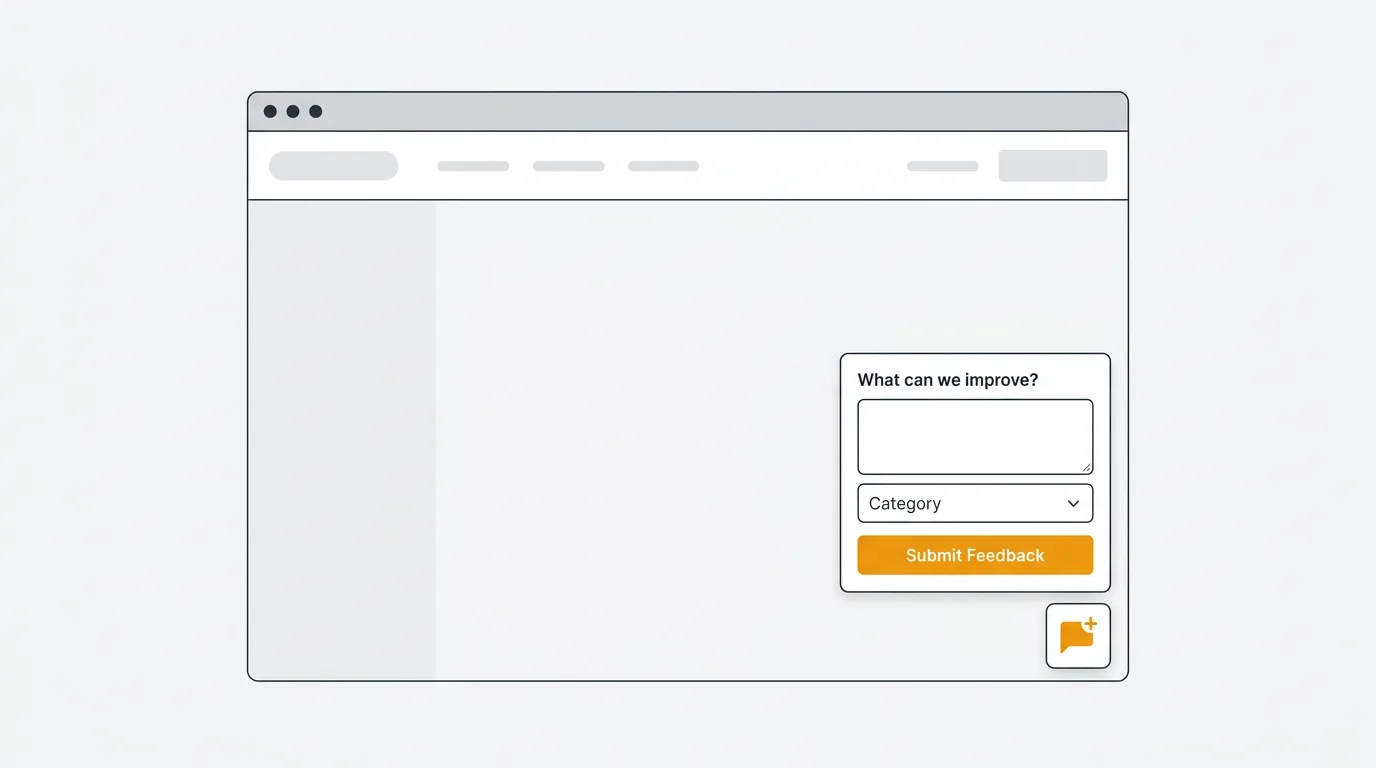
What is a feedback widget
A feedback widget is an embedded UI element that lets users submit feedback without leaving your app. It sits inside your product rather than behind a separate URL.
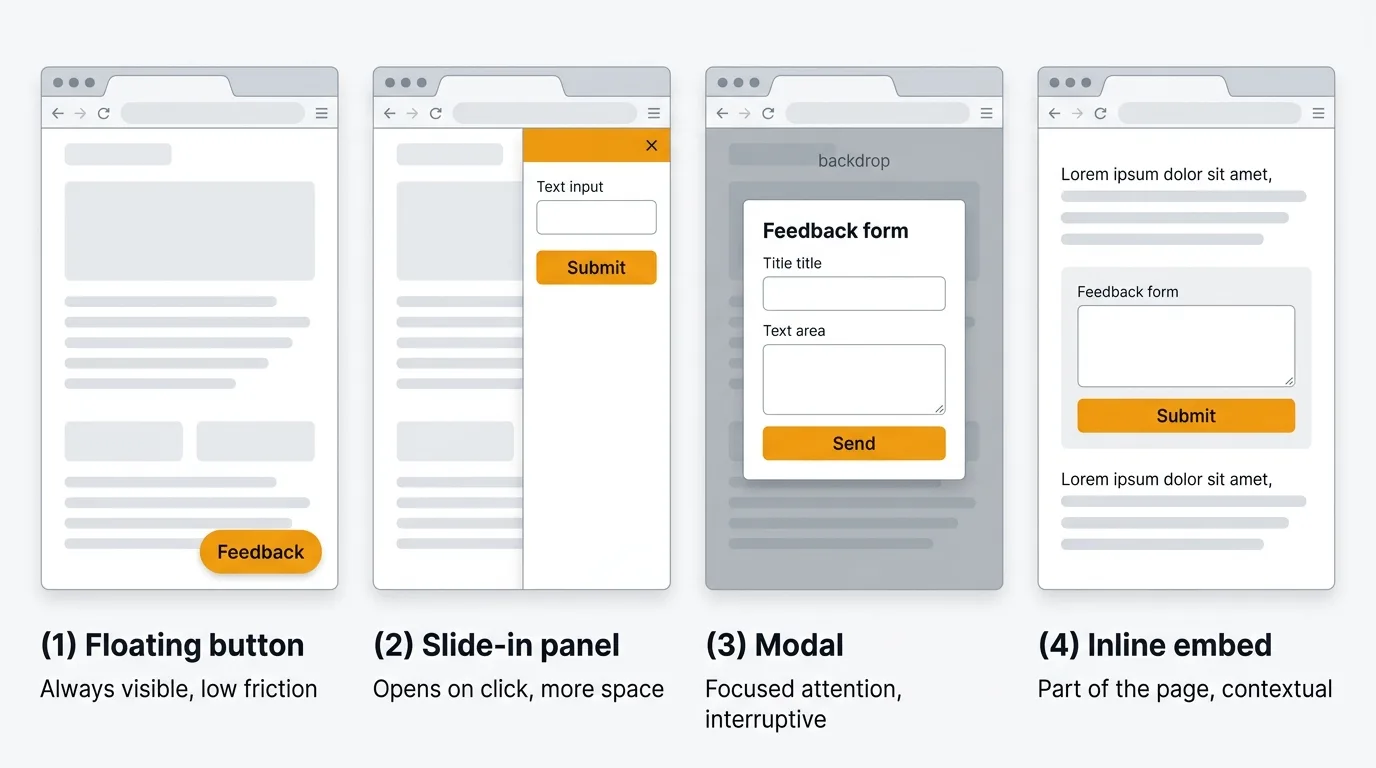
Common widget types include:
- Floating button — a persistent button, usually in the bottom corner, that opens a feedback panel on click
- Slide-in panel — a drawer that slides in from the side of the screen
- Modal — a centered overlay triggered by a button or user action
- Inline form — a form embedded directly into a page or section
- Contextual prompt — a targeted question shown after a specific action, like completing onboarding or submitting a ticket
Most tools in this comparison offer at least the floating button and slide-in panel. Some add contextual triggering, screenshot capture, or integration with your existing feedback board.
Why use a feedback widget
A standalone feedback form requires users to navigate away, remember the URL, or hunt for a link in your footer. Most of them do not bother. A widget removes every step between "I have a thought" and "I submitted it."
Widgets also capture context automatically. They know which page the user was on, which account they belong to, and what they were doing. That context would otherwise require you to ask for it, which reduces response rates further.
Compared to email surveys or NPS campaigns, in-product widgets tend to produce higher response rates because the feedback moment aligns with the user's natural workflow. The friction is lower, and the signal arrives when the experience is still fresh.
Finally, most feedback widgets deliver structured data. Instead of an email saying "the thing doesn't work," you get a categorized report with page URL, user ID, and a screenshot — information your team can act on without follow-up.
8 feedback widgets compared
Pricing last verified January 2026. Vendors may change plans and pricing without notice. Check each vendor's pricing page for the latest figures.
1. Quackback
Overview: Quackback is an open-source feedback platform with an embeddable widget. The widget connects directly to a full feedback management system: voting boards, a public roadmap, a changelog, and 25 integrations. Users can submit new requests or vote on existing ones without leaving your app.
The widget includes built-in duplicate detection. When a user submits a request that matches an existing one, Quackback surfaces the similar post and lets them vote on it instead of creating a fragmented duplicate. That keeps your vote counts accurate and your feedback board clean.
Key features:
- Embeddable floating button and slide-in panel
- Users can submit new feedback or vote on existing requests from within the widget
- AI duplicate detection prevents fragmented feedback
- Connects to full feedback platform: boards, roadmap, changelog, 25 integrations
- Anonymous submission support
- Custom branding and theming
- MCP server for AI agents to triage and respond to feedback
Pricing: Free and open source (AGPL-3.0) to self-host. Or let us run it: Quackback Cloud is fully managed (backups, updates, and uptime handled) from $29/mo on annual billing, with a 14-day free trial, no card required.
Pros:
- Widget is backed by a complete feedback management platform
- AI deduplication keeps vote data accurate
- Open source — you own your data and the code
Cons:
- Newer project than some established alternatives
- Self-hosting requires running your own infrastructure (or a one-click deploy on Railway)
Best for: Teams that want an embeddable widget connected to a full feedback management system, with no vendor lock-in.
2. Sleekplan
Overview: Sleekplan is a widget-first feedback tool. It was built around the in-app embed rather than a standalone portal. The widget includes feedback boards, a roadmap, a changelog, and NPS/CSAT satisfaction surveys — all accessible from a single floating button in your app.
Paid plans include AI features ("Sleek Intelligence") for summarization and analysis. The Starter plan at $13/month adds the roadmap, surveys, and 1,000 AI credits. Business at $38/month unlocks post merging, user segmentation, and conditional surveys.
Key features:
- Floating button widget with feedback board, roadmap, changelog, and surveys
- NPS and CSAT surveys embedded in the widget
- Impact scoring beyond raw vote counts
- AI-powered features on paid plans (summarization, analysis)
- 12 integrations: Jira, Linear, Azure DevOps, Slack, Intercom, ClickUp, GitHub, Zapier
Pricing: Free Indie plan (1 seat, limited features). Starter at $13/month. Business at $38/month. Enterprise is custom.
Pros:
- Widget-first design with all features accessible in one embed
- Affordable starting price
- Includes satisfaction surveys alongside feedback collection
Cons:
- Post merging and user segmentation require the Business plan ($38/month)
- Free plan lacks roadmap, surveys, and AI
- Standalone portal is less polished than the widget
- No self-hosting
Best for: Teams that want a widget-centric feedback experience with built-in satisfaction surveys at a low starting price.
See how it compares: Quackback vs Sleekplan.
3. Canny
Overview: Canny is a feedback board platform that offers a widget as an add-on to its core product. The widget lets users submit new requests and vote on existing ones from inside your app, with all data flowing into your Canny board.
Canny's Autopilot AI discovers implicit feedback from support conversations in Intercom, Zendesk, Help Scout, and Gong — attributing those interactions as votes on relevant feature requests. The pricing model shifted in May 2025 to tracked-user billing: anyone who submits or votes through the widget becomes a tracked user.
Key features:
- Embeddable widget for submission and voting
- Autopilot AI discovers votes from support tool conversations
- Vote-based prioritization scoring
- Public and private roadmaps
- Changelog with email notifications
- Integrations: Jira, Linear, Slack, HubSpot, Salesforce (Business plan)
Pricing: Free plan (25 tracked users). Core from $19/month. Pro from $79/month. Business is custom.
Pros:
- Mature platform with large user base
- AI-powered feedback discovery from support conversations
- Clean submission and voting experience
Cons:
- Every widget user becomes a tracked user, increasing costs as adoption grows
- No anonymous submissions (users must authenticate)
- Jira integration requires Pro ($79/month)
- No self-hosting
Best for: Existing Canny users who want to add in-app submission and voting to their feedback boards.
See how it compares: Quackback vs Canny.
4. Userback
Overview: Userback focuses on visual feedback: screenshot capture, annotation tools, and session replay. When users click the widget, they can draw directly on the screen, highlight problem areas, and attach recordings. That context is automatically attached to every report.
The tool is aimed at design and QA workflows. Reports include browser info, screen resolution, and OS automatically. Session replay lets your team see exactly what the user was doing before they submitted the report.
Key features:
- In-app widget with screenshot and annotation tools
- Session replay attached to feedback reports
- Video feedback recording
- Custom feedback categories and workflows
- Integrations: Jira, GitHub, Trello, Asana, Slack, Zapier, and more
- User identification and custom metadata
Pricing: From $49/month for up to 3 team members.
Pros:
- Visual feedback with annotations and session replay gives deep context
- Automatic technical metadata (browser, OS, resolution)
- Strong integration set for development teams
Cons:
- Focused on visual bug reporting rather than feature requests or voting
- Higher starting price than most widget-only tools
- No open source or self-hosting
Best for: Design and UX teams that need annotated screenshot feedback and session replay alongside standard text submissions.
5. Marker.io
Overview: Marker.io is a bug reporting widget built around screenshot annotations. It integrates tightly with project management and issue tracking tools, sending annotated bug reports directly to Jira, GitHub, Trello, or Asana as formatted issues.
The widget sits in your app or site and captures browser metadata automatically. Users can highlight, blur, or annotate the screenshot before submitting. Reports arrive in your issue tracker pre-formatted, reducing the manual work of converting feedback into actionable tickets.
Key features:
- Screenshot annotation widget with highlight, blur, and drawing tools
- Direct integration with Jira, GitHub, Trello, Asana, ClickUp, and Monday.com
- Automatic browser, OS, and resolution metadata
- Console log capture for JavaScript errors
- Custom feedback forms and categories
- Guest reporting (no account required for submitters)
Pricing: From $39/month for up to 3 team members.
Pros:
- Strong integrations with development tools create properly formatted issues
- Automatic technical metadata reduces back-and-forth with reporters
- Guest reporting means external stakeholders can report without accounts
Cons:
- Purpose-built for bug reporting, not feature requests or general feedback
- No voting or roadmap features
- No self-hosting
Best for: QA and development teams that want structured bug reports flowing directly into their issue tracker.
6. Hotjar
Overview: Hotjar takes a different angle. Rather than a submission widget, it combines feedback tools (polls, surveys, incoming feedback) with behavioral analytics (heatmaps, session recordings, funnels). The feedback widget sits alongside usage data, so you can correlate what users say with what they actually do.
The Feedback tool lets users rate pages and leave comments using a simple thumbs-up/thumbs-down widget or a multi-step survey. The Surveys product handles longer-form questions. Both integrate with the heatmap and session data in the same dashboard.
Key features:
- In-product polls and surveys with visual targeting
- Incoming feedback widget for ratings and open-ended comments
- Heatmaps, click maps, and scroll maps
- Session recording and replay
- Funnel analysis and form analytics
- Integrations: Slack, HubSpot, Segment, Google Analytics
Pricing: From $32/month. The free plan includes limited sessions and heatmaps. Feedback features are available on paid plans.
Pros:
- Combines feedback collection with behavioral data in one platform
- Targeted surveys based on user behavior and page triggers
- Large user base and mature product
Cons:
- Not a feedback management platform — no voting boards, roadmaps, or changelogs
- Focused on UX research rather than product feedback workflows
- Per-session pricing can escalate on high-traffic sites
- No self-hosting
Best for: UX research teams that want to combine qualitative feedback with behavioral analytics in a single tool.
7. Doorbell.io
Overview: Doorbell.io is a lightweight feedback widget that does one thing: collect text feedback from users and send it somewhere. Users click the widget, type their feedback, and optionally attach a screenshot. That's it. Reports land in your inbox or get forwarded to Slack, Trello, or GitHub.
It covers the minimal use case without the overhead of a full feedback platform. There are no voting boards, no roadmaps, no changelogs, and no prioritization. Just a simple form in your app.
Key features:
- Lightweight floating button widget
- Optional screenshot attachment
- Email and Slack notifications
- Integrations: Slack, Trello, GitHub, Jira, Asana, Basecamp
- Custom feedback categories
- User identification via JavaScript snippet
Pricing: From $29/month. Pricing scales by number of apps.
Pros:
- Simple to set up and use
- Low overhead for teams that only need basic collection
- No complexity to learn
Cons:
- No voting, roadmap, changelog, or prioritization
- Feedback lands in your inbox rather than a structured system
- Limited compared to full feedback platforms
- No self-hosting
Best for: Teams with minimal needs who want a simple, low-overhead widget and are comfortable managing feedback in email or Slack.
8. Featurebase
Overview: Featurebase bundles feedback boards, a changelog, a roadmap, a help center, and a support inbox into a single product. The widget surfaces all of these from a floating button in your app. Users can submit feedback, browse the changelog, or search help articles without leaving your product.
Their AI agent, Fibi, automatically resolves customer questions using context from your help articles and feedback posts. At $0.49 per AI resolution, costs are usage-based. The free plan covers one seat with limited features.
Key features:
- Widget with feedback submission, changelog, roadmap, and help center access
- Unified support inbox with live chat, email, and ticketing
- Fibi AI agent ($0.49/resolution) for automated question resolution
- In-widget surveys: NPS, CSAT, multiple choice
- Voter segmentation by plan and company (paid plans)
- 12 integrations: Linear, Jira, GitHub, ClickUp, Slack, Intercom, Zendesk, HubSpot
Pricing: Free plan (1 seat, limited features). Growth at $29/seat/month. Professional at $59/seat/month. Enterprise at $99/seat/month.
Pros:
- All-in-one widget covering feedback, changelog, help center, and support
- AI agent handles question resolution automatically
- Clean, polished widget experience
Cons:
- Per-seat pricing adds up for larger teams
- AI resolutions at $0.49 each can become significant at volume
- Post merging and user segmentation locked to higher tiers
- No self-hosting
Best for: Small teams that want a widget covering feedback, support, and help center access in a single embed.
See how it compares: Quackback vs Featurebase.
Comparison table
| Tool | Widget type | Voting | Screenshots | Analytics | Starting price |
|---|---|---|---|---|---|
| Quackback | Floating button, slide-in | Yes | No | Yes | Free (open source) |
| Sleekplan | Floating button | Yes | No | Paid plans | $13/month |
| Canny | Floating button, slide-in | Yes | No | Yes | Free (25 tracked users) |
| Userback | Floating button | No | Yes (annotations + replay) | Yes | $49/month |
| Marker.io | Floating button | No | Yes (annotations) | No | $39/month |
| Hotjar | Floating button, inline | No | No | Yes (heatmaps) | $32/month |
| Doorbell.io | Floating button | No | Optional | No | $29/month |
| Featurebase | Floating button | Yes | No | Paid plans | $29/seat/month |
How to choose
The right widget depends on what you want to do with the feedback after it arrives.
Feedback-only vs. full platform. Doorbell.io and Marker.io collect feedback and route it to your inbox or issue tracker. That is the full workflow. If you want users to vote on existing requests, see a roadmap, and get notified when features ship, you need a platform with a widget on top — Quackback, Canny, Sleekplan, or Featurebase.
Bug reporting vs. feature requests. If your primary use case is bug reports from QA or stakeholders, Marker.io and Userback offer annotation tools that general-purpose widgets do not. If you want to collect and prioritize feature requests, tools with voting boards are a better fit.
Standalone vs. integrated. Some teams already have a feedback board and just need a widget to feed it. Others are starting from scratch and want the widget and the board to be the same product. Starting from scratch generally means choosing a tool where both are built together rather than bolting them on separately.
Pricing model. Per-seat pricing (Featurebase, Canny's tracked-user model) means costs grow as your team or user base grows. Flat-rate pricing (Sleekplan, Doorbell.io) is more predictable. Open source (Quackback) eliminates the recurring cost entirely if you are willing to self-host.
Customization. Most widgets let you change colors and add your logo. Fewer let you control the layout, trigger behavior, or CSS deeply. If matching your product's design system is important, check how much customization each tool allows before committing.
Implementation tips
Placement. Bottom-right is the default position for most tools and carries less visual weight than bottom-left, which users associate with live chat. It is visible without blocking primary UI. If your app has a persistent right sidebar, consider bottom-left or a contextual inline trigger instead.
When to show. A persistent floating button works for general feedback. Contextual triggers — showing the widget after a specific action — produce higher-quality, more relevant submissions. Show a targeted prompt after a user completes onboarding, exports a file, or cancels a subscription. The feedback you get is directly tied to that experience.
What to ask. Keep it short. One or two questions at most. "What were you trying to do?" and "What got in your way?" produce more actionable feedback than "How would you rate this feature?" Open-ended questions surface problems you did not think to ask about.
Avoid survey fatigue. If you show a prompt every session, users start ignoring it. Rate-limit your contextual prompts. Show them once per experience, not once per visit. Let users dismiss without penalizing them — repeated prompts after dismissal create negative associations with your brand.
Test on mobile. Most widgets are designed and tested on desktop. If your users are on mobile, verify that the widget does not cover primary content, that it is easy to dismiss, and that the form inputs work on a small screen.
Frequently asked questions
What is a feedback widget?
A feedback widget is an embedded UI component that lets users submit feedback without leaving your app or website. It typically appears as a floating button that opens a form, panel, or modal when clicked. Unlike a standalone feedback form on a separate page, a widget captures feedback in context — while the user is actively in your product. Most widgets automatically attach the current URL, user ID, and browser metadata to every submission.
How does a feedback widget differ from a feedback board?
A feedback widget is the collection point — the UI element your users interact with. A feedback board is where that feedback lives, gets organized, and gets acted on. Some tools are widget-only and route submissions to your inbox or issue tracker. Others include both: the widget collects feedback, and the board (with voting, roadmap, and changelog features) is where you manage it. Tools like Quackback, Canny, and Featurebase include both. Tools like Doorbell.io and Marker.io are widget-only.
Can users vote on feedback through a widget?
Some tools support this. Quackback, Canny, Sleekplan, and Featurebase let users submit new requests or upvote existing ones directly from the widget. When a user starts typing a request, the widget surfaces similar existing posts and offers a one-click vote instead of a duplicate submission. This keeps vote counts consolidated and your feedback board accurate. Tools focused on bug reporting (Marker.io, Userback) and lightweight collection (Doorbell.io) do not include voting.
For a broader look at feedback collection strategies, see our guides on how to collect customer feedback, how to ask for customer feedback, and the best customer feedback tools in 2026. If you are evaluating whether Quackback fits your needs, see the feedback features overview.

Authored by James Morton
Founder of Quackback. Building open-source feedback tools.
Try Quackback
The open-source feedback platform. Boards, voting, and roadmaps.
Get startedStar on GitHub305