
Every PM has seen a roadmap. Gantt charts that stretch to infinity. Notion pages with three outdated quarters. Spreadsheets that only one person understands. Most roadmaps communicate nothing useful to anyone.
A good roadmap does something harder. It tells your team and your users what you are building, in what order, and why — without committing to a schedule you cannot keep. These 12 examples, drawn from real SaaS companies and internal planning formats, show what that looks like in practice.
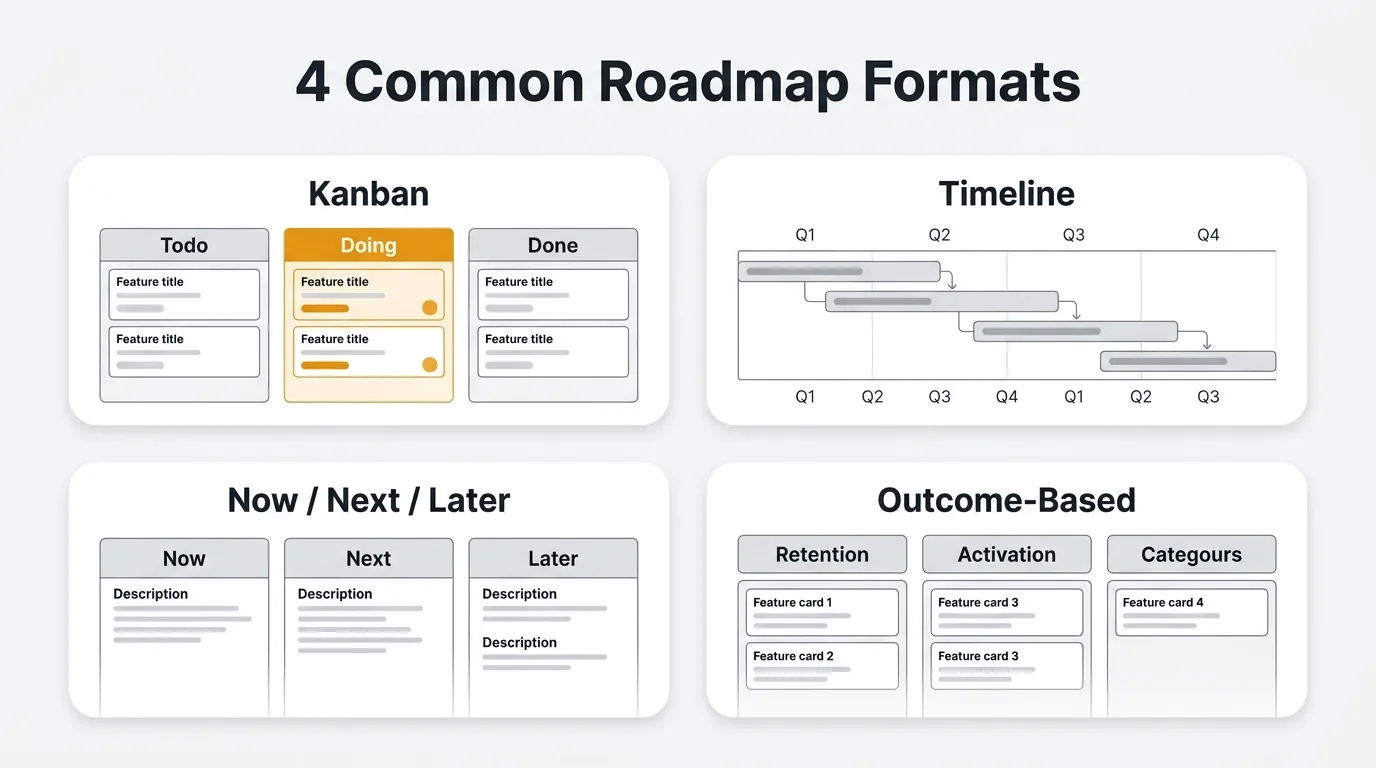
A good product roadmap communicates what you are building, in what order, and why — without promising a fixed schedule. The strongest examples (Linear, Notion, GitHub, Cal.com, Raycast) share five traits: clear priorities, realistic scope, items tied to user feedback, intent rather than commitments, and detail matched to the audience. Public roadmaps lean on kanban or changelog formats; internal ones use Now/Next/Later, quarterly themes, or outcome-based planning.
Company roadmap formats last verified May 2026. Public roadmaps change often — check each link for the current layout.
What makes a good product roadmap
A good product roadmap is a prioritized, audience-appropriate view of what a team is building and why, communicating direction without committing to a fixed delivery schedule. Most roadmap problems come from conflating intent with commitment, or from showing the same roadmap to everyone regardless of audience.
A good product roadmap has five properties:
Clear priorities. Your most important work is obviously most important. Users and stakeholders should not have to ask what matters most this quarter.
Realistic scope. The roadmap reflects your actual capacity. A roadmap that includes everything is a roadmap that plans nothing. Cut ruthlessly.
Tied to user feedback. Items on the roadmap trace back to real user problems. Requests with vote counts. Support tickets with patterns. Qualitative interviews. The roadmap is not your engineering team's wishlist — it is your response to what users actually need.
Intent, not commitments. A roadmap communicates direction. It is not a contract. "We plan to build X in Q2" is different from "X will ship May 15." The best roadmaps make this distinction explicit.
Appropriate detail for the audience. Your board gets a theme-level view. Your engineering team gets a quarterly breakdown. Your users get a kanban with statuses. Showing the wrong level of detail to any audience creates confusion and unrealistic expectations.
With those criteria in mind, here are 12 examples worth studying.
Public roadmap examples
Public roadmaps are a different challenge from internal ones. You cannot hedge with "TBD" columns or internal jargon. Every status and every label is a message to a customer who may be evaluating you against a competitor.
1. Linear
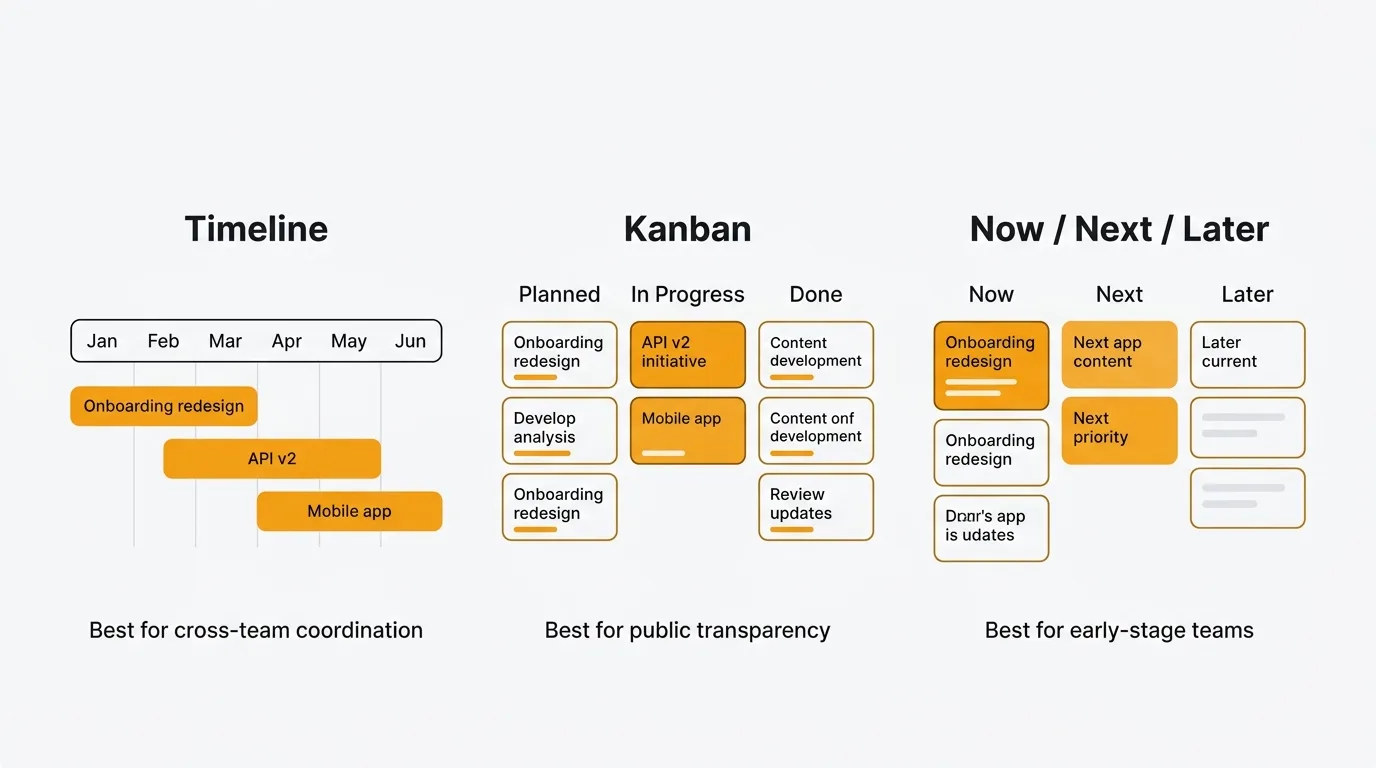
Linear's public roadmap uses a clean kanban layout with three columns: Planned, In Progress, and Done. Each card shows a title and a one-line description. No estimated dates. No priority scores. No feature explanations beyond what the title communicates.
What works here is the restraint. Linear commits only to what they can show without caveats. The Done column does most of the credibility work — it shows a long history of shipped work, which is more convincing than any promise about the future. The In Progress column is always short, which signals that Linear does not overload their pipeline.
Format: Three-column kanban Audience: Existing users and potential customers Detail level: Minimal — title and one line per item What it communicates: We ship consistently, we have clear priorities, we don't overpromise
2. Notion
Notion does not publish a traditional roadmap. Instead, they lead with a "What's new" page — a reverse-chronological changelog of shipped features. The implied message is: judge us on what we have built, not on what we say we will build.
This is an honest approach for a company at Notion's scale. Their feature velocity is high enough that a changelog tells the product story more convincingly than a kanban with speculative planned items. The tradeoff is that users who want to know whether a specific missing feature is coming have no place to look.
Format: Changelog-first, no traditional roadmap Audience: Existing users, power users Detail level: High on shipped features, zero on future plans What it communicates: We ship fast. Check back often.
3. GitHub
GitHub's public roadmap is a GitHub repository — literally a collection of GitHub Issues with labels, milestones, and a project board. Users can react to issues with emoji, leave comments, and link their own issues to the roadmap items.
The format is clever because GitHub's core user is a developer who lives in GitHub. The roadmap meets the audience where they already are. It is also genuinely interactive: GitHub product managers respond to comments, which turns the roadmap into a two-way communication channel. The community-driven nature gives users a sense of influence, even when their requests aren't directly on the board.
Format: GitHub Issues with project board Audience: Developers and technical users Detail level: Medium — issues include context, but estimates are rare What it communicates: We build in the open. Your input reaches us directly.
4. Cal.com
Cal.com is open source, which makes radical transparency the natural choice. Their public roadmap lives on a GitHub board and is visible alongside their codebase. Anyone can see what is being built, submit pull requests, and contribute directly to items on the roadmap.
The result is a roadmap that is genuinely community-driven. Feature priorities shift based on who shows up and contributes. This works well for an open-source project where contributors are also users. It is harder to replicate for closed-source products where the community cannot directly influence velocity by writing code.
Format: GitHub project board, open to community Audience: Developers, contributors, self-hosters Detail level: High — issues include acceptance criteria and technical context What it communicates: This is your product too. Build what you need.
5. Plausible
Plausible's roadmap is a simple list grouped by status: Done, In Progress, and Planned. Each item has a title and links to a corresponding GitHub issue or feedback thread. The list is short — rarely more than a dozen items across all three statuses.
The short list is deliberate. Plausible is a small team with a focused product. A long roadmap would be dishonest about their capacity. Linking items to GitHub issues also closes the loop between the public roadmap and the underlying work, so users can follow progress without relying on status updates.
Format: Simple status-grouped list with issue links Audience: Privacy-focused users and small teams Detail level: Minimal — title and status only What it communicates: We know what we are building. We're not pretending otherwise.
6. Resend
Resend combines their changelog and roadmap on a single page. Recent changelog entries sit at the top. A short "Coming soon" section sits below. The whole thing is minimal, developer-focused, and updated frequently.
This format works because Resend's audience — developers building email infrastructure — cares more about what shipped yesterday than what might ship next quarter. The changelog-first layout reflects that. The "Coming soon" section avoids dates and commitments while still giving users a signal about direction.
Format: Changelog + short planned section Audience: Developers and technical users Detail level: High for shipped items, low for planned ones What it communicates: We move fast. Here's proof.
7. Raycast
Raycast uses a community-driven roadmap with voting. Users submit feature requests, upvote the ones they care about, and watch the roadmap to see what gets prioritized. The Raycast team responds to requests, closes duplicates, and explains decisions in comment threads.
What makes Raycast's approach work is the quality of the engagement. The team does not just collect votes — they explain why highly-voted items did or didn't make the roadmap. That transparency builds more trust than a silent vote count would. Users feel heard even when their request doesn't ship.
Format: Voting board with active team engagement Audience: Power users, extension developers Detail level: Medium — request title, vote count, team response What it communicates: Your votes shape what we build. We'll tell you why we made each call.
8. Canny's own roadmap
Canny builds feedback and roadmap software, so their own roadmap is a live demonstration of their product. It uses their voting board and kanban roadmap exactly as their customers would. Feature requests with vote counts feed directly into a public roadmap with statuses.
The dogfooding aspect is intentional. Prospects can see the product in action before signing up. The roadmap also shows items in Canny's own backlog that were requested by Canny users, closing the loop between customer feedback and product direction. If you are evaluating roadmap software, seeing how the vendor uses their own tool is useful signal.
Quackback takes the same closed-loop approach but is open source (AGPL-3.0) — you can self-host it free or run it on Quackback Cloud, and inspect the code that powers your public roadmap.
Format: Canny voting board + kanban roadmap (their own product) Audience: Customers and prospects evaluating the tool Detail level: Medium — vote counts, statuses, request detail What it communicates: We use what we sell. Here's what we're building next.
Internal roadmap examples
Internal roadmaps serve a different purpose. They align your team, not your customers. The audience is people who need to understand priorities, dependencies, and trade-offs to do their jobs well.
9. Now / Next / Later
The Now/Next/Later format divides work into three buckets: what the team is actively building, what they will build next, and what they intend to build eventually. There are no dates. No quarter labels. Just three columns that reflect relative priority.
When to use it: Early-stage teams, fast-moving products, situations where quarterly planning feels premature. Also useful when you want to share direction without locking in a timeline.
Pros:
- Forces triage. If everything is "Now," the format breaks.
- Survives disruption. Pivots don't require the whole roadmap to be rebuilt.
- Easy to explain to any audience, including non-technical stakeholders.
Cons:
- No time information, which frustrates teams that need to sequence work against external commitments.
- "Later" can become a graveyard for ideas no one will revisit.
- Hard to use for cross-functional coordination where timing matters.
10. Quarterly theme-based roadmap
The quarterly theme-based format groups work into named strategic themes for each quarter. Instead of a list of features, you communicate intent: Q1 is about onboarding, Q2 is about retention, Q3 is about enterprise readiness. Individual features live inside themes, but the theme is the unit of communication.
When to use it: Series A and beyond, when you have enough track record to plan by quarter and enough complexity to need a common language across teams.
Pros:
- Aligns cross-functional teams around shared goals rather than individual features.
- Makes it easier to say no. "That doesn't fit our Q3 theme" is a clearer answer than "we're too busy."
- Survives scope changes within a quarter — if a feature gets cut, the theme still holds.
Cons:
- Themes can be vague enough to mean everything and nothing.
- Engineers may not connect their daily work to the theme without explicit mapping.
- Quarterly cadence can feel slow for fast-moving products.
11. Timeline with swimlanes
The timeline format lays work across a calendar on horizontal swimlanes — one lane per team or product area. This is the closest thing to a traditional Gantt chart, but organized around teams rather than individual tasks.
When to use it: Multi-team organizations where coordination across engineering, design, marketing, and infrastructure matters. Useful for planning launches that require simultaneous work from multiple groups.
Pros:
- Makes dependencies visible at a glance.
- Supports capacity planning across teams.
- Useful for external communication with enterprise customers who want delivery windows.
Cons:
- High maintenance overhead. Timeline roadmaps go stale faster than any other format.
- Creates false precision. A bar on a Gantt chart looks like a commitment even when it isn't.
- Not useful for early-stage teams or products where scope changes weekly.
12. Outcome-based roadmap
The outcome-based roadmap organizes work around metrics rather than features. Instead of "Build SSO," the roadmap says "Reduce enterprise deal friction: target 20% reduction in sales cycle length." The features that might contribute to that outcome appear as options, not commitments.
When to use it: Product-led growth teams, mature products where the connection between features and outcomes is well-understood, and organizations that have moved past the "build everything on the backlog" phase.
Pros:
- Forces clarity on why you are building each thing.
- Keeps the team focused on impact rather than output.
- Survives feature changes — if a different feature achieves the same outcome, the roadmap is still valid.
Cons:
- Requires a culture that is comfortable with uncertainty about implementation.
- Hard to explain to stakeholders who want to know exactly what will ship.
- Needs reliable analytics to measure whether outcomes are being achieved.
Roadmap formats compared
| Format | Best for | Flexibility | Stakeholder clarity | Maintenance effort |
|---|---|---|---|---|
| Public kanban (Linear-style) | User-facing transparency | Medium | High | Low |
| Changelog-first (Notion-style) | Fast-shipping teams | High | Low | Low |
| GitHub Issues | Developer audiences | High | Medium | Medium |
| Voting board (Raycast-style) | Community-driven products | High | High | Medium |
| Now / Next / Later | Early-stage teams | Very high | High | Very low |
| Quarterly theme-based | Series A+, multi-team | Medium | High | Medium |
| Timeline with swimlanes | Cross-functional coordination | Low | Very high | High |
| Outcome-based | Growth-stage, metrics-driven | High | Medium | Medium |
Flexibility refers to how easily the format accommodates changes in scope or timing. Stakeholder clarity refers to how quickly someone unfamiliar with your roadmap can understand priorities. Maintenance effort refers to how much ongoing work is required to keep the roadmap accurate.
No single format is best for every team. Most teams use a combination — an internal outcome-based roadmap for planning, a quarterly theme view for leadership, and a public kanban for customers.
How to build your own roadmap
The format is the last decision, not the first. Start with the inputs.
Step 1: Collect feedback. Your roadmap should reflect what your users actually need, not what your team assumes they need. Use a feedback board to capture requests, votes, and comments. Look at support ticket patterns. Run user interviews. Read your NPS responses. The goal is a clear picture of where your users are struggling.
Step 2: Prioritize. With a list of candidates, apply a structured scoring method. The RICE framework — Reach, Impact, Confidence, Effort — is a good starting point. It forces you to estimate each factor separately, which surfaces trade-offs that gut feeling obscures. Sort your candidates by score and use the result as a starting point for conversation, not a final answer.
Step 3: Group into themes. Individual features are hard to communicate at the roadmap level. Group related features into themes that describe the user problem you are solving. "Reduce time to first value" is a better roadmap item than a list of eight onboarding improvements. Themes also make it easier to absorb scope changes — if one feature in a theme gets cut, the theme still makes sense.
Step 4: Choose your format. Match the format to your audience and your planning maturity. Early-stage teams should default to Now/Next/Later. Teams with quarterly planning cycles should use a theme-based format. Teams sharing with customers should use a public kanban. Don't use a timeline unless you have the coordination overhead that justifies the maintenance cost.
Step 5: Set a review cadence. A roadmap reviewed once and never updated is worse than no roadmap — it creates false expectations. Set a recurring review: monthly for the Now column, quarterly for Next and Later. Assign someone to own updates. If that person leaves, the roadmap dies.
Step 6: Share and close the loop. Publish your public roadmap where users can find it. Link it from your product, your docs, and your support channels. When items ship, notify the users who requested them. Quackback's roadmap feature handles this automatically — every item on the roadmap links back to its source feedback, and voters get notified when their request ships via the changelog.
The loop matters. Users who see their feedback acted on become advocates. Users who submit feedback into silence stop submitting feedback. Closing the loop is what separates a roadmap from a planning document.
If you want to see what this looks like in practice, the best public roadmap tools guide compares tools that make the public-facing side easier to maintain. For teams building an agile roadmap, the format considerations are somewhat different — the agile context demands formats that absorb change without requiring a full rebuild each sprint.
Roadmaps for specific contexts like technology roadmaps and marketing roadmaps follow similar principles but have their own audience and timing considerations worth understanding separately.
Try Quackback — open source with a managed cloud option. Build a public roadmap where every item links back to its source feedback, and voters get notified through the changelog when their request ships. Start free. Get started | View on GitHub
Frequently asked questions
How often should you update a product roadmap?
Keep the Now column current at all times, review the Next column monthly, and review the Later column or strategic themes quarterly. Fast-moving products benefit from monthly reviews across the whole roadmap. The key is a fixed cadence, not reactive updates after someone notices the roadmap is wrong.
Should you share a roadmap with customers?
Most SaaS teams should publish some version of a public roadmap. It reduces "when is this coming?" support volume, builds trust with users who can see their feedback being acted on, and differentiates you from competitors who hide their direction. The caveat is that you should only publish what you are reasonably confident you will build. A public roadmap full of items that never ship is worse than no roadmap at all.
What is the difference between a roadmap and a backlog?
A backlog is an unordered or lightly ordered list of all potential work, often hundreds of items. A roadmap is a curated, prioritized view of what you have committed to building and when, usually tens of items. The roadmap is a communication tool; the backlog is a planning artifact.
How do you handle requests that don't make the roadmap?
Close the loop with the users who submitted them. A brief explanation — "we're focusing on X this quarter" or "we don't have a timeline for this yet, but we're tracking demand" — is better than silence. Tools like Quackback let you set statuses on feedback items and notify voters automatically, so you're not manually emailing everyone who upvoted a feature that didn't make the cut. Users appreciate honesty about priorities far more than vague reassurances.

Authored by James Morton
Founder of Quackback. Building open-source feedback tools.
Try Quackback
The open-source feedback platform. Boards, voting, and roadmaps.
Get startedStar on GitHub305