
A roadmap template gives you structure without forcing you into a specific tool. You can start with a markdown table or a spreadsheet, run planning cycles with your team, and upgrade to dedicated software only when you have a clear reason to. Most teams move faster by starting simple.
This post covers five roadmap formats, each with a copy-pasteable template. Pick the one that fits your current situation, customize the columns, and start planning.
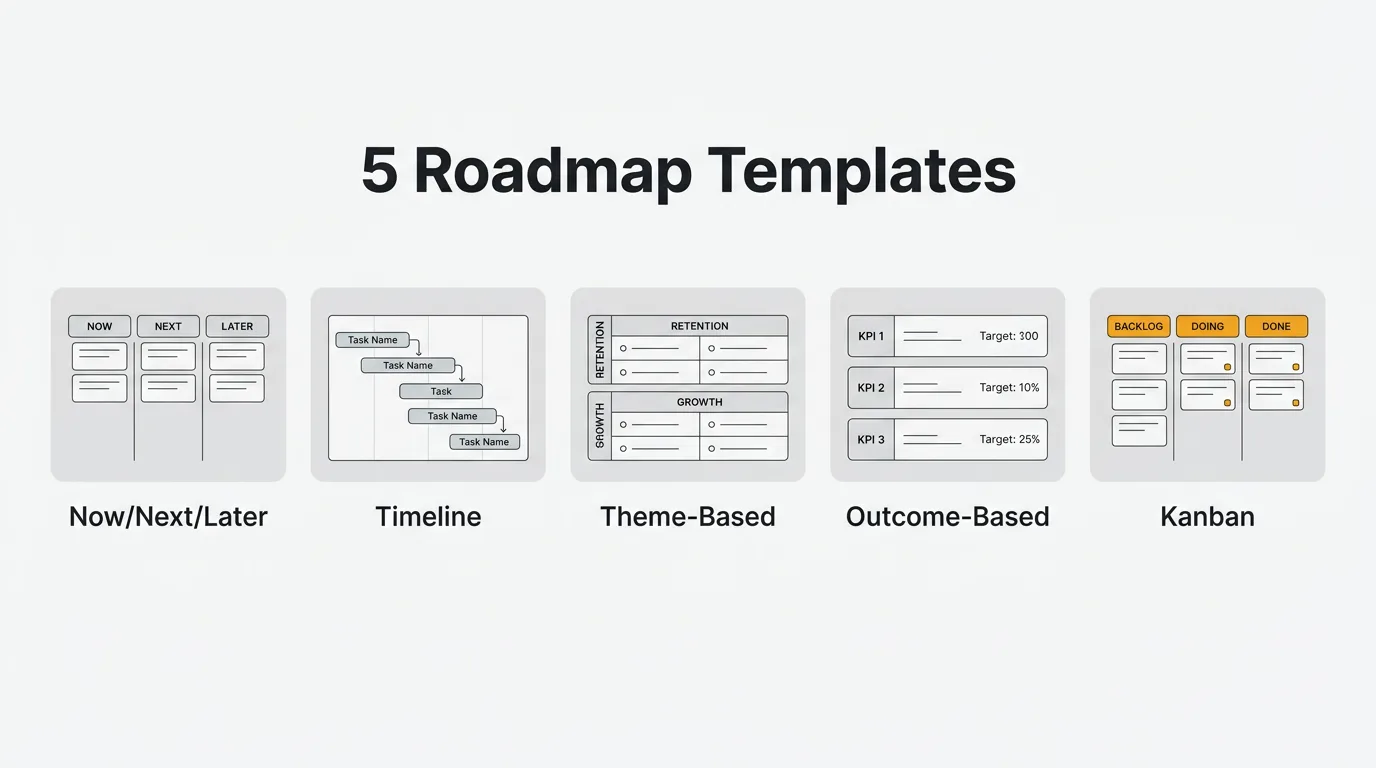
How to choose a roadmap format
No format is universally correct. The right one depends on three factors: who reads it, how much flexibility you need, and how far out you're planning.
Audience. Executives want to see priorities and timelines. Engineers need enough detail to estimate and sequence work. Customers need clarity on what's coming without seeing your internal deliberation. A format that works for weekly standups often fails in a board meeting.
Flexibility. If your priorities shift every few weeks, a quarterly timeline will feel outdated almost immediately. The now/next/later format handles uncertainty better because it doesn't commit to specific dates. If your org runs on quarterly planning cycles, a timeline format is easier to defend to stakeholders.
Planning horizon. Longer horizons reward theme-based or outcome-based formats because they don't lock you into specific features you can't yet define. Shorter horizons — the next six to twelve weeks — suit kanban or now/next/later.
For a deeper breakdown of roadmap types and how to choose between them, see what is a product roadmap.
Template 1: Now / Next / Later
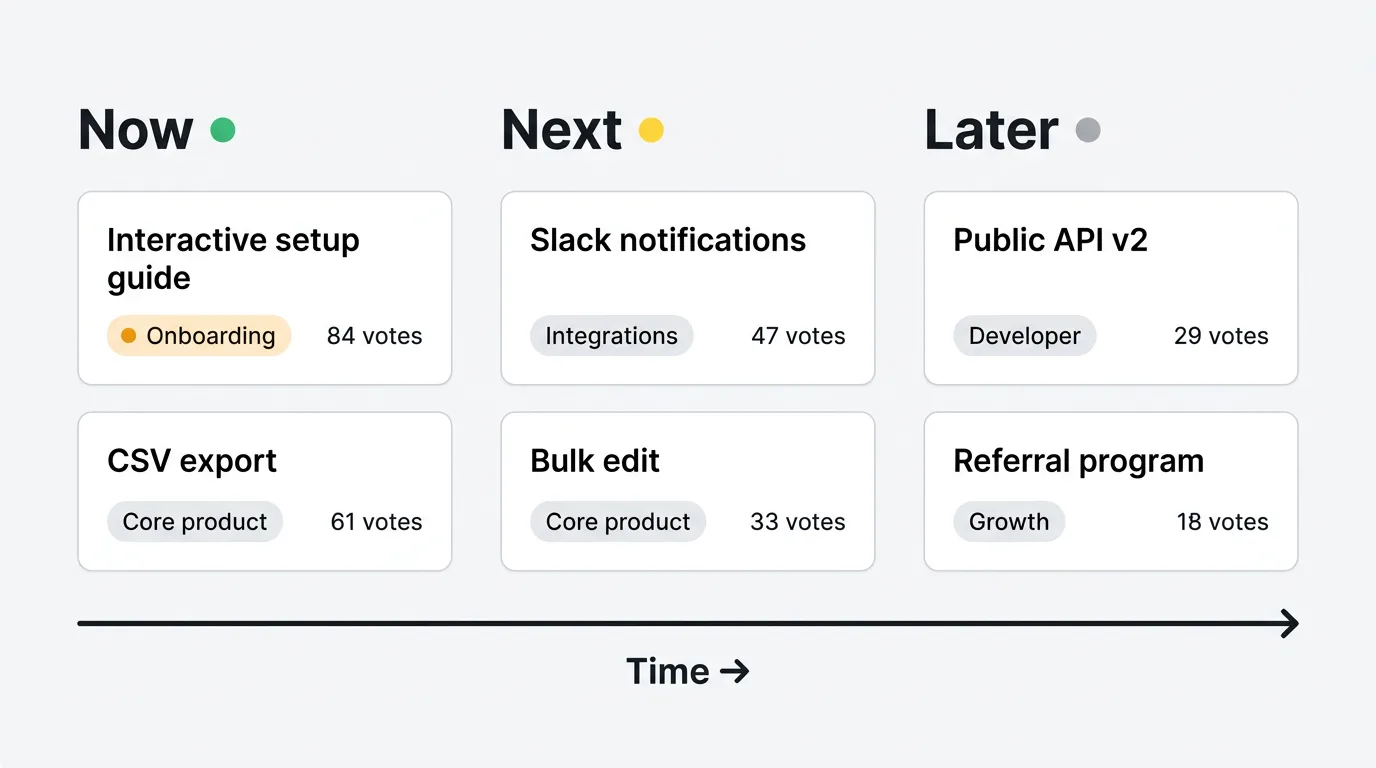
The now/next/later format organizes your roadmap into three time buckets rather than calendar dates. "Now" is what your team is actively building. "Next" is what you'll tackle after current work ships. "Later" is everything else that's on your radar but not yet committed.
This format is well-suited to early-stage products, fast-moving teams, and situations where stakeholders understand that priorities can change. It's honest about uncertainty without abandoning structure.
The "Evidence/Votes" column is worth including from the start. It forces you to connect each item to actual user demand — a number from your feedback board, a count of support tickets, or a note linking to user research. Without it, roadmaps tend to drift toward internal pet projects.
| Theme         | Item                      | Status      | Evidence/Votes |
|---------------|---------------------------|-------------|----------------|
| Onboarding    | Interactive setup guide   | Now         | 84 votes       |
| Core product  | CSV export                | Now         | 61 votes       |
| Integrations  | Slack notifications       | Next        | 47 votes       |
| Core product  | Bulk edit                 | Next        | 33 votes       |
| Developer     | Public API v2             | Later       | 29 votes       |
| Growth        | Referral program          | Later       | 18 votes       |
Copy this table into your internal wiki, Notion, or a Google Doc. Update the Status column each planning cycle. Archive items when they ship rather than deleting them — you'll want the history when you look back at what drove decisions.
For teams using agile sprints, this format pairs naturally with sprint planning. See the agile roadmap guide for how to connect sprint cadences to the now/next/later buckets.
Template 2: Timeline (Quarterly)
The quarterly timeline maps your roadmap to calendar quarters. Each row is an initiative; each column is a quarter. Status indicators show where each item stands.
This format is the standard for cross-functional planning and executive reporting. It answers the question stakeholders most often ask: "when is this shipping?" It works best when your team has a reasonably stable planning horizon and when you need to coordinate work across multiple teams or functions.
The tradeoff is rigidity. Quarterly commitments are easy to make and hard to keep when priorities shift. Use this format when the dates actually mean something — not as aspirational targets, but as coordinated commitments your engineering team has bought into.
| Initiative              | Q1 2026    | Q2 2026    | Q3 2026    | Q4 2026    |
|-------------------------|------------|------------|------------|------------|
| SSO / SAML              | In Progress| Done       | —          | —          |
| Mobile app (iOS)        | —          | In Progress| Shipping   | —          |
| API v2                  | Planned    | In Progress| Done       | —          |
| Data export center      | —          | Planned    | In Progress| Done       |
| Audit log               | —          | —          | Planned    | In Progress|
| Multi-workspace support | —          | —          | —          | Planned    |
For status indicators, keep it simple: Planned, In Progress, Shipping (imminent), Done. Avoid custom statuses that require explanation. The more a stakeholder has to ask what a status means, the less useful the roadmap becomes.
Template 3: Theme-Based
A theme-based roadmap groups initiatives under strategic themes rather than individual features. The themes represent the areas of the product you're investing in — Retention, Growth, Platform, Developer Experience — and the initiatives underneath each theme are the concrete bets you're making to move those areas forward.
This format is best for communicating strategy. When a CEO or investor asks how you're thinking about the next year, a list of features tells them almost nothing. A set of four themes with clear goals and supporting initiatives tells them how you're thinking about the business.
It also keeps your team anchored to outcomes during planning. If an initiative doesn't fit any theme, that's a signal to either define a new theme or cut the initiative.
| Theme              | Initiatives                          | Status      | Goal                         |
|--------------------|--------------------------------------|-------------|------------------------------|
| Retention          | In-app onboarding checklist          | In Progress | Reduce 30-day churn by 15%   |
| Retention          | Automated health score alerts        | Planned     | Reduce 30-day churn by 15%   |
| Growth             | Referral program                     | Planned     | Add 200 signups/month        |
| Growth             | Public roadmap (customer-facing)     | In Progress | Add 200 signups/month        |
| Platform           | Multi-workspace support              | Planned     | Support enterprise accounts  |
| Platform           | Role-based access control            | In Progress | Support enterprise accounts  |
| Developer          | Public API v2                        | In Progress | 3rd-party integrations       |
| Developer          | Webhooks (all events)                | Planned     | 3rd-party integrations       |
Review themes at each planning cycle, not just individual initiatives. If a theme has been "Planned" for two quarters with no active work, it's either not a real priority or it's blocked by something that needs to be addressed directly.
Template 4: Outcome-Based
An outcome-based roadmap organizes work around metrics you want to move, not features you want to ship. Each row is a metric. The initiatives column lists the bets you're making to shift that metric. Status tracks where the work stands.
This format is common on product-led teams that think in terms of activation rates, retention curves, and NPS scores rather than release schedules. It keeps the conversation anchored on impact — not on whether a feature shipped on time, but on whether it moved the number it was supposed to move.
The discipline this format requires is that you have to define the metric before you plan the initiative. If you can't state what you're trying to measure, you're not ready to commit the work to the roadmap.
| Metric              | Target          | Initiatives                            | Status      |
|---------------------|-----------------|----------------------------------------|-------------|
| Activation rate     | 60% (from 41%)  | Onboarding checklist, email sequence   | In Progress |
| 30-day retention    | 70% (from 58%)  | In-app health alerts, digest emails    | Planned     |
| NPS                 | 45 (from 31)    | Support SLA improvements, docs refresh | In Progress |
| Time-to-value       | < 5 min         | Setup wizard, sample data              | Planned     |
| Expansion revenue   | +25% NRR        | Usage-based upsell prompts, seat mgmt  | Planned     |
| API adoption        | 40% of accounts | API v2, better auth flow, SDKs         | In Progress |
When a quarter ends, review each row: did the metric move? By how much? What worked? This turns the roadmap into a learning artifact, not just a planning document.
Template 5: Kanban (Status Columns)
A kanban roadmap organizes items by their current status: Planned, In Progress, Shipped. Each cell in the table represents an item in that state.
This format works well for public roadmaps and for teams that want a simple, transparent view of what's moving. Customers can see at a glance what you're working on and what has recently shipped. You don't need to explain quarter labels or theme hierarchies — the status is self-evident.
The tradeoff is that it doesn't communicate priorities or timelines well. If customers want to know when a specific feature will ship, a kanban roadmap doesn't answer that question. It tells them the current state, not the future date.
| Planned                      | In Progress               | Shipped                   |
|------------------------------|---------------------------|---------------------------|
| Audit log                    | SSO / SAML                | Dark mode                 |
| Multi-workspace support      | API v2                    | CSV export                |
| Referral program             | Mobile app (iOS)          | Email digests             |
| Custom domains               | Onboarding checklist      | Slack integration         |
| GDPR data export             | Public roadmap            | Two-factor authentication |
For a public roadmap, filter this view before sharing it. You don't want internal experiments or speculative items visible to customers. Keep only items that are actively planned or in progress, and ship to the "Shipped" column promptly when work is done.
Tips for using roadmap templates
Update on a fixed cadence. A weekly 15-minute update is enough for most teams. Pick a day — Monday morning works well — and make it a habit. Stale roadmaps breed distrust. When stakeholders check the roadmap and find items that shipped three weeks ago still marked "In Progress," they stop relying on it.
Archive shipped items rather than deleting them. Keep a separate sheet or section for archived items. The history matters when you're doing planning retrospectives, writing changelogs, or trying to understand how long work actually takes versus how long you thought it would.
Link to feedback data. Every roadmap item should have a source. Add a column or note that links to the feedback thread, support tickets, or user interviews that motivated it. When someone asks why something is on the roadmap, point to evidence. This also helps when you're deprioritizing something — you can explain what you chose over it and why.
Don't over-detail. Roadmaps are not specs. A row should be enough to communicate what the initiative is and roughly why it matters. If a cell requires a paragraph of explanation, the roadmap has become a requirements document. Keep descriptions short and link to separate docs for the detail.
Review at each planning cycle. At the start of each quarter or sprint cycle, review every row on the roadmap. Cut items that have been "Planned" for more than two cycles without any active work. Promote items from "Later" to "Next" only if you have a realistic plan to resource them. A roadmap that grows without pruning becomes noise.
When to move to a dedicated tool
Templates work until they don't. Here are the signs you've outgrown a spreadsheet or a markdown table.
You have more than 50 active items. Filtering and sorting in a table becomes slow and error-prone. You spend more time maintaining the structure than planning the product.
Multiple stakeholders need to update it simultaneously. Shared docs handle concurrent edits poorly for structured data. When three people update the same rows during a planning meeting, you get conflicts and accidental overwrites with no audit trail.
You want a public roadmap customers can interact with. A shared Google Sheet is not a good public roadmap. It exposes internal notes, offers no control over visibility, and gives customers no way to vote or comment. A dedicated tool handles the separation between internal and public views.
You want feedback connected directly to roadmap items. In a template, the "votes" or "feedback count" column is a number you update by hand. It has no connection to your actual feedback board. When you want user votes, comments, and feature requests to surface automatically alongside roadmap items, a template becomes a bottleneck.
Quackback's roadmap feature connects your roadmap directly to your feedback board. Vote counts update automatically as users interact with your board. When an item's status changes, subscribers get notified. You can maintain a private internal view and a clean public-facing roadmap from the same data.
For more context on what to look for when you're ready to upgrade, see best public roadmap tools and product roadmap examples.
Frequently asked questions
Which roadmap template is best for a small startup?
Now/next/later is usually the right starting point. It doesn't require you to commit to specific dates, which is honest when your team is small and priorities shift frequently. It's also easy to share with investors and early customers without a lot of explanation. Once you have a stable planning cadence and a larger team, you can migrate to a quarterly timeline or theme-based format.
How is a roadmap template different from a backlog?
A backlog is a full list of everything you might build, organized for engineering to pull from. A roadmap is a strategic view of what you plan to build, why, and roughly when — oriented toward stakeholders and communication. If your roadmap has 200 items, it's functioning as a backlog. Keep the roadmap to the work you've committed to or are actively considering for the near term.
Can I use these templates for a public roadmap?
The kanban template (Planned / In Progress / Shipped) works best for public-facing use because it's simple and self-explanatory. Before sharing any template publicly, remove internal notes, cut speculative items, and review what you're signaling about unshipped work. If you want customers to be able to vote on items or receive status notifications, a dedicated tool handles that better than a static table.
How often should I update a roadmap template?
Once a week is enough for most teams. Status changes more frequently than that can make the roadmap feel unstable — stakeholders don't have time to track daily shifts. A Monday morning update that reflects the current state of all active items is a reasonable habit. If a significant change happens mid-week (a feature ships, a priority changes), update it then and notify your team directly rather than expecting them to check on their own.
What's the difference between theme-based and outcome-based roadmaps?
Theme-based roadmaps organize work by product area or strategic focus: Retention, Growth, Platform. Outcome-based roadmaps organize work by the metric you're trying to move: activation rate, NPS, revenue. Theme-based formats are easier to communicate to mixed audiences. Outcome-based formats are more rigorous and better suited to teams that have established metrics and want to tie planning directly to measurable results. For a broader overview of both approaches, see product roadmap examples and the Google Sheets roadmap template for a simpler implementation.

Authored by James Morton
Founder of Quackback. Building open-source feedback tools.
Try Quackback
The open-source feedback platform. Boards, voting, and roadmaps.
Get startedStar on GitHub305