
Every customer has opinions about your product. Most of them never reach your product team.
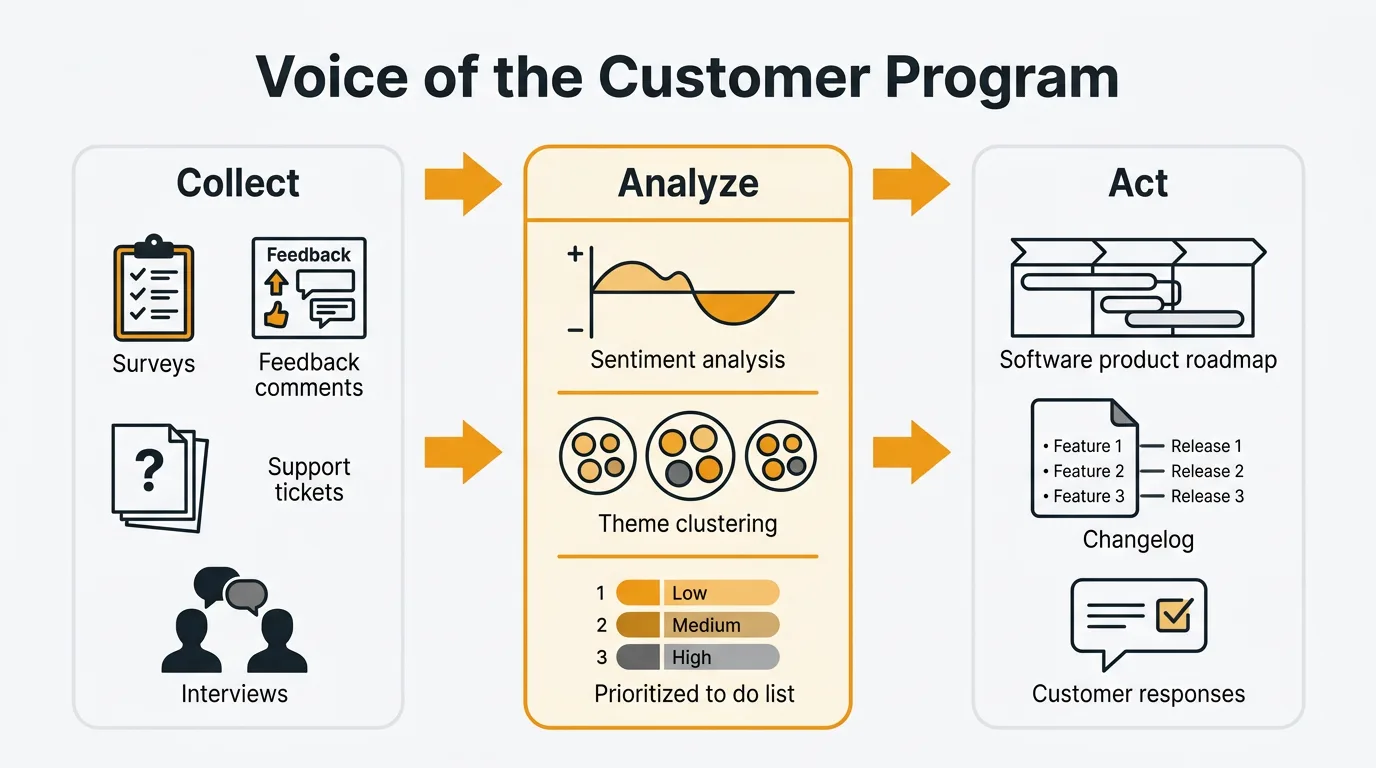
A Voice of the Customer (VoC) program is a structured, continuous process for collecting customer signals across all channels, finding patterns in them, and turning those patterns into product decisions. It goes well beyond surveys: support tickets, feature requests, NPS responses, in-app feedback, sales objections, and churn interviews all count. To build one, centralize every channel into a single system, tag and quantify the feedback with voting and sentiment, report to stakeholders on a regular cadence, and close the loop with the customers who gave the input.
The user who hit a confusing workflow and quietly moved on. The churned customer who switched to a competitor because a missing integration made your product impractical. The power user who figured out a workaround for something you could fix in a day. These people had useful things to tell you. Without a system to capture that input, it disappears.
A Voice of the Customer program creates systematic channels between customers and the people who build the product. Not a quarterly survey. Not a suggestion box that nobody reads. A continuous, structured process for collecting, analyzing, and acting on the full range of customer signals — and communicating back to the customers who gave them.
What is Voice of the Customer (VoC)?
Voice of the Customer is a structured approach to understanding customer needs, expectations, and experiences across all touchpoints. It is not synonymous with surveys. Surveys are one input. VoC is the full system.
Every signal your customers generate counts: support tickets, feature requests, NPS responses, in-app feedback, sales call objections, social media mentions, churn interviews, and direct conversations. A mature VoC program captures all of these, routes them into a unified system, finds patterns, and turns those patterns into decisions.
The goal is not to collect feedback for its own sake. The goal is to close the gap between what customers experience and what your product team knows. Without a VoC program, that gap is filled by whoever is loudest internally — the executive who talked to one enterprise customer, the sales rep pushing a deal-specific feature, the engineer who built something they personally wanted. With a VoC program, decisions are grounded in the actual distribution of customer needs.
Why VoC matters for product teams
Reduces guessing. Product decisions made without customer data are hypotheses. VoC replaces guesses with evidence. When you can show that 80 customers have requested the same workflow improvement, the conversation shifts from "I think we should build this" to "here's what the data supports."
Surfaces unmet needs before churn. Customers rarely announce they are about to leave. They stop engaging, submit a final frustrated support ticket, and then disappear. A VoC program catches these signals early. Sentiment trends, declining engagement with your feedback board, patterns in support volume — these are leading indicators of churn that a reactive approach misses entirely.
Prioritizes with evidence. Feature backlogs without demand data are unsorted. VoC gives you the signals to rank requests by frequency, revenue impact, and customer segment. That makes prioritization decisions defensible. When you say no to a request, you can explain why, which maintains trust even when you don't build what someone asked for.
Builds customer trust. Customers who see their input acknowledged — even when the answer is no — stay engaged with your product longer. They give better feedback. They become advocates. The act of listening, systematically and visibly, signals that your roadmap is shaped by their reality.
Aligns cross-functional teams. Product, support, sales, and success teams all interact with customers, but rarely share what they learn. VoC creates a common language and a shared data source. When everyone is looking at the same customer signals, internal debates become more productive and less political.
VoC collection methods
A VoC program is only as good as its collection channels. Each method captures a different type of signal. The strongest programs combine several.
Feedback boards and voting
A public feedback board gives customers a dedicated place to submit ideas, vote on requests from others, and track the status of their suggestions. The key mechanism is voting: instead of every user submitting the same request independently, they vote on an existing post. You get clean demand data rather than a pile of duplicates.
Feedback boards work because they make customer input visible. A user who searches the board and finds their idea already submitted understands that others share the problem. A product team that sees 120 votes on a single request has a clearer picture of demand than one that received 120 separate emails about it.
Quackback provides feedback boards and voting as its core functionality. Users can submit requests, vote, comment, and follow updates. Your team can triage, tag, merge duplicates, and update statuses. It handles this layer of the VoC stack well.
Support ticket analysis
Your support team is already collecting feedback. Every ticket about a confusing workflow, every chat asking how to accomplish something, every email requesting a feature — these are data points. The difference between a support operation and a VoC channel is whether you aggregate and analyze what comes in.
Tag tickets by theme. Track which issues surface most frequently. Look for language patterns: if fifteen users describe the same problem in different words, your product's mental model probably doesn't match theirs. Quackback integrates with Zendesk and Intercom, so support conversations can feed directly into your feedback board without requiring your support team to manually copy and paste.
NPS and CSAT surveys
NPS surveys ask customers how likely they are to recommend your product. CSAT surveys measure satisfaction after specific interactions. Both produce quantitative scores you can track over time — but the most valuable output is the open-ended follow-up question, where customers explain their rating in their own words.
Quackback does not run surveys. If you need NPS or CSAT infrastructure, you will need a separate tool (more on the full stack below). What feedback boards and survey data do together is more useful than either alone: surveys tell you how customers feel, boards tell you what they want. Used together, you can segment board data by NPS score, prioritize fixes for detractors, and validate that shipped features are moving sentiment in the right direction. For survey templates, see the NPS survey template and customer satisfaction survey template.
Customer interviews
Interviews give you depth that no other method produces. A 30-minute conversation with a churned customer reveals context, motivation, and workflow detail that no survey can capture. The best interview subjects are users who recently churned, users who recently converted, and power users who use your product in unexpected ways.
The key is to avoid leading questions. Ask "how do you currently handle X?" rather than "would you use feature Y?" The former reveals the actual problem. The latter produces polite agreement that tells you nothing useful. For a set of questions that work across different interview contexts, see the user interview questions guide.
Five good interviews often surface patterns that hundreds of survey responses miss. Use them to generate hypotheses, then validate with quantitative data from your feedback board and surveys.
In-app feedback widgets
An embedded feedback widget captures input at the moment of experience. The user hits a frustrating flow and can submit a report without leaving the page. Context is high — you know what they were doing, where they were, and who they are. Friction is low — a button click and a few sentences.
In-app collection consistently produces higher response rates than email surveys or external forms because you are asking for feedback exactly when the user has something to say. Submissions from an in-app widget can route directly to your feedback board, keeping everything in one place for analysis.
Sales and CS call notes
Your sales team hears every objection that stops a deal from closing. Your customer success team hears every frustration from customers who are about to churn. Both groups generate valuable VoC data that rarely reaches the product team in a structured form.
Create a lightweight process for logging what comes up on calls. A single field — "What was the primary objection or missing feature?" — captures enough to identify patterns. Lost deal analysis is especially useful: your existing users cannot tell you what your prospects need. Sales calls can.
Social media and review sites
G2, Capterra, Reddit, and social platforms capture feedback from customers who won't submit it through official channels. This input is unfiltered. Users on review sites describe what they actually think, including complaints and comparisons with competitors that they would soften in a direct conversation.
Set up alerts for your product name and competitor names. Review patterns on G2 and Capterra for recurring themes. This channel skews toward the very satisfied and very frustrated, so treat it as a signal source rather than a primary truth. When ten reviews in a row describe confusing onboarding, that is worth investigating even if your in-app feedback board is silent on the topic.
Churn exit interviews
Customers who leave are your most honest source of feedback. They have nothing to gain from being polite, and their decision to cancel was made after weighing your product against their alternatives. Churn interviews surface competitive gaps, missing features, and usability problems that retained customers may have adapted to or given up on reporting.
Keep churn interviews short — five to ten minutes. Focus on two questions: what prompted the decision to cancel, and what would have needed to be true for them to stay. The answers are often more specific than you expect.
How to analyze VoC data
Collecting feedback creates a backlog. Analysis turns that backlog into insight. Raw volume is not useful until you find the patterns.
Theme identification. Group feedback by recurring topic. "Export doesn't work," "CSV export is broken," and "I can't get my data out" are all the same theme. Tag consistently across all channels so you can query across them. Without consistent tagging, every question about "what are users saying about X" requires a manual search.
Sentiment tracking. Sentiment analysis classifies feedback by emotional signal — positive, negative, frustrated, urgent. Quackback runs automated sentiment analysis on incoming feedback, so your team can surface the most frustrated users without reading every post. A feature request from a user exploring possibilities is different from the same request from a user threatening to cancel. Sentiment context changes prioritization.
Volume and frequency analysis. A single request is an anecdote. Forty requests about the same problem is a pattern. Resist building based on one compelling request from an important customer. Aggregate first, then decide. Track how request volume changes over time — a sudden spike in tickets about a specific workflow often signals a regression or an emerging use case.
Segmentation. Not all feedback carries equal weight. A request from five enterprise accounts is different from the same request from five free-tier users — not because free-tier users matter less, but because the business implications differ. Segment by customer type, revenue tier, plan, and tenure. Patterns that look weak in aggregate may be strong within specific segments.
For more detail on the AI tools available for feedback analysis and how they compare, see AI customer feedback analysis. For a framework on when to use qualitative versus quantitative signals, see qualitative vs quantitative feedback.
Building a VoC program
A VoC program is not a tool. It is a process. Tools support the process, but they do not replace the need for consistent habits and clear ownership.
Step 1: Identify where feedback already exists
Before setting up new channels, audit what you already have. Support tickets, sales call notes, existing surveys, social mentions — feedback is almost certainly flowing somewhere already. Map the current sources, identify who owns each one, and assess how much of what comes in actually reaches the product team.
Most teams discover that feedback is fragmented across a dozen places with no single person responsible for aggregating it. That is the problem a VoC program solves.
Step 2: Centralize into one system
Pick a primary system and route all channels into it. A feedback board works well as the hub because it creates a shared, searchable backlog that the whole team can see. Support integrations pipe in ticket themes. In-app widget submissions land directly in the board. Sales call notes get logged as internal posts.
The goal is a single source of truth for customer signals. Fragmented tools create fragmented analysis. When feedback lives in ten places, patterns are invisible. When it lives in one place, they surface.
Step 3: Tag and categorize consistently
Define a tagging taxonomy before you start. Product area, feedback type (feature request, bug, usability, question), and customer segment are the minimum. Apply tags consistently to every item, including items ingested from other channels.
Consistent tagging is what makes analysis possible later. If you tag ad hoc, you will not be able to query "all feedback about the billing flow from enterprise customers" six months from now. The upfront investment in taxonomy pays off at scale.
Step 4: Quantify with voting and sentiment
Tags tell you what feedback is about. Voting tells you how much it matters. Sentiment tells you how customers feel about it. Together, these signals give you a prioritization basis that is far more defensible than gut instinct.
A feature request with 200 votes and high negative sentiment is different from one with 200 votes and neutral sentiment. The first represents customers who are actively frustrated by the absence of the feature. The second represents customers who would appreciate it. Both are worth building — but the first is more urgent.
Step 5: Report to stakeholders regularly
Schedule a regular cadence — weekly or biweekly — to review the top themes, surface emerging signals, and share findings with product, design, and engineering. This is where VoC data moves from a feedback tool into the product decision process.
Reporting does not need to be elaborate. A short summary of the top five themes by volume, the five highest-voted open requests, and any significant sentiment shifts is enough to keep the team oriented. The goal is to make customer signals a routine input to planning, not a quarterly event.
Step 6: Close the loop
When you ship a feature that came from customer feedback, tell the customers who asked for it. When you decide not to build something, explain why. Closing the loop is what turns a feedback collection system into a VoC program. It is also the step most teams skip.
For a detailed walkthrough of how to close the loop effectively, see the customer feedback loop guide.
VoC metrics
Tracking a few metrics keeps your VoC program honest and gives you a way to demonstrate its value internally.
Feedback volume. The number of feedback items received per week or month across all channels. Rising volume generally means users trust that their input matters. Declining volume is a warning sign.
Response rate. For surveys and outreach, the percentage of users who respond. Declining rates suggest survey fatigue or loss of trust in the process. Review your frequency and timing if rates drop.
Time to first response. How long it takes to acknowledge a new feedback item with a status update or comment. Users who submit feedback and hear nothing are likely to disengage. A short time to first response signals that the team is paying attention.
Time to close the loop. The elapsed time from when feedback is submitted to when the user is notified of a decision — whether that decision is to build, decline, or defer. This metric tracks the health of the full cycle, not just the collection layer.
Feature request coverage. The percentage of shipped features that originated from or were validated by customer feedback. If your team is regularly shipping features with no connection to customer signals, your VoC program is not informing product decisions.
NPS and CSAT trend. If you are running surveys, track these scores over time. The goal is not a single number — it is a trend. Rising scores alongside a maturing VoC program suggest that closing the loop is working.
Common VoC mistakes
Only using surveys
Surveys are one input. A VoC program built entirely on quarterly surveys misses the majority of customer signal. Passive channels — feedback boards, support ticket analysis, social monitoring — capture the customers who would never complete a survey. Surveys are good for structured, quantitative questions. They are bad at capturing the unscripted, specific feedback that drives the most valuable product improvements.
Not closing the loop
Collecting feedback without communicating decisions back to customers is the most common failure mode. Users submit ideas, hear nothing, and eventually stop engaging. The feedback volume drops. The team interprets this as "users don't have feedback," when the reality is that users concluded their feedback was pointless. Closing the loop — even to say no — keeps the channel open.
Cherry-picking feedback
It is tempting to highlight the feedback that confirms what the team already wants to build and downweight the rest. This undermines the entire purpose of a VoC program. If you are going to act on customer signals, you need to look at the full distribution, including the patterns that challenge your current direction.
Ignoring detractors
Negative feedback is uncomfortable. It is also often the most actionable. A customer who gives you a 3 out of 10 and writes three paragraphs about what went wrong is giving you specific, high-value signal. Dismissing that input because it is critical is a systematic way to miss your highest-leverage improvements.
Treating VoC as a one-time project
Some teams run a feedback initiative — a big survey, a round of interviews, a week of triaging the backlog — and then go quiet for months. Users learn the cadence and stop engaging between initiatives. VoC is a continuous process, not a project with a start and end date. The infrastructure, the habits, and the reporting cadence all need to be always-on.
Tools for VoC
A complete VoC stack typically involves several tools working together. Here is an honest breakdown of the categories and what each handles.
Survey tools cover NPS, CSAT, and structured questionnaires. Typeform and SurveyMonkey are the most widely used. They handle survey design, distribution, response collection, and basic analysis. They do not handle feature requests, voting, or public roadmaps.
Feedback collection and prioritization tools handle feature boards, voting, in-app widgets, duplicate detection, and roadmap management. Quackback and Canny are the main options in this category. Quackback handles the collection and prioritization layer well: public boards, voting, sentiment analysis, integrations with Zendesk and Intercom for support ticket ingestion, and a changelog for closing the loop. It does not run surveys, build NPS dashboards, or cluster themes across qualitative data at scale. It is the right tool for the collection and prioritization layer of VoC — not a full VoC platform.
What sets Quackback apart in this category is the licensing and access model. It is open source under AGPL-3.0, so you can self-host the full program for free or run it on Quackback Cloud. You can add your whole product, support, and success team to the VoC process. It runs automated sentiment analysis on incoming feedback so you can surface frustrated users without reading every post. And an MCP server lets you query your feedback data directly from AI assistants — useful when you want to ask "what are enterprise customers asking for this quarter?" without building a report by hand.
Qualitative analysis tools process large volumes of open-ended text. Dovetail and Thematic specialize in analyzing interview transcripts, survey verbatims, and support tickets at scale. These tools handle the analysis layer that sits between raw qualitative data and actionable insight. They are most useful once your feedback volume exceeds what your team can manually categorize.
Most product teams at the growth stage need: one survey tool, one feedback collection tool, and a consistent process for sharing findings across teams. The qualitative analysis tools become worth the cost once volume makes manual analysis impractical.
For a broader comparison of tools in this space, see the best customer feedback tools in 2026 and the guide to collecting customer feedback.
Try Quackback — open source with a managed cloud option. Start free. Get started | View on GitHub
Frequently asked questions
What is the difference between VoC and customer feedback?
Customer feedback is any single input a customer gives you, such as a support ticket or feature request. Voice of the Customer is the program that systematically collects, organizes, and acts on that input across all channels. Feedback is the raw material; VoC is the process around it.
How is VoC different from market research?
Market research studies target markets, often including people who are not yet customers, and answers who you should sell to. Voice of the Customer focuses on existing customers and their experience with your actual product, answering what the people using it today need. Both are useful for different questions.
Do I need a dedicated VoC team?
Not at the start. A small product team can run a functional VoC program with a feedback board, a support integration, and a weekly review meeting. Dedicated VoC roles make sense at larger organizations where signal volume exceeds what product managers can synthesize. Early on, clear ownership matters more.
How do I get buy-in to start a VoC program?
Start with a small demonstration. Run a one-month pilot: set up a feedback board, route support tickets into it, and present the top five patterns at the next planning meeting. Once the team sees customer signals informing a real decision, the case for investing usually makes itself.
How do I handle conflicting VoC signals?
Treat conflicting signals as segmentation data, not a problem to resolve. When enterprise customers want one thing and SMB customers want another, that reveals a strategic trade-off. Segment your VoC data consistently so you can see whose voice is behind each signal, then prioritize based on your current focus.

Authored by James Morton
Founder of Quackback. Building open-source feedback tools.
Try Quackback
The open-source feedback platform. Boards, voting, and roadmaps.
Get startedStar on GitHub305