
A product requirements document defines what you are building, who it is for, and how you will know it worked. It is the single artifact that aligns engineering, design, and leadership around the same set of expectations before work begins.
Most teams skip PRDs or write bad ones. They jump straight to building because writing feels slow. Then they discover misalignment two weeks into a sprint — engineering built the wrong thing, design solved the wrong problem, and the PM assumed everyone understood the context that was only in their head.
A good PRD takes a few hours to write. It saves weeks of rework. This guide covers what a product requirements document is, when to write one, what to include, and provides a free PRD template you can copy and adapt. You will also find a filled-out example PRD, a decision framework for when to write one, and best practices drawn from how product teams actually work.
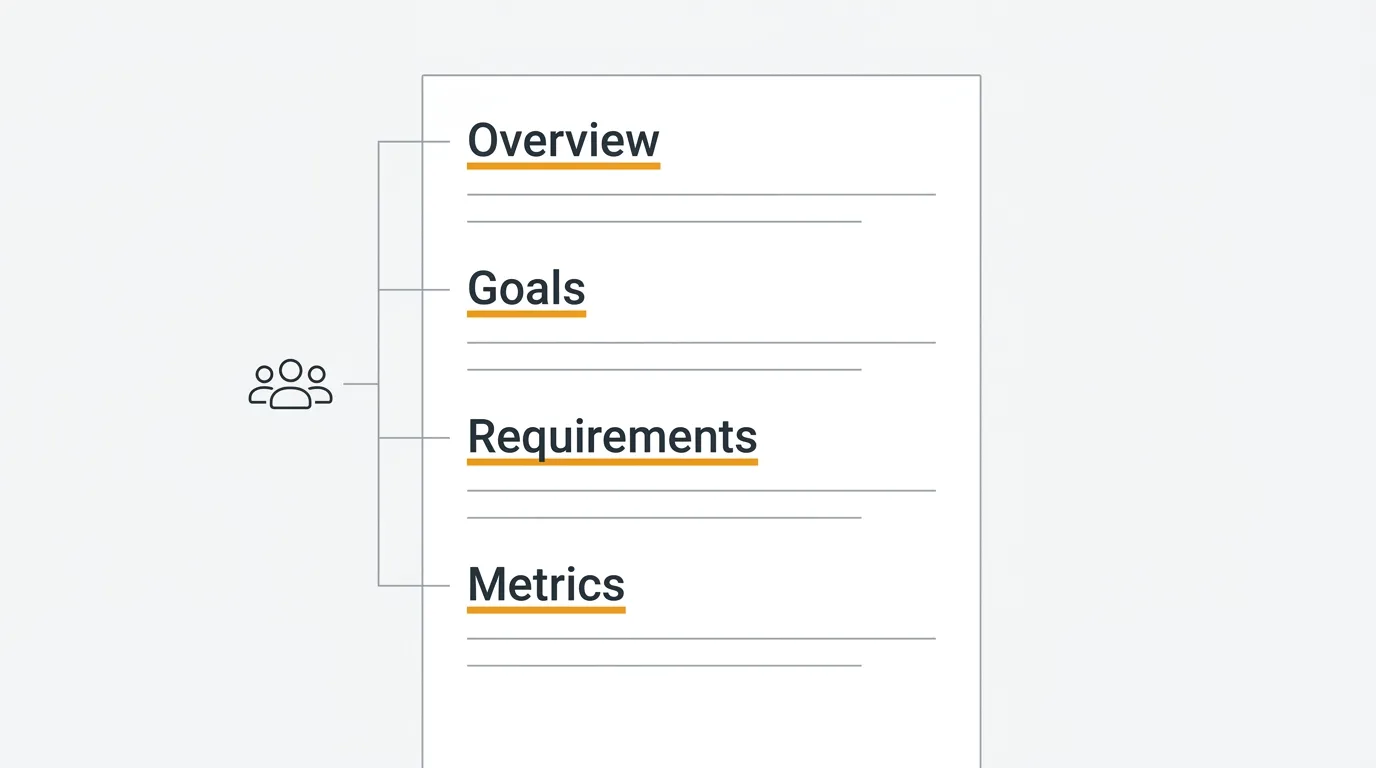
A product requirements document (PRD) is a written specification that defines what you are building, who it is for, and how you will know it worked. A good PRD covers the problem, the proposed solution, the requirements, and the success criteria in two to four pages. It takes a few hours to write and saves weeks of rework by aligning engineering, design, and leadership before work begins. Copy the free template below and adapt it to your team.
What is a product requirements document
A product requirements document is a written specification that describes a product feature or initiative from the user's perspective. It defines the problem, the proposed solution, the requirements, and the success criteria.
A PRD is not a technical specification. It does not prescribe how to build something. It defines what to build and why. The engineering team uses the PRD to understand the problem and constraints, then decides the implementation approach.
A PRD is also not a project plan. It does not cover timelines, resource allocation, or sprint planning in detail. It may include a rough timeline or milestones, but the focus is on requirements — what the product needs to do — not logistics.
The best PRDs are concise. They give the team enough context to make good decisions without prescribing every interaction or edge case. They leave room for engineering and design to contribute their expertise while ensuring everyone agrees on the outcome.
When to write a PRD (and when not to)
Write a PRD when the work involves meaningful ambiguity. If the feature touches multiple teams, affects existing user workflows, introduces new concepts, or requires more than a few days of engineering time, a PRD is worth the investment.
Write a PRD when:
- You are building a new feature that affects user-facing behavior
- The work spans multiple engineering teams or disciplines
- Stakeholders need to align on scope before work begins
- The feature involves trade-offs that should be documented
- You need to communicate the reasoning behind a product decision
Skip the PRD when:
- The work is a straightforward bug fix with an obvious solution
- The change is cosmetic or trivial — copy changes, color tweaks
- The team is small enough that a 10-minute conversation achieves alignment
- You are running a quick experiment or prototype that will be thrown away
The mistake most teams make is binary thinking: either every feature gets a PRD or none do. The right approach is proportional. Match the rigor to the risk.
| Initiative size | Documentation level | Typical length | Example |
|---|---|---|---|
| Major (multi-team, 4+ weeks) | Full PRD with all sections | 3-5 pages | New permissions system, billing overhaul |
| Medium (one team, 1-3 weeks) | Lightweight PRD | 1-2 pages | New CSV export feature, onboarding redesign |
| Small (one person, a few days) | Ticket with context | A few paragraphs | Copy change, bug fix, small UI tweak |
| Experiment / prototype | Hypothesis doc | Half a page | A/B test, throwaway prototype |
The threshold question is: "If this goes wrong, how much time do we lose?" A two-day task with a clear spec does not need a PRD. A three-week initiative involving design, backend, and frontend does.
What to include in a PRD
A product requirements document template should cover seven core sections. Not every PRD needs every section in full detail, but these are the building blocks.
Overview
A short summary of what you are building and why. Two to three sentences. Anyone reading the PRD should understand the initiative after reading just this section. Think of it as the executive summary.
Goals and non-goals
Goals define what success looks like. Non-goals define what is explicitly out of scope. Non-goals are as important as goals — they prevent scope creep and make trade-offs visible.
A goal might be: "Reduce time-to-first-value for new users from 3 days to 1 day." A non-goal for the same initiative: "We are not redesigning the entire onboarding flow. This effort focuses on the first 15 minutes after signup."
User stories
Describe the feature from the user's perspective. Who is the user? What do they want to do? Why do they want to do it?
The standard format works: "As a [user type], I want to [action] so that [outcome]." Write three to five user stories that cover the primary use cases. These stories ground the requirements in real user needs rather than abstract feature descriptions.
Here is what user stories look like for a real feature — say, adding team-level permissions to a feedback board:
- As a team lead, I want to restrict who can change the status of feedback posts so that only authorized team members can move items to "planned" or "shipped."
- As an admin, I want to assign different permission levels (viewer, contributor, moderator) to team members so that I can control access without creating separate boards.
- As a contributor, I want to see which actions I have permission to take so that I do not attempt something that will be blocked.
Notice that each story identifies a specific user type, a specific action, and a specific reason. "As a user, I want permissions to work" is not a user story. It is a wish.
If your team collects customer feedback, pull user stories directly from feedback posts and support tickets. Real user language is more specific and more grounded than anything you write from scratch. User interview questions can also surface the stories you need.
Requirements
The functional requirements. What the product needs to do, described in concrete terms. Each requirement should be testable — you should be able to look at the shipped feature and determine whether the requirement is met.
Separate requirements into categories:
- Must-have: The feature does not ship without these. These are the minimum viable requirements.
- Should-have: Important but not blocking. Include if time and complexity allow.
- Nice-to-have: Desirable but deferrable. Candidates for a follow-up release.
This is where the MoSCoW framework or RICE scoring can help you prioritize within the PRD itself.
Success metrics
How will you measure whether this feature achieved its goals? Define specific, measurable outcomes.
Bad metric: "Users like the new feature." Good metric: "30% of active users adopt the feature within 60 days of launch. Support tickets related to the old workflow decrease by 50%."
Define the metrics before you build. If you cannot articulate what success looks like, you do not understand the problem well enough to write requirements for the solution.
Timeline and milestones
A rough timeline, not a detailed project plan. Include key milestones: design complete, engineering start, internal beta, public launch. This section sets expectations without over-committing to specific dates.
For larger initiatives, break the timeline into phases. Phase 1 ships the must-haves. Phase 2 adds the should-haves. This gives the team a structure for incremental delivery.
Open questions
Every PRD has unknowns. List them. Open questions are not a sign of a bad PRD — they are a sign of an honest one. Questions might include technical feasibility concerns, unresolved design decisions, dependencies on other teams, or areas where user research is incomplete.
Documenting open questions ensures they get answered. Unanswered questions that live only in someone's head tend to surface as surprises during implementation.
Free PRD template
Copy and adapt this product requirements document template for your team.
# [Feature Name] — Product Requirements Document

**Author:** [Name]
**Date:** [YYYY-MM-DD]
**Status:** [Draft / In Review / Approved]
**Stakeholders:** [List names and roles]

---

## Overview

[2-3 sentence summary. What are you building and why?]

## Goals

- [Goal 1: Specific, measurable outcome]
- [Goal 2: Specific, measurable outcome]

## Non-goals

- [What is explicitly out of scope for this initiative]
- [What you are not trying to solve]

## User stories

- As a [user type], I want to [action] so that [outcome].
- As a [user type], I want to [action] so that [outcome].
- As a [user type], I want to [action] so that [outcome].

## Requirements

### Must-have

- [ ] [Requirement — specific and testable]
- [ ] [Requirement — specific and testable]
- [ ] [Requirement — specific and testable]

### Should-have

- [ ] [Requirement]
- [ ] [Requirement]

### Nice-to-have

- [ ] [Requirement]

## Design

[Link to Figma, wireframes, or design specs. Include screenshots
of key screens if available.]

## Success metrics

| Metric | Current | Target | Measured by |
|--------|---------|--------|-------------|
| [Metric name] | [Baseline] | [Target] | [How you measure it] |
| [Metric name] | [Baseline] | [Target] | [How you measure it] |

## Timeline

| Milestone | Target date |
|-----------|-------------|
| Design complete | [Date] |
| Engineering start | [Date] |
| Internal beta | [Date] |
| Public launch | [Date] |

## Open questions

- [ ] [Question that needs to be answered before or during development]
- [ ] [Question that needs to be answered before or during development]

## References

- [Link to user research]
- [Link to related feedback posts]
- [Link to competitive analysis]
- [Link to technical design doc]
Adapt the template to your context. A startup building its first feature needs less structure than an enterprise team coordinating across five engineering teams. Remove sections that add no value for your team size and stage.
Filled-out PRD example
Templates are more useful with an example. Here is a condensed PRD for a real-world feature: adding CSV export to a feedback board.
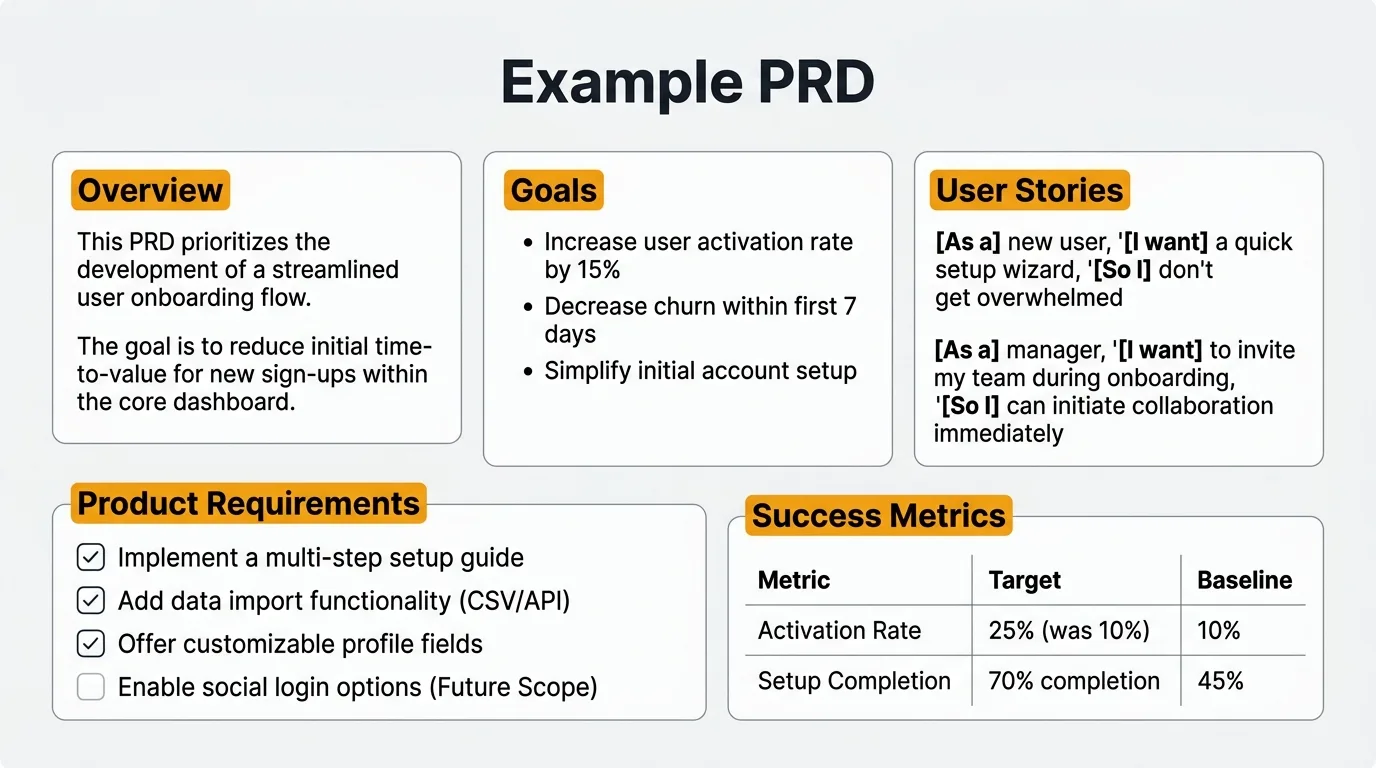
# CSV Export for Feedback Boards — Product Requirements Document

**Author:** Sarah Chen
**Date:** 2026-03-15
**Status:** Approved
**Stakeholders:** James (Engineering Lead), Maria (Design), Tom (CS Lead)

---

## Overview

Users need to export their feedback board data for reporting, analysis,
and sharing with stakeholders who do not use the product. We will add
CSV export for feedback posts, including votes, status, and metadata.

## Goals

- Enable users to export feedback data without manual copy-paste
- Support common reporting workflows (quarterly reviews, board meetings)

## Non-goals

- We are not building a BI integration or API endpoint (future work)
- We are not supporting PDF or Excel export in this iteration

## User stories

- As a product manager, I want to export all feedback posts with vote
  counts so I can include the data in my quarterly business review.
- As a CS lead, I want to filter by status before exporting so I can
  share only "planned" items with our customer advisory board.

## Requirements

### Must-have

- [ ] Export all feedback posts as CSV with columns: title, description,
      status, vote count, category, created date, author
- [ ] Allow filtering by status and category before export
- [ ] Include a "Download CSV" button on the board settings page

### Should-have

- [ ] Allow selecting which columns to include in the export
- [ ] Support date range filtering

### Nice-to-have

- [ ] Schedule recurring exports via email

## Success metrics

| Metric | Current | Target | Measured by |
|--------|---------|--------|-------------|
| Users exporting data manually (copy-paste) | ~15/week | 0 | Support ticket volume |
| Feature adoption | 0% | 20% of active boards within 60 days | Analytics |

## Open questions

- [ ] Should we include voter email addresses in the export? (Privacy)
- [ ] What is the maximum row count before we need async export?
This example is deliberately concise. A two-page PRD like this takes about an hour to write and gives engineering everything they need to start.
PRD best practices
Start with the problem, not the solution. The most common PRD failure is describing a solution without establishing the problem. If the reader does not understand why this work matters after reading the Overview and Goals, the PRD is not doing its job. Root the document in user problems and business outcomes.
Keep it concise. A PRD is not a novel. Most good PRDs are two to four pages. If yours is longer than five pages, you are probably including implementation details that belong in a technical design doc. The PRD should contain enough context for the team to start, not every detail they will need along the way.
Write requirements that are testable. "The feature should be fast" is not a requirement. "The page loads in under 2 seconds on a 3G connection" is a requirement. Every requirement should have a clear pass/fail criterion.
Include non-goals explicitly. Scope creep kills timelines. Non-goals prevent the conversation where someone asks "shouldn't we also..." three weeks into development. If you considered something and decided not to include it, write it down as a non-goal.
Collaborate early. Share the PRD in draft form before it is polished. Get engineering input on feasibility. Get design input on user experience. Get stakeholder input on priorities. A PRD written in isolation and presented as final creates alignment problems, not solutions.
Update it as decisions change. A PRD is a living document during active development. When the team decides to cut a should-have or change an approach, update the PRD. The document should reflect what you actually built, not just what you planned to build. This makes it useful as a reference after launch.
Ground decisions in user feedback. The strongest PRDs cite specific user feedback, support ticket volumes, and feature request data. "42 users have requested this feature in the last quarter, with an average of 3 support tickets per week related to the workaround" is more convincing than "we think users want this." Pull data from your feedback board and reference it directly.
Use a prioritization framework for requirements. The must-have / should-have / nice-to-have split is a good start. For more rigor, apply MoSCoW prioritization or RICE scoring to rank requirements within each tier. This is especially useful when stakeholders disagree about what is essential versus desirable. A framework makes trade-offs explicit. You can also use a prioritization matrix to visualize the effort-impact relationship.
Review before kickoff, not after. A PRD that the team reads for the first time in the sprint planning meeting is too late. Share the draft at least a week before work begins. Give engineering time to flag feasibility concerns. Give design time to identify UX gaps. The goal is to resolve major questions in the document, not in the standup.
PRD vs other product documents
A product requirements document is one of several documents product teams use. Here is how it relates to the others.
PRD vs technical design doc. The PRD defines what to build and why. The technical design doc defines how to build it. The PRD is owned by the product manager. The technical design doc is owned by engineering. They are complementary — engineering writes the tech design doc after reviewing the PRD.
PRD vs user stories. User stories are a component of a PRD, not a replacement. User stories describe individual interactions from the user's perspective. A PRD provides the broader context: goals, constraints, success metrics, and trade-offs that surround those stories.
PRD vs design brief. A design brief describes the visual and interaction design requirements. It is narrower than a PRD — focused on the user experience rather than the full product context. Some teams include design requirements in the PRD. Others write a separate design brief that references the PRD.
PRD vs product spec. The terms are often used interchangeably. When there is a distinction, a product spec tends to be more detailed and more prescriptive — describing exact behaviors, states, and edge cases — while a PRD stays at the requirements level. For most teams, one document serving both purposes is sufficient.
PRD vs one-pager. A one-pager is a condensed version of a PRD, typically used for smaller features or for getting initial buy-in before writing the full document. If the feature is small enough that a one-pager covers it, you may not need a full PRD at all.
Tools for writing PRDs
Most teams write PRDs in the same tool they use for other documentation.
Notion is popular for PRDs because it supports rich formatting, embedded databases, and templates. You can create a PRD template in Notion and duplicate it for each new initiative. The built-in commenting and mention features work well for async review.
Confluence is the standard for larger organizations, especially those already using Jira. It integrates with project management workflows and supports granular permissions. The editor is less elegant than Notion but adequate for structured documents.
Google Docs works for teams that want simplicity. Real-time collaboration, commenting, and suggestion mode make it easy to review and iterate. The limitation is organization — Google Docs does not have a built-in way to structure and navigate a library of PRDs over time.
Linear Docs is gaining popularity among teams that use Linear for project management. Writing a PRD next to your project tracker means requirements and tasks stay connected. Linear's approach is opinionated — which helps maintain consistency across a team.
Whichever tool you use, the most important input to a good PRD is understanding what your users need. Quackback connects user feedback directly to product decisions. When you are writing the user stories section of your PRD, you can reference specific feedback posts, vote counts, and user comments rather than guessing what users want. The feedback data grounds your requirements in evidence. When the feature ships, Quackback's changelog closes the loop by notifying the users who requested it.
Quackback is open source (AGPL-3.0), so you can invite every PM, engineer, and stakeholder who needs to read a PRD. Its MCP server lets you pull feedback and voting data straight into the AI assistant where you draft the document, and AI features are built in. You can self-host for free or run Quackback Cloud as a managed option. See the docs to connect a board to your PRD workflow.
The workflow looks like this: collect feedback on a feedback board, identify the highest-voted requests with feature voting, write a PRD grounded in that data, build the feature, and announce it through a changelog that notifies every user who voted. The PRD is the bridge between what users ask for and what your team builds.
Try Quackback — open source with a managed cloud option. Start free. Get started | View on GitHub
Frequently asked questions
How long should a PRD be?
Most PRDs should be two to four pages. Match the length to the complexity and risk of the initiative: a one-week feature might need a single page, while a multi-team platform initiative might need five to six. If yours exceeds six pages, move implementation details into a technical design doc.
Who writes the PRD?
The product manager typically owns and writes the PRD. But writing it should not happen in isolation. Engineering provides feasibility input and effort estimates. Design contributes user experience perspective. Stakeholders validate goals and priorities. The PM synthesizes these inputs into a coherent document.
When should you write a PRD versus just creating tickets?
Write a PRD when the work involves ambiguity, trade-offs, or cross-team coordination. Tickets are good for well-understood tasks with clear acceptance criteria. A PRD provides the context and reasoning that individual tickets cannot capture. For medium-sized features, write a lightweight PRD and then break it into tickets for execution.
How do you get stakeholders to actually read the PRD?
Keep it concise and put the overview, goals, and non-goals at the top. Make it scannable with headers, bullets, and tables. Share it in draft and ask for feedback on specific sections, not a vague "any thoughts?" Make reading the PRD a prerequisite for the kickoff meeting.

Authored by James Morton
Founder of Quackback. Building open-source feedback tools.
Try Quackback
The open-source feedback platform. Boards, voting, and roadmaps.
Get startedStar on GitHub305