
Zendesk Suite starts at $55 per agent per month and climbs to $115 per agent per month for the Professional tier. A ten-agent support team on Suite Professional costs $13,800 a year before a single add-on. Add AI, workforce management, or quality assurance modules and the bill goes up again.
For a lot of teams, that math does not work. Zendesk is still the most comprehensive help desk on the market — nobody disputes the feature depth — but comprehensive has a price, and the market has filled with alternatives that cover most of what most teams actually use for a fraction of the cost.
This article compares the six strongest Zendesk alternatives for customer support in 2026. The goal is to help you work out which one matches your team's workflow, budget, and support volume. At the end, I will also cover an edge case most of these lists skip: what to do if the thing driving you off Zendesk is not the ticket system at all, but the fact that Zendesk cannot do product feedback properly.
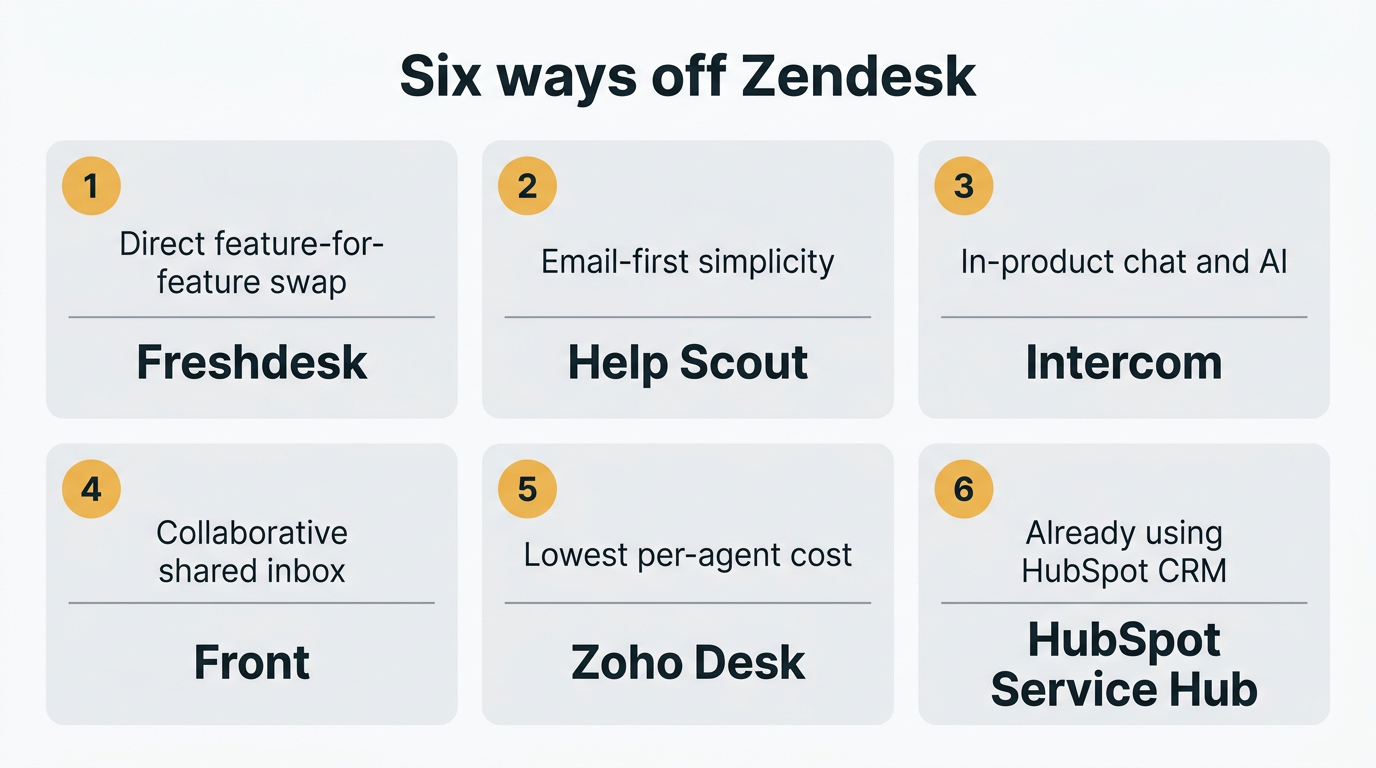
The best Zendesk alternatives for customer support are Freshdesk, Help Scout, Intercom, Front, Zoho Desk, and HubSpot Service Hub. Freshdesk is the most direct feature-for-feature swap and the cheapest credible option for most teams, with a 6-month free tier for 1-2 agents and paid plans from $19 per agent per month. If the real gap is product feedback rather than ticketing, pair your help desk with a dedicated feedback tool instead of switching.
Pricing last verified April 2026. Vendors may change plans and pricing without notice. Check each vendor's pricing page for the latest figures.
Ranked, the strongest options:
- Freshdesk — The most direct feature-for-feature alternative. Free tier for 1-2 agents (6 months). Paid plans from $19/agent/month.
- Help Scout — Clean, email-first shared inbox. Standard plan $25/user/month. Strong fit for smaller teams.
- Intercom — Conversational support with strong AI (Fin agent). Essential plan $29/seat/month plus $0.99 per AI resolution.
- Front — Collaborative shared inbox that looks and feels like email. Starter $25/seat/month, Professional $65/seat/month.
- Zoho Desk — The cheapest credible option. Free for up to 3 agents. Paid plans from $14/agent/month.
- HubSpot Service Hub — Tightly integrated with HubSpot CRM. Free tier available; Professional at $100/seat/month.
Why teams switch from Zendesk
Three reasons show up in almost every migration conversation.
- Per-agent pricing adds up fast. Zendesk Suite Team is $55/agent/month, Suite Professional is $115/agent/month, billed annually. Every support hire is a budget conversation. Alternatives like Freshdesk and Zoho Desk do the same core job for 20-30% of the cost. For a detailed breakdown, see Zendesk Pricing in 2026.
- Configuration is heavy. Zendesk covers a lot, but it assumes you have time to configure triggers, automations, macros, views, and routing rules. Teams that want to be live in a week rather than a quarter often find the setup cost (in time, not money) too high.
- Add-ons multiply the bill. AI agents, workforce management, quality assurance, and advanced analytics are separately priced add-ons on top of the Suite plan. What starts as $55/agent/month can easily become $150/agent/month once you layer on what Zendesk's marketing implies is included.
There are secondary reasons too: some teams want a more conversational interface for live chat (Intercom's specialty), some want the inbox to feel like email (Front, Help Scout), some want to keep everything inside their existing CRM (HubSpot Service Hub). The options below each take a different slice of the problem.
1. Freshdesk
Freshdesk is the most straightforward Freshworks-to-Zendesk swap. The feature set is close to parity — omnichannel ticketing, automation, SLAs, a knowledge base, reporting, and AI via Freddy — but at about a third of the price. It is the first tool most teams evaluate when they decide to leave Zendesk.
The free tier is a starter offer rather than a permanent plan: 1-2 agents for the first 6 months, with email and social ticketing, a knowledge base, and basic ticket dispatch. It is a low-friction way to evaluate Freshdesk. When you outgrow it, Growth is $19/agent/month (annual), Pro is $55/agent/month, and Enterprise is $89/agent/month.
The main tradeoff is that Zendesk still has deeper capabilities in a few areas. Its reporting is more flexible, its marketplace of third-party apps is larger, and its custom object model supports more complex data structures. Freshdesk covers the 90% of use cases most teams actually need.
Key features:
- Omnichannel ticketing (email, social, chat, phone)
- Knowledge base with unlimited articles
- Freddy AI for ticket triage, response suggestions, and summaries (higher tiers)
- Automation, SLAs, custom ticket forms
- Marketplace with 1,000+ integrations
Pricing: Free (1-2 agents, 6 months). Growth $19/agent/mo (annual). Pro $55/agent/mo. Enterprise $89/agent/mo.
Pros:
- Low-friction free starter tier for evaluation
- Direct feature-for-feature Zendesk alternative
- Easier to configure than Zendesk for small teams
- Predictable per-agent pricing
Cons:
- Reporting and customization depth still behind Zendesk
- AI features gated to higher tiers
- Some teams find the UI dated compared to newer tools
Best for: Small and mid-size teams that want a Zendesk-like feature set at a much lower price, or teams starting from scratch who want to stay free as long as possible.
See the full Freshdesk pricing breakdown for plan details.
2. Help Scout
Help Scout takes a different philosophy from Zendesk. Instead of building a ticket-centric interface with SLAs, priorities, and queues, it builds around the shared email inbox. Conversations feel like normal email — to customers and to agents — which makes it easier for customers to engage and faster for agents to onboard.
For smaller support teams, especially SaaS companies where most tickets come through email, Help Scout is a common landing spot. The Standard plan at $25/user/month includes unlimited mailboxes, saved replies, workflows, and a knowledge base. Plus is $45/user/month and adds advanced permissions, custom fields, and API access. Pro is $75/user/month with dedicated hosting, HIPAA compliance, and advanced security.
AI Answers, Help Scout's chatbot-style automation, is priced separately at $0.75 per resolution — cheaper than Intercom's Fin ($0.99) but more expensive than Featurebase's Fibi ($0.49). New accounts get three months of unlimited AI Answers to test it out.
Key features:
- Shared inbox with email-style conversations
- Knowledge base (Docs) and help widget
- Beacon live chat and self-service widget
- Saved replies, workflows, and collision detection
- AI Answers chatbot ($0.75/resolution)
Pricing: Free plan available. Standard $25/user/mo. Plus $45/user/mo. Pro $75/user/mo.
Pros:
- Clean, simple interface with a low learning curve
- Email-first feel that customers find familiar
- Strong knowledge base and help widget
- Good fit for SaaS and service businesses
Cons:
- Less capable for high-volume ticket operations
- AI is a separate add-on
- Fewer channels than Zendesk or Freshdesk (lighter on phone, social)
Best for: Small and mid-size teams that want a friendly, conversational support experience and primarily handle email.
3. Intercom
Intercom is the closest thing to Zendesk in terms of breadth, but with a different center of gravity. Where Zendesk built out from email ticketing, Intercom built out from in-app messaging. The result is a product that handles support as an ongoing conversation rather than a series of discrete tickets, and that excels when most of your support happens inside your product.
Intercom's Fin AI agent is the most mature AI support tool on this list. It handles first-touch resolution on a meaningful percentage of support volume, pulling answers from your help center, past conversations, and any connected knowledge sources. The trade-off is pricing: Fin charges $0.99 per resolution on top of your base plan. For high-volume teams that can get real deflection rates, the math works. For lower-volume teams, it can look expensive compared to flat-rate alternatives.
Base pricing is $29/seat/month (Essential), $85/seat/month (Advanced), and $132/seat/month (Expert). SSO/SAML is gated to Expert, which is a dealbreaker for security-conscious teams on a budget. See the full Intercom pricing breakdown for the details.
Key features:
- Live chat via Intercom Messenger
- Shared inbox with AI-powered workflows
- Fin AI agent for automated resolutions ($0.99 each)
- Help center and self-service
- Custom bots and automation
Pricing: Essential $29/seat/mo. Advanced $85/seat/mo. Expert $132/seat/mo. Fin AI $0.99/resolution.
Pros:
- Live chat and in-app messaging that customers rate highly
- Most mature AI support agent (Fin)
- Strong workflow builder on Advanced tier
- Rich customer profile and behavioral data
Cons:
- SSO locked to the $132/seat/mo Expert tier
- Fin AI costs are usage-based and can scale unpredictably
- More expensive than most alternatives at comparable tiers
Best for: SaaS and B2C companies where most customer interaction happens inside the product, and teams that can justify Fin AI's per-resolution pricing.
4. Front
Front is built for teams that want the shared inbox to look and feel exactly like email. Unlike Zendesk (ticket-centric) or Intercom (chat-centric), Front presents every incoming message — email, SMS, social DMs, chat — as an email-style conversation that multiple team members can assign, comment on, and reply to collaboratively.
This model fits teams whose support and sales conversations overlap, or whose agents already live in email and do not want to learn a ticketing system. Operations, logistics, and professional services teams also land on Front because it handles mixed internal/external communication better than a pure help desk.
Pricing is per-seat: Starter at $25/seat/month (capped at 10 seats), Growth in the $59 range, Professional at $65/seat/month, and Enterprise at $105/seat/month. AI features are largely gated as paid add-ons even on Professional, which can push the real cost closer to $115/seat/month once you turn them on.
Key features:
- Unified inbox for email, SMS, chat, and social
- Collaborative email with internal comments and assignments
- Workflow automation and shared drafts
- Analytics and team reporting
- CRM and productivity tool integrations
Pricing: Starter $25/seat/mo (up to 10 seats). Professional $65/seat/mo. Enterprise $105/seat/mo.
Pros:
- Email-first experience with strong collaboration features
- Handles mixed internal/external communication naturally
- Clean interface with low learning curve
- Strong fit for operations and professional services teams
Cons:
- AI features often require paid add-ons on top of base plan
- Starter plan caps at 10 seats
- Not built for high-volume ticketing the way Zendesk is
Best for: Teams that already live in email and want collaborative workflows without forcing everyone into a ticketing paradigm.
5. Zoho Desk
Zoho Desk is the cheapest credible Zendesk alternative on this list. The Free plan supports up to three agents with basic ticketing. Standard is around $14-20/agent/month, Professional is in the $23 range, and Enterprise tops out around $40/agent/month. For a five-agent team, that is a difference of several hundred dollars a month compared to Zendesk Suite.
The catch is the Zoho ecosystem commitment. Zoho Desk works best when you are already using Zoho CRM, Zoho Books, or other Zoho products — it integrates deeply inside that ecosystem. Outside the Zoho stack, the value is lower. Phone support also requires a separate Zoho Voice subscription (starting around $34/user/month), which can double the real per-agent cost once you add it.
Key features:
- Multi-channel ticketing (email, chat, social)
- Zia AI assistant for ticket routing and suggestions
- Automation, SLAs, and workflows on higher tiers
- Tight integration with Zoho CRM and Zoho ecosystem
- Free plan for up to 3 agents
Pricing: Free (3 agents). Standard $14-20/agent/mo. Professional $23/agent/mo. Enterprise $40/agent/mo.
Pros:
- Most affordable paid plans in the category
- Useful free tier for very small teams
- Deep integration with Zoho CRM and ecosystem
- Surprisingly full feature set at lower tiers
Cons:
- Best value requires Zoho ecosystem commitment
- Phone support is a separately-priced Zoho Voice add-on
- UI and UX feel dated compared to newer tools
- Global support coverage varies by region
Best for: Budget-conscious teams or anyone already using Zoho CRM or Zoho One.
6. HubSpot Service Hub
HubSpot Service Hub is the right answer if you already live inside HubSpot for marketing and sales. The service module sits on the same CRM backbone, which means every support ticket is automatically tied to the same contact record your sales team sees. No separate integration, no data sync, no duplicate customer profiles.
The Free tier gives you ticketing, live chat, and a shared inbox up to a point. Starter adds more capacity and some automation. Professional jumps sharply to $100/seat/month and unlocks knowledge base, customer portal, SLA management, and automation. Enterprise is $150/seat/month with advanced permissions, playbooks, and custom objects.
The jump from Starter to Professional is the main friction point. Teams that outgrow the Free or Starter tiers but do not need the full Professional feature set end up paying for a lot more than they use. If you do not already have a HubSpot commitment for marketing or sales, most teams get better value from Freshdesk or Zoho Desk at similar capability.
Key features:
- Ticketing, live chat, and shared inbox
- Tight integration with HubSpot CRM
- Customer portal, knowledge base (Professional+)
- SLA management and automation (Professional+)
- Reporting and dashboards
Pricing: Free plan available. Starter $20/seat/mo. Professional $100/seat/mo. Enterprise $150/seat/mo.
Pros:
- Unified customer record with sales and marketing
- Useful free tier for small teams already on HubSpot
- Good fit if you already pay for HubSpot Marketing or Sales Hub
- Clean, modern UI
Cons:
- Big price jump from Starter to Professional
- Poor value as a standalone support tool
- Core features (knowledge base, automation) gated to $100/seat/mo
- Less support-specific depth than Zendesk, Freshdesk, or Intercom
Best for: Teams already committed to HubSpot for marketing and sales that want support in the same CRM.
Comparison table
Here is how all six stack up against Zendesk Suite on the features most teams care about.
| Zendesk | Freshdesk | Help Scout | Intercom | Front | Zoho Desk | HubSpot | |
|---|---|---|---|---|---|---|---|
| Starting price | $55/agent/mo | Free (1-2 agents, 6 mo) | Free | $29/seat/mo | $25/seat/mo | Free (3 agents) | Free |
| Entry paid tier | $55/agent/mo | $19/agent/mo | $25/user/mo | $29/seat/mo | $25/seat/mo | $14-20/agent/mo | $20/seat/mo |
| Professional tier | $115/agent/mo | $55/agent/mo | $45/user/mo | $85/seat/mo | $65/seat/mo | $23/agent/mo | $100/seat/mo |
| Free plan | No | Yes | Yes | No | No | Yes | Yes |
| Omnichannel | Yes | Yes | Email-first | Chat-first | Email-first | Yes | Yes |
| Live chat | Yes | Yes | Beacon | Yes (in-app) | Yes | Yes | Yes |
| AI agent | Yes (add-on) | Freddy (tiers) | $0.75/resolution | Fin ($0.99) | Add-on | Zia (included) | Breeze |
| Knowledge base | Yes | Yes | Yes | Yes | Limited | Yes | Yes (Pro+) |
| CRM integration | Many | Many | Many | Native | Many | Zoho native | HubSpot native |
If what you actually need is feedback tooling, not a ticket system
One category of team leaves Zendesk for a reason none of the other comparison articles cover: they do not need a better help desk. They need a different kind of tool entirely.
Here is how this plays out in practice. Your support agents field hundreds of tickets that contain buried feature requests. "Can you add X?" inside a bug report. "We keep asking for Y" in a renewal conversation. Zendesk is good at resolving each of those tickets. It is not good at telling you which feature request has the most votes, which bug is blocking the most customers, or what you should ship next quarter to reduce support load.
Tags and custom fields inside Zendesk do not solve this. They tell you a topic came up. They do not give you a ranked list of what customers most want, tied to the customers who asked for it, with a public roadmap and automatic notifications when features ship.
If that is the real gap driving you off Zendesk, the answer is not another help desk. The answer is a dedicated feedback tool paired with your existing support setup. Quackback is built for exactly this pattern. It is open source (AGPL-3.0), self-hosted, and free, and it integrates directly with Zendesk. Your support agents keep using Zendesk for tickets. Feature requests captured in those tickets flow into Quackback automatically, where they become structured posts with votes, status, and a public roadmap. When you ship a feature, every customer who voted or requested it gets notified through your changelog.
The AI features matter here. Duplicate detection catches the situation where two customers file the same request through different Zendesk tickets — exactly the problem tags cannot solve. Merge suggestions identify related requests. Sentiment and theme summarization surface the patterns buried in hundreds of posts.
The MCP server is something no help desk or feedback tool on the market offers. It exposes your feedback data to AI agents through the Model Context Protocol, so an agent can search posts, triage requests, write responses, create changelog entries, and merge duplicates with full attribution and audit logs.
Try Quackback — open source and self-hosted. Pairs with Zendesk for feedback tracking. Deploy in under five minutes with Docker. Get started free | View on GitHub | Zendesk integration
Other dedicated feedback tools in the same category include Canny, Productboard, UserVoice, and Featurebase. For a full comparison of the category, see Best Customer Feedback Tools in 2026.
How to choose
Start by figuring out what is actually driving the migration. The right answer depends heavily on why Zendesk is not working.
If the problem is price: Freshdesk and Zoho Desk are the most direct cost-saving swaps. Freshdesk has the better free tier and a more mainstream feature set. Zoho Desk is cheaper at the paid tiers but assumes some Zoho ecosystem commitment.
If the problem is complexity: Help Scout is the easiest tool on this list to onboard. Email-first, small learning curve, minimal configuration. Front is similar for teams that want collaboration on top of email.
If the problem is in-product chat and AI: Intercom has the most mature AI agent (Fin) and the best in-product messaging. Budget for the per-resolution pricing.
If you already use HubSpot for sales and marketing: HubSpot Service Hub is the obvious answer because of the unified customer record. If you do not have a HubSpot commitment already, the standalone value is weaker than Freshdesk.
If you are on Zoho CRM or Zoho One: Zoho Desk is the natural fit. The free tier works for very small teams and the paid tiers are the cheapest in the category.
If the real gap is customer feedback, not ticketing: Keep Zendesk (or swap to Freshdesk for cost) and add a dedicated feedback tool. Quackback integrates directly with Zendesk and is free to self-host. See Best Customer Feedback Tools in 2026 for the full category.
For more on Zendesk's own pricing and where it makes sense to stay put, see Zendesk Pricing in 2026.
Frequently asked questions
Is there a free alternative to Zendesk?
Yes, though most are limited. Zoho Desk has the most useful free help desk plan — up to 3 agents with no time limit. Freshdesk's Free Program covers 1-2 agents for the first 6 months. Help Scout and HubSpot Service Hub both have free tiers with tighter limits. For teams that also need feedback tracking beyond ticketing, Quackback is free to self-host.
Which Zendesk alternative is cheapest?
Zoho Desk is the cheapest paid option, starting around $14-20/agent/month for the Standard plan. Freshdesk Growth is $19/agent/month. For truly zero-cost support on a very small team, Zoho Desk's free plan (3 agents, no time limit) is hard to beat, and Freshdesk's Free Program covers 1-2 agents for 6 months.
Which Zendesk alternative has the best AI?
Intercom's Fin is the most mature AI support agent and has the best track record on deflection rates. The trade-off is per-resolution pricing ($0.99 each), which is more expensive than Help Scout's AI Answers ($0.75) or Featurebase's Fibi ($0.49). Freshdesk's Freddy AI is included in higher tiers. Zoho Desk's Zia is included across plans but less sophisticated than Fin.
Can I use Zendesk alongside a feedback tool?
Yes. Most teams that leave Zendesk for feedback tracking specifically end up keeping Zendesk (or switching to Freshdesk) for support tickets and pairing it with a dedicated feedback tool. Quackback, Canny, Productboard, UserVoice, and Featurebase all integrate with Zendesk. Support agents work tickets in Zendesk, feature requests flow into the feedback tool, and voters get notified when features ship.
Is Zendesk worth the premium price?
For large enterprises with complex workflows, custom objects, and mature support operations, Zendesk often still makes sense — the depth, marketplace, and reliability are hard to replicate. For small and mid-size teams running standard ticketing workflows, alternatives like Freshdesk deliver 90% of what you need at 25-30% of the cost. The decision usually comes down to whether you need the top 10% of Zendesk's capabilities enough to justify the price gap. See Zendesk Pricing in 2026 for a detailed cost analysis.

Authored by James Morton
Founder of Quackback. Building open-source feedback tools.
Try Quackback
The open-source feedback platform. Boards, voting, and roadmaps.
Get startedStar on GitHub305