
Most teams treat feature requests as an inbox problem. A Slack channel fills up, a support queue overflows, a spreadsheet grows another tab. The team assumes that if they can just file it all in one place, they will have solved it. They have not. Feature request tracking is a prioritization problem, not a storage problem, and the tool you choose shapes what you can actually see.
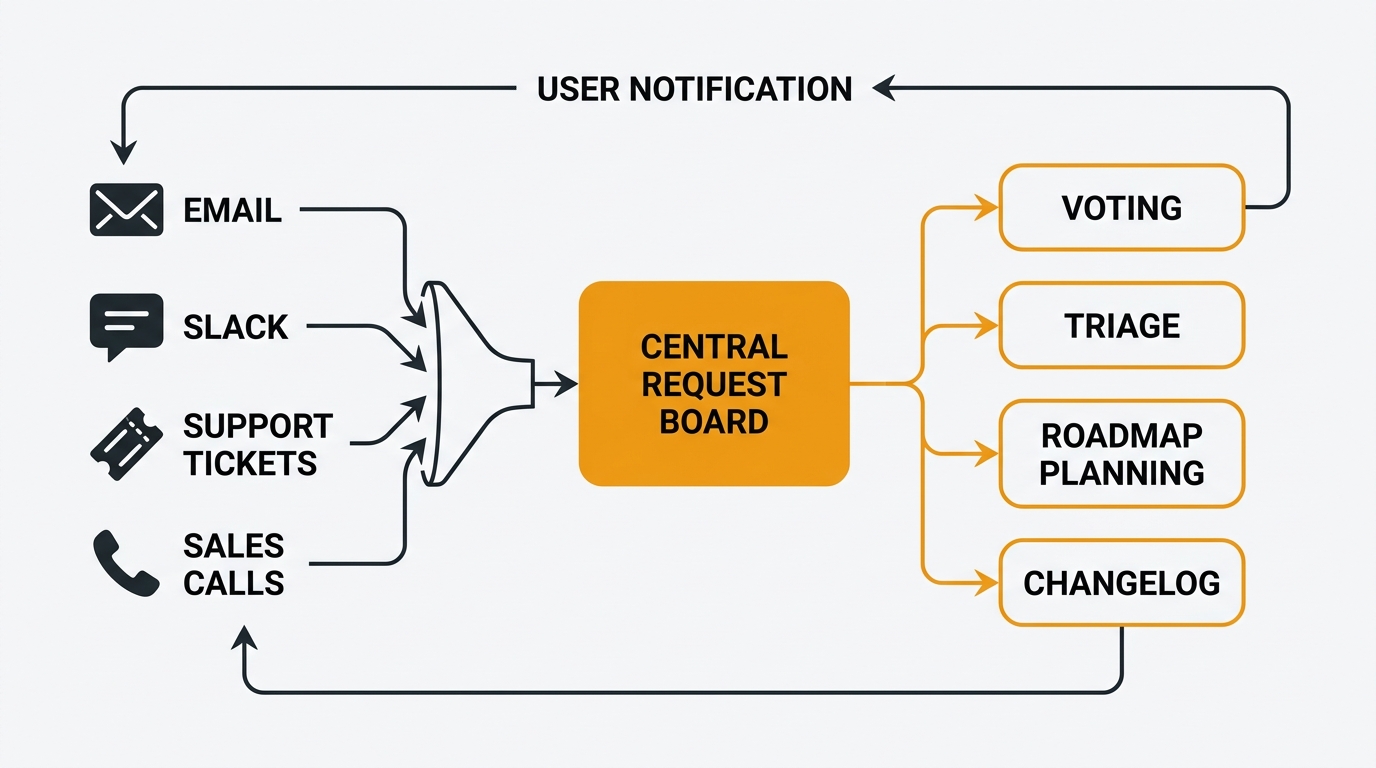
The teams that do this well can answer three questions at any moment: what is the total demand for this change, which customer segments want it, and what did we tell the people who asked. This guide covers what feature request tracking is, the components that make it work, the frameworks teams use to prioritize, and the workflows that keep requests moving from capture to closed loop.
What is feature request tracking
Feature request tracking is the structured process of collecting, organizing, prioritizing, and responding to user suggestions about what your product should do next. It turns a pile of unstructured ideas from customers, support agents, salespeople, and internal stakeholders into a ranked, searchable, accountable list that feeds your roadmap.
It is not the same thing as support ticketing, bug tracking, or general feedback collection, even though the tools overlap. The distinction matters because each flow has a different goal, a different success metric, and a different owner.
| Feature request tracking | Bug tracking | Support ticketing | General feedback | |
|---|---|---|---|---|
| Primary goal | Inform the roadmap | Fix broken behavior | Unblock a user now | Understand sentiment |
| Success metric | Demand aligned to priorities | Time to fix, regression rate | Time to resolution, CSAT | Theme coverage, response rate |
| Owner | Product | Engineering | Support | Product + UX |
| Lifecycle | Open, planned, shipped, declined | Open, fixed, verified, closed | Open, pending, resolved | Collected, analyzed, reported |
| Typical tool | Feedback board, voting system | Jira, Linear, GitHub Issues | Zendesk, Intercom | Survey tool, research repo |
| Who sees it | Customers and team, often public | Internal only | Reporter and agent | Researchers and PMs |
A single complaint can touch more than one of these flows. A customer who writes "the CSV export is broken and I wish it included custom fields" has submitted a bug and a feature request in the same sentence. A mature tracking system separates the two without forcing the customer to file twice.
Feature request tracking also differs from the broader practice of collecting customer feedback. Feedback collection is the upstream activity: surveys, support tickets, sales calls. Feature request tracking is what happens once a specific "we should build this" signal emerges from that noise. The collection layer is about hearing. The tracking layer is about deciding.
Here is a concrete example. A product team at a 40-person SaaS company receives 60 pieces of customer input in a typical week: 15 bug reports, 20 how-to questions, 10 general sentiment, and 15 feature suggestions. Without feature request tracking, all 60 end up in the same Slack channel and the 15 suggestions that should inform the roadmap get buried. With feature request tracking, those 15 land on a feedback board, get deduplicated, get voted on, and become the raw material for the next planning cycle.
The components of feature request tracking
A working system has six components. You can bolt them together from several tools or get them in one. What matters is that all six are present — missing any one of them creates a failure mode.
Intake and capture
Requests need to arrive from every channel where customers talk: a public board, an in-app widget, email, support tickets, sales notes, and direct messages from the CEO. The tracking system must accept all of them without forcing anyone to learn a new workflow.
The most common mistake is requiring customers to file requests in a specific format. They will not. A support agent who sees a feature request in a chat will create the board post themselves if the friction is low enough. For a deeper look at the capture layer, see collect customer feedback and the feature request template.
Voting and demand signal
Voting turns qualitative requests into quantitative demand data. One user asking for X is an anecdote. Two hundred users voting on the same post is a signal you can rank. Without voting, the loudest stakeholder wins every prioritization argument.
Voting works best when it is public and frictionless. A user who has to create an account, confirm an email, and click through three screens to upvote a post will not upvote the post. For a comparison of voting systems across tools, see best feature voting tools.
Triage and deduplication
Raw incoming requests are messy. Users describe the same underlying need in five different ways. "CSV export bug," "I can't download my data," and "export is broken" may all point to the same root request. Triage groups these into one canonical post so the vote count aggregates correctly.
Good triage happens daily and takes minutes, not hours. The team merges duplicates, tags by product area, and decides whether each post is a feature request, a bug, or a support question to route elsewhere. AI-assisted triage can cluster similar posts automatically, which is valuable once volume exceeds what one person can manage by hand. See AI customer feedback analysis.
Roadmap and status
A request that sits on a board forever is indistinguishable from a request nobody is looking at. Users need to see their input moving through a pipeline: submitted, under review, planned, in progress, shipped, or declined. A public roadmap is the visible output of this status system — what is happening now, what is coming next, and what is being considered for later. For more, see what is a product roadmap and product roadmap examples.
Changelog and close the loop
When a feature ships, the users who asked for it need to be told. A changelog is the mechanism for closing the loop at scale. It lists what shipped, links to the originating requests, and can notify subscribers automatically. A user who votes on ten requests, sees three of them ship with attribution, and hears nothing about the rest will keep voting. A user who votes and never hears anything will stop. For a detailed walkthrough, see the customer feedback loop guide.
AI triage and MCP access
Once your volume passes a few dozen requests per week, manual triage breaks down. AI triage reads incoming posts, suggests tags, flags likely duplicates, and summarizes long threads. It does not replace human judgment, but it removes the busywork that made teams give up on board hygiene in the first place.
The more interesting layer is AI access to the board via an MCP server. A product manager can ask an AI assistant "what are the top five requests from enterprise customers this quarter" and get an answer in seconds. See MCP server for feedback management and what is an MCP server.
How Quackback features shape feature request tracking
Quackback is built around these six components. Here are three concrete examples of how the feature set translates into daily workflow.
Example 1: A support agent converts a ticket into a tracked request. A customer emails support asking for CSV exports with voter company names. The support agent reads the message and creates a board post directly from the ticketing integration. The customer is automatically notified that their idea is now a trackable post. Other customers with the same need vote on it rather than filing their own ticket. Within two weeks, the post has 35 votes and the product team has a clear signal. The request went from email to tracked demand in under a minute.
Example 2: A product manager prioritizes the quarter using voting data. At planning time, the PM opens the feedback board and sorts by vote count filtered to the last 90 days. The top five requests cluster around a single theme: better filtering on the roadmap view. The PM makes "roadmap filtering" a theme for the quarter. Each bet is tied to a specific board post, so when the work ships, the changelog automatically notifies the users who voted. Planning took 30 minutes instead of two days, because the team was reading demand data instead of arguing about which feature mattered more.
Example 3: A founder uses an AI assistant via MCP to answer a board question. A customer on a sales call asks, "Are you working on Jira integration improvements?" The founder asks their AI assistant, which has access to the instance through the MCP server. The assistant returns: "Three open requests mention Jira integration. The top one has 47 votes and is marked 'planned' on the Q3 roadmap. The other two are duplicates that can be merged." The founder answers the customer in real time instead of promising to check and following up tomorrow.
Feature request tracking is only useful when it changes what your team does on ordinary days. A board that is tied into your support flow, your planning flow, and your AI assistants is a system your team actually uses.
Feature request tracking step by step
Here is the full pipeline from a single user saying "I wish the product did X" to a shipped feature with attribution. Each step has a time estimate for a mid-sized team handling 20-50 requests per week.
1. Capture the request (under 1 minute). When a user submits an idea through any channel — board, widget, email, support ticket, sales call — a post is created on the central board. No formal format is required at this stage. The goal is to get the signal into the system before it gets lost.
2. Acknowledge receipt (same day). Within 24 hours, the user receives confirmation that their post exists. This can be automatic or manual. Users who hear nothing after submitting assume their input was ignored and stop contributing.
3. Triage and deduplicate (15 minutes per day). A team member reviews new posts once per day. They tag by product area, merge duplicates, and route bugs or support questions to the correct channel. Daily triage is much easier than weekly triage because the volume stays small and patterns are fresh.
4. Gather demand signal (ongoing, automatic). Users vote, comment, and subscribe. This phase is passive from the team's perspective. Votes accumulate over days and weeks. Comments surface additional context.
5. Prioritize for planning (1-2 hours per quarter). Sort open requests by vote count, filter by segment, and apply a prioritization framework. RICE, MoSCoW, or Kano all work here. Pick the 3-5 requests that will get committed to the next cycle.
6. Update status and communicate (10 minutes). Move the chosen requests to "planned" and add them to the public roadmap. Users who voted see their input landed. The act of changing status is itself a message.
7. Build the feature. Engineering and design do the work. The request post stays linked to the development workstream so the connection back to originating users is preserved.
8. Ship and publish to the changelog (30 minutes). A changelog entry goes up and links back to the original request post. The system automatically notifies the users who voted, commented, or subscribed. For a template, see release notes template.
9. Close the loop (5 minutes). Leave a short closing comment on the original post. Anyone who finds it in the future sees a clear history: requested, voted on, built, and the users who asked were notified.
10. Review and repeat (30 minutes per month). Review closed posts, declined posts, and the top of the backlog. Is there a theme emerging? Are there important customer segments who are not voting at all? The review cycle is what keeps the system from drifting.
Feature request tracking vs bug tracking
This is the most common confusion in the early days of setting up a feedback system. Both flows take in reports from users, both need triage, both need status, and both need to close the loop. They are still different systems with different owners.
| Feature request tracking | Bug tracking | |
|---|---|---|
| What it represents | A gap in product capability | Broken behavior in existing product |
| Prioritized by | Demand signal (votes, revenue) | Severity, frequency, regression risk |
| Owner | Product | Engineering |
| Success means | More customers get a feature they asked for | The problem stops happening |
| Lifecycle | Open, planned, in progress, shipped, declined | Open, fixed, verified, closed |
| Visibility | Often public on a board | Usually internal |
| Ranking criteria | RICE, vote count, customer revenue | Severity x frequency |
| Typical tool | Feedback board | Linear, Jira, GitHub Issues |
| Resolution time | Weeks to quarters | Hours to days |
Conflating them destroys the prioritization signal on both sides. If a bug is mixed into your feature request board, its vote count dominates because bugs generate more complaints than feature requests. If a feature request is mixed into your bug tracker, it will never ship because it does not meet the severity bar engineering uses.
The practical answer is two systems and one handoff rule. Feature requests live on a public board. Bugs live in your engineering tracker. When a user submits a report that is actually a bug, the product team moves it out of the feature board. For teams using a bug report template, this handoff is easier because the format is already standardized.
Common feature request tracking frameworks
Once you have clean demand data, you need a way to rank requests against each other. A framework is not a substitute for judgment — it structures the judgment so the team can debate it openly. Here are the four most useful ones.
RICE (Reach, Impact, Confidence, Effort). Each request gets a score: how many users will this reach per quarter, how big is the impact per user, how confident are you in those estimates, and how much effort will it take. The final score is (Reach x Impact x Confidence) / Effort. RICE is the best all-purpose framework because it forces you to estimate reach explicitly. It works best when you have a feedback board with vote counts feeding into the Reach calculation. See RICE framework explained.
MoSCoW (Must, Should, Could, Won't). Requests get sorted into four buckets. MoSCoW is coarser than RICE but much faster. It works well for quarterly planning when you need to set expectations across the team without spending two days on scoring. See MoSCoW prioritization.
Kano Model. Features are classified by how they affect user satisfaction: basic (expected, only noticed when missing), performance (more is better), delighters (unexpected wins), indifferent, and reverse. Kano is useful when you need to explain why a high-demand request might not be the right thing to build. See Kano model.
ICE (Impact, Confidence, Ease). A simpler cousin of RICE. Score each on 1-10, multiply, rank. Faster than RICE but less rigorous because it skips the reach dimension. For a broader set of approaches side by side, see the prioritization matrix template.
The right framework depends on your context. Use RICE when you have real vote counts and time to score carefully. Use MoSCoW when you need quarterly decisions fast. Pick one, run it for a quarter, and switch if it does not fit.
Why spreadsheets fail at feature request tracking
Every team starts with a spreadsheet. Spreadsheets are free, flexible, and already installed on every laptop. For the first few weeks, they work. After that, they fail in predictable ways.
Spreadsheets do not deduplicate. A user cannot see that their request already exists. The same underlying need shows up as six rows with six different phrasings, and the real demand stays hidden.
Spreadsheets do not vote. There is no way for users to signal "me too" on an existing request. Prioritization falls back on whoever is loudest in the room.
Spreadsheets do not close the loop. When a feature ships, there is no mechanism to notify the users who asked for it. The team has to maintain a separate list, remember to update it, and manually email everyone. In practice, this never happens.
Spreadsheets do not support status workflows. You can add a "status" column, but there is no history of when a status changed and no public view. Status becomes a lie — the column says "in progress" for nine months on a project that was abandoned in month two.
Spreadsheets do not integrate with your other tools. Support is in Zendesk. Engineers are in Linear. Sales is in Salesforce. The spreadsheet is in Google Drive. The same request gets logged in four places, none reflecting the others.
Spreadsheets do not scale past one person. When three people edit the sheet, the taxonomy breaks — one tags "auth," another "login," a third "sign-in," and filtering is useless.
The team that built the spreadsheet usually knows this. They keep using it because migration feels expensive. The ongoing cost is almost always higher than the cost of moving. For the full breakdown, see feature request tracking spreadsheet. This is also why idea management software exists — to do what spreadsheets structurally cannot.
Communicating feature requests
A feature request tracking system has two audiences: the people inside your company who need to know what is being asked for, and the customers outside who want to know what is being built.
Internally, different teams care about feature requests for different reasons. Engineering wants to plan architecture. Sales wants to answer objections. Executives want revenue impact. Support wants to know what ticket categories will drop.
| Audience | What they care about | Where to frame it | Cadence |
|---|---|---|---|
| Engineering | What is coming next, technical implications | Roadmap, planning meetings | Sprint cycle |
| Sales | Top requested features, deal-blocking gaps | Weekly digest, battle cards | Weekly |
| Executives | Revenue impact, customer trends | Monthly report with top themes | Monthly |
| Support | What will reduce ticket volume, how to answer current questions | Shared board view, tag filters | Daily |
| Customer success | What is planned for at-risk accounts | Account-specific filters | Per account review |
| Design | User problems behind the top requests | Board comments, interview links | Per design sprint |
The best internal communication strategy is to make the board itself the source of truth and give each team a saved filter. Sales gets "top 20 requests by vote, last 90 days." Engineering gets "posts tagged 'planned' this quarter." Nobody waits for a monthly email because the data is always current.
Externally, customers want to see two things: what you are working on, and what happened to their specific request. A public roadmap handles the first — now, next, later — with a small number of items in each. It does not need to be precise. It needs to be honest. Users accept "later" as an answer if they believe the team is thinking about it. They do not accept silence.
A public changelog handles the second. When you ship a feature, the entry links back to the board post, and the users who voted get notified automatically. A user who receives a "we shipped the thing you asked for" notification is the most engaged user in your base. For a broader comparison, see best public roadmap tools.
A good tracking tool like Quackback lets you choose per-post whether a request is public or private, so you can keep sensitive requests internal while running a public board for the rest.
Frequently asked questions
Do feature requests need to be public?
Not necessarily, but there are strong reasons to make them public when you can. Public requests let customers find existing posts and vote on them instead of filing duplicates, which gives you cleaner demand data. Public status tells users what is happening without requiring your team to send individual updates. The argument against public posts is usually about sensitive competitive information or enterprise-specific requests — those can be kept private while the rest of the board stays public. If you want a fully self-hosted, open-source tool that handles both public and private boards, see self-hosted feedback tools and open-source feedback tools.
How often should you triage feature requests?
Daily if you can manage it, weekly at a minimum. Daily triage keeps the volume small and the patterns fresh, which makes deduplication and tagging dramatically faster. Weekly triage works if your volume is low (under 20 new posts per week). Monthly triage does not work — by the time you review the backlog, you have lost the context for half of it and duplicates have already accumulated. AI-assisted triage makes daily review possible even at higher volumes. See AI customer feedback analysis for how this scales.
What is the best tool for feature request tracking?
The answer depends on your constraints. If you need a hosted SaaS tool with a large user community, Canny and Productboard are the common choices — see best Canny alternatives and best Productboard alternatives for context on why teams switch. If you need an open-source, self-hosted option with no per-user fees, Quackback is built specifically for this workflow — see Quackback vs Canny and Quackback vs Productboard for side-by-side comparisons. The broader landscape is covered in best feature request tools and best customer feedback tools 2026.
How do you prevent your board from filling with low-value requests?
Three mechanisms work together. First, aggressive triage — merge duplicates daily, mark out-of-scope requests as "not planned" with a short explanation, and keep the open queue clean. Second, public status — a request marked "declined" or "not planned" stays visible so users can see the decision, but it does not clutter the prioritization view. Third, smart defaults — sort by vote count so low-demand posts sink naturally and the team only sees the top of the backlog during planning. A board that looks overwhelming is usually a triage problem, not a volume problem.
How do you decide between building what users vote for and what you think they need?
Feature request tracking is an input to prioritization, not the prioritization itself. Vote counts tell you what users are asking for based on what they already know. They do not tell you what users need but have not thought to request. The best product decisions combine demand data from the board, qualitative signal from user interviews and continuous discovery, and strategic judgment about where the product should go. A good rule of thumb: use vote counts to rank requests within a theme you have already committed to, and use discovery work to decide which themes to commit to in the first place. For more on this, see voice of the customer.
What happens to requests you decline?
They stay on the board with a status of "not planned" and a short explanation of why. A user who sees their request marked "declined: out of scope because we are focusing on X this year" stays engaged, because they learned something about the product's direction. The "declined" status is also useful to you — when the same request comes back a year later, you can see your previous reasoning. Declining is a form of closing the loop, not an alternative to it.

Authored by James Morton
Founder of Quackback. Building open-source feedback tools.
Try Quackback
The open-source feedback platform. Boards, voting, and roadmaps.
Get startedStar on GitHub305