
Jira Product Discovery is Atlassian's answer to product feedback and prioritization. It gives product managers a dedicated space to collect ideas, score them against impact and effort criteria, and build roadmaps — all within the Jira ecosystem. That tight integration is both its core value proposition and its principal constraint.
If your team already runs on Jira Software and Confluence, adding JPD is low friction. If you don't, you're evaluating an entire Atlassian stack, not just one tool.
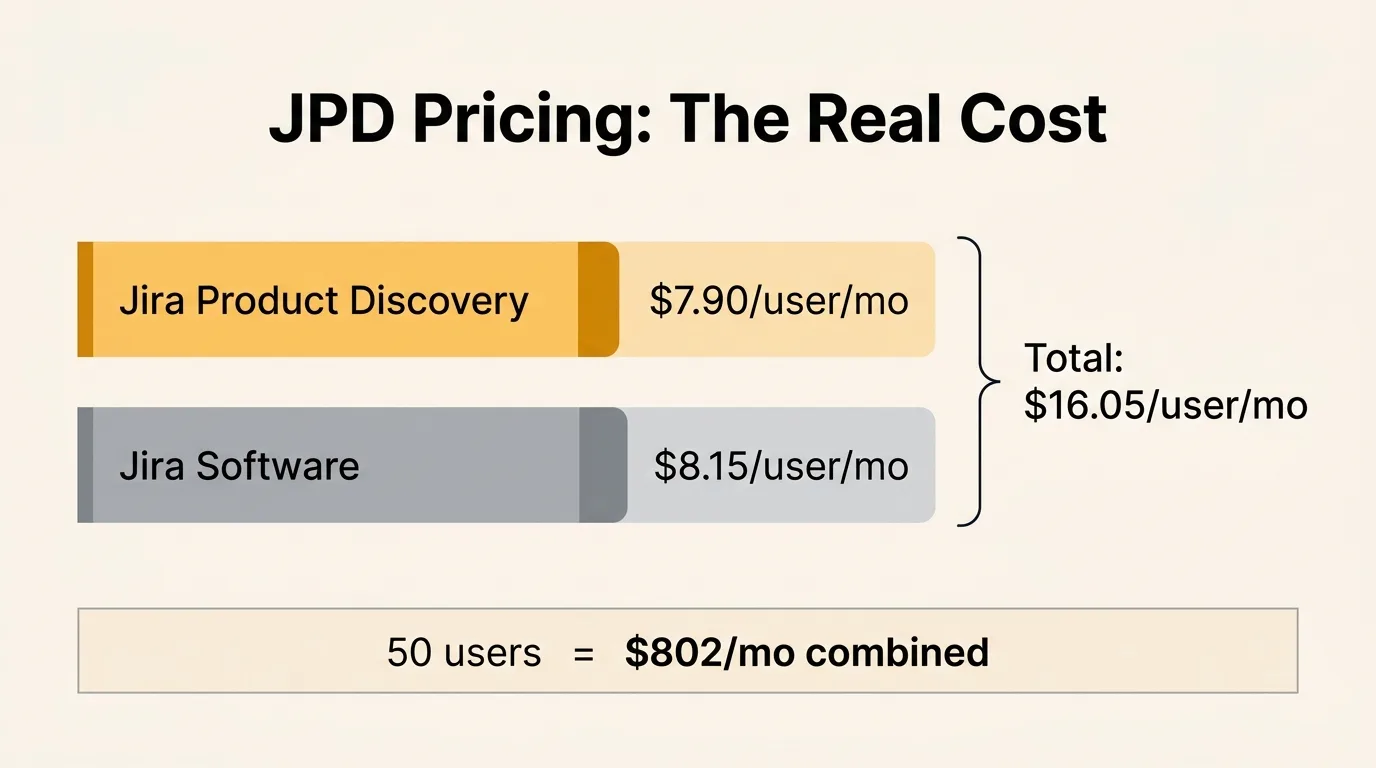
Jira Product Discovery has a free tier for up to 3 creators, Standard at $10/creator/month, and Premium at $25/creator/month. Only creators are billable — contributors who view and comment are free. The catch is that most product teams also need Jira Software, which is priced separately, so a 50-creator team's combined bill can exceed $1,500/month. Standalone alternatives like Quackback work without Jira and cost nothing to self-host.
Pricing last verified February 2026. Vendors may change plans and pricing without notice. Check Atlassian's pricing page for the latest figures.
What is Jira Product Discovery
Jira Product Discovery is Atlassian's product management tool for collecting, organizing, and prioritizing product ideas. It launched in beta in 2023 and reached general availability in 2024. It sits alongside Jira Software in the Atlassian ecosystem, and is built specifically for product managers rather than developers.
The core workflow: ideas come in from stakeholders, customers, or your own team. You score them using configurable fields (impact, confidence, effort). Views let you sort and filter ideas by score, status, or label. You build a roadmap from prioritized ideas, then link them to Jira Software issues for delivery tracking. When development is complete, the linked issues surface status updates back in JPD.
This delivery feedback loop — where Jira Software ticket progress reflects in JPD — is the product's clearest differentiator. It works well when your engineering team is already on Jira Software. It adds no value when they are not.
Pricing breakdown
Jira Product Discovery is priced per creator per month, billed monthly or annually. Annual billing gives you up to 17% off the monthly rate. Only creators — people who create and manage ideas, fields, and views — are billable; contributors who view and comment are free with an Atlassian account.
| Plan | Price (per creator) | Creators | Key Features |
|---|---|---|---|
| Free | $0 | Up to 3 | Idea capture, custom fields, prioritization views, roadmaps, basic integrations |
| Standard | $10/creator/mo | Unlimited | Everything in Free, project permissions, audit logs, 250 GB storage |
| Premium | $25/creator/mo | Unlimited | Everything in Standard, advanced roadmaps, unlimited storage, admin insights |
| Enterprise | Custom | Unlimited | Everything in Premium, unlimited sites, Atlassian Access included, SAML SSO, dedicated support |
The free tier covers up to 3 creators and includes the core workflow: ideas, custom fields, scoring views, and roadmaps. For very small teams that only need internal prioritization, this is a usable starting point.
Standard at $10/creator/month adds the operational features that matter once you have more than a handful of people: project-level permissions, audit logging, and expanded storage. Most teams beyond the free tier land here first.
Premium at $25/creator/month adds advanced roadmaps (cross-project views, dependencies), unlimited storage, and admin insights. The advanced roadmap view is the primary reason to upgrade from Standard, and it's only relevant if you're managing multiple product lines or need timeline views with dependency tracking.
Enterprise is sold with custom pricing and billed annually. It includes Atlassian Access (centralized user provisioning and SSO across the Atlassian suite) and unlimited Atlassian sites.
Note that SSO and SCIM provisioning below the Enterprise tier are available through Atlassian Guard (formerly Atlassian Access), which is a separate add-on subscription. If your organization requires SSO but is not on Enterprise, you pay for JPD plus a Guard subscription on top.
Total cost with Jira Software
Jira Product Discovery is priced separately from Jira Software. Most product and engineering teams need both: JPD for the product management layer, Jira Software for the development backlog and sprint tracking. The delivery tracking integration — linking JPD ideas to Jira Software issues — only works if your engineering team is on Jira Software.
This means your real cost is the combined subscription, not just the JPD line item.
Jira Software is priced at $8.15/user/month (Standard) and $16/user/month (Premium), billed annually. The table below shows the combined monthly cost for teams that need both tools.
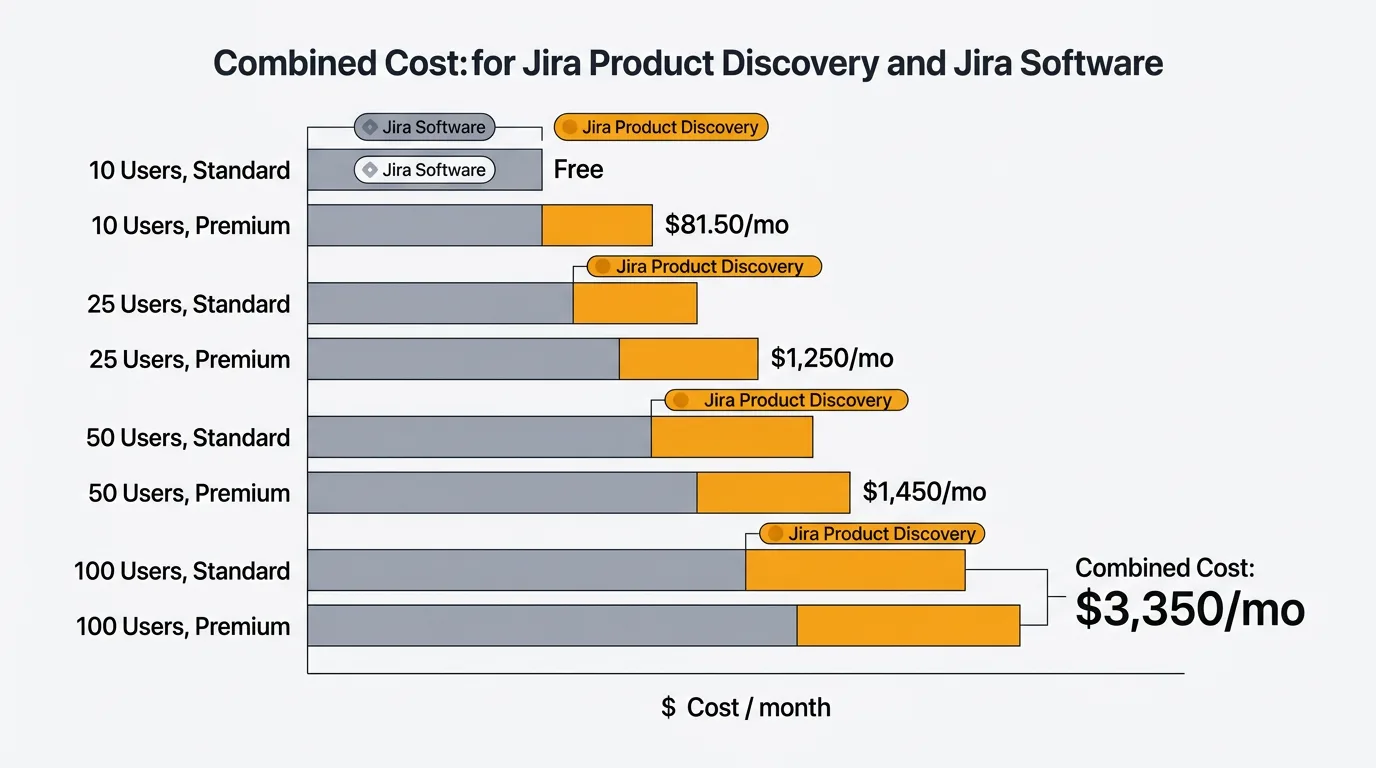
| Team Size | JPD Standard | Jira Software Standard | Combined (Standard) | Combined (Premium) |
|---|---|---|---|---|
| 10 users | $100/mo | $81.50/mo | $181.50/mo | $410/mo |
| 25 users | $250/mo | $203.75/mo | $453.75/mo | $1,025/mo |
| 50 users | $500/mo | $407.50/mo | $907.50/mo | $2,050/mo |
| 100 users | $1,000/mo | $815/mo | $1,815/mo | $4,100/mo |
With 3 or fewer creators, you can use JPD for free while paying for Jira Software on whatever plan your engineering team already uses. The free JPD tier is genuinely useful here — it costs nothing to add JPD to an existing Jira Software subscription for a tiny product team.
Above 3 creators, JPD costs stack on top of whatever your team already pays for Jira Software. At 50 creators on Standard, you're looking at roughly $900/month combined. At 100 creators on Premium, the combined bill reaches about $4,100/month.
These figures count every JPD creator and every Jira Software user. In practice many viewers are free JPD contributors, and some engineers only need Jira Software. But any person who actively creates ideas in JPD and also works in Jira Software counts toward both subscriptions.
What you get
Jira Product Discovery covers the standard product management workflow with some additions specific to the Jira ecosystem.
Ideas and feedback capture. You can create ideas manually, collect them via a submission form, or import from integrations like Slack, Salesforce, and Zendesk. Each idea is a first-class object with a description, status, and configurable fields.
Custom fields and scoring. You can add custom numeric, text, select, and formula fields to any idea. Impact scoring is done through configurable formulas — you define the calculation, JPD computes a score for each idea based on the field values. This is more flexible than fixed frameworks (ICE, RICE) and lets you build scoring models that reflect your team's actual priorities.
Prioritization views. Ideas can be viewed as a list, matrix (two-axis prioritization chart), or board (Kanban-style). Views are filterable and sortable by any field. You can save views for recurring use.
Roadmap. The roadmap view is a timeline-style view that shows ideas across time. On Standard, this is a single-project roadmap. On Premium, you get cross-project roadmap views with dependency tracking.
Delivery tracking. When you link a JPD idea to one or more Jira Software issues, the status of those issues surfaces in JPD. This lets product managers see development progress without leaving JPD or asking engineers for updates. This is the feature that distinguishes JPD from standalone tools.
Integrations. JPD includes native integrations with Slack, Salesforce, Zendesk, and other common tools for feedback capture. Deeper integrations with other Atlassian products (Confluence, Jira Service Management) are available given that everything lives on the same platform.
Limitations
JPD has real limitations that are worth understanding before committing to it.
Tied to the Atlassian ecosystem. JPD is not a standalone product. It lives inside Jira, depends on Atlassian's infrastructure, and the delivery tracking feature only works if your engineering team uses Jira Software. If you're not already on Jira, adding JPD means adopting Atlassian's broader platform.
No meaningful public-facing roadmap. JPD's roadmap views are internal by default. You can share a read-only roadmap link, but it is basic — no public voting, no commenting from external users, no branding customization. If you want customers to vote on features or follow your roadmap publicly, JPD does not support this workflow.
No customer-facing feedback portal. External users cannot submit ideas or vote on existing ones through a public portal. Feedback collection happens through embedded forms or integrations, not through a dedicated customer-facing board. This is a significant gap for teams that want to build a visible feedback loop with their customers.
No changelog. JPD has no mechanism for publishing release notes or changelogs to external audiences. If you want to tell customers what shipped, you need a separate tool.
No purpose-built API for automation. JPD has no dedicated public API. Because JPD ideas are stored as Jira issues, you can read and update them through the general Jira Cloud REST API, but there is no first-class API for views and no out-of-the-box way to connect AI agents to your discovery data. Automation leans on Atlassian's own rules and integrations. Tools built for automation — Quackback, for example, with its MCP server — let AI agents read and act on feedback directly.
Learning curve if you're new to Jira. Jira's data model — projects, issue types, schemes, permissions — is not intuitive for new users. JPD inherits this complexity. Teams that have used Jira for years will adapt quickly. Teams coming from simpler tools will spend meaningful time in setup and training before they can use JPD productively.
Storage and SLA limits on Standard. The Standard plan includes 250 GB of storage and no SLA. For most teams this is sufficient, but organizations with compliance requirements may need Premium's unlimited storage and 99.9% SLA.
Who it's best for
JPD is a good fit for product teams that are already deep in the Jira and Confluence ecosystem. If your engineers live in Jira Software and your documentation lives in Confluence, JPD slots in with minimal disruption. The delivery tracking integration — seeing Jira issue progress inside JPD — provides real value for teams where the PM and engineering workflows are otherwise siloed.
It is also a reasonable choice for Atlassian customers who want to consolidate tooling. Adding JPD to an existing Atlassian subscription is administratively simple: same identity provider, same billing, same admin console.
For teams not on Jira, the calculus is different. You'd be adopting JPD and Jira Software together, which means a substantial combined cost and a non-trivial onboarding investment. Most standalone feedback and prioritization tools cost less and require less setup.
Alternatives for teams not on Jira
If you're not already in the Jira ecosystem — or if you want a tool that handles customer-facing feedback, voting, and changelogs — these alternatives are worth comparing.
| Tool | Price | Key Differences |
|---|---|---|
| Quackback | Free (open source, self-hosted) | Feedback portal, public voting, roadmap, changelog, AI features, SSO — no Jira dependency |
| Canny | From $19/mo | Public feedback boards, voting, roadmap, changelog — standalone, no Jira required. See Canny pricing. |
| Productboard | From $19/maker/mo | Strategic roadmaps, insight repository, prioritization frameworks — standalone. See Productboard pricing. |
Quackback is the free, open-source option. You self-host it with Docker, there are no per-user fees, and it includes feedback boards with public voting, a customer-facing roadmap, changelogs, and 25 integrations. SSO/OIDC is included. Where JPD has no open API for automation, Quackback ships an MCP server so AI agents and scripts can read and act on feedback programmatically, and its AI summarization runs on your own API key — no per-summary credit caps. It does not have delivery tracking tied to a specific project management tool, but it works with any stack. Prefer not to host it yourself? Quackback Cloud is a managed option. See the Quackback vs Productboard comparison and the best feature request tools guide for more context.
Canny is a hosted tool with a polished interface, a public feedback board, voting, roadmap, and changelog. It works without Jira. The Core plan at $19/month covers 100+ tracked users, and PM integrations for Jira, ClickUp, and Linear are available on the Pro plan at $79/month. See the full Canny pricing breakdown.
Productboard is the closest to JPD in terms of strategic depth. It has a strong insight repository, custom prioritization scoring, and multi-view roadmaps. It does not require Jira. The Spark plan starts at $15/maker/month (annual). See the full Productboard pricing breakdown.
For a broader view, see the feedback tool pricing comparison, best public roadmap tools, and product management tools overview.
Try Quackback — open source with a managed cloud option. Start free. Get started | View on GitHub
Frequently asked questions
Is Jira Product Discovery free?
Yes, for up to 3 creators. The free tier includes idea capture, custom fields, prioritization views, roadmaps, and basic integrations. Beyond 3 creators, Standard is $10/creator/month and Premium is $25/creator/month, billed monthly or annually (annual saves up to 17%). Contributors who only view and comment are free. Teams that need Jira Software too pay for that subscription separately.
Do I need Jira Software to use Jira Product Discovery?
No, but the most valuable feature — delivery tracking — depends on Jira Software. JPD can capture ideas, score them, and display a roadmap independently. The integration that shows linked Jira Software issue progress inside JPD only works when your engineering team uses Jira Software. If they don't, you're paying for JPD without access to the feature that differentiates it from standalone tools.
What is the total cost of Jira Product Discovery for a 50-person team?
At 50 creators on Standard, JPD costs $500/month and Jira Software for 50 users costs $407.50/month — a combined total of about $907.50/month, or roughly $10,900/year. On Premium, the combined cost reaches about $2,050/month. These figures assume all 50 people are billable in both products.
Does Jira Product Discovery support public feedback voting?
No. Jira Product Discovery has no customer-facing feedback portal where external users submit ideas and vote on them. Feedback collection happens through forms and integrations, not a public board. For public voting, you need a different tool: Quackback, Canny, and Productboard all offer public-facing portals.

Authored by James Morton
Founder of Quackback. Building open-source feedback tools.
Try Quackback
The open-source feedback platform. Boards, voting, and roadmaps.
Get startedStar on GitHub305